Module 04 · Practice, Final Project, and Peer Review Assignment实践、期末项目与同伴评审作业
Practice project: Conference Expense Planner app实践项目:会议费用规划器应用
In the Conference Expense Planner app practice project, you will build the front end of an application that allows the user to price out the expenses related to hosting a conference at a convention center. The lab will guide you through the development of the application elements required for this project.
在会议费用规划器应用实践项目中,您将构建一个应用程序的前端,该应用程序允许用户计算在会议中心举办会议的相关费用。实验室将引导您开发此项目所需的应用程序元素。
The Conference Expense Planner will have a landing page, a product selection page, and a pop-up summary window. The product selection page allows users to select their rooms, their add-ons, and meals. Based on those selections, it provides pricing. The pop-up window summarizes the expenses in a table based on the user's selections from the product selection page.
会议费用规划器将包含一个着陆页、一个产品选择页和一个弹出摘要窗口。产品选择页允许用户选择他们的房间、附加服务和餐点。根据这些选择,它提供定价。弹出窗口根据用户从产品选择页的选择汇总费用到一个表格中。
We strongly encourage you to complete the practice project prior to starting the final project. It will give you practice developing many of the same elements and functionality you will need to develop in your final project. The practice project lab contains step-by-step instructions for the code required in this application.
我们强烈建议你在开始最终项目之前完成实践项目。这将帮助你练习开发许多你将在最终项目中需要开发的相同元素和功能。实践项目实验室包含了在此应用程序中所需代码的逐步说明。
Let's discuss the features of the conference event budgeting app in greater detail. Sample screenshots are provided, though feel free to experiment with the code, components, and layouts.
让我们更详细地讨论会议活动预算应用程序的功能。提供了示例截图,尽管您可以自由地尝试代码、组件和布局。
Landing page 着陆页面
The landing page will have the same elements as the final project's landing page.
着陆页面将与最终项目的着陆页面具有相同的元素。
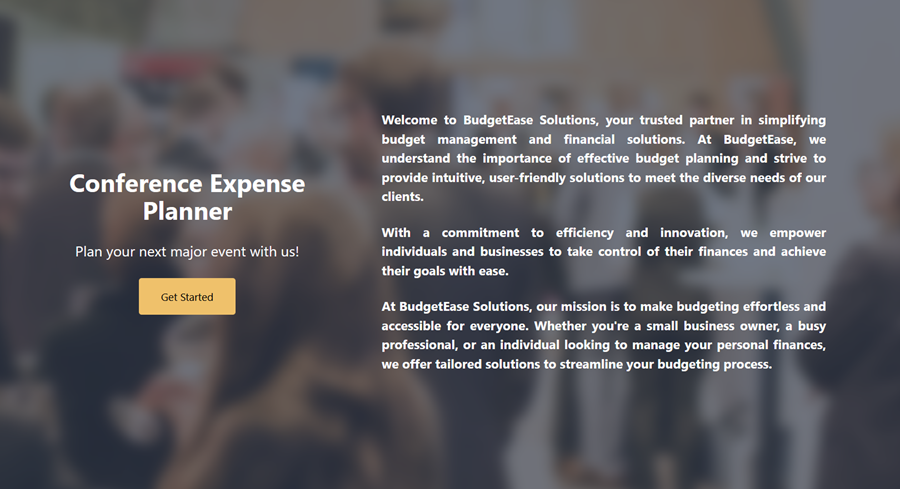
You will create a landing page like the image below that engages your customers with your product line and provides entry into the main application. See the screenshot at the end of this section for a visual of what this page might look like.
您将创建一个类似于下面图片的着陆页,通过您的产品线吸引客户并提供进入主应用的入口。请参阅本节末尾的截图,以了解此页面的可能外观。
Features on this page should include:
该页面上的功能应包括:
- A paragraph about the company
关于公司的段落 - A background image 背景图片
- Your company name and 您的公司名称和
- A Get Started button linking to the product selection page
一个链接到产品选择页面的“开始使用”按钮
You landing page will look something like this:
您的落地页面将看起来像这样:
Product selection page 产品选择页面
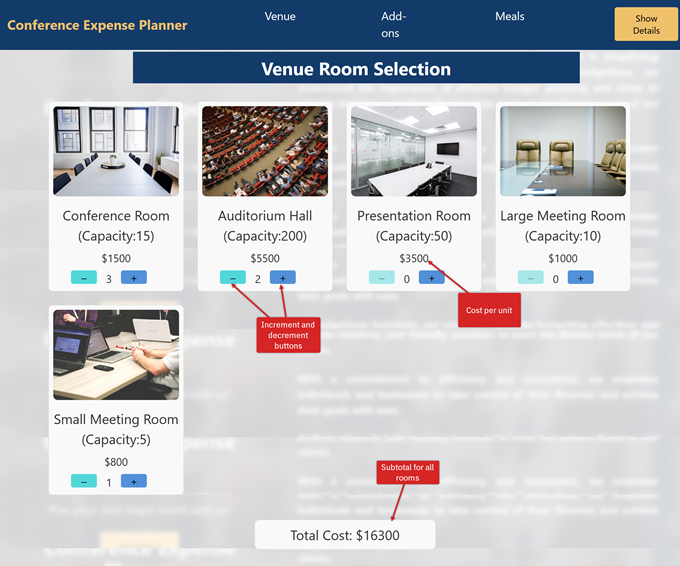
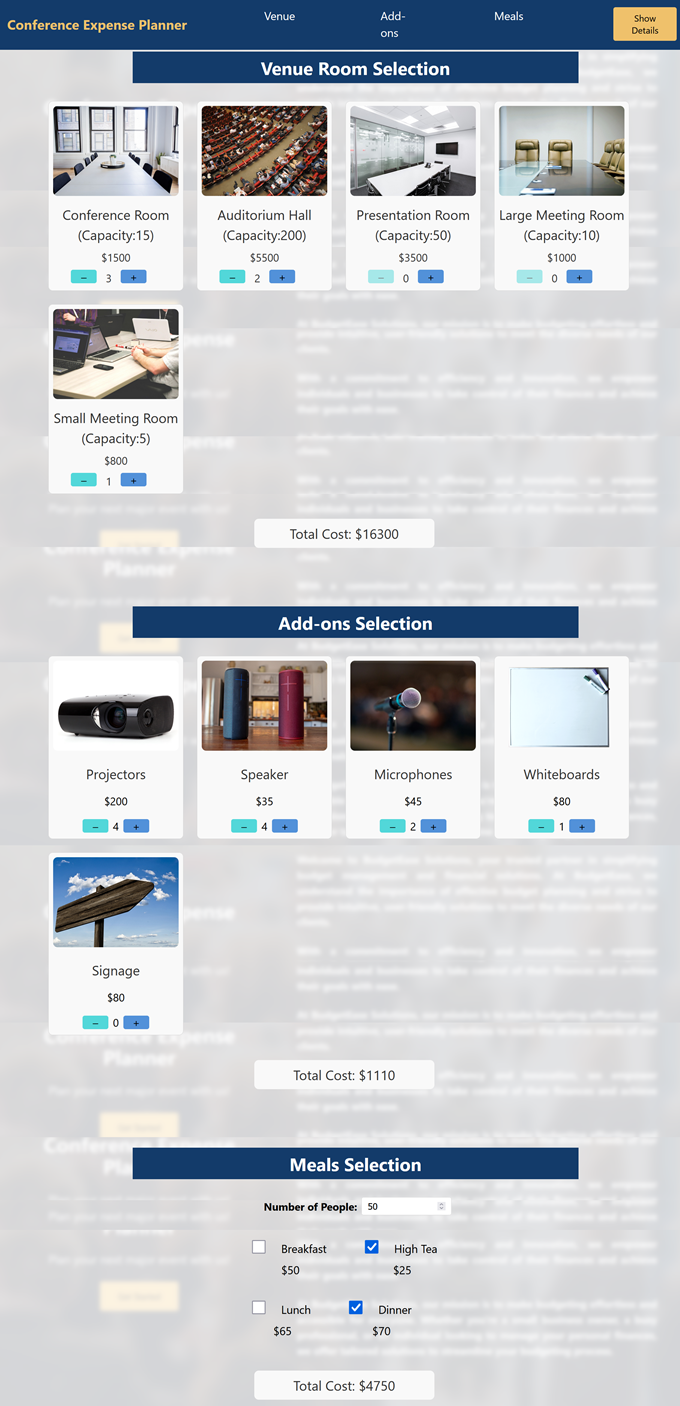
After selecting Get Started, the application should direct the user to the product selection page. This page allows users to select rooms in the venue, add-ons needed for presentations such as microphones and speakers, and meals they would like catered for the participants. This page will have three sections: room selection, add-ons, and meals. Each section should have its own header and also a page header with navigation to each section.
在选择“开始”后,应用程序应将用户导向产品选择页面。此页面允许用户选择场地内的房间、用于演示所需的附加设备,如麦克风和扬声器,以及他们希望为参与者提供的餐饮。此页面将分为三个部分:房间选择、附加设备和餐饮。每个部分应有自己的标题,以及一个页面标题,包含对每个部分的导航。
The suggested layout is displayed in an annotated screenshot for each section and an image of the whole page.
建议的布局在每个部分都通过标注的截图进行展示,以及整个页面的图片。
Room selection and navigation bar 房间选择和导航栏
Users select from 5 room types:
用户可以从 5 种房型中选择:
- Auditorium hall – capacity 200, $5500 ea
礼堂 - 容量 200,每张 5500 美元 - Conference room – capacity 15, $3500 ea
会议室 - 容量 15,每人 3500 美元 - Presentation room – capacity 50, presentation room, $700 ea
演示室 - 容量 50,演示室,每间 700 美元 - Large meeting room – capacity 10, $900 ea
大型会议室 - 容量 10 人,每间 900 美元 - Small meeting room – small meeting room, capacity 5, $1100 ea
小型会议室 - 小型会议室,容量 5,每间 1100 美元
You will provide an increment and decrement button for each room type so the user can request the number of each room type they need.
您将为每种房型提供一个增加和减少按钮,以便用户可以请求他们需要的每种房型的数量。
The product selection page should also have a header with a navigation bar. The navigation bar should display a Show Details button, which opens a pop-up window displaying data related to the user's selections.
产品选择页面也应包含一个带有导航栏的标题栏。导航栏应显示一个“显示详情”按钮,该按钮打开一个弹出窗口,显示与用户选择相关的数据。
Add-ons selection 插件选择
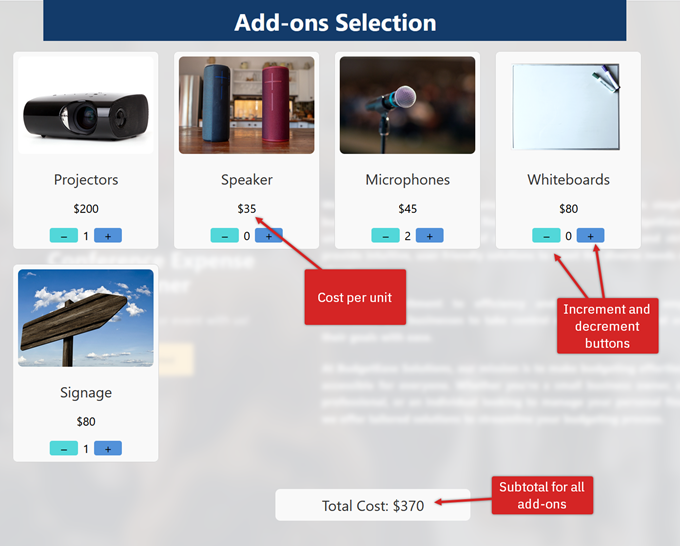
Users can select their audio/visual equipment in the add-ons section:
用户可以在附加组件部分选择他们的音频/视频设备:
- Speakers – $35 ea 演讲者 - 每位$35
- Microphones – $45 ea 麦克风 - 每个售价 45 美元
- Whiteboards – $80 ea 白板 - 每件 80 美元
- Projectors – $200 ea 投影仪 - 每个售价 $200
- Signage – $80 ea 标识牌 - 每个人民币 80 元
You will provide an increment and decrement button for each type of equipment so the user can request the number of each type of AV equipment they need.
您将为每种设备提供一个增加和减少按钮,以便用户可以请求他们需要的每种类型 AV 设备的数量。
Meals selection 餐点选择
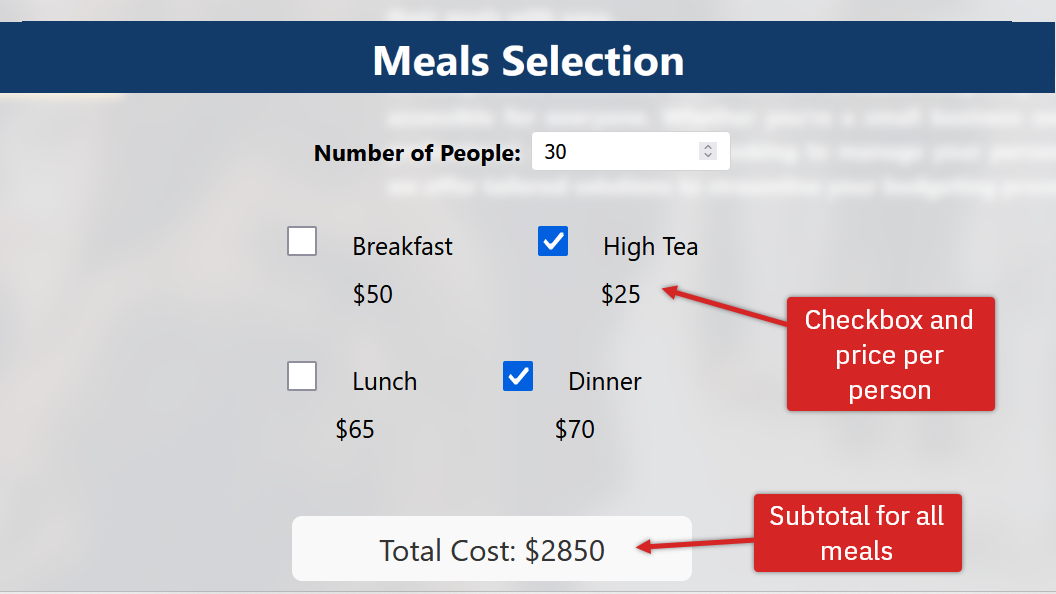
Users can select the following options for meals in the meals section:
用户可以在“餐点”部分选择以下选项进行餐点:
- Breakfast – $50 per person
早餐 - 每人 50 美元 - Lunch – $60 per person
午餐 - 每人 60 美元 - High tea – $25 per person
高级茶点 - 每人 25 美元 - Dinner – $70 per person
晚餐 - 每人 70 美元
You will provide a text entry box where the user can enter the number of people for these meals.
您将提供一个文本输入框,用户可以输入这些餐点的用餐人数。
Sample product selection page (all sections) 示例产品选择页面(所有部分)
Show details pop-up 显示详情弹出窗口
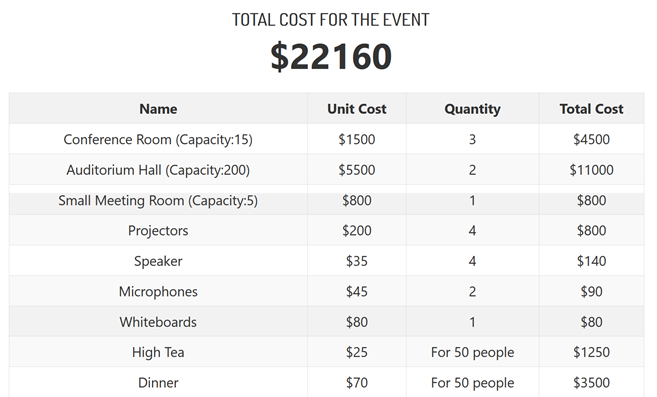
The users will need to see the details of their selections. For this element, they can access this information through a Show Details button in the header. When the user selects the button, a window pops up displaying a four-column table. Each row of the table contains the selection type, its unit cost, the quantity indicated, and the subtotal for the quantity of that item type. It will also display the total cost for all items.
用户需要查看他们选择的详细信息。为此元素,他们可以通过页眉中的“显示详情”按钮访问这些信息。当用户选择此按钮时,会弹出一个窗口,显示一个四列的表格。表格的每一行包含选择类型、其单位成本、指示的数量以及该物品类型的数量小计。它还将显示所有物品的总成本。
Final project similarities 最终项目相似性
The final project has many elements in common with the practice project. For your final project, you will create a shopping cart application for purchasing household plants.
最终项目与实践项目有许多共同元素。对于你的最终项目,你将创建一个用于购买家庭植物的购物车应用程序。
Similar functionalities between the two projects include:
两个项目之间相似的功能包括:
- Landing page 着陆页面
- Navigation bar 导航栏
- Array of product items and associated data
产品项及其相关数据的数组 - Array of selected item 数组所选项目
- Use of the
map()function to iterate through an array
使用map()函数遍历数组 - Subtotal and total cost calculations
小计和总成本计算 - Dynamic pricing displays based on user selections
基于用户选择的动态定价显示 - Increment and decrement buttons for product quantity selection
产品数量选择用的增减按钮 - Use of Redux and the Redux toolkit for managing application states with 'slices'
使用 Redux 和 Redux 工具包通过 'slices' 管理应用程序状态 - Function components for presenting interactive UI elements
功能组件,用于展示交互式 UI 元素