Module 02 · Why Is It Revolutionary?3D 打印的革命性影响
Peer-graded Assignment: Remixing Products (Exercise)同行评审作业:产品再设计
The goal of this second exercise is to give you some experience remixing objects. In essence, a digital iPhone case is really not much different than a digital iTunes song. So, now you can remix objects just as easily as you can remix music. My hope is by engaging in this remixing activity, you will gain a firsthand understanding of the revolutionary potential of 3D printing.
这个第二个练习的目标是让你获得一些混搭物体的经验。本质上,一个数字 iPhone 壳和数字 iTunes 歌曲并没有太大的区别。所以,现在你可以像混搭音乐一样轻松地混搭物体。我希望通过参与这个混搭活动,你能亲身体验到 3D 打印革命性的潜力。
To engage in this remixing exercise, we will be using Thingiverse. As we discussed earlier, Thingiverse is essentially an iTunes store for objects. However, in addition to downloading designs made by others, you can also remix many of these designs using its Customizer feature.
为了进行这次混搭练习,我们将使用 Thingiverse。正如我们之前讨论的,Thingiverse 本质上是一个物体的 iTunes 商店。然而,除了下载他人制作的设计外,您还可以使用其定制功能混搭许多这些设计。
- Open Thingiverse and create an account if you do not already have one.
打开 Thingiverse 并创建一个账户,如果您还没有的话。 - Find a Customizable design that you would like to remix (you can easily find customizable designs under the "Create" menu bar).
找到您想要混搭的自定义设计(您可以在“创建”菜单栏下轻松找到可自定义的设计)。 - Click on this object. 点击此物体。
- Once it is open, click on the "Open in Customizer" to the right of the image.
一旦打开,点击图片右侧的“在自定义器中打开”。 - The design will show up with some menu which will allow you to change parameters for the design. This is 'Remixing'
设计将显示一些菜单,允许您更改设计的参数。这是“混搭”。 - Once you are done, hit the blue "Create Thing" button on the top right of the image.
完成之后,点击图片右上角的蓝色“创建物品”按钮。 - Save and publish your remixed design on Thingiverse. (Note: It may take up to 24 hours before your Thing is published).
保存并发布您的混搭设计到 Thingiverse。(注意:您的作品发布可能需要 24 小时)。 - On the My submission tab, record the Thing number for your remixed design, state why you picked this design to remix, and briefly discuss your thoughts and feeling about this remixing process.
在“我的提交”标签页中,记录您混搭设计的物品编号,说明您选择这个设计进行混搭的原因,并简要讨论您对这个混搭过程的感想和感受。
You may save a draft of your work as you go, and you can come back later to continue working on your draft. When you are finished working, click the Preview button, verify your identity, and then click Submit for review to submit the assignment.
您可以随时保存您的工作草稿,稍后再回来继续编辑草稿。完成工作后,点击预览按钮,验证您的身份,然后点击提交审核以提交作业。
Grading Criteria Overview 评分标准概述
You are required to evaluate the submissions of at least THREE of your peers based on the instructions and rubric provided. You may begin giving feedback to other students as soon as you submit your assignment; click the Review classmates tab to begin. Feel free to provide additional reviews beyond the three required!
您需要根据提供的说明和评分标准评估至少三位同行的作品。您提交作业后即可开始对其他学生进行反馈;点击“审查同学”标签开始。请随意提供超出三个要求的额外评价!
Every submission will need to include the following.
每个提交都必须包含以下内容。
- The thing number for your remixed design
你的混搭设计编号 - Why you picked this design to be remixed
为什么选择这个设计进行混搭 - Your thoughts about the remixing process
你对混音过程的看法
Each part of the submission will be graded on the following scale:
每个提交的部分将按照以下标准进行评分:
The Thing number for your remixed design
你的混搭设计的事物编号
- 0 points: Does not provide the required information
0 分:未提供所需信息 - 1 point: Provides the required information
1 分:提供所需信息
Why you picked this design to be remixed
为什么选择这个设计进行混搭
- 0 points: Does not provide the required information or does not answer the question
0 分:未提供所需信息或未回答问题 - 1 point: Answers the question but has less than 25 words
1 分:回答了问题但字数少于 25 字 - 2 points: Answers the question and has 25 words or more
2 分:回答了问题且字数超过 25 字
Your thoughts about the remixing process
你对混音过程的看法
- 0 points: Does not provide the required information or does not answer the question
0 分:未提供所需信息或未回答问题 - 1 point: Answers the question but has less than 25 words
1 分:回答了问题但字数少于 25 字 - 2 points: Answers the question and has 25 words or more
2 分:回答了问题且字数超过 25 字
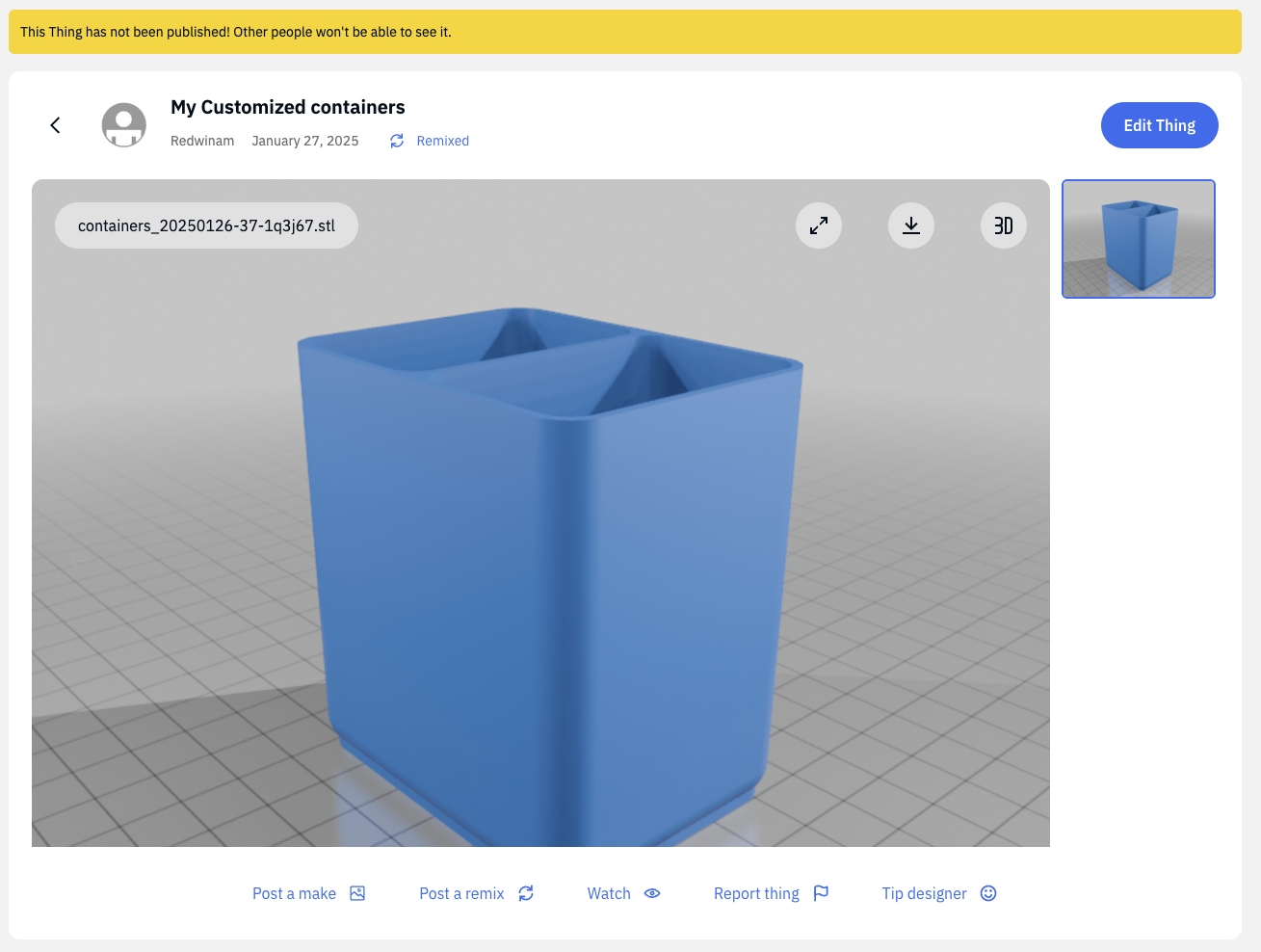
Thing Number for My Remixed Design:
https://www.thingiverse.com/thing:6926941
Why I Picked This Design to Be Remixed:
I chose to remix a small container design because I wanted a practical solution for organizing my workspace. The original design was compact and functional, but I needed a slightly larger version with two compartments to better sort and store small items. Customizing the dimensions and adding a divider allowed me to create a more tailored and efficient storage solution for my needs. This experience also highlighted how easily 3D printing can be adapted to personal requirements.
My Thoughts About the Remixing Process:
The remixing process on Thingiverse was both intuitive and engaging. Using the Customizer feature, I adjusted the dimensions and added a divider with ease. This hands-on experience showed me how accessible 3D printing customization can be, even for beginners. It’s amazing how quickly a basic design can be transformed into a personalized container. This exercise made me appreciate the creativity and utility of 3D printing as a tool for solving everyday problems.