Module 03 · Express Web Application FrameworkExpress Web 应用框架
Welcome to Authentication and Authorization in Node.jsNode.js 身份验证与授权入门
预计所需时间:20 分钟
目标
在本次阅读中,您将能够:
- 定义认证
- 解释基于会话、基于令牌和无密码认证
- 比较和对比不同类型的认证,包括基于会话、基于令牌和无密码认证
身份验证
身份验证过程通过验证用户声称的身份来确认用户的身份。身份验证通过确保只有具有有效凭据的人才能访问系统,从而保证应用程序的安全性。身份验证是应用程序后端的责任。
在 Node.js 中,三种流行的身份验证方法包括:
- 基于会话
- 基于令牌
- 无密码
让我们简单解释一下这些方法,并进行比较。
基于会话的
基于会话的身份验证是最古老的身份验证技术。通常,会话的流程如下。
- 用户使用他们的凭据登录。
- 登录凭据与数据库中的凭据进行验证。数据库负责存储基于会话 ID 可以访问的资源。
- 服务器创建一个会话,生成一个唯一的加密字符串作为会话 ID。会话 ID 存储在数据库中。
- 会话 ID 也作为 cookie 存储在浏览器中。
- 当用户注销或经过指定的时间后,会话 ID 会在浏览器和数据库中同时被销毁。
以下是一个示例代码片段,演示在 Express 应用程序中基于会话的身份验证:
const express = require('express');
const session = require('express-session');

const app = express();

// Middleware to set up session management
app.use(session({
  secret: 'secret-key',      // Replace with a strong secret key
  resave: false,             // Whether to save the session data if there were no modifications
  saveUninitialized: true,   // Whether to save new but not modified sessions
  cookie: { secure: false }  // Set to true in production with HTTPS
}));

// POST endpoint for handling login
app.post('/login', (req, res) => {
  const { username, password } = req.body;

  // Simulated user authentication (replace with actual logic)
  if (username === 'user' && password === 'password') {
    req.session.user = username;  // Store user information in session
    res.send('Logged in successfully');
  } else {
    res.send('Invalid credentials');
  }
});

// GET endpoint for accessing dashboard
app.get('/dashboard', (req, res) => {
  if (req.session.user) {
    res.send(`Welcome ${req.session.user}`);  // Display welcome message with user's name
  } else {
    res.send('Please log in first');
  }
});

// Start the server on port 3000
app.listen(3000, () => console.log('Server running on port 3000'));
说明:
- Express 设置:此代码设置一个 Express 应用程序,并使用 express-session 配置会话管理。
- 会话配置:express-session 中间件使用一个密钥(secret: ‘secret-key’)来加密会话数据,并配置其他选项,如 resave 和 saveUninitialized。
- 登录端点 (/login):处理用户登录的 POST 请求。如果提供的用户名和密码匹配,则将用户名 (req.session.user) 存储在会话中。
- 仪表盘端点 (/dashboard):检查用户是否已认证 (req.session.user 存在)。如果已认证,则欢迎用户;否则,提示他们登录。
基于令牌
基于令牌的安全性包括两个部分:身份验证和授权。身份验证是提供凭据并获取证明用户凭据的令牌的过程。授权是指使用该令牌的过程,以便资源服务器知道用户应该访问哪些资源。
基于令牌的身份验证
基于令牌的身份验证使用访问令牌来验证用户。访问令牌是一小段代码,包含有关用户、其权限、组和过期时间的信息,这些信息从服务器传递到客户端。ID 令牌是证明用户已被认证的凭证。
令牌包含三个部分:头部、有效载荷和签名。头部包含有关令牌类型和创建它所使用的算法的信息。有效载荷包含用户属性,称为声明,例如权限、组和过期时间。签名验证令牌的完整性,这意味着令牌在传输过程中没有被更改。JSON Web 令牌,发音为“jot”,但拼写为 JWT,是一种用于以 JSON 格式创建加密有效载荷数据的互联网标准。
用户的浏览器向身份验证服务器发出请求并获得对 Web 应用程序的访问。身份验证服务器然后返回一个 ID 令牌,该令牌由客户端作为加密 cookie 存储。然后将 ID 令牌传递给 Web 服务器上的应用程序,以证明用户已被认证。
基于令牌的授权
该流程图展示了令牌在授权过程中的工作流程。
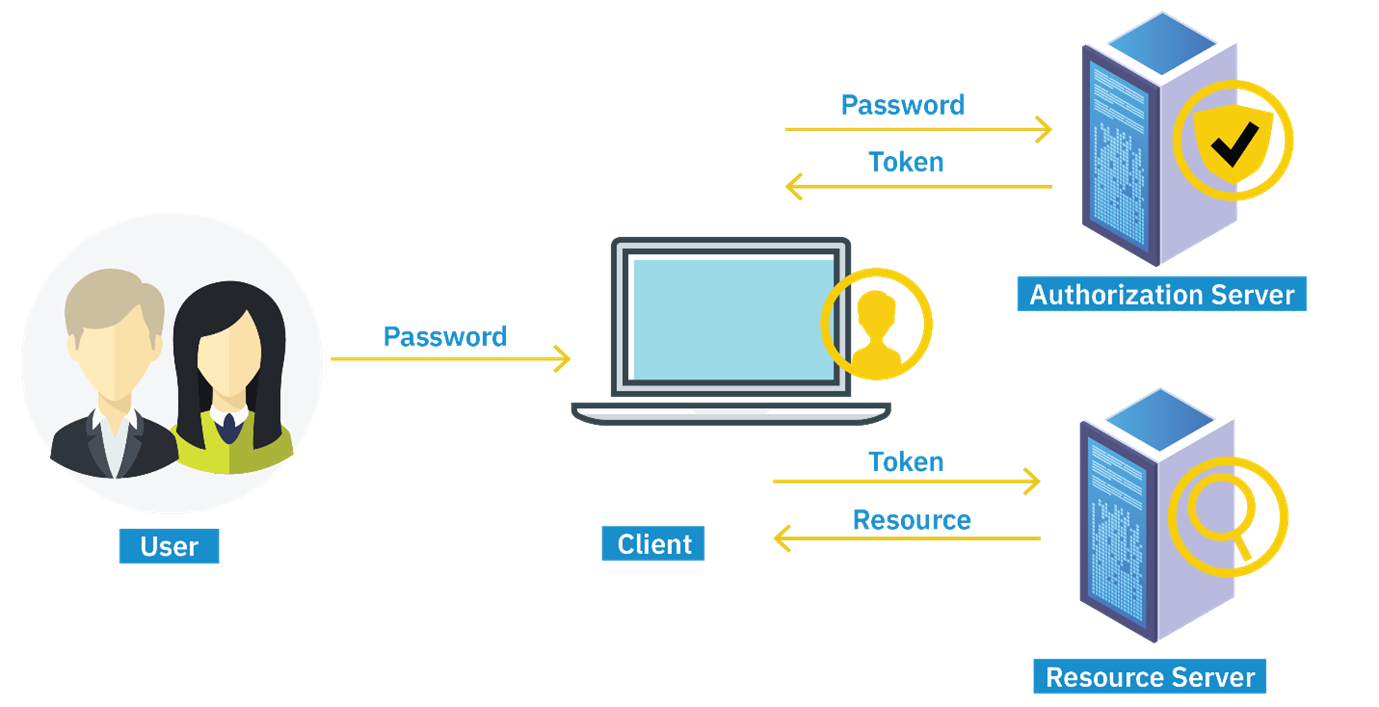
当Web应用程序想要访问受保护资源(例如,受保护的API)时,授权过程会被执行。用户向授权服务器进行身份验证。授权服务器创建一个访问令牌(请注意,ID令牌和访问令牌是两个不同的对象),并将访问令牌发送回客户端,在那里存储该访问令牌。然后,当用户发出请求或访问资源时,令牌会被传递给资源,也称为API服务器。该令牌会随着每个HTTP请求传递。令牌包含关于用户权限的嵌入信息,无需从授权服务器访问这些权限。即使令牌被盗,黑客也无法访问用户的凭据,因为令牌是加密的。
下面是一个演示在Express应用程序中基于令牌的身份验证的代码片段:
const express = require('express');
const jwt = require('jsonwebtoken');
const bodyParser = require('body-parser');

const app = express();
app.use(bodyParser.json());

const secretKey = 'your-secret-key'; // Replace with a strong secret key

// POST endpoint for user login and JWT generation
app.post('/login', (req, res) => {
  const { username, password } = req.body;

  // Simulated user authentication
  if (username === 'user' && password === 'password') {
    // Generate JWT with username payload
    const token = jwt.sign({ username }, secretKey, { expiresIn: '1h' });
    res.json({ token }); // Send token as JSON response
  } else {
    res.send('Invalid credentials');
  }
});

// GET endpoint to access protected resource (dashboard)
app.get('/dashboard', (req, res) => {
  // Get token from Authorization header
  const token = req.headers['authorization'];

  if (token) {
    // Verify JWT token
    jwt.verify(token, secretKey, (err, decoded) => {
      if (err) {
        res.send('Invalid token');
      } else {
        // Token is valid, send welcome message with username
        res.send(`Welcome ${decoded.username}`);
      }
    });
  } else {
    res.send('Token missing');
  }
});

// Start server
app.listen(3000, () => console.log('Server running on port 3000'));
说明
- Express 设置:配置一个 Express 应用程序,使用中间件如 body-parser 来解析 JSON 请求。
- JWT 生成 (/login):处理用户登录的 POST 请求。如果凭据有效,它生成一个包含用户名的 JWT(token)(jwt.sign({ username }, secretKey, { expiresIn: ‘1h’ }))。
- JWT 验证 (/dashboard):检查传入请求的 Authorization 头中是否有 JWT(const token = req.headers[‘authorization’])。如果存在,它验证该 token(jwt.verify(token, secretKey))并提取用户名(decoded.username)以授予访问权限。
无密码
通过无密码认证,用户无需登录凭据,而是通过证明他们拥有某种证明身份的因素来获得系统访问权限。常见的因素包括生物识别技术,如指纹、发送到其电子邮件地址的“魔法链接”或发送到移动设备的一次性密码。无密码认证现在通常用于密码恢复系统。
无密码认证是通过公钥和私钥加密实现的。在这种方法中,当用户注册应用时,用户的设备会生成一个私钥/公钥对,利用上述证明其身份的因素。
公钥用于加密消息,私钥用于解密消息。私钥存储在用户的设备上,而公钥则与应用程序一起存储并注册到注册服务中。
任何人都可以访问公钥,但私钥仅为客户端所知。当用户登录应用程序时,应用程序会生成一个登录挑战,例如请求生物识别信息、发送“魔法链接”或通过短信发送特殊代码,并使用公钥进行加密。私钥允许解密消息。然后,应用程序验证登录挑战并接受响应以授权用户。
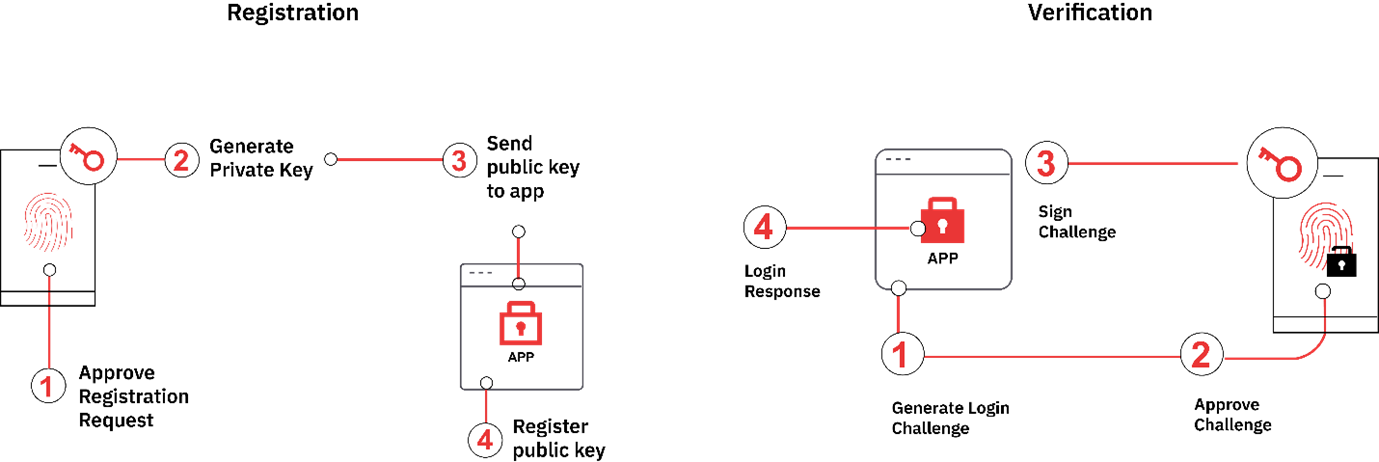
以下是一个在Express应用程序中演示基于无密码认证的代码片段:
const express = require('express');
const bodyParser = require('body-parser');
const nodemailer = require('nodemailer');

const app = express();
app.use(bodyParser.json());

const users = {}; // In-memory storage for demo purposes

// Endpoint to request access and send verification code via email
app.post('/request-access', (req, res) => {
  const { email } = req.body;

  // Generate a 6-digit verification code
  const code = Math.floor(100000 + Math.random() * 900000).toString();

  // Store the code in memory (users object)
  users[email] = code;

  // Simulated email sending (for demonstration)
  console.log(`Sending code ${code} to ${email}`);

  res.send('Code sent to your email');
});

// Endpoint to verify the received code
app.post('/verify-code', (req, res) => {
  const { email, code } = req.body;

  // Compare the received code with stored code for the email
  if (users[email] === code) {
    // Code matches, access granted
    res.send('Access granted');
  } else {
    // Code does not match, access denied
    res.send('Invalid code');
  }
});

// Start the Express server
app.listen(3000, () => console.log('Server running on port 3000'));
说明
- Express 设置:设置一个 Express 应用程序,使用中间件解析 JSON 请求(body-parser)。
- 请求访问 (/request-access):处理用户提供电子邮件以请求访问的 POST 请求。生成一个 6 位数字的验证码(code),并将其存储在内存对象中(users[email] = code)。
- 验证代码 (/verify-code):处理 POST 请求以验证接收到的代码与存储的代码是否匹配(if (users[email] === code))。如果匹配,则授予访问权限;否则,拒绝访问。
摘要
在本次阅读中,您了解到:
- 身份验证是通过验证用户声称的身份来确认用户身份的过程。
- 基于会话的身份验证使用凭据创建存储在数据库和客户端浏览器中的会话 ID。当用户注销时,会话 ID 被销毁。
- 基于令牌的身份验证使用访问令牌,通常是 JWT,这些令牌在服务器和客户端之间传递,并携带两者之间传递的数据。
- 无密码身份验证使用公钥/私钥对加密和解密在客户端和服务器之间传递的数据,无需密码。