Module 02 · CSS Overview & HTML5 ElementsCSS 概述与 HTML5 元素
Additional HTML Elements: HTML Fieldset and Legend Tag附加 HTML 元素:fieldset 与 legend 标签
Estimated time needed: 15 minutes
所需估计时间:15 分钟
Special HTML Elements 特殊 HTML 元素
In this section, you will explore two tags found within the <form> tag, namely the <fieldset> and <legend> tags.
在这一节中,您将探索在 <form> 标签内发现的两个标签,即 <fieldset> 和 <legend> 标签。
Objectives 目标
After completing this reading section, you will be able to:
完成本阅读部分后,您将能够:
- Use the
<fieldset>tag appropriately in HTML pages
在 HTML 页面中适当使用<fieldset>标签 - Use the
<legend>tag to decorate your fieldset
使用<legend>标签装饰您的 fieldset
HTML fieldset tag HTML 字段集标签
- The HTML
<fieldset>tag is found within the<form>tag and is used to group related elements in an HTML form, often by enclosing them within a box.
HTML<fieldset>标签位于<form>标签内,用于在 HTML 表单中分组相关元素,通常通过将它们包围在一个框内来实现。 - There is no restriction to the kind of elements that can be inside a fieldset, but they are mostly used to group related input type of elements, as shown in the example below.
字段集中可以包含的元素类型没有限制,但它们主要用于将相关的输入类型元素分组,如下例所示。 - The fieldset element is especially useful in large forms, where readability and ease of access can be improved with segmentation. Browsers will most likely render a frame around the grouped controls.
字段集元素在大型表单中特别有用,通过分段可以提高可读性和易访问性。浏览器很可能会在分组控件周围渲染一个框架。
Syntax 语法
<fieldset> Contents… </fieldset>
Attributes 属性
- disabled: It specifies that the elements belonging to the fieldset should be disabled.
禁用:指定属于该字段集的元素应被禁用。 - form: It specifies the id of the form that the fieldset is to be considered a part of.
表单:指定 fieldset 视为其一部分的表单的 ID。 - name: It specifies the name for the fieldset.
name: 指定字段集的名称。
Example 示例
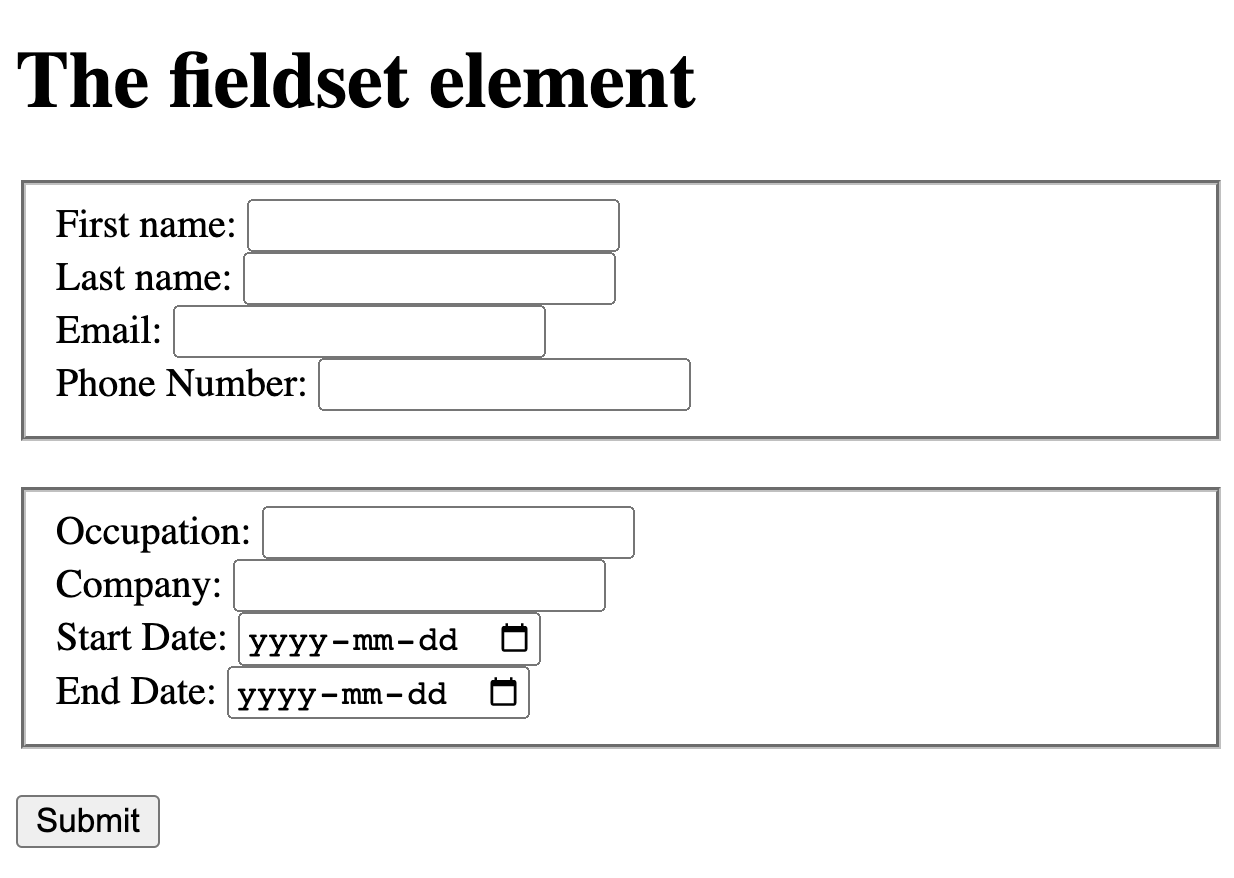
In the first example we will create a form with two fieldsets separating personal and professional details:
在第一个例子中,我们将创建一个表单,其中包含两个分组,分别用于分隔个人和职业信息:
<!DOCTYPE html>
<html>
    <body>
        <h1>The fieldset element</h1>

        <form>
            <fieldset name="personal_details">
                <label for="fname">First name:</label>
                <input type="text" id="fname" name="fname"><br>
                <label for="lname">Last name:</label>
                <input type="text" id="lname" name="lname"><br>
                <label for="email">Email:</label>
                <input type="email" id="email" name="email"><br>
                <label for="phone">Phone Number:</label>
                <input type="tel" id="phone" name="phone"><br>
            </fieldset>

            <br>

            <fieldset name="professional_details">
                <label for="occupation">Occupation:</label>
                <input type="text" id="occupation" name="occupation"><br>
                <label for="company">Company:</label>
                <input type="text" id="company" name="company"><br>
                <label for="start">Start Date:</label>
                <input type="date" id="start" name="start"><br>
                <label for="end">End Date:</label>
                <input type="date" id="end" name="end"><br>
            </fieldset>
            <br>
            <input type="submit" value="Submit">
        </form>
    </body>
</html>
Output 输出
HTML legend tag HTML 图例标签
A fieldset can additionally have a title or name, which can be provided by legend.
字段集还可以有标题或名称,该标题或名称可以通过图例提供。
The <legend> tag is used with the <fieldset> element as a first child (the first inner tag) to define the caption for the grouped related fields
<legend> 标签与 <fieldset> 元素一起用作第一个子元素(第一个内部标签),以定义分组相关字段的标题
By using the <legend> tag with <fieldset> elements, it is easy to understand the purpose of grouped form elements.
通过使用 <legend> 标签与 <fieldset> 元素,可以轻松理解分组表单元素的目的。
Example 示例
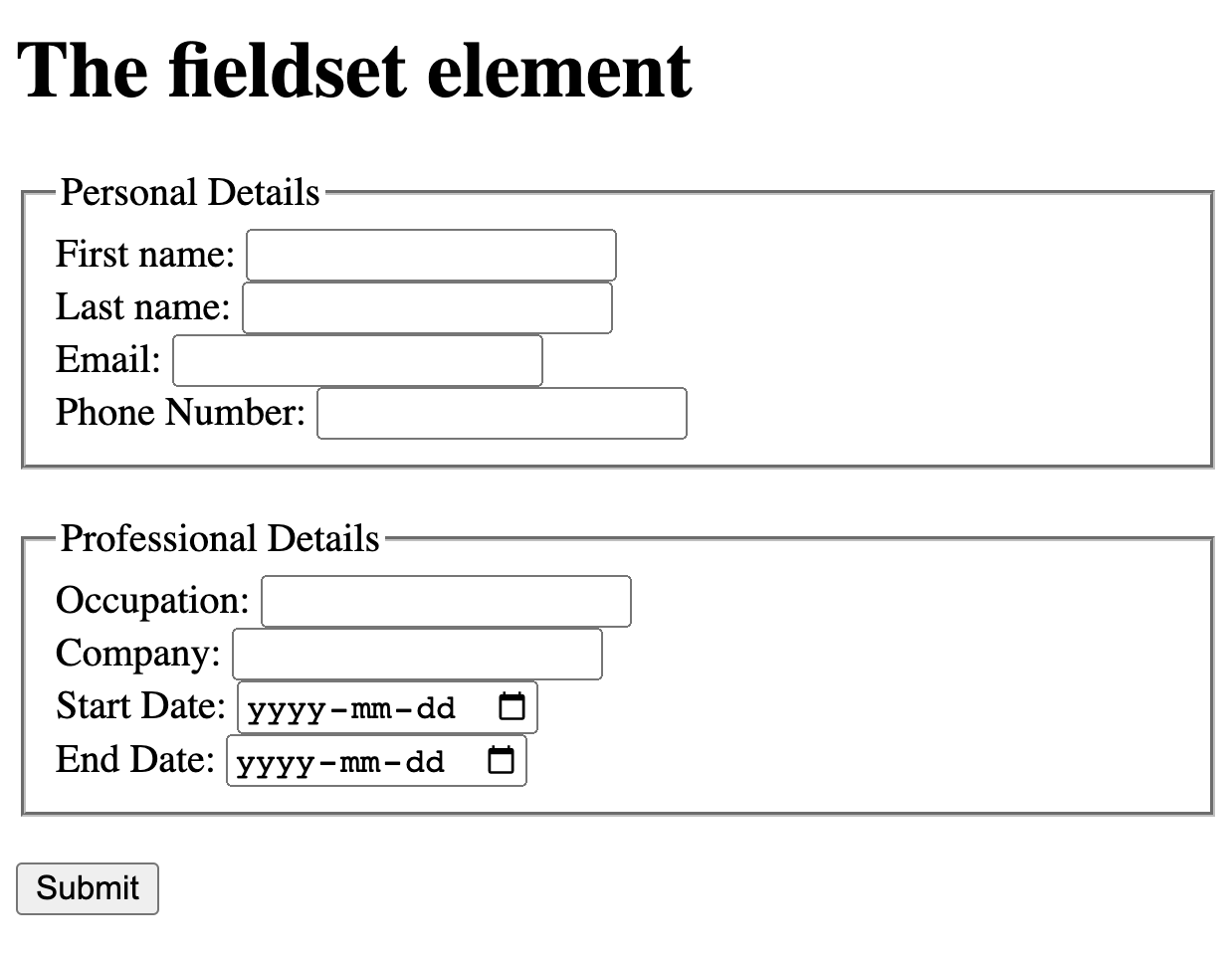
To understand the <legend> tag, let’s add this tag to the above example and see the output:
为了理解 <legend> 标签,让我们将此标签添加到上述示例中,并查看输出:
<!DOCTYPE html>
<html>
    <body>
        <h1>The fieldset element</h1>

        <form>
            <fieldset name="personal_details">
                <legend>Personal Details</legend>

                <label for="fname">First name:</label>
                <input type="text" id="fname" name="fname"><br>
                <label for="lname">Last name:</label>
                <input type="text" id="lname" name="lname"><br>
                <label for="email">Email:</label>
                <input type="email" id="email" name="email"><br>
                <label for="phone">Phone Number:</label>
                <input type="tel" id="phone" name="phone"><br>
            </fieldset>

            <br>

            <fieldset name="professional_details">
                <legend>Professional Details</legend>

                <label for="occupation">Occupation:</label>
                <input type="text" id="occupation" name="occupation"><br>
                <label for="company">Company:</label>
                <input type="text" id="company" name="company"><br>
                <label for="start">Start Date:</label>
                <input type="date" id="start" name="start"><br>
                <label for="end">End Date:</label>
                <input type="date" id="end" name="end"><br>
            </fieldset>
            <br>
            <input type="submit" value="Submit">
        </form>
    </body>
</html>
Output 输出