Module 04 · Final Project期末项目(补充材料)
Publish your Portfolio to GitHub Pages将作品集发布到 GitHub Pages
In this lab, you will publish the portfolio page to Github Pages.
在这个实验室,您将把作品集页面发布到 Github Pages。
GitHub Pages is a static site hosting service that takes HTML, CSS, and JavaScript files straight from a repository on GitHub, optionally runs the files through a build process, and publishes a website.
GitHub Pages 是一种静态网站托管服务,它直接从 GitHub 上的存储库获取 HTML、CSS 和 JavaScript 文件,可选择运行文件通过构建过程,并发布网站。
Prerequisites 先决条件
Before doing this lab, you need to have:
在进行这个实验之前,您需要具备:
- Completed the Final Project: Portfolio Website (https://cf-courses-data.s3.us.cloud-object-storage.appdomain.cloud/IBMDeveloperSkillsNetwork-CD0101EN-SkillsNetwork/labs/Project/Final_Project_V3/final-project_instructions_v3.md.html).
完成了最终项目:个人网站(https://cf-courses-data.s3.us.cloud-object-storage.appdomain.cloud/IBMDeveloperSkillsNetwork-CD0101EN-SkillsNetwork/labs/Project/Final_Project_V3/final-project_instructions_v3.md.html)。 - Downloaded the Final Project having the below files and folders to your local system:
下载了以下文件和文件夹的最终项目到您的本地系统:- index.html
- style.css
- script.js
- html_finalprojimages folder with the relevant image files
html_finalprojimages 文件夹包含相关图片文件
Instructions 说明
Task 1 : Create a Github repository & the branch for the Github Pages link 任务 1:创建 Github 仓库及用于 Github Pages 链接的分支
- Sign up for a new Github account at https://github.com/ , or login if you already have an account.
在 https://github.com/ 注册一个新的 Github 账户,或者如果您已有账户,请登录。 - Create a new repository by clicking on the
+dropdown at the top right, and selectingNew repository.
通过点击右上角的+下拉菜单,选择New repository创建一个新的仓库。
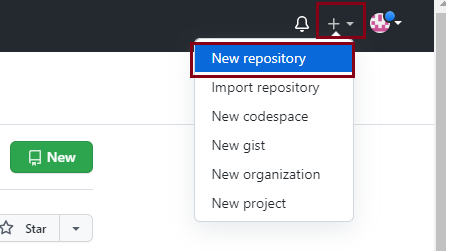
- Give it an appropriate name like my-portfolio. eg.,JaneDoe-portfolio. Select the repository type as Public, select Add a README file, and click on
Create repository.
给它一个合适的名字,例如 my-portfolio。例如,JaneDoe-portfolio。选择仓库类型为公共,选择添加 README 文件,然后点击Create repository。
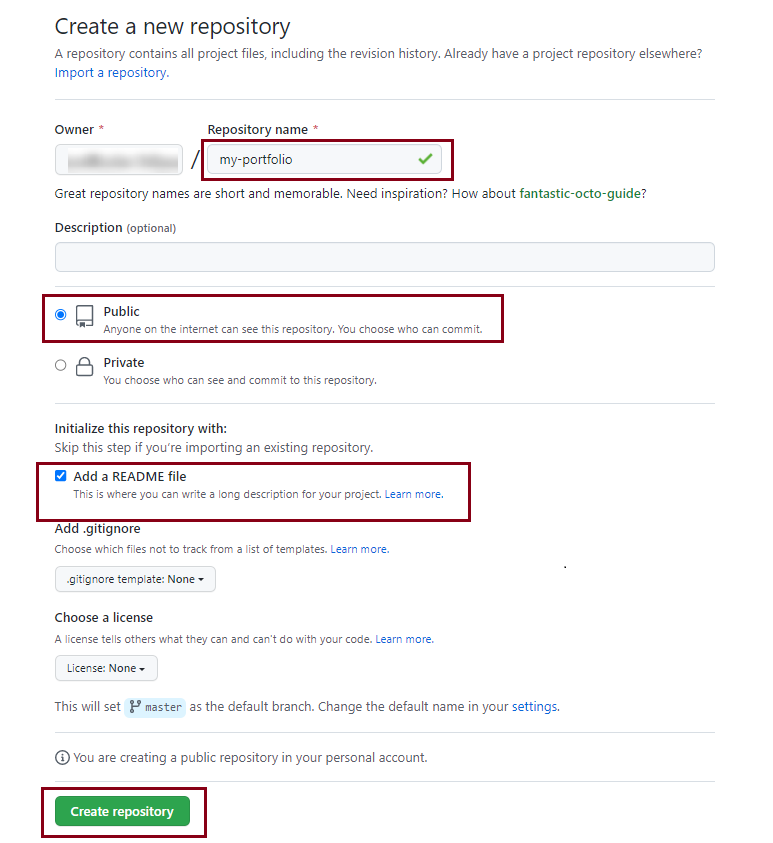
- Go to
Settingsand selectPages.
前往Settings并选择Pages。
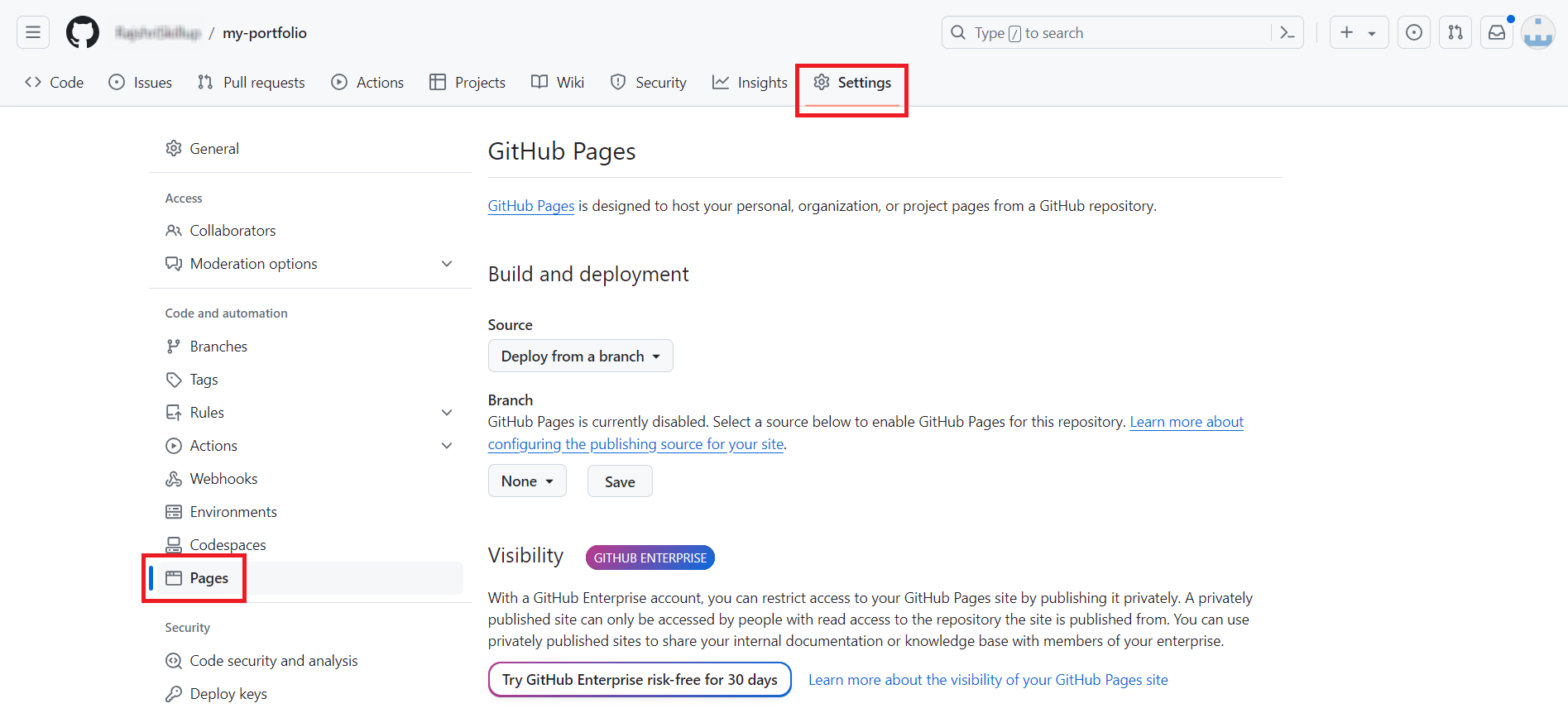
- Select the branch as
mainfrom the dropdown.
选择下拉菜单中的main分支。
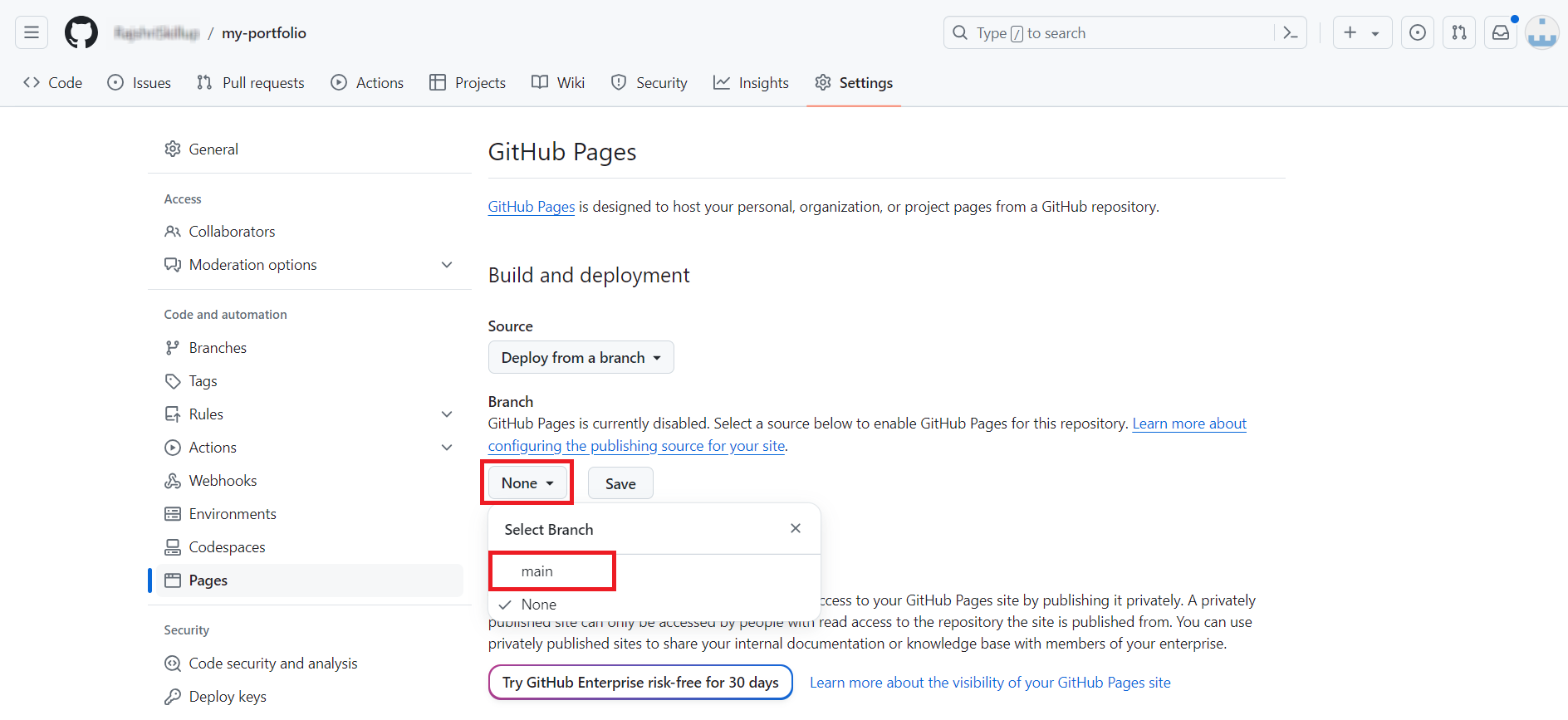
- Once the
mainbranch is selected click onSave.
一旦选择了main分支,点击Save。
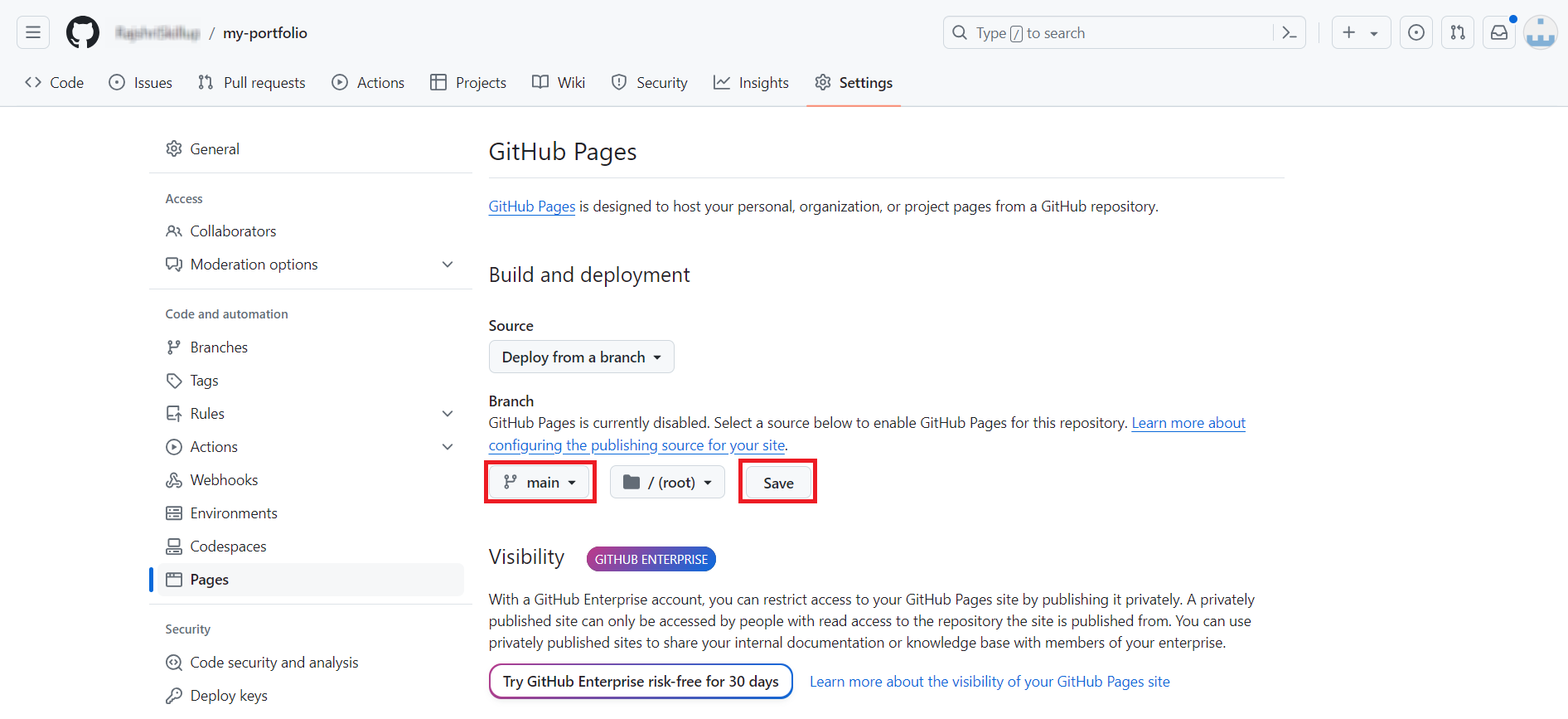
With this, the Github repository and the master branch which will be used to configure the Github pages link to your Portfolio, have been set up.
使用此方法,已设置好用于配置 GitHub 页面链接到您的作品集的 GitHub 仓库和主分支。
Task 2 : Adding the project files and folders to your Github repository 任务 2:将项目文件和文件夹添加到您的 GitHub 仓库
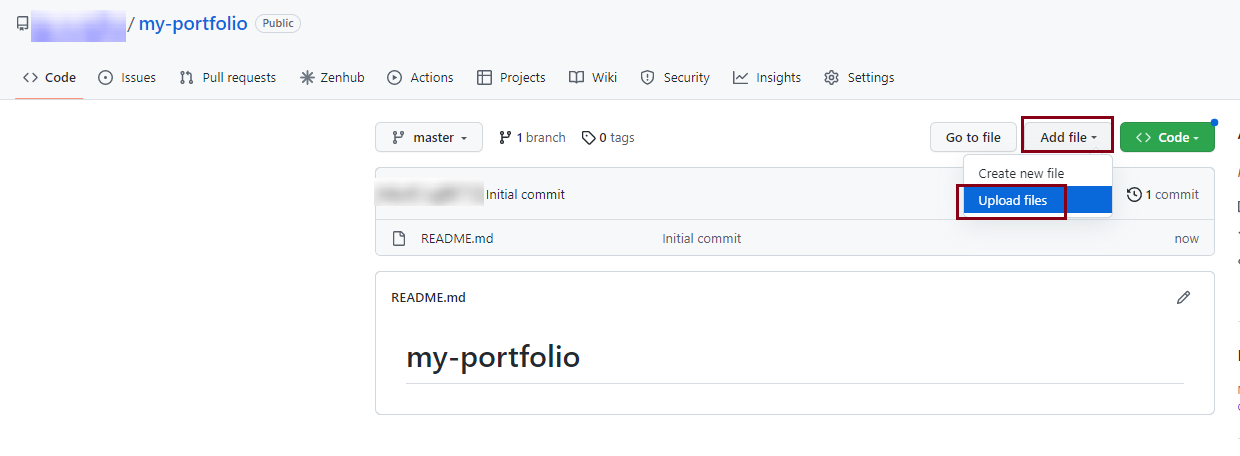
- Click on
Add fileand then click onUpload files.
点击Add file,然后点击Upload files。
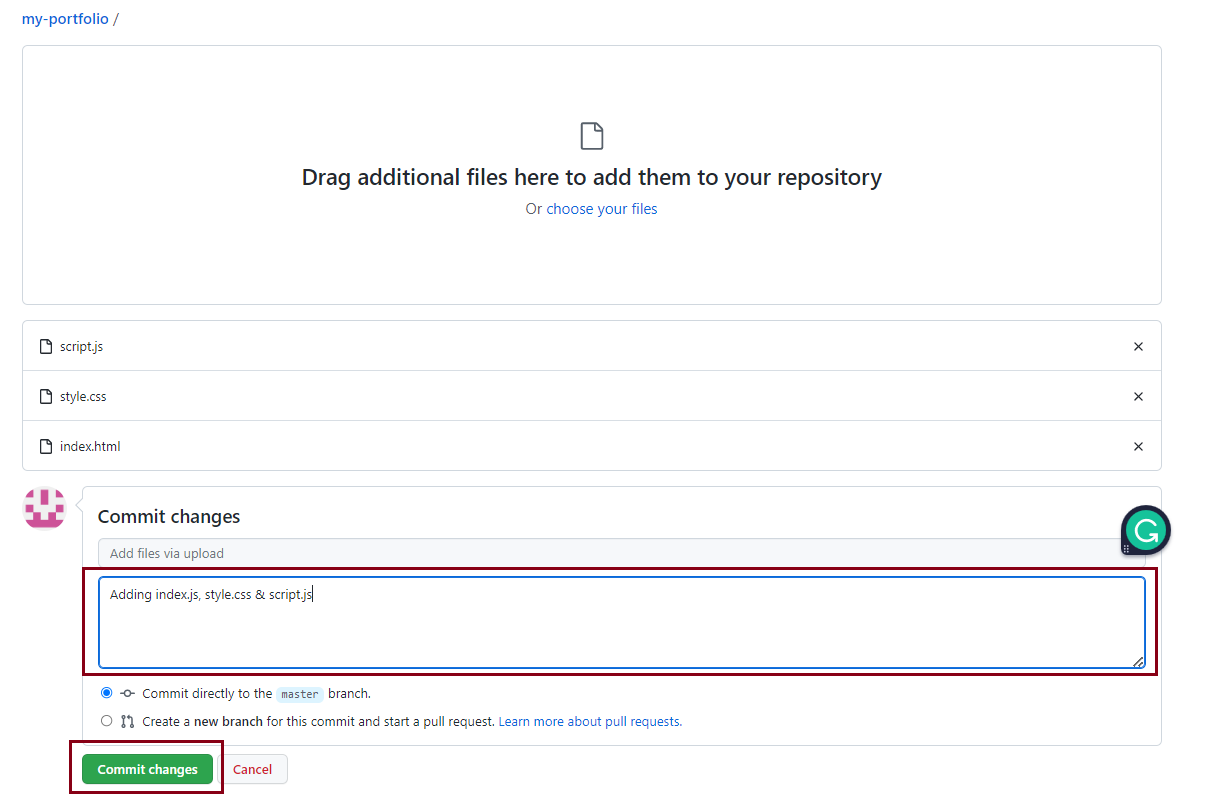
- Drag and drop
index.html,style.cssandscript.jsfiles from where they are stored, to add them.
拖拽index.html、style.css和script.js文件从存储位置,以添加它们。 - Add an appropriate commit message and click on
Commit Changes.
添加适当的提交信息并点击Commit Changes。
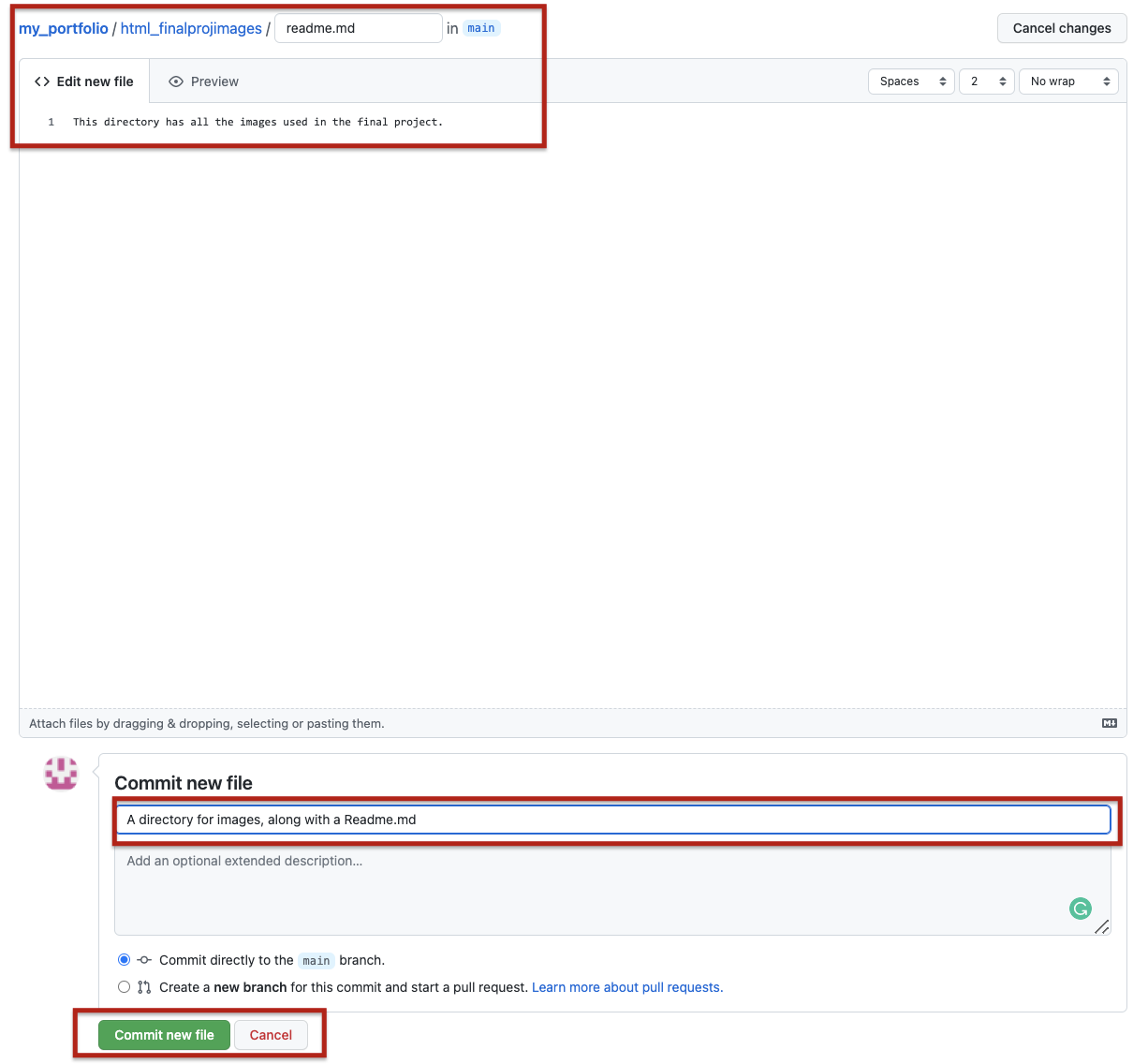
- Click on
Add File->Create Newand enterhtml_finalprojimages/readme.mdas filename. This will create a directoryhtml_finalprojimagesfor us to upload the image files. You can add a one-line information in the readme.
点击Add File->Create New,输入html_finalprojimages/readme.md作为文件名。这将为我们创建一个目录html_finalprojimages用于上传图片文件。您可以在 readme 中添加一行信息。 - Add an appropriate commit message and click on
Commit Changes. This will create thehtml_finalprojimagesimages directory.
添加适当的提交信息并点击Commit Changes。这将创建html_finalprojimages图片目录。
- Click on
Add file, and then click onUpload files, and upload all the files by dragging and dropping them from where they are stored.
点击Add file,然后点击Upload files,从存储位置拖动所有文件进行上传。 - Add an appropriate commit message and click on
Commit Changes.
添加适当的提交信息并点击Commit Changes。
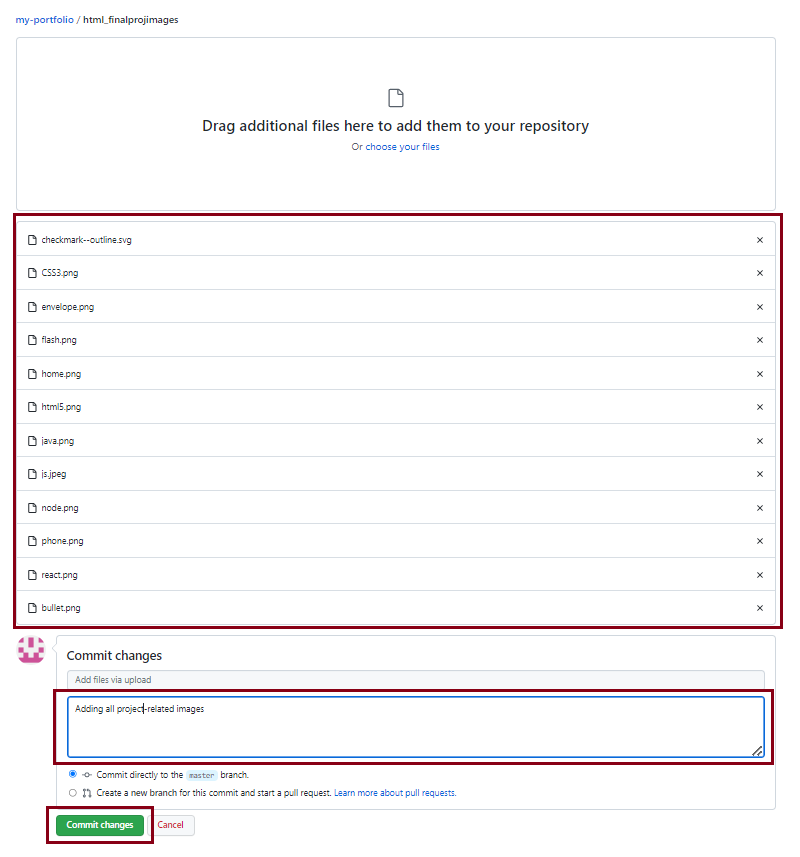
With this, the project files and folders have been added.
因此,项目文件和文件夹已添加。
Task 3: Accessing your app on the Github Pages link 任务 3:通过 Github Pages 链接访问您的应用
- Go to the main page of your repository.
前往您的仓库主页面。 - Go to
Settingsand selectPages.
前往Settings并选择Pages。 - Your Github pages link should be visible as below
您的 Github 页面链接应如下所示
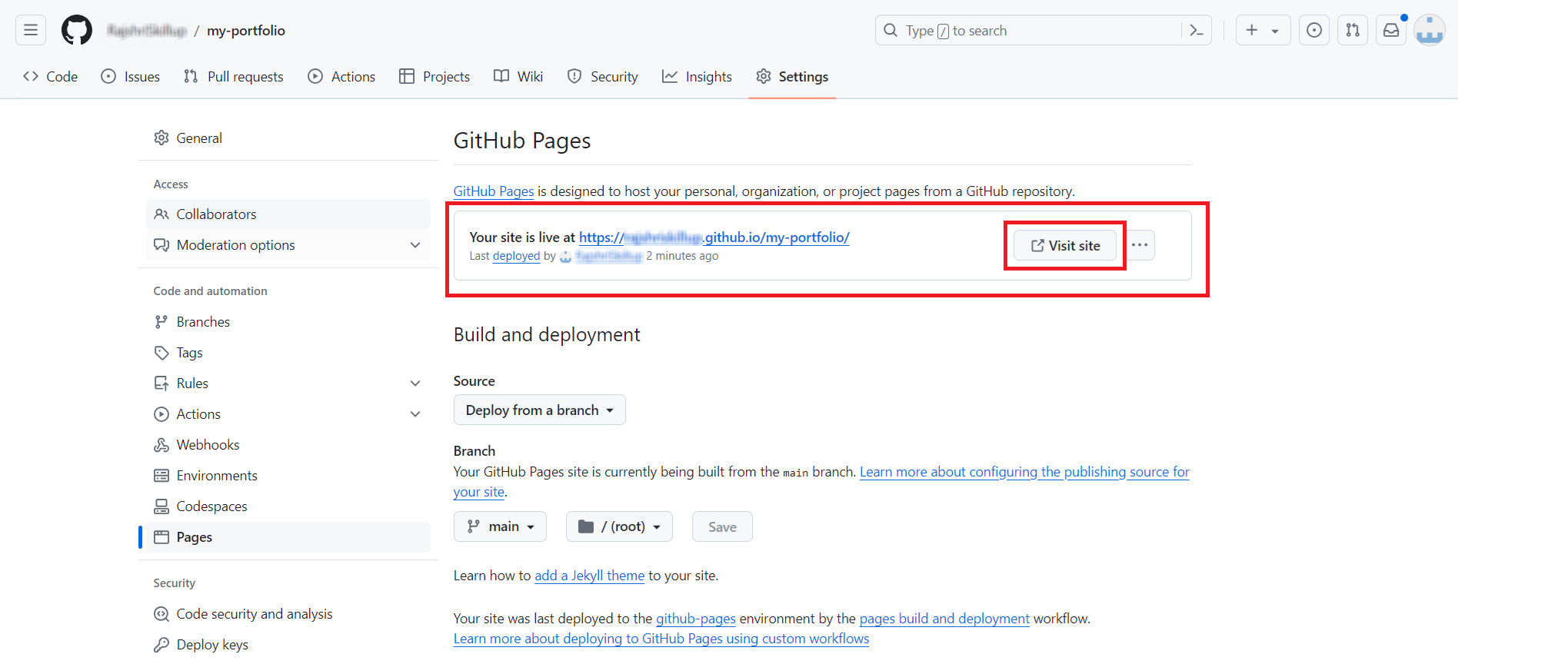
- Clicking on
Visit sitewill take you to the page where your Portoflio is published.
点击Visit site将带您进入您作品集发布的页面。

Congratulations! In this lab, you have successfully published your Portfolio on Github Pages.
恭喜!在这个实验室,您已成功在 Github Pages 上发布您的作品集。
Author(s) 作者(们)
K Sundararajan
Other Contributors 其他贡献者
Lavanya T S 拉瓦尼亚·T·S
