Module 03 · JavaScript Programming for Web ApplicationsWeb 应用 JavaScript 编程
Hands-on Lab: JavaScript - Browser Console动手实验:JavaScript——浏览器控制台
Estimated Time: 25 minutes
预计时间:25 分钟
The purpose of this lab is to practice using JavaScript in the browser console, to reinforce your understanding of certain concepts.
本实验的目的是在浏览器控制台中练习使用 JavaScript,以加强你对某些概念的理解。
Objectives 目标
After completing this lab, you will be able to:
完成本实验后,您将能够:
- Write and run JavaScript on the browser console
编写并运行浏览器控制台中的 JavaScript - Create variables, work with conditional statements, create loops, and define methods in JavaScript.
创建变量、使用条件语句、创建循环和在 JavaScript 中定义方法。
Task 1 - Open the browser console 任务 1 - 打开浏览器控制台
In this task, we are going to run JavaScript code in the browser console. The Chrome browser uses V8, which is Google’s open source high-performance JavaScript engine.
在这个任务中,我们将要在浏览器控制台中运行 JavaScript 代码。Chrome 浏览器使用 V8,这是谷歌的开源高性能 JavaScript 引擎。
- Open a new, blank tab in your browser. You can do this by clicking on
Ctrl+T(Windows) orCommand+T(Mac).
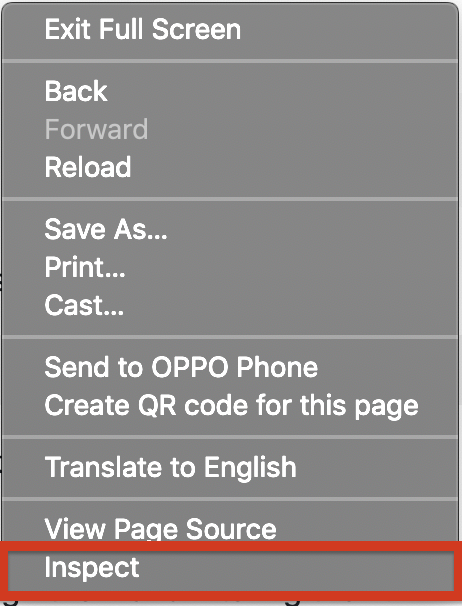
打开浏览器的新空白标签页。您可以通过点击Ctrl+T(Windows)或Command+T(Mac)来实现。 - Right-click anywhere on the new blank browser tab and choose Inspect or Inspect Element, depending on the browser you are using. The image below is for the Chrome Browser.
在新的空白浏览器标签页上右键单击,根据您使用的浏览器选择“检查”或“检查元素”。下方的图片是为 Chrome 浏览器准备的。
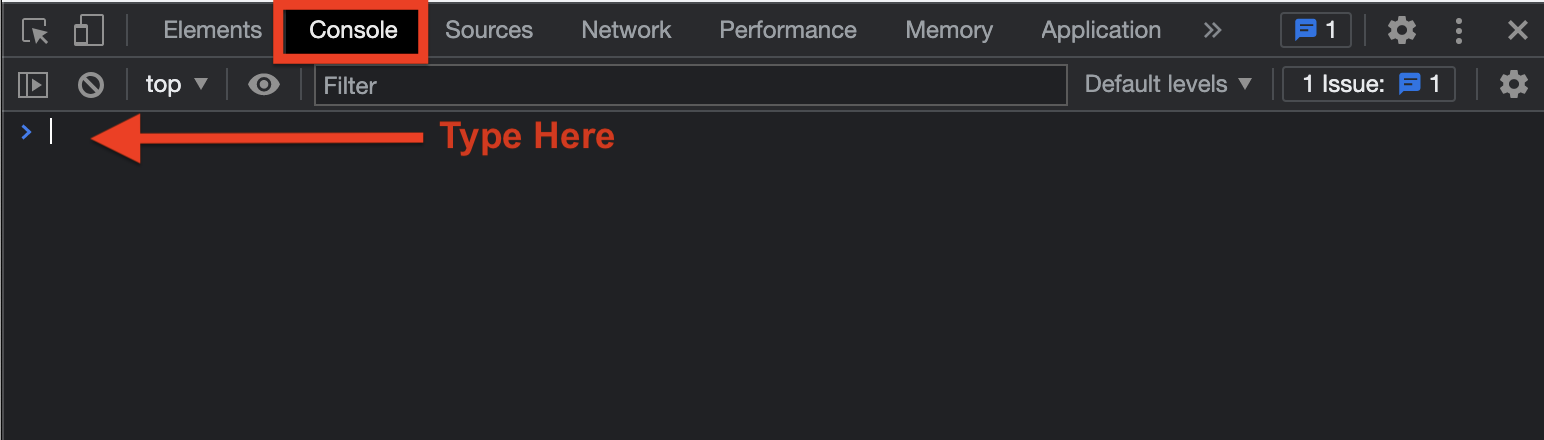
- A developer window should open on your screen. Go to the Console tab, as shown below. You will see a command prompt. You can run the rest of the tasks there.
开发者窗口应在您的屏幕上打开。转到如下所示的“控制台”标签页。您将看到一个命令提示符。您可以在那里运行剩余的任务。
- If your console has any logs printed, clear it by running the following command. This is not mandatory, but will you help have a fresh start.
如果您的控制台打印了任何日志,请通过运行以下命令将其清除。这不是强制性的,但您能帮助我们从新开始吗?
If your browser does not support this, use theclear()console.clear()command instead.
如果您的浏览器不支持此功能,请使用console.clear()命令代替。
Task 2 - Running JavaScript commands 任务 2 - 运行 JavaScript 命令
NOTE: At any point of time, when you want to clear the console run the
clear(), orconsole.clear()command.
注意:在任何时候,如果您想清空控制台,请运行clear()或console.clear()命令。
To run the commands we will use the command prompt on the browser control. Type or paste each command and press enter to run the command.
运行命令时,我们将在浏览器控制台使用命令提示符。输入或粘贴每个命令,然后按回车键运行命令。
-
Let’s start with some simple code to print Hello World! to the console. Run the following command.
让我们从一些简单的代码开始,将“Hello World!”打印到控制台。运行以下命令。console.log("Hello World!")The output should be the same as below.
输出结果应与以下相同。
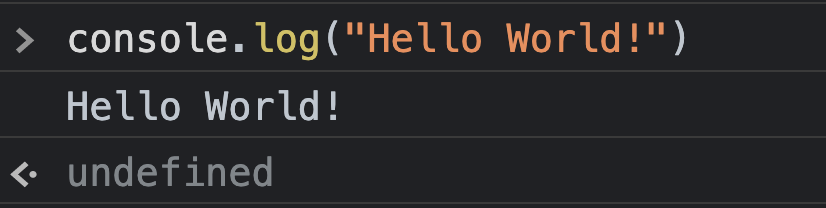
Theundefinedvalue means that your command doesn’t return any value.
undefined值表示您的命令不返回任何值。 -
Let’s create some variables and print them. Run the following commands.
让我们创建一些变量并打印它们。运行以下命令。let num = 5 var mystr = "John" console.log(num) console.log(mystr)Both
letandvarcan be used to create variables.varis used when you want the variable to have global scope andletis used when you want the variable to have scope within the block where it is created.
let和var都可以用来创建变量。var用于需要变量具有全局作用域的情况,let用于需要变量在其创建的块内具有作用域的情况。 -
Let’s create a constant and print it. Run the following command.
让我们创建一个常量并打印它。运行以下命令。const pi_val = 3.147 console.log(pi_val)constis used to declare variables whose values can never change.
const用于声明值不可变的变量。 -
Let’s create function which prints any value that is input to it.
让我们创建一个函数,该函数可以打印出输入给它的任何值。function printMyInput(user_input) { console.log("The parameter passed is " + user_input) } -
Call the function you created in the previous step, once with a number and once with a string.
调用您在上一步骤中创建的函数,一次用数字调用,一次用字符串调用。- Note:
9&Johnare the 2 input parameters passed to the printMyInput function.
注意:9和John是传递给 printMyInput 函数的 2 个输入参数。
printMyInput(9) printMyInput("John") - Note:
-
Let us see another approach of writing the printMyInput function according to the ES6 standard. This syntax is also called
arrow functionsand provide a shorthand to write functions.
让我们看看根据 ES6 标准编写 printMyInput 函数的另一种方法。这种语法也称为arrow functions,并提供了一种编写函数的简写方式。let printMyInputES6 = (user_input) => { console.log(user_input) } -
Call the function you created in the previous step once with a number and once with a string.
调用您在上一步骤中创建的函数,一次使用一个数字,一次使用一个字符串。printMyInputES6(9) printMyInputES6("John")Since the function is passed a single value and the body of the function is a single line, the brackets can be omitted. The code can also be written as below.
由于函数只传递一个值,且函数体只有一行,因此可以省略括号。代码也可以写成如下形式。let printMyInputES6Short = user_input => console.log(user_input)Now when we call it, the output should remain the same.
现在当我们调用它时,输出应该保持不变。printMyInputES6Short(9) printMyInputES6Short("John")
Task 3 - Operators, Conditions, Loops 任务 3 - 运算符、条件、循环
In this task, you will be running some JavaScript from which you can learn how to use operators, controls, and loops.
在这个任务中,您将运行一些 JavaScript 代码,从中您可以学习如何使用运算符、控制和循环。
Ensure that you understand the code in each file. These are primitive and foundational for your understanding of JavaScript.
确保您理解每个文件中的代码。这些是您理解 JavaScript 的基础和基础。
-
Arithmetic operators are operators that we use to perform arithmetic operations.
算术运算符是我们用来执行算术运算的运算符。+(plus) operator is used to add
加(加号)运算符用于相加-(minus) operator is used to subtract
减(减号)运算符用于减法*(star or asterisk) operator is used to multiply*(星号)运算符用于乘法/(slash) operator is used to divide
斜杠(/)运算符用于除法**(double star) operator is used for exponentiation/power**(双星) 运算符用于指数/幂%(percentage) operator is used for modulus operation (the remainder left over after division)
百分号(%)运算符用于取模运算(除法后的余数)
console.log("5 + 3 = ", 5 + 3)
console.log("7 - 3 = ", 7 - 3)
console.log("8 * 2 = ", 8 * 2)
console.log("27 / 3 = ", 27 / 3)
console.log("4 to the power of 3 = ", 4 ** 3)
console.log("19 mod 4 = ", 19 % 4)
The plus (+) operator is also used for string concatenation. When using a
+with both a number and a string, they both get treated as a string, and get concatenated rather than added.
加号(+)运算符也用于字符串连接。当使用+与数字和字符串一起时,它们都被视为字符串,并且进行连接而不是相加。
Expressions are read left to right, so adding two numbers and then a string will interpret the first + as addition, and the second + as concatenation.
表达式从左到右读取,因此先加两个数字再接一个字符串,第一个“+”会被解释为加法,第二个“+”会被解释为连接。console.log("5 + 3 = ", 5 + 3) console.log("5 + \"3\" = ", 5 + "3") console.log("5 + 5 + \"3\" = ", 5 + 5 + "3") console.log("\"3\" + 5 + 5 = ", "3" + 5 + 5) console.log("5 + 5 + \"3\" + 5 = ", 5 + 5 + "3" + 5) -
Assignment operators are operators that are used to assign values to variables
赋值运算符是用于将值赋给变量的运算符=operator is used to assign value on the right to the variable on left
等号运算符用于将右侧的值赋给左侧的变量+=operator is used to increment the value stored in the left operand by the value of the right operand and store it back to the left operand (the same as writingtmp = tmp + valwheretmpis a variable andvalis some arbitrary value)
加等于运算符用于将右操作数的值加到左操作数的存储值上,并将结果存储回左操作数(等同于写作tmp = tmp + val,其中tmp是变量,val是某个任意值)-=operator is used to decrement the value stored in the left operand by the value of the right operand and store it back to the left operand (the same as writingtmp = tmp - valwheretmpis a variable andvalis some arbitrary value)
减号运算符用于将左操作数存储的值减去右操作数的值,并将结果存储回左操作数(等同于写作tmp = tmp - val,其中tmp是变量,val是任意值)*=operator is used to multiply the value stored in the left operand by the value of the right operand and store it back to the left operand (the same as writingtmp = tmp * valwheretmpis a variable andvalis some arbitrary value)*=运算符用于将左操作数存储的值乘以右操作数的值,并将结果存储回左操作数(等同于写作tmp = tmp * val,其中tmp是一个变量,val是某个任意值)/=operator is used to divide the value stored in the left operand by the value of the right operand and store it back to the left operand (the same as writingtmp = tmp / valwheretmpis a variable andvalis some arbitrary value)
左操作数存储的值除以右操作数的值,并将结果存储回左操作数(等同于写作tmp = tmp / val,其中tmp是变量,val是任意值)**=operator is used to raise the value stored in the left operand to the power value of the right operand and store it back to the left operand (the same as writingtmp = tmp ** valwheretmpis a variable andvalis some arbitrary value)
运算符用于将左操作数存储的值提升到右操作数的幂次,并将其存储回左操作数(等同于写作tmp = tmp ** val,其中tmp是变量,val是某个任意值)%=operator is used to get modulus of the value stored in the left operand by value of the right operand and store it back to the left operand (the same as writingtmp = tmp % valwheretmpis a variable andvalis some arbitrary value)%=运算符用于获取左操作数中存储的值除以右操作数的余数,并将其存储回左操作数(等同于写作tmp = tmp % val,其中tmp是变量,val是某个任意值)
x = 5 console.log("Old value of x: ", x) x += 3 console.log("New value of x: ", x) y = 5 console.log("Old value of y: ", y) y -= 3 console.log("New value of y: ", y) a = 6 console.log("Old value of a: ", a) a *= 3 console.log("New value of a: ", a) b = 6 console.log("Old value of b: ", b) b /= 3 console.log("New value of b: ", b) c = 6 console.log("Old value of c: ", c) c %= 3 console.log("New value of c: ", c) d = 6 console.log("Old value of d: ", d) d **= 3 console.log("New value of d: ", d) -
Comparison Operators are used to compare values or variables against other values or variables
比较运算符用于比较值或变量与其它值或变量==operator checks if the operand on the left is of equal value to the operand on right
比较运算符检查左侧操作数是否与右侧操作数具有相等值===operator checks if the operand on the left is of equal value and equal type to the operand on right
等于运算符检查左侧操作数是否与右侧操作数具有相同的值和类型!=operator checks if the operand on the left is not of equal value to the operand on right
不等于运算符检查左侧操作数是否与右侧操作数值不相等>operator checks if the operand on the left is greater than that on the right
操作符检查左操作数是否大于右操作数<operator checks if the operand on the left is lesser than that on the right<运算符检查左操作数是否小于右操作数>=operator checks if the operand on the left is greater than or equal to that on the right
大于等于运算符检查左操作数是否大于或等于右操作数<=operator checks if the operand on the left is lesser than or equal to that on the right
小于等于运算符检查左操作数是否小于或等于右操作数
//Checking equality of 5 (number type) and 5 (string type) console.log("5=='5' ", 5=='5') console.log("5==='5' ", 5==='5') console.log("5===5 ", 5===5) console.log("5 != 5 ", 5 !== 5) console.log("5 != 6 ", 5 != 6) console.log("5 != '5' ", 5 !== '5') console.log("5 > 2 ", 5 > 2) console.log("5 > 7 ", 5 > 7) console.log("5 > 5 ", 5 > 5) console.log("5 < 7 ", 5 < 7) console.log("5 < 2 ", 5 < 2) console.log("5 < 5 ", 5 < 5) console.log("5 >= 5 ", 5 >= 5 ) console.log("5 <= 5 ", 5 <= 5 ) -
Logical Operators are used to combine more than one conditions.
逻辑运算符用于组合多个条件。&&operator checks if the condition on left and right are true. Returns true only of both conditions are true. Else returns false.
逻辑与运算符检查左右两侧的条件是否为真。只有当两个条件都为真时才返回真。否则返回假。||operators checked if either the condition on the left is true or right is true. Returns true even if one of the two conditions is true.||操作符检查左侧或右侧的条件是否为真。即使两个条件中有一个为真,也返回真。!operator checks if the condition is not met.!运算符检查条件是否未满足。
var raining = false
var cloudy = true

console.log("It is raining: ", raining)
console.log("It is cloudy: ", cloudy)

console.log("It is raining AND cloudy: ", raining && cloudy)
console.log("It is raining OR cloudy: ", raining || cloudy)
console.log("It is not raining: ", !raining)
console.log("It is not cloudy: ", !cloudy)
Short-Circuit Evaluation 短路评估
Short-circuit evaluation is a concept in which the compiler will skip checking sub-expressions in a compound statement (a statement with logical operators) once the value is determined.
短路评估是一种概念,其中编译器在确定值后,将跳过检查复合语句(带有逻辑运算符的语句)中的子表达式。exp1 && exp2will not evaluate exp2 if exp1 is false because if even one expression is false with an&&, the entire expression is falseexp1 && exp2如果 exp1 为假,则不会评估 exp2,因为即使有一个表达式在&&中为假,整个表达式也是假的exp1 || exp2will not evaluate exp2 if exp1 is true because if even one expression is true with an||, the entire expression is trueexp1 || exp2在 exp1 为真时不会评估 exp2,因为即使有一个表达式在||中为真,整个表达式就为真
This can be very useful when evaluating certain expressions, and should be taken advantage of where needed.
这在评估某些表达式时非常有用,应在需要的地方加以利用。var chocolate = true var candy = false console.log("There is chocolate: ", chocolate) console.log("There is candy: ", candy) console.log("There is candy AND chocolate: ", chocolate && candy, " -- Only candy is evaluated") console.log("There is chocolate OR candy: ", chocolate || candy, " -- Only chocolate is evaluated") -
if - else if - else Conditional statements are very useful to control the flow of your code.
if - else if - else 条件语句对于控制代码流程非常有用。//Accept a input from the user. If it is a number, print the multiplication table for the number. Else print the input and the length of the input. let user_input = prompt('Enter a value'); //Check if the user did not input anything if (!user_input) { console.log("You did not input anything") } //Check if the user input is not a number else if (isNaN(user_input)) { console.log("Your input is ", user_input) console.log("The length of your input is ", user_input.length) } //The only option remaining is that the input is a number else { console.log(user_input, " X 1 = ", user_input*1) console.log(user_input, " X 2 = ", user_input*2) console.log(user_input, " X 3 = ", user_input*3) console.log(user_input, " X 4 = ", user_input*4) console.log(user_input, " X 5 = ", user_input*5) console.log(user_input, " X 6 = ", user_input*6) console.log(user_input, " X 7 = ", user_input*7) console.log(user_input, " X 8 = ", user_input*8) console.log(user_input, " X 9 = ", user_input*9) console.log(user_input, " X 10 = ", user_input*10) } -
switch-case statements are used to replace multiple if - else if conditions which check the same variable. After one of the conditions is satisfied and the block of code is executed, the control should explicitly break out of the switch block. Otherwise, all other conditions will be executed until either a break statement is found, or until there is no more code.
switch-case 语句用于替换检查相同变量的多个 if-else if 条件。在满足其中一个条件并执行代码块之后,控制应该明确地从 switch 块中跳出。否则,将执行所有其他条件,直到找到 break 语句或没有更多代码为止。let user_input = prompt('Enter a number between 1 to 7'); //Using logical OR operator to check if the input is a number and it is between 1 to 7 if(isNaN(user_input) || user_input< 1 || user_input>7) { console.log("Invalid input") } else { user_input = parseInt(user_input) switch(user_input){ case 1: console.log("Sunday"); break; case 2: console.log("Monday"); break; case 3: console.log("Tuesday"); break; case 4: console.log("Wednesday"); break; case 5: console.log("Thursday"); break; case 6: console.log("Friday"); break; case 7: console.log("Saturday"); break; default: console.log("Invalid entry"); } } -
Loops can be used when the same block of code needs to be executed many times.
循环可用于需要多次执行相同代码块的情况。
for loops have an initial value, condition based on which the loop is executed, and an incremental value.
for 循环具有初始值、基于该值的循环执行条件和增量值。//Accept a input from the user. If it is a number print the multiplication table for the number. let user_input = prompt('Enter a number'); //Check if the user input is a number if(!isNaN(user_input)) { //Using for loop for the repetitive statement for (let i=0; i<10; i++) { console.log(user_input, " X ", i, " = ", user_input*i) } }while loops have only expression: a condition based on which a block of code is executed. This is the same type of expression as the second one in a for loop
while 循环只有表达式:一个基于该表达式执行代码块的条件。这与 for 循环中的第二个表达式类型相同。//The code below is to find the length of the words the user is entering. The loop will go on and on until the user chooses not to continue by pressing 'n' let do_more = true while(do_more) { //Accept a input from the user. let user_input = prompt('Enter a word'); //Check if the user input is not a number and then print the length of the input if(isNaN(user_input)) { console.log("Length of the word you entered is " + user_input.length) } else { console.log("You entered a number. Only words are allowed") } let should_continue = prompt("Do you want to continue. Press n to stop") if(should_continue === "n") { do_more = false } }
Task 4 - Collections 任务 4 - 集合
- Array is an indexed collection. The index positions start from 0. The element in first position is at index 0, the second element is at position 1, and so on. The index of the last position will always be one less than the length of the array.
数组是一个索引集合。索引位置从 0 开始。第一个位置的元素位于索引 0,第二个元素位于位置 1,依此类推。最后一个位置的索引总是比数组的长度少 1。let myArray = ["Jack","Jill",4,5,true,"John"] console.log(myArray[0]); console.log(myArray[5]); - To iterate through arrays, there is a special type of for loop, forEach, which gets executed for each value in the given array.
遍历数组时,有一种特殊的 for 循环类型,称为 forEach,它会针对给定数组中的每个值执行。let myArray = ["Jack","Jill",4,5,true,"John"] myArray.forEach(element => { console.log(element) }) - To find the index position and the value, we can use the generic Object.entries method, which can be used with all collection objects. This maps each index position to the value.
要找到索引位置和值,我们可以使用通用的 Object.entries 方法,它可以与所有集合对象一起使用。这个方法将每个索引位置映射到对应的值。let myArray = ["Jack","Jill",4,5,true,"John"] for (const [index, value] of Object.entries(myArray)) { console.log(index, " - ", value); } - Map object maps a key to a value. The keys have to be unique. The values can be string, int, float, or any other valid JavaScript datatype. An empty Map object can be create with the
newkeyword.
Map 对象将一个键映射到一个值。键必须是唯一的。值可以是字符串、整数、浮点数或任何有效的 JavaScript 数据类型。可以使用new关键字创建一个空的 Map 对象。let myMap = new Map(); //Add a key-value pair to the map, with a key of "name" and a value of "John". myMap.set("name", "John") //Add another key-value pair to the map, with a key of "age" and a value of 22. myMap.set("age", 22) myMap.forEach((val,key) => { console.log(key, " - ", val) })
Author(s) 作者(们)
Other Contributor(s) 其他贡献者
Michelle Saltoun 米歇尔·萨尔顿