Module 01 · HTML OverviewHTML 概述
Common HTML Elements常见 HTML 元素
This reading will introduce you to the most common HTML elements you need to know as a web developer. The HTML elements described in this reading are key to your learning.
本阅读将向您介绍作为网页开发者需要了解的最常见 HTML 元素。本阅读中描述的 HTML 元素是您学习的关键。
Estimated time needed: 25 minutes
所需估计时间:25 分钟
Objectives 目标
After completing this reading section, you will be able to:
完成本阅读部分后,您将能够:
- Use titles and headings to label information
使用标题和标题来标记信息 - Insert text using the paragraph element
使用段落元素插入文本 - Insert line breaks on a page
在页面中插入换行符 - Add links to different sections of a page and other pages
添加页面不同部分和其他页面的链接 - Create a list of items
创建一个项目列表 - Add a table of data
添加数据表 - Insert an image 插入图片
HTML Setup HTML 设置
Recall that an HTML document must always start by specifying the DOCTYPE. The entire content is then enclosed within an <html> tag. Within this tag, the content is further segregated into either the <head> or <body> elements of the code. The <head> tag contains all the metadata about the page, and the <body> tag contains the content that is displayed to the end user.
回忆一下,一个 HTML 文档必须始终以指定 DOCTYPE 开始。然后,整个内容被包含在 <html> 标签内。在这个标签内,内容进一步被划分为代码的 <head> 或 <body> 元素。 <head> 标签包含关于页面的所有元数据,而 <body> 标签包含显示给最终用户的页面内容。
As per this setup, an empty HTML document without content or metadata should look as follows:
按照此设置,一个没有内容或元数据的空 HTML 文档应如下所示:
<!DOCTYPE html>
<html>
    <head>
        <!-- Metadata goes here -->
    </head>
    <body>
        <!-- Content goes here -->
    </body>
</html>
Browser Tab Title 浏览器标签页标题
The title of the page appears on the browser tab when you open a webpage in the browser. For example, if you open Google in a new tab, the browser title will display as “Google” along with the Google logo.
页面标题在浏览器标签中显示,当你在浏览器中打开网页时。例如,如果你在新标签页中打开 Google,浏览器标题将显示为“Google”,并伴有 Google 标志。
You can define the browser title using the <title> tag, which is placed within the <head> section of your HTML markup as follows:
您可以使用 <title> 标签定义浏览器标题,该标签放置在您的 HTML 标记的 <head> 部分中,如下所示:
<head>
    <title>Sample Page Title</title>
</head>
Page Headings 页面标题
You can separate your information into different sections by using headings, as can be seen in this reading. HTML defines six different font sizes for headings. Each heading represents a different level of importance and text size.
您可以通过使用标题将信息分为不同的部分,正如本阅读材料中所示。HTML 定义了六种不同的标题字体大小。每个标题代表不同的重要性和文本大小级别。
HTML headings are defined with the following tags: <h1>, <h2>, <h3>, <h4>, <h5>, and <h6>. The number in these tags specifies the importance, with <h1> being the largest heading and <h6> being the smallest heading.
HTML 标题使用以下标签定义: <h1> 、 <h2> 、 <h3> 、 <h4> 、 <h5> 和 <h6> 。这些标签中的数字指定了重要性,其中 <h1> 是最大的标题, <h6> 是最小的标题。
Since this element defines the content within a web page, it should be placed in the <body> section of your markup as follows:
由于此元素定义了网页中的内容,因此它应放置在您的标记的 <body> 部分中,如下所示:
<body>
    <h1>Most Important (and Largest) Heading</h1>
    <h6>Least Important (and Smallest) Heading</h6>
</body>
Adding Text 添加文本
The <p> tag should be used to insert text into your HTML document. This element stands for paragraph and includes any text content, whether it is a single word or a 10-page essay.
<p> 标签应用于将文本插入到您的 HTML 文档中。此元素代表段落,包括任何文本内容,无论是一个单词还是一篇 10 页的论文。
Since this element defines content within a web page, it should be placed in the <body> section of your markup as follows:
由于此元素定义了网页中的内容,因此它应放置在您的标记的 <body> 部分中,如下所示:
<body>
    <h1>Most Important (and Largest) Heading</h1>
    <p>This is some text. The content within this paragraph element can be as short or as long as needed.</p>
    <h6>Least Important (and Smallest) Heading</h6>
    <p>This is another paragraph of text.</p>
</body>
Using Line Breaks 使用换行符
A line break is used to complete one line and continue the remaining text
一个换行符用于完成一行并继续剩余文本
at the start of a new line, like what was just done here.
在新的行首,就像刚才所做的那样。
This can be useful in many scenarios, such as when writing addresses. You can use the <br> tag to insert a line break in HTML. This is not a container tag and therefore does not have an end tag.
这在许多场景下都很有用,例如在编写地址时。您可以使用 <br> 标签在 HTML 中插入换行符。这不是一个容器标签,因此没有结束标签。
<body>
    <p>This is some text that needs to be split up <br>here, <br>here, and <br>here.</p>
</body>
Add Links to Other Pages 添加其他页面链接
Web pages can link to other pages or other places on the same page via a hyperlink. The <a> tag defines a hyperlink in HTML, followed by the href attribute to define the destination address of the hyperlink.
网页可以通过超链接链接到其他页面或同一页面的其他位置。HTML 中的 <a> 标签定义超链接,后跟 href 属性来定义超链接的目标地址。
Hyperlinks are normally inserted into text so that when you click some hyperlinked text, it takes you to the destination. For example, if you want to hyperlink the word “IBM” to the official IBM website, you can use the <a> tag with the href attribute as shown below:
超链接通常插入到文本中,以便点击超链接文本时,可以跳转到目标页面。例如,如果您想将“IBM”这个词超链接到 IBM 官方网站,可以使用如下所示的 <a> 标签和 href 属性:
<a href="https://www.ibm.com">IBM</a>
In the example above, anytime a user clicks the “IBM” text, the IBM website will open in the current tab.
在上面的例子中,每次用户点击“IBM”文本时,IBM 网站将在当前标签页中打开。
If you want a hyperlink to open a certain destination in a new tab, you can do so by adding target="_blank" to the <a> tag as follows:
如果您想在新标签页中打开超链接到特定目的地,可以通过在 <a> 标签中添加 target="_blank" 来实现,如下所示:
<a href="https://www.ibm.com" target="_blank">IBM</a>
Hyperlinks are also able to link to other places on the same page. You can link to the top of the current page in either of the following two ways:
超链接还可以链接到同一页上的其他位置。您可以通过以下两种方式之一链接到当前页面的顶部:
 <a href="#">Top of Page</a>
 <a href="#top">Top of Page</a>
To link to a different section of the page, you can use the id of the section you want to link to, as follows:
要链接到页面上的不同部分,您可以使用要链接到的部分的 ID,如下所示:
 <a href="#section">Link to section</a>
 ...
 <h1 id="section">Section</h1>
Create a List 创建列表
To create a list of items, you can use the <ol> (ordered list) tag for numbered lists and the <ul> (unordered list) tag for bulleted lists.
创建项目列表时,您可以使用 <ol> (有序列表)标签创建编号列表,或使用 <ul> (无序列表)标签创建项目符号列表。
Each point within a list will be enclosed by a <li> opening and closing tag, which represents a list item. This same tag is used for both ordered and unordered lists.
每个列表中的点将由一个 <li> 开闭标签包围,该标签代表一个列表项。此标签同时用于有序列表和无序列表。
<!-- Unordered List -->
<ul>
    <li>This is a bullet point </li>
    <li>The items in this list have no particular order </li>
    <li>Each item will appear as a bullet, rather than a number </li>
</ul>
<!-- Ordered List -->
<ol>
    <li>This is an ordered list </li>
    <li>The items in this list have a particular order </li>
    <li>Each item will be numbered, starting from 1 </li>
    <li>This is the fourth point in the list </li>
</ol>
Add a Table 添加表格
Tables are often required to format data, as shown below.
表格通常需要用于格式化数据,如下所示。
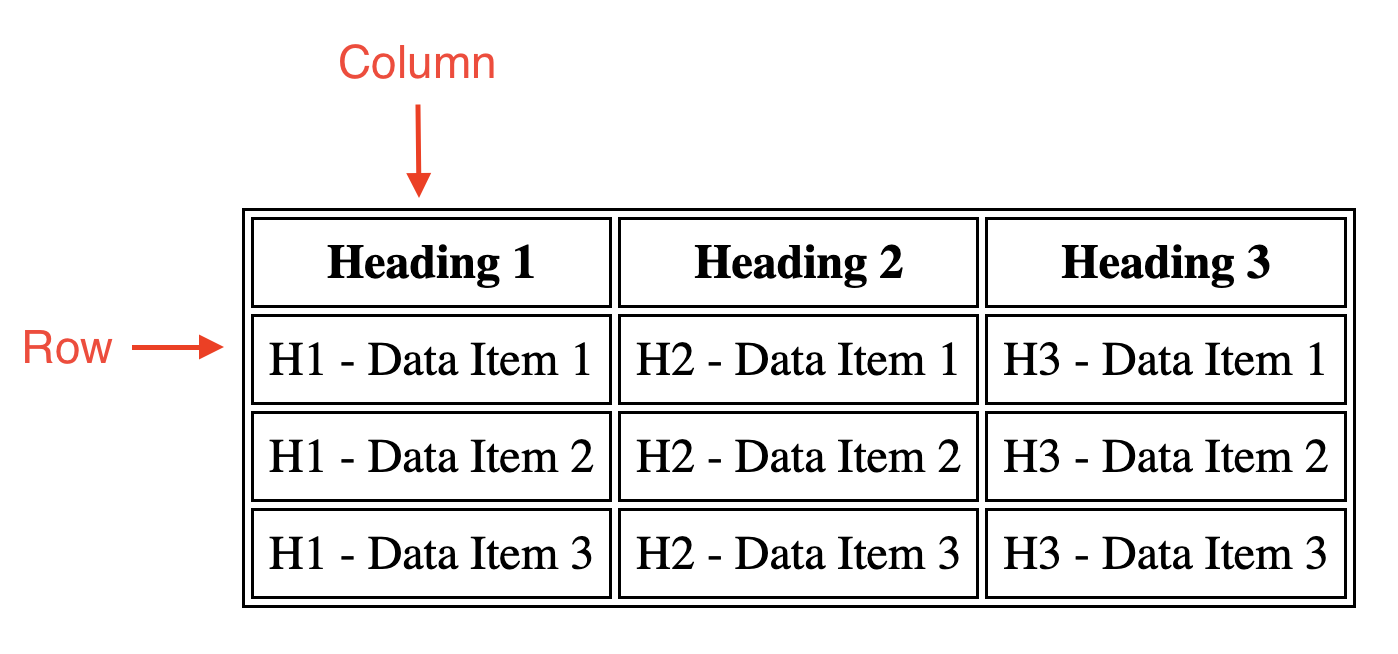
A table is created with HTML using the <table> tag. Within the table, each row of data is represented using the <tr> (table row) tag. The column or row headings can be specified by the <th> (table heading) element. Finally, each data element within the table cells is specified using the <td> (table data) tag.
使用 HTML 通过 <table> 标签创建表格。在表格中,每行数据使用 <tr> (表格行)标签表示。列或行标题可以通过 <th> (表格标题)元素指定。最后,表格单元格中的每个数据元素使用 <td> (表格数据)标签指定。
<table>
    <tr>
        <th>Heading 1</th>
        <th>Heading 2</th>
        <th>Heading 3</th>
    </tr>
    <tr>
        <td>H1 - Data Item 1</td>
        <td>H2 - Data Item 1</td>
        <td>H3 - Data Item 1</td>
    </tr>
    <tr>
        <td>H1 - Data Item 2</td>
        <td>H2 - Data Item 2</td>
        <td>H3 - Data Item 2</td>
    </tr>
    <tr>
        <td>H1 - Data Item 3</td>
        <td>H2 - Data Item 3</td>
        <td>H3 - Data Item 3</td>
    </tr>
</table>
Add an Image 添加图片
Images can be added within a web page by using the <img> tag. Both external images (for instance, from the internet) and local images (for instance, files saved on your computer) can be used in this tag.
图片可以通过使用 <img> 标签添加到网页中。在此标签中可以使用外部图片(例如,来自互联网的图片)和本地图片(例如,保存在您电脑上的文件)。
To add an image, you need to know the image file name and include it in the ‘src’ attribute. The ‘src’ attribute specifies an external resource that you want to link, such as the URL of an image. If you are referencing a file online, you can insert the URL of the image in this attribute. If you want to insert a local image, you should insert the file path of the image relative to the location of your HTML file.
要添加图片,您需要知道图片文件名并将其包含在'src'属性中。'src'属性指定您想要链接的外部资源,例如图片的 URL。如果您正在引用在线文件,可以将图片的 URL 插入此属性中。如果您想插入本地图片,应插入相对于 HTML 文件位置的图片文件路径。
The <img> tag also requires the ‘alt’ attribute, which defines alternative text to be displayed in the event the image cannot be loaded and when a screen reader is used.
<img> 标签也需要“alt”属性,该属性定义了在图像无法加载或使用屏幕阅读器时显示的替代文本。
The size of an image can also (optionally) be specified using the ‘width’ and ‘height’ attributes, with the numbers listed in pixels.
图像大小也可以(可选地)通过“width”和“height”属性指定,数字以像素为单位列出。
<!-- External Image -->
<img src="https://upload.wikimedia.org/wikipedia/commons/thumb/5/51/IBM_logo.svg/440px-IBM_logo.svg.png" alt="IBM Logo" width="300" height="300">
<!-- Local Images -->
<img src="images/IBMlogo.png" alt="IBM Logo" width="300" height="300">
Congratulations 祝贺
Congratulations! You have learned about some of the most common HTML elements you will be using as a web developer. Feel free to refer to this page as a reference when creating your own HTML documents.
恭喜!你已经学习了作为网页开发者将经常使用的最常见 HTML 元素。在创建自己的 HTML 文档时,请随时参考此页面。