Module 03 · Data Engineering Lifecycle数据工程生命周期
Hands-On Lab: Load data into the Datasette from a CSV file动手实验:从 CSV 文件加载数据到 Datasette

Lab Overview: 实验概述:
Now, that you have learned about the process of importing data into a data repository from varied sources, you will load data from a CSV file into the Datasette.
现在,您已经了解了将数据从各种来源导入数据存储库的过程,接下来您将把 CSV 文件中的数据加载到 Datasette 中。
Estimated time needed: 15 minutes
预计所需时间:15 分钟
Dataset used in this exercise:
本练习中使用的数据集:
The dataset used in this exercise comes from the following source: https://www.kaggle.com/antfarol/car-sale-advertisements under a CC0: Public Domain license.
本练习中使用的数据集来源于以下网址:https://www.kaggle.com/antfarol/car-sale-advertisements,遵循 CC0:公共领域许可。
We are using a modified subset of that dataset for this lab. To follow the lab instructions successfully, please use the dataset provided with this exercise rather than the dataset from the original source.
在本实验中,我们使用的是该数据集的修改子集。为了成功遵循实验说明,请使用本练习提供的数据集,而不是原始来源的数据集。
Download the dataset 下载数据集
https://cf-courses-data.s3.us.cloud-object-storage.appdomain.cloud/IBM-DB0100EN-SkillsNetwork/labs/exercise03_car_sales_data.csv is the csv file used in this lab.
https://cf-courses-data.s3.us.cloud-object-storage.appdomain.cloud/IBM-DB0100EN-SkillsNetwork/labs/exercise03_car_sales_data.csv 是本实验中使用的 csv 文件。
Objectives 目标
After completing this lab, you will be able to:
完成本实验后,您将能够:
- Create and Load data into a table from a CSV file.
从 CSV 文件创建表并将数据加载到表中。
Exercise 1: Create a table by loading a CSV file using Datasette 练习 1:使用 Datasette 通过加载 CSV 文件创建表
In this exercise, you will learn how to load a CSV file and create a table using the Datasette tool.
在此练习中,您将学习如何加载 CSV 文件并使用 Datasette 工具创建表。
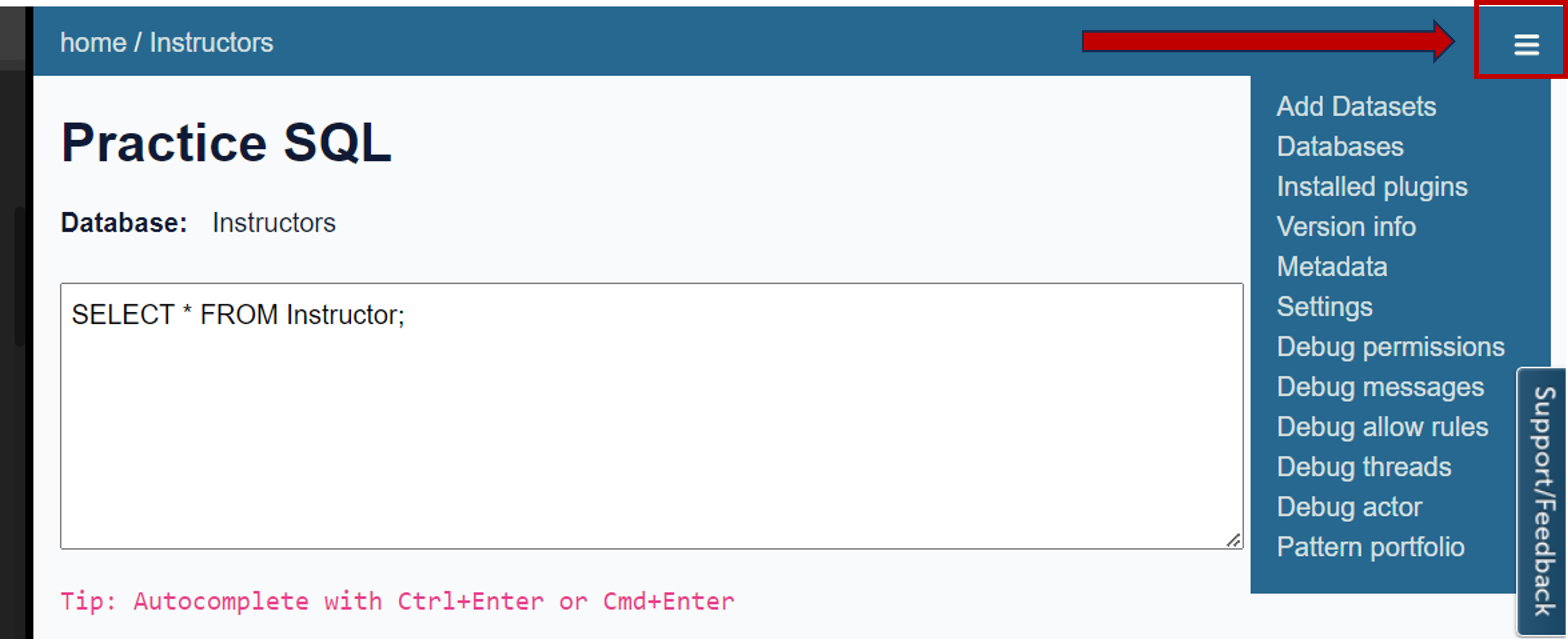
- After launching the Datasette tool through the Launch App button, click on the three vertical lines located in the upper right corner to open the menu for adding datasets.
通过“启动应用程序”按钮启动 Datasette 工具后,单击右上角的三条垂直线以打开添加数据集的菜单。
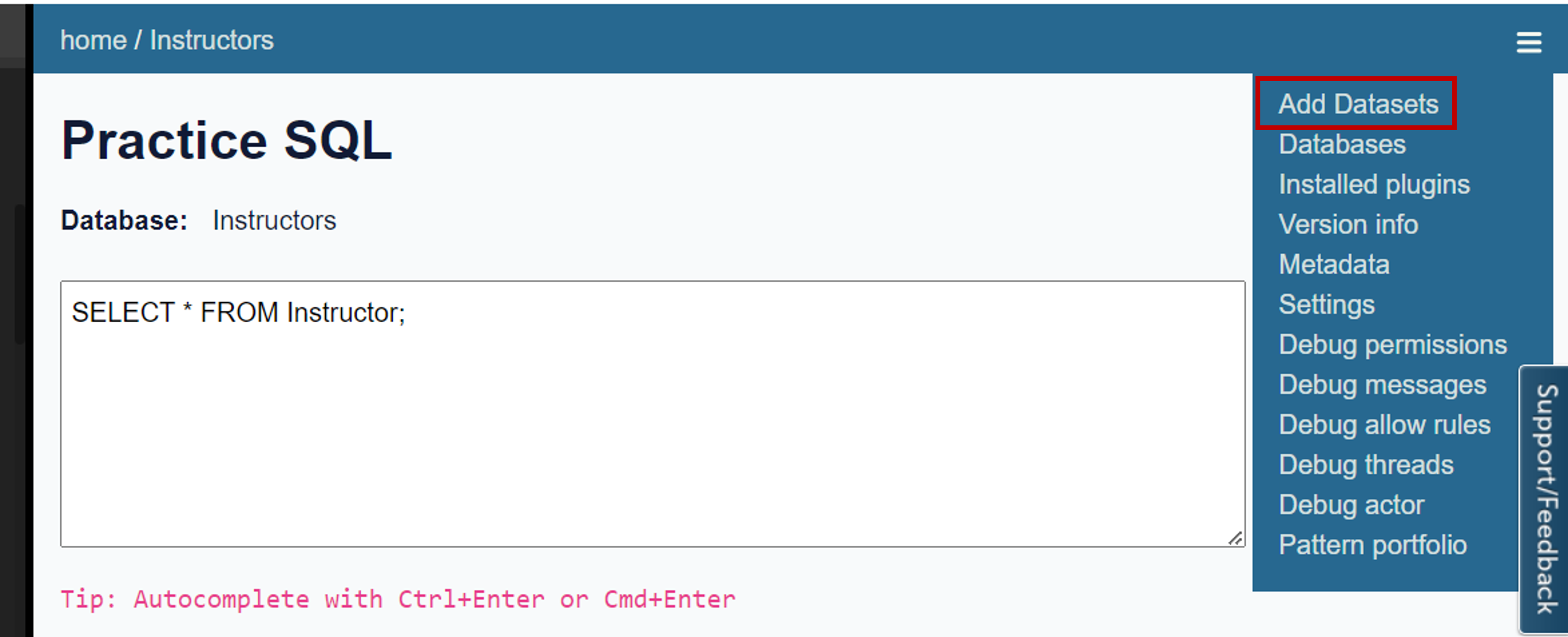
- Next click the Add DataSets option to add the dataset.
接下来,单击“添加数据集”选项以添加数据集。
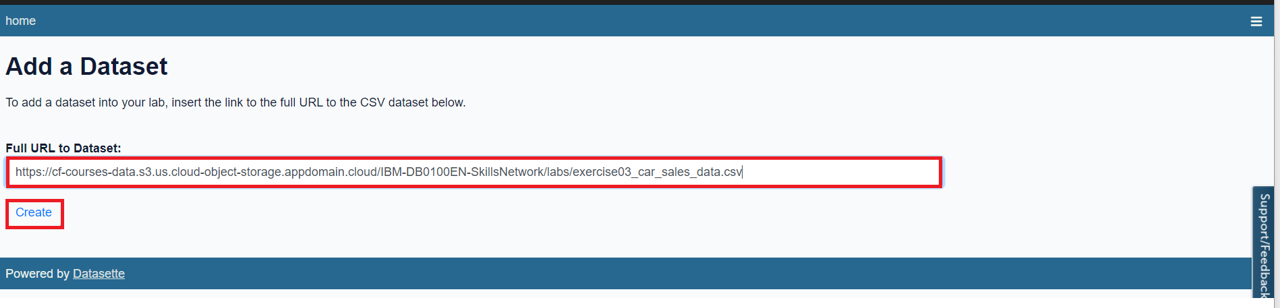
- You will be redirected to a page where you need to enter the full URL of the CSV dataset in the text box.
您将被重定向到一个页面,您需要在文本框中输入 CSV 数据集的完整 URL。- Right-click on the link exercise03_car_sales_data.csv and copy the link address.
右键单击链接 exercise03_car_sales_data.csv 并复制链接地址。 - Enter the copied URL in the text box and click on the create button.
在文本框中输入复制的 URL,然后单击创建按钮。
- Right-click on the link exercise03_car_sales_data.csv and copy the link address.
-
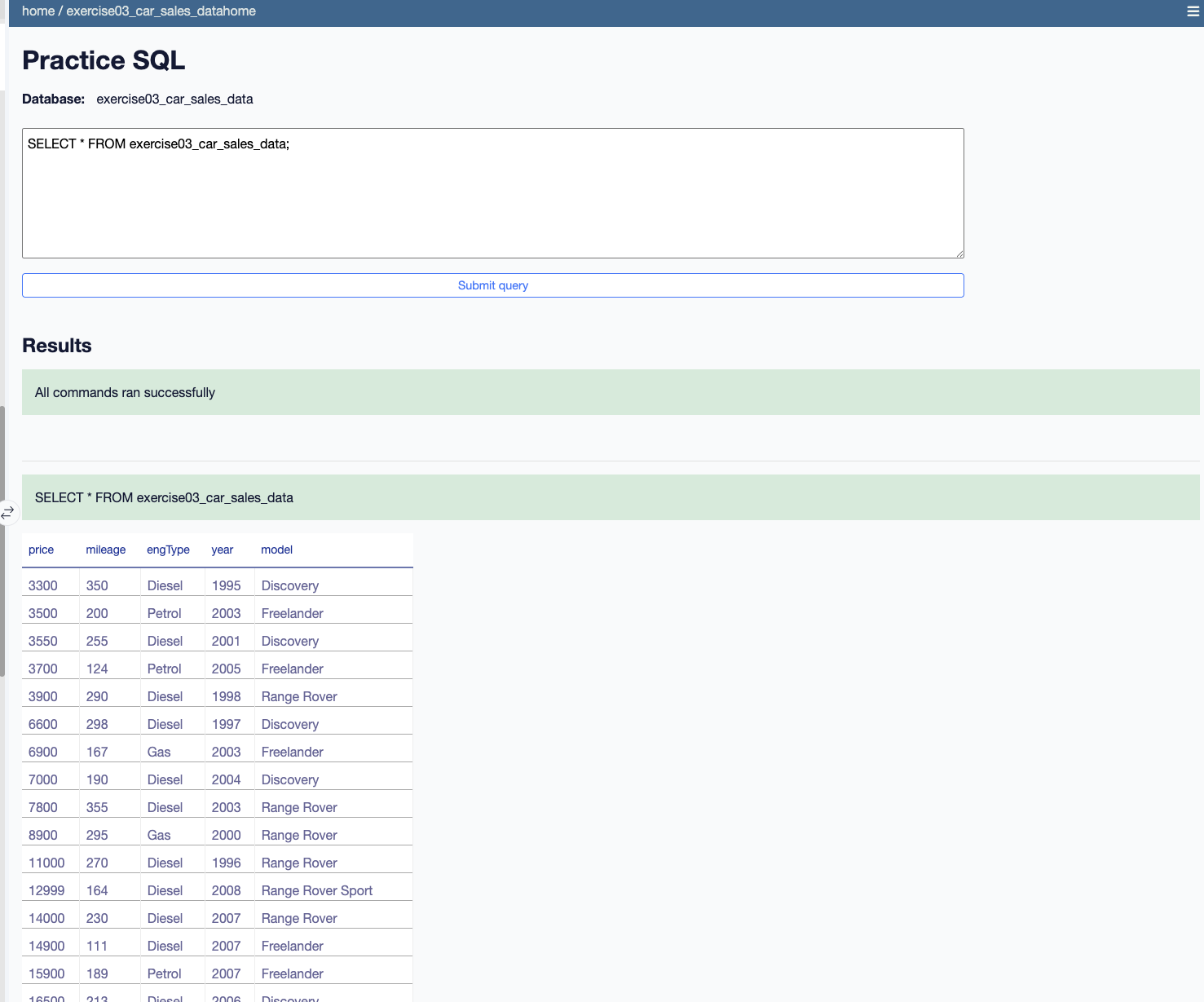
将创建 exercise03_car_sales_data 表,其中包含从 CSV 文件加载的数据。
A select query related to the table will appear on the text area section of the following webpage.
Click on the Submit Query button to view the results.
<img src="./images/Data_img3.png" width="1200"/>
- Next, modify the select query as follows:
接下来,按如下方式修改选择查询:SELECT COUNT(*) FROM exercise03_car_sales_data; - Once the query executes successfully, it displays the counts.
查询成功执行后,将显示计数。