Module 03 · Introduction to Application Development应用开发简介
Demo: Drag and Drop演示:拖放
Effort: 15 minutes 努力:15 分钟
Time for another demo of what you can develop with HTML5, CSS3, and JavaScript.
HTML5、CSS3 和 JavaScript 可以开发的内容的又一演示时间。
Learning Objectives 学习目标
- Understand what the Drag and Drop API does.
了解拖放 API 的功能。 - Identify use cases of the Drag and Drop API.
识别拖放 API 的应用场景。 - Utilize a demo of the Drag and Drop API.
使用拖放 API 的演示。
What is the Drag and Drop API? 什么是拖放 API?
Drag and drop is a popular feature of many Graphical User Interface (GUI) systems. Implementing the same functionality in a browser used to be an exceedingly difficult task. The HTML5 Drag and Drop API enables web applications to use drag-and-drop features in browsers. This helps web developers to create rich user interfaces which can compete with the desktop user interfaces. The Drag and Drop API allows you to make your divs, spans, and paragraphs draggable. You can drop them onto any other container tags, such as divs.
拖放是许多图形用户界面(GUI)系统的流行功能。在浏览器中实现相同的功能曾经是一项极其困难的任务。HTML5 拖放 API 允许网络应用程序在浏览器中使用拖放功能。这有助于网络开发者创建可以与桌面用户界面相媲美的丰富用户界面。拖放 API 允许您使 div、span 和段落可拖放。您可以将它们拖放到任何其他容器标签上,例如 div。
Use cases of the Drag and Drop API 拖放 API 的应用场景
How do you add an item into a shopping cart on an e-commerce web site? You may have to select an item, key in the quantity and click on the 'add to cart' button. Imagine how cool would it be if you could drag an item onto your shopping cart.
如何在一个电子商务网站上添加商品到购物车?你可能需要选择一个商品,输入数量并点击“加入购物车”按钮。想象一下,如果能够将商品拖到购物车中,那会多么酷。
Demo of the Drag and Drop API 拖放 API 演示
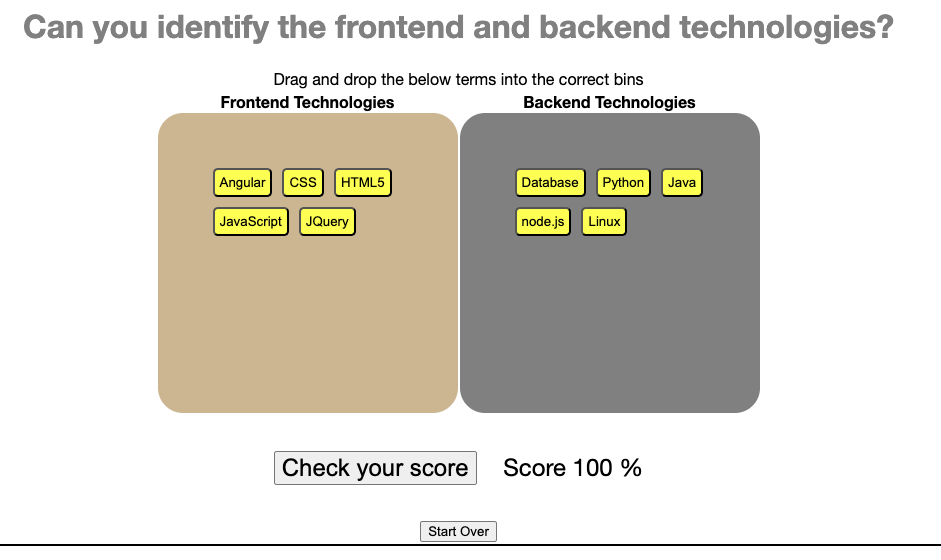
Try out the demo at the link below. It allows you to play with the drag and drop features that can be built into a web application. At the same time, it tests your grasp of front-end and back-end technologies. Don't forget to click the Check your score button after you are done with dragging and dropping. Worried about your low score? No problem, just click start over.
在下面的链接中尝试演示。它允许您在 Web 应用程序中尝试拖放功能。同时,它测试您对前端和后端技术的掌握。完成拖放后,别忘了点击“检查你的分数”按钮。担心分数低?没问题,只需点击“重新开始”。