Module 04 · [Optional] Working with GitHub from Your Windows Desktop在 Windows 桌面使用 GitHub(可选)
SSH Key CreationSSH 密钥创建
预计时间:20 分钟
什么是 SSH 密钥?
SSH 密钥(SSH key)是 SSH 协议中的一种访问凭据。它的作用类似于用户名和密码,但密钥主要用于自动化流程。
生成 SSH 密钥
按照以下步骤生成 SSH 密钥:
- 启动终端。如果使用 Windows,请启动 Git Bash。
- 在终端中输入以下命令,将
<your email address>替换为关联 GitHub 账户的邮箱地址。输入命令后,按 Enter。
ssh-keygen -t rsa -b 4096 -C "<your email address>"
- 系统会提示输入保存密钥的目录。直接按 Enter 即可接受默认位置,即主目录中的 .ssh 文件夹。这样,你就可以在
~/.ssh/id_rsa找到密钥。 - 系统会提示设置口令(passphrase)。你也可以选择不设置口令。要跳过口令,连续按两次 Enter,确认口令为空。
- 可选:要进入 .ssh 目录并查看目录内容,在终端中运行以下命令:
cd ~/.ssh
然后运行:
ls
列出 .ssh 目录内容时,你应当看到 id_rsa 和 id_rsa.pub,其中 id_rsa 是私钥,id_rsa.pub 是公钥。
6. 现在,需要将 SSH 密钥添加到帮助完成身份验证的 ssh-agent。要启动 ssh-agent,在终端中运行以下命令:
eval "$(ssh-agent -s)"
- 要将密钥添加到代理中,在终端中运行以下命令:
ssh-add ~/.ssh/id_rsa
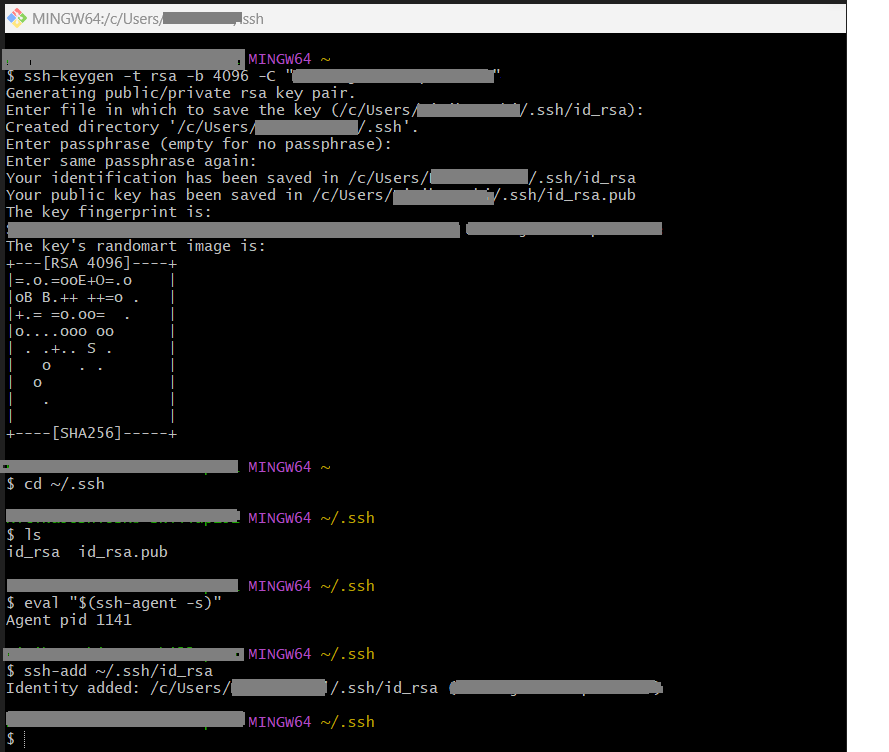
- 参考截图如下:
总结
恭喜!你已学会如何生成 SSH 密钥。
Tutorial details
Author(s)
- Malika Singla
- Sannareddy Ramesh