Module 01 · Extract, Transform, Load (ETL)提取、转换与加载(ETL)
Hands-on Lab: Extract, Transform, Load (ETL)动手实验:提取、转换与加载(ETL)
In this lab you will practice extracting data from different file types, transforming the data and then loading to a database for further processing.
Extract, Transform, and Load Data using Python 使用 Python 提取、转换和加载数据

Introduction 简介
Extract, Transform and Load (ETL) operations are of extreme importance in the role of a Data engineer. A data engineer extracts data from multiple sources and different file formats, transforms the extracted data to predefined settings and then loads the data to a database for further processing. In this lab, you will get hands-on practice of performing these operations.
提取、转换和加载(ETL)操作在数据工程师的角色中至关重要。数据工程师从多个来源和不同的文件格式中提取数据,将提取的数据转换为预定义的设置,然后将数据加载到数据库中进行进一步处理。在本实验中,您将获得执行这些操作的实践经验。
Objectives 目标
After completing this lab, you will be able to:
完成本实验后,您将能够:
- Read CSV, JSON, and XML file types.
读取 CSV、JSON 和 XML 文件类型。 - Extract the required data from the different file types.
从不同的文件类型中提取所需数据。 - Transform data to the required format.
将数据转换为所需格式。 - Save the transformed data in a ready-to-load format, which can be loaded into an RDBMS.
以可加载格式保存转换后的数据,该格式可加载到 RDBMS 中。
Initial steps 初始步骤
The first step in this process is to create a new file in the default project folder in the IDE. To create the new file, you can press the button below (recommended).
此过程的第一步是在 IDE 的默认 project 文件夹中创建新文件。要创建新文件,您可以按下下面的按钮(推荐)。
- Create a new
etl_code.pyfile
创建新的etl_code.py文件
Open etl_code.py in IDE 在 IDE 中打开 etl_code.py
Alternatively, we can do it the hard way
或者,我们可以用更麻烦的方式来做
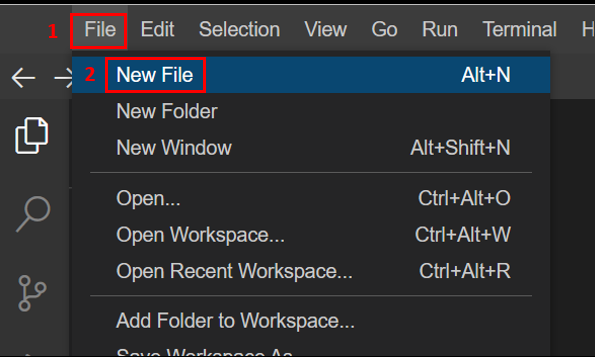
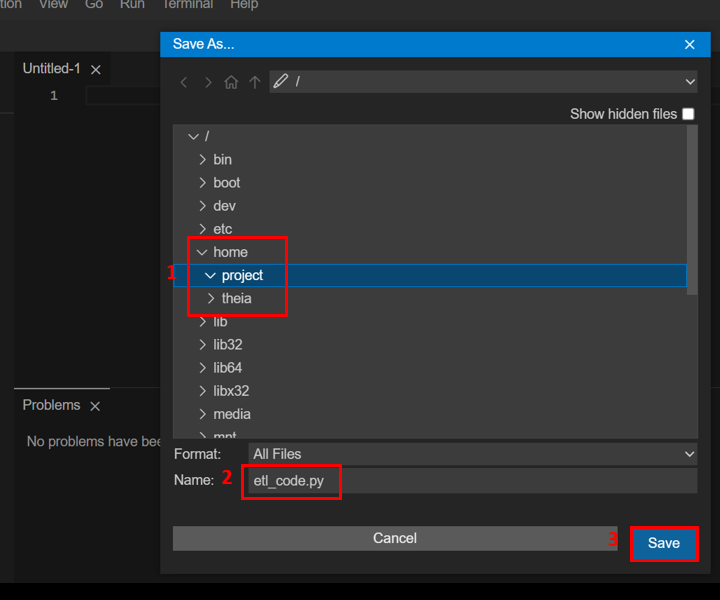
Navigate to the File tab in the menu bar and click New File. Save this file in the path \home\project as etl_code.py. These steps are shown in the following images.
导航到菜单栏中的“文件”选项卡,然后单击“新建文件”。将此文件保存在路径 \home\project 中,文件名为 etl_code.py。这些步骤如下图所示。
-
Create New File 创建新文件
-
Save the file as
etl_code.py.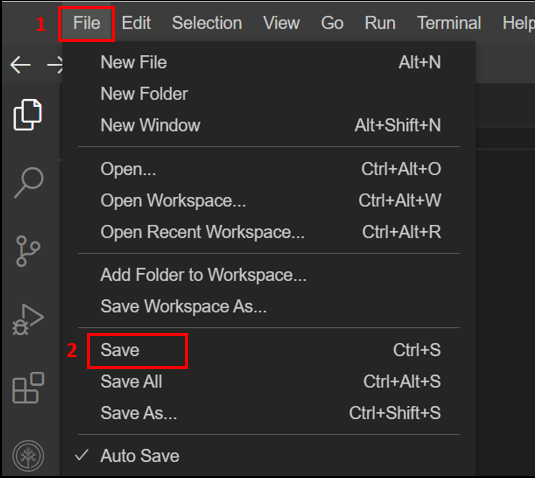
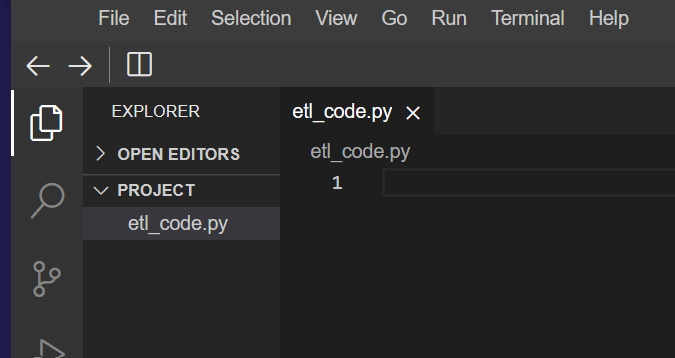
The file is now ready in the project folder and further steps will be done in the file.
Gather the data files
Before you start the extraction of data, you need the files containing the data to be available in the project folder. For the purpose of this lab, perform the following steps to gather the required data:
-
Open a new terminal window
打开一个新的终端窗口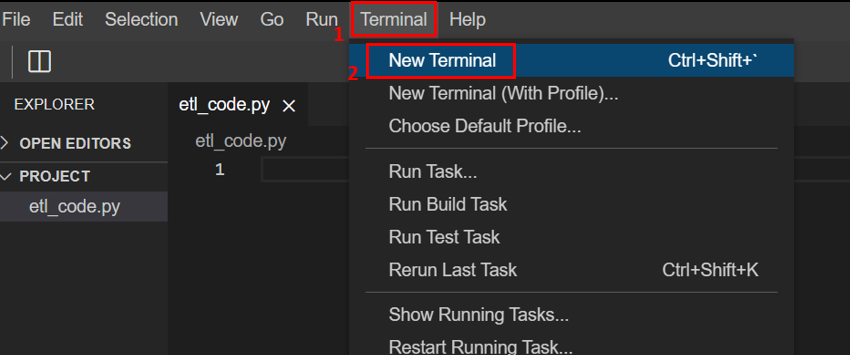
-
Run the following commands in the terminal shell:
在终端 shell 中运行以下命令:a. Download the zip file containing the required data in multiple formats.
a. 下载包含多种格式所需数据的 zip 文件。wget https://cf-courses-data.s3.us.cloud-object-storage.appdomain.cloud/IBMDeveloperSkillsNetwork-PY0221EN-SkillsNetwork/labs/module%206/Lab%20-%20Extract%20Transform%20Load/data/source.zipb. Unzip the downloaded file.
b. 解压下载的文件。unzip source.zip
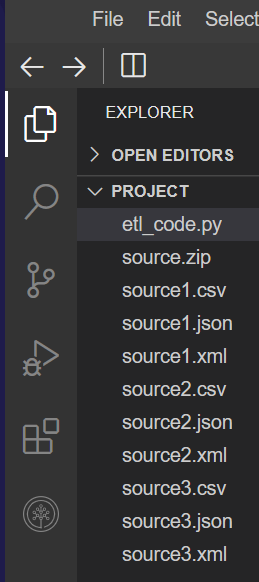
After you complete the above steps, the folder structure should appear as shown in the following image.
完成上述步骤后,文件夹结构应如下图所示。
Importing Libraries and setting paths 导入库和设置路径
The required files are now available in the project folder.
所需文件现已在 project 文件夹中。
In this lab, you will extract data from CSV, JSON, and XML formats. First, you need to import the appropriate Python libraries to use the relevant functions.
在本实验中,您将从 CSV 、 JSON 和 XML 格式中提取数据。首先,您需要导入适当的 Python 库以使用相关函数。
The xml library can be used to parse the information from an .xml file format. The .csv and .json file formats can be read using the pandas library. You will use the pandas library to create a data frame format that will store the extracted data from any file.
xml 库可用于解析 .xml 文件格式中的信息。 .csv 和 .json 文件格式可以使用 pandas 库读取。您将使用 pandas 库创建数据帧格式,该格式将存储从任何文件中提取的数据。
To call the correct function for data extraction, you need to access the file format information. For this access, you can use the glob library.
要调用正确的数据提取函数,您需要访问文件格式信息。为此,您可以使用 glob 库。
To log the information correctly, you need the date and time information at the point of logging. For this information, you require the datetime package.
为了正确记录信息,您需要记录时的日期和时间信息。为此,您需要 datetime 包。
While glob, xml, and datetime are inbuilt features of Python, you need to install the pandas library to your IDE.
虽然 glob 、 xml 和 datetime 是 Python 的内置功能,但您需要将 pandas 库安装到您的 IDE 中。
Run the following command in a terminal shell to install pandas for python3.11.
在终端 shell 中运行以下命令,为 python3.11 安装 pandas 。
python3.11 -m pip install pandas
After the installation is complete, you can import all the libraries in etl_code.py using the following commands.
安装完成后,您可以使用以下命令导入 etl_code.py 中的所有库。
import glob
import pandas as pd
import xml.etree.ElementTree as ET
from datetime import datetime
Note that you import only the ElementTree function from the xml.etree library because you require that function to parse the data from an XML file format.
请注意,您仅从 xml.etree 库导入 ElementTree 函数,因为您需要该函数来解析 XML 文件格式的数据。
You also require two file paths that will be available globally in the code for all functions. These are transformed_data.csv, to store the final output data that you can load to a database, and log_file.txt, that stores all the logs.
您还需要两个文件路径,它们将在代码中全局可用,供所有函数使用。这些是 transformed_data.csv ,用于存储您可以加载到数据库的最终输出数据,以及 log_file.txt ,用于存储所有日志。
Introduce these paths in the code by adding the following statements:
通过添加以下语句在代码中引入这些路径:
log_file = "log_file.txt"
target_file = "transformed_data.csv"
Remember to save your file! You may use Ctrl+S to save the file or click Save in the File tab.
请记住保存您的文件!您可以使用 Ctrl+S 保存文件,或单击 File 选项卡中的 Save 。
Task 1: Extraction 任务 1:提取
Next, you will develop the functions to extract the data from different file formats. As there will be different functions for the file formats, you'll have to write one function each for the .csv, .json, and the .xml filetypes.
接下来,您将开发用于从不同文件格式中提取数据的函数。由于每种文件格式都有不同的函数,因此您必须为 .csv 、 .json 和 .xml 文件类型各编写一个函数。
You can name these three functions as extract_from_csv(), extract_from_json(), and extract_from_xml(). You need to pass the data file as an argument, file_to_process, to each function.
您可以将这三个函数分别命名为 extract_from_csv() 、 extract_from_json() 和 extract_from_xml() 。您需要将数据文件作为参数 file_to_process 传递给每个函数。
To extract from a CSV file, you can define the function extract_from_csv() as follows using the pandas function read_csv:
要从 CSV 文件中提取数据,您可以使用 pandas 函数 read_csv 如下定义函数 extract_from_csv() :
def extract_from_csv(file_to_process):
    dataframe = pd.read_csv(file_to_process)
    return dataframe
To extract from a JSON file, you can define the function extract_from_json() using the pandas function read_json. It requires an extra argument lines=True to enable the function to read the file as a JSON object on line to line basis as follows.
要从 JSON 文件中提取数据,您可以使用 pandas 函数 read_json 定义函数 extract_from_json() 。它需要一个额外的参数 lines=True ,以使函数能够逐行将文件读取为 JSON 对象,如下所示。
def extract_from_json(file_to_process):
    dataframe = pd.read_json(file_to_process, lines=True)
    return dataframe
To extract from an XML file, you need first to parse the data from the file using the ElementTree function. You can then extract relevant information from this data and append it to a pandas dataframe as follows.
要从 XML 文件中提取数据,首先需要使用 ElementTree 函数解析文件中的数据。然后,您可以从这些数据中提取相关信息,并将其附加到 pandas 数据框中,如下所示。
Note: Adding Data to DataFrames using
pd.concat注意:使用pd.concat向数据框添加数据In this lab, we use
pd.concatto append data to an existing DataFrame. This method is recommended because theappendmethod is deprecated.pd.concatoffers better efficiency and flexibility, especially when combining multiple DataFrames.
在本实验中,我们使用pd.concat将数据附加到现有数据框中。推荐使用此方法,因为append方法已被弃用。pd.concat提供了更好的效率和灵活性,尤其是在合并多个数据框时。Why use
pd.concat: 为什么要使用pd.concat:
pd.concatis more efficient when adding rows or combining multiple DataFrames.
当添加行或组合多个 DataFrame 时,pd.concat更高效。- It provides better control over the operation, allowing you to concatenate along rows or columns.
它提供了更好的操作控制,允许您沿行或列进行连接。- It also includes the
ignore_index=Trueargument, which resets the index to avoid duplication when combining DataFrames.
它还包括ignore_index=True参数,该参数在组合 DataFrame 时重置索引以避免重复。Example: 示例:
import pandas as pd

# Create DataFrames
df1 = pd.DataFrame({'A': [1, 2], 'B': [3, 4]})
df2 = pd.DataFrame({'A': [5], 'B': [6]})

# Use concat
result = pd.concat([df1, df2], ignore_index=True)
print(result)
Output: 输出:
  A B
0 1 3
1 2 4
2 5 6
Note: You must know the headers of the extracted data to write this function. In this data, you extract "name", "height", and "weight" headers for different persons.
注意:您必须知道提取数据的标题才能编写此函数。在此数据中,您提取不同人员的“姓名”、“身高”和“体重”标题。
This function can be written as follows:
此函数可以编写如下:
def extract_from_xml(file_to_process):
    dataframe = pd.DataFrame(columns=["name", "height", "weight"])
    tree = ET.parse(file_to_process)
    root = tree.getroot()
    for person in root:
        name = person.find("name").text
        height = float(person.find("height").text)
        weight = float(person.find("weight").text)
        dataframe = pd.concat([dataframe, pd.DataFrame([{"name":name, "height":height, "weight":weight}])], ignore_index=True)
    return dataframe
Now you need a function to identify which function to call on basis of the filetype of the data file. To call the relevant function, write a function extract, which uses the glob library to identify the filetype. This can be done as follows:
现在您需要一个函数来根据数据文件的文件类型确定要调用哪个函数。要调用相关函数,请编写一个函数 extract ,它使用 glob 库来识别文件类型。这可以按如下方式完成:
def extract():
    extracted_data = pd.DataFrame(columns=['name','height','weight']) # create an empty data frame to hold extracted data

    # process all csv files, except the target file
    for csvfile in glob.glob("*.csv"):
        if csvfile != target_file:  # check if the file is not the target file
            extracted_data = pd.concat([extracted_data, pd.DataFrame(extract_from_csv(csvfile))], ignore_index=True)

    # process all json files
    for jsonfile in glob.glob("*.json"):
        extracted_data = pd.concat([extracted_data, pd.DataFrame(extract_from_json(jsonfile))], ignore_index=True)

    # process all xml files
    for xmlfile in glob.glob("*.xml"):
        extracted_data = pd.concat([extracted_data, pd.DataFrame(extract_from_xml(xmlfile))], ignore_index=True)

    return extracted_data
After adding these functions to etl_code.py you complete the implementation of the extraction part.
将这些函数添加到 etl_code.py 后,您就完成了提取部分的实现。
Remember to save your file using Ctrl+S.
请记住使用 Ctrl+S 保存文件。
Task 2 - Transformation 任务 2 - 转换
The height in the extracted data is in inches, and the weight is in pounds. However, for your application, the height is required to be in meters, and the weight is required to be in kilograms, rounded to two decimal places. Therefore, you need to write the function to perform the unit conversion for the two parameters.
提取数据中的身高以英寸为单位,体重以磅为单位。但是,对于您的应用程序,身高需要以米为单位,体重需要以千克为单位,并四舍五入到小数点后两位。因此,您需要编写函数来执行这两个参数的单位转换。
The name of this function will be transform(), and it will receive the extracted dataframe as the input. Since the dataframe is in the form of a dictionary with three keys, "name", "height", and "weight", each of them having a list of values, you can apply the transform function on the entire list at one go.
此函数的名称将是 transform() ,它将接收提取的数据帧作为输入。由于数据帧是字典形式,包含三个键:“name”、“height”和“weight”,每个键都包含一个值列表,因此您可以一次性对整个列表应用转换函数。
The function can be written as follows:
该函数可以编写如下:
def transform(data):
    '''Convert inches to meters and round off to two decimals
    1 inch is 0.0254 meters '''
    data['height'] = round(data.height * 0.0254,2)

    '''Convert pounds to kilograms and round off to two decimals
    1 pound is 0.45359237 kilograms '''
    data['weight'] = round(data.weight * 0.45359237,2)

    return data
The output of this function will now be a dataframe where the "height" and "weight" parameters will be modified to the required format.
此函数的输出将是一个数据帧,其中“height”和“weight”参数将修改为所需的格式。
You can add the transform() function to the etl_code.py file, thus completing the transform operation.
您可以将 transform() 函数添加到 etl_code.py 文件中,从而完成转换操作。
Remember to save your file using Ctrl+S.
请记住使用 Ctrl+S 保存文件。
Task 3 - Loading and Logging 任务 3 - 加载和记录
You need to load the transformed data to a CSV file that you can use to load to a database as per requirement.
您需要将转换后的数据加载到 CSV 文件中,以便根据需要加载到数据库中。
To load the data, you need a function load_data() that accepts the transformed data as a dataframe and the target_file path. You need to use the to_csv attribute of the dataframe in the function as follows:
要加载数据,您需要一个函数 load_data() ,它接受转换后的数据作为数据帧和 target_file 路径。您需要在函数中使用数据帧的 to_csv 属性,如下所示:
def load_data(target_file, transformed_data):
    transformed_data.to_csv(target_file)
Finally, you need to implement the logging operation to record the progress of the different operations. For this operation, you need to record a message, along with its timestamp, in the log_file.
最后,您需要实现日志记录操作,以记录不同操作的进度。对于此操作,您需要将消息及其时间戳记录在 log_file 中。
To record the message, you need to implement a function log_progress() that accepts the log message as the argument. The function captures the current date and time using the datetime function from the datetime library. The use of this function requires the definition of a date-time format, and you need to convert the timestamp to a string format using the strftime attribute. The following code creates the log operation:
要记录消息,您需要实现一个函数 log_progress() ,该函数接受日志消息作为参数。该函数使用 datetime 库中的 datetime 函数捕获当前日期和时间。使用此函数需要定义日期时间格式,并且您需要使用 strftime 属性将时间戳转换为字符串格式。以下代码创建日志操作:
def log_progress(message):
    timestamp_format = '%Y-%h-%d-%H:%M:%S' # Year-Monthname-Day-Hour-Minute-Second
    now = datetime.now() # get current timestamp
    timestamp = now.strftime(timestamp_format)
    with open(log_file,"a") as f:
        f.write(timestamp + ',' + message + '\n')
After you add these functions to etl_code.py, you will complete the implementation of the loading and logging operations. With this, all the functions for Extract, Transform, and Load (ETL) are ready for testing.
将这些函数添加到 etl_code.py 后,您将完成加载和日志记录操作的实现。至此,所有提取、转换和加载 (ETL) 功能均已准备好进行测试。
Remember to save your file using Ctrl+S.
请记住使用 Ctrl+S 保存文件。
Testing ETL operations and log progress 测试 ETL 操作和日志进度
Now, test the functions you have developed so far and log your progress along the way. Insert the following lines into your code to complete the process. Note the comments on every step of the code.
现在,测试你目前已开发的功能,并记录你的进度。将以下代码行插入到你的代码中以完成此过程。请注意代码每一步的注释。
# Log the initialization of the ETL process
log_progress("ETL Job Started")

# Log the beginning of the Extraction process
log_progress("Extract phase Started")
extracted_data = extract()

# Log the completion of the Extraction process
log_progress("Extract phase Ended")

# Log the beginning of the Transformation process
log_progress("Transform phase Started")
transformed_data = transform(extracted_data)
print("Transformed Data")
print(transformed_data)

# Log the completion of the Transformation process
log_progress("Transform phase Ended")

# Log the beginning of the Loading process
log_progress("Load phase Started")
load_data(target_file,transformed_data)

# Log the completion of the Loading process
log_progress("Load phase Ended")

# Log the completion of the ETL process
log_progress("ETL Job Ended")
Remember to save your file using Ctrl+S.
请记住使用 Ctrl+S 保存文件。
Execution of code 代码执行
Execute etl_code.py from a terminal shell using the command
从终端 shell 使用命令执行 etl_code.py
python3.11 etl_code.py
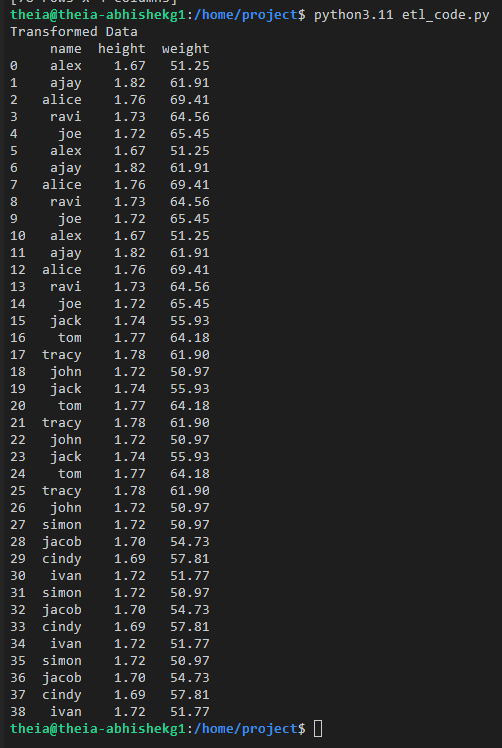
Upon execution, you can view the output of the print command on the terminal as shown in the image below.
执行后,您可以在终端上查看打印命令的输出,如下图所示。
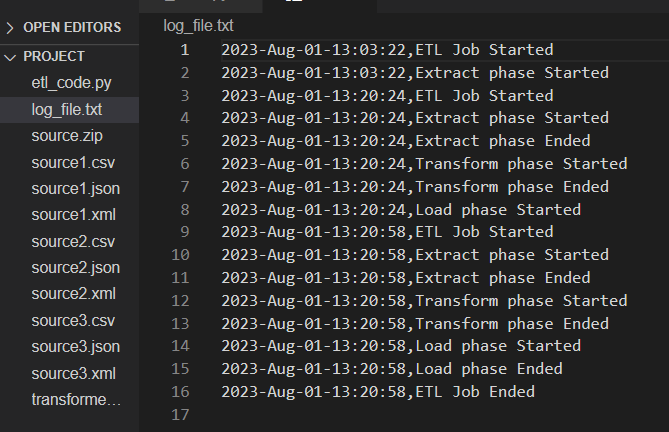
The contents of the log file will appear as shown in the image below.
日志文件的内容将如下图所示。
Lab Solution 实验解决方案
In case you face some issue while you execute the created code, it might be because of missing a step in the process somewhere. The complete code of all the steps is given below to help you resolve the issue. Please note that you should refer to this only if you are unable to achieve the desired results yourself or get an error during the execution in the next step.
如果您在执行所创建的代码时遇到问题,可能是因为在某个步骤中遗漏了什么。下面提供了所有步骤的完整代码,以帮助您解决问题。请注意,只有当您无法自行达到预期结果或在下一步执行过程中出现错误时,才应参考此代码。
import glob
import pandas as pd
import xml.etree.ElementTree as ET
from datetime import datetime

log_file = "log_file.txt"
target_file = "transformed_data.csv"

def extract_from_csv(file_to_process):
    dataframe = pd.read_csv(file_to_process)
    return dataframe

def extract_from_json(file_to_process):
    dataframe = pd.read_json(file_to_process, lines=True)
    return dataframe

def extract_from_xml(file_to_process):
    dataframe = pd.DataFrame(columns=["name", "height", "weight"])
    tree = ET.parse(file_to_process)
    root = tree.getroot()
    for person in root:
        name = person.find("name").text
        height = float(person.find("height").text)
        weight = float(person.find("weight").text)
        dataframe = pd.concat([dataframe, pd.DataFrame([{"name":name,"height":height, "weight":weight}])], ignore_index=True)
    return dataframe

def extract():
    extracted_data = pd.DataFrame(columns=['name','height','weight'])  # create an empty data frame to hold extracted data

    # process all csv files, except the target file
    for csvfile in glob.glob("*.csv"):
        if csvfile != target_file:  # check if the file is not the target file
            extracted_data = pd.concat([extracted_data, pd.DataFrame(extract_from_csv(csvfile))], ignore_index=True)

    # process all json files
    for jsonfile in glob.glob("*.json"):
        extracted_data = pd.concat([extracted_data, pd.DataFrame(extract_from_json(jsonfile))], ignore_index=True)

    # process all xml files
    for xmlfile in glob.glob("*.xml"):
        extracted_data = pd.concat([extracted_data, pd.DataFrame(extract_from_xml(xmlfile))], ignore_index=True)

    return extracted_data

def transform(data):
    # Convert inches to meters and round off to two decimals
    # 1 inch is 0.0254 meters
    data['height'] = round(data.height * 0.0254,2)

    # Convert pounds to kilograms and round off to two decimals
    # 1 pound is 0.45359237 kilograms
    data['weight'] = round(data.weight * 0.45359237,2)

    return data

def load_data(target_file, transformed_data):
    transformed_data.to_csv(target_file)

def log_progress(message):
    timestamp_format = '%Y-%h-%d-%H:%M:%S' # Year-Monthname-Day-Hour-Minute-Second
    now = datetime.now() # get current timestamp
    timestamp = now.strftime(timestamp_format)
    with open(log_file,"a") as f:
        f.write(timestamp + ',' + message + '\n')

# Log the initialization of the ETL process
log_progress("ETL Job Started")

# Log the beginning of the Extraction process
log_progress("Extract phase Started")
extracted_data = extract()

# Log the completion of the Extraction process
log_progress("Extract phase Ended")

# Log the beginning of the Transformation process
log_progress("Transform phase Started")
transformed_data = transform(extracted_data)
print("Transformed Data")
print(transformed_data)

# Log the completion of the Transformation process
log_progress("Transform phase Ended")

# Log the beginning of the Loading process
log_progress("Load phase Started")
load_data(target_file,transformed_data)

# Log the completion of the Loading process
log_progress("Load phase Ended")

# Log the completion of the ETL process
log_progress("ETL Job Ended")
Practice Exercises 练习题
Follow the process learned in this lab to perform ETL operations on the data available in the link below.
按照本实验中学到的流程,对以下链接中提供的数据执行 ETL 操作。
https://cf-courses-data.s3.us.cloud-object-storage.appdomain.cloud/IBMDeveloperSkillsNetwork-PY0221EN-SkillsNetwork/labs/module%206/Lab%20-%20Extract%20Transform%20Load/data/datasource.zip
Complete the following practice exercises:
完成以下练习:
- Create a folder
data_sourceand use the terminal shell to change the current directory to\home\project\data_source. Create a fileetl_practice.pyin this folder.
创建一个文件夹data_source,并使用终端 shell 将当前目录更改为\home\project\data_source。在此文件夹中创建一个文件etl_practice.py。 - Download and unzip the data available in the link shared above.
下载并解压上面共享链接中提供的数据。 - The data available has four headers: 'car_model', 'year_of_manufacture', 'price', 'fuel'. Implement the extraction process for the
CSV,JSON, andXMLfiles.
可用数据有四个标题:“car_model”、“year_of_manufacture”、“price”、“fuel”。实现CSV、JSON和XML文件的提取过程。 - Transform the values under the 'price' header such that they are rounded to 2 decimal places.
将“price”标题下的值四舍五入到小数点后两位。 - Implement the loading function for the transformed data to a target file,
transformed_data.csv.
实现将转换后的数据加载到目标文件transformed_data.csv的函数。 - Implement the logging function for the entire process and save it in
log_file.txt.
实现整个过程的日志记录功能并将其保存到log_file.txt中。 - Test the implemented functions and log the events as done in the lab.
测试已实现的功能并记录事件,如实验中所示。
Please note that the solutions for this practice exercise are not provided to motivate you to try them yourself. However, feel free to share your opinions on the solutions as well as your questions in the discussion forums.
请注意,本练习的解决方案不予提供,旨在鼓励您亲自尝试。但是,欢迎您在讨论区分享您对解决方案的看法以及您的问题。
Conclusion
In this lab, you practiced the implementation of:
- Extraction of data from
CSV,JSON, andXMLfile formats. - Transformation of data as per requirement.
- Loading the transformed data to a
CSVfile. - Logging the progress of the said operations.
Author(s)
Abhishek Gagneja
Ramesh Sannareddy
Joseph Santarcangelo
Azim Hirjani