Module 01 · Extract, Transform, Load (ETL)提取、转换与加载(ETL)
Hands-on Lab: Web scraping and Extracting Data using APIs动手实验:网络抓取与 API 数据提取
Estimated Effort: 30 mins
预计用时:30 分钟
Web scraping is used for extraction of relevant data from web pages. If you require some data from a web page in a public domain, web scraping makes the process of data extraction quite convenient. The use of web scraping, however, requires some basic knowledge of the structure of HTML pages. In this lab, you will learn the process of analyzing the HTML code of a web page and how to extract the required information from it using web scraping in Python.
网络爬取用于从网页中提取相关数据。如果您需要从公共领域的网页中获取某些数据,网络爬取使数据提取过程变得非常方便。然而,使用网络爬取需要对 HTML 页面的结构有一些基本了解。在本实验中,您将学习分析网页 HTML 代码的过程,以及如何使用 Python 中的网络爬取从中提取所需信息。
Objectives 目标
By the end of this lab, you will be able to:
完成本实验后,您将能够:
- Use the
requestsandBeautifulSouplibraries to extract the contents of a web page
使用requests和BeautifulSoup库提取网页内容 - Analyze the
HTMLcode of a webpage to find the relevant information
分析网页的HTML代码以查找相关信息 - Extract the relevant information and save it in the required form
提取相关信息并以所需形式保存
Scenario 场景
Consider that you have been hired by a Multiplex management organization to extract the information of the top 50 movies with the best average rating from the web link shared below.
假设您受雇于一家多功能影院管理机构,需要从下面分享的网页链接中提取平均评分最高的 50 部电影的信息。
https://web.archive.org/web/20230902185655/https://en.everybodywiki.com/100_Most_Highly-Ranked_Films
The information required is Average Rank, Film, and Year.
所需信息是 Average Rank 、 Film 和 Year 。
You are required to write a Python script webscraping_movies.py that extracts the information and saves it to a CSV file top_50_films.csv. You are also required to save the same information to a database Movies.db under the table name Top_50.
您需要编写一个 Python 脚本 webscraping_movies.py ,用于提取信息并将其保存到 CSV 文件 top_50_films.csv 中。您还需要将相同的信息保存到数据库 Movies.db 中,表名为 Top_50 。
Initial steps 初始步骤
You require the following libraries for this lab.
您需要以下库才能完成本实验。
pandaslibrary for data storage and manipulation.
用于数据存储和操作的pandas库。BeautifulSouplibrary for interpreting theHTMLdocument.
用于解释HTML文档的BeautifulSoup库。requestslibrary to communicate with the web page.
用于与网页通信的requests库。sqlite3for creating the database instance.
用于创建数据库实例。
While requests and sqlite3 come bundled with Python3, you need to install pandas and BeautifulSoup libraries to the IDE.
虽然 requests 和 sqlite3 与 Python3 捆绑在一起,但您需要将 pandas 和 BeautifulSoup 库安装到 IDE 中。
For this, run the following commands in a terminal window.
为此,请在终端窗口中运行以下命令。
python3.11 -m pip install pandas
python3.11 -m pip install bs4
Now, create a new file by the name of webscraping_movies.py in the path /home/project/.
现在,在路径 /home/project/ 中创建一个名为 webscraping_movies.py 的新文件。
You will write all of your code in this file.
您将在此文件中编写所有代码。
Code setup 代码设置
To create a Python script, call the relevant libraries and the initializations as a first step.
要创建 Python 脚本,第一步是调用相关库和初始化。
Importing Libraries 导入库
Import the following four libraries by adding lines of code noted below to your webscraping_movies.py file.
通过将以下代码行添加到您的 webscraping_movies.py 文件中来导入以下四个库。
import requests
import sqlite3
import pandas as pd
from bs4 import BeautifulSoup
Initialization of known entities 已知实体的初始化
You must declare a few entities at the beginning. For example, you know the required URL, the CSV name for saving the record, the database name, and the table name for storing the record. You also know the entities to be saved. Additionally, since you require only the top 50 results, you will require a loop counter initialized to 0. You may initialize all these by using the following code in webscraping_movies.py:
您必须在开头声明一些实体。例如,您知道所需的 URL 、用于保存记录的 CSV 名称、数据库名称以及用于存储记录的表名称。您还知道要保存的实体。此外,由于您只需要前 50 个结果,因此您需要一个初始化为 0 的循环计数器。您可以使用 webscraping_movies.py 中的以下代码来初始化所有这些:
url = 'https://web.archive.org/web/20230902185655/https://en.everybodywiki.com/100_Most_Highly-Ranked_Films'
db_name = 'Movies.db'
table_name = 'Top_50'
csv_path = '/home/project/top_50_films.csv'
df = pd.DataFrame(columns=["Average Rank","Film","Year"])
count = 0
Loading the webpage for Webscraping 加载网页进行网络抓取
To access the required information from the web page, you first need to load the entire web page as an HTML document in python using the requests.get().text function and then parse the text in the HTML format using BeautifulSoup to enable extraction of relevant information.
要从网页访问所需信息,您首先需要使用 requests.get().text 函数将整个网页作为 HTML 文档加载到 python 中,然后使用 BeautifulSoup 以 HTML 格式解析文本,以便提取相关信息。
Add the following code to webscraping_movies.py:
将以下代码添加到 webscraping_movies.py :
html_page = requests.get(url).text
data = BeautifulSoup(html_page, 'html.parser')
Save your file using Ctrl+S.
使用 Ctrl+S 保存文件。
Analyzing the HTML code for relevant information 分析 HTML 代码以获取相关信息
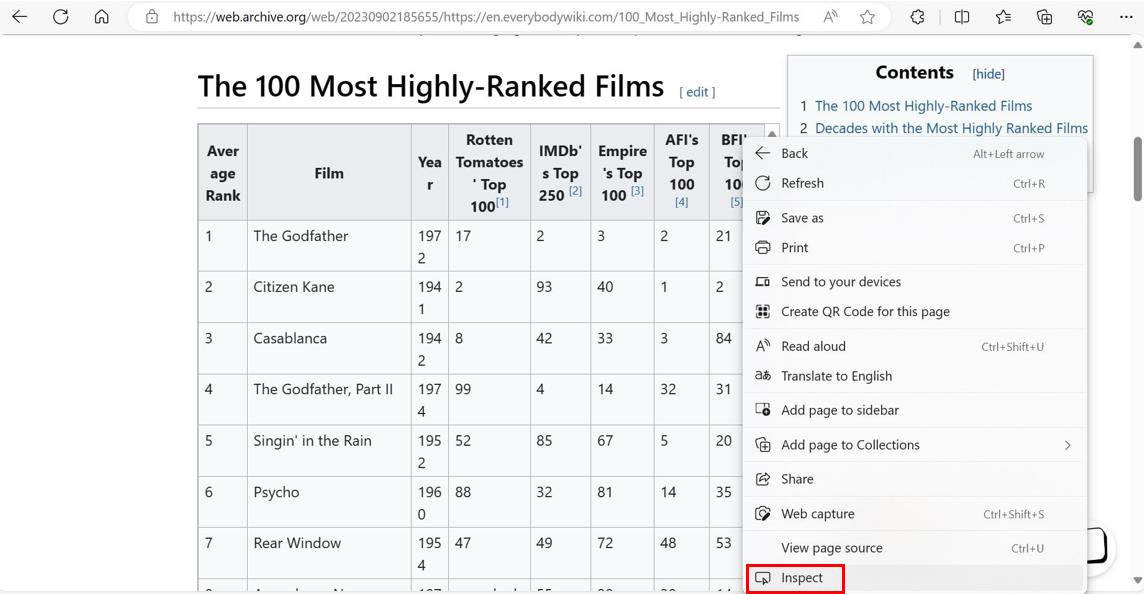
Open the web page in a browser and locate the required table by scrolling down to it. Right-click the table and click Inspect at the bottom of the menu, as shown in the image below.
在浏览器中打开网页,向下滚动找到所需的表格。右键单击该表格,然后单击菜单底部的“ Inspect ”,如下图所示。
This opens the HTML code for the page and takes you directly to the point where the definition of the table begins. To check, take your mouse pointer to the tbody tag in the HTML code and see that the table is highlighted in the page section.
这将打开页面的 HTML 代码,并直接带您到表格定义开始的位置。要检查,将鼠标指针移到 tbody 标签上,您会看到表格在页面部分中被突出显示。
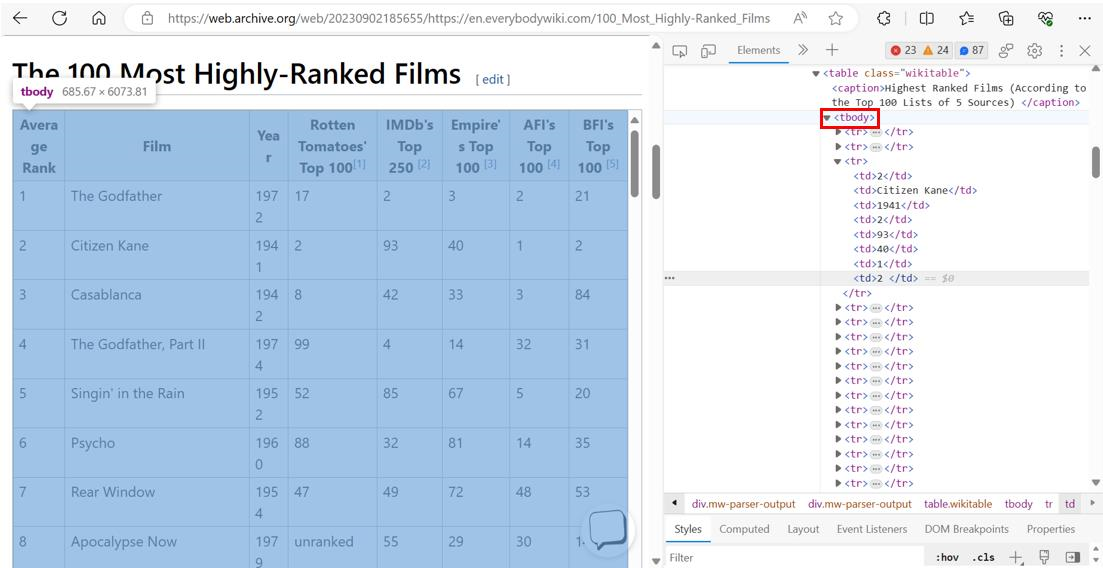
Notice that all rows under this table are mentioned as tr objects under the table. Clicking one of them would show that the data in each row is further saved as a td object, as seen in the image above. You require the information under the first three headers of this stored data.
请注意,此表下的所有行都作为 tr 对象列在表下。单击其中一个会显示每行中的数据进一步保存为 td 对象,如上图所示。您需要此存储数据的前三个标题下的信息。
It is also important to note that this is the first table on the page. You must identify the required table when extracting information.
同样重要的是要注意,这是页面上的第一个表格。提取信息时,您必须识别所需的表格。
Scraping of required information 所需信息的抓取
You now need to write the loop to extract the appropriate information from the web page. The rows of the table needed can be accessed using the find_all() function with the BeautifulSoup object using the statements below.
现在您需要编写循环以从网页中提取适当的信息。可以使用下面的语句,通过 BeautifulSoup 对象和 find_all() 函数访问所需的表格行。
tables = data.find_all('tbody')
rows = tables[0].find_all('tr')
Here, the variable tables gets the body of all the tables in the web page and the variable rows gets all the rows of the first table.
在这里,变量 tables 获取网页中所有表格的主体,变量 rows 获取第一个表格的所有行。
You can now iterate over the rows to find the required data. Use the code shown below to extract the information.
您现在可以遍历这些行以查找所需的数据。使用下面显示的代码提取信息。
for row in rows:
    if count<50:
        col = row.find_all('td')
        if len(col)!=0:
            data_dict = {"Average Rank": col[0].contents[0],
                         "Film": col[1].contents[0],
                         "Year": col[2].contents[0]}
            df1 = pd.DataFrame(data_dict, index=[0])
            df = pd.concat([df,df1], ignore_index=True)
            count+=1
    else:
        break
The code functions as follows.
代码功能如下。
- Iterate over the contents of the variable
rows.
迭代变量rows的内容。 - Check for the loop counter to restrict to 50 entries.
检查循环计数器以限制为 50 个条目。 - Extract all the
tddata objects in the row and save them tocol.
提取行中所有td数据对象并将其保存到col。 - Check if the length of
colis 0, that is, if there is no data in a current row. This is important since, many times there are merged rows that are not apparent in the web page appearance.
检查col的长度是否为 0,即当前行中是否没有数据。这很重要,因为很多时候,网页外观上不明显的合并行是存在的。 - Create a dictionary
data_dictwith the keys same as the columns of the dataframe created for recording the output earlier and corresponding values from the first three headers of data.
创建一个字典data_dict,其键与之前创建的用于记录输出的数据框的列相同,对应的值来自数据的前三个标题。 - Convert the dictionary to a dataframe and concatenate it with the existing one. This way, the data keeps getting appended to the dataframe with every iteration of the loop.
将字典转换为数据框,并与现有数据框连接。这样,数据将在循环的每次迭代中不断添加到数据框中。 - Increment the loop counter.
增加循环计数器。 - Once the counter hits 50, stop iterating over rows and break the loop.
一旦计数器达到 50,停止迭代行并中断循环。
Print the contents of the dataframe using the following:
使用以下命令打印数据框的内容:
print(df)
Save the file using Ctrl+S.
使用 Ctrl+S 保存文件。
Storing the data 存储数据
After the dataframe has been created, you can save it to a CSV file using the following command:
创建数据帧后,您可以使用以下命令将其保存到 CSV 文件中:
df.to_csv(csv_path)
Remember that you defined the variable csv_path earlier.
请记住,您之前定义了变量 csv_path 。
To store the required data in a database, you first need to initialize a connection to the database, save the dataframe as a table, and then close the connection. This can be done using the following code:
要将所需数据存储在数据库中,您首先需要初始化与数据库的连接,将数据帧保存为表,然后关闭连接。这可以通过以下代码完成:
conn = sqlite3.connect(db_name)
df.to_sql(table_name, conn, if_exists='replace', index=False)
conn.close()
Save the file using Ctrl+S.
使用 Ctrl+S 保存文件。
This database can now be used to retrieve the relevant information using SQL queries. You will learn how to do that later in the course.
现在可以使用此数据库通过 SQL 查询检索相关信息。您将在本课程的后面学习如何做到这一点。
Execute the code 执行代码
Execute the code using the statement below in a terminal window. Make sure the current directory is /home/project/.
在终端窗口中使用以下语句执行代码。确保当前目录是 /home/project/ 。
python3.11 webscraping_movies.py
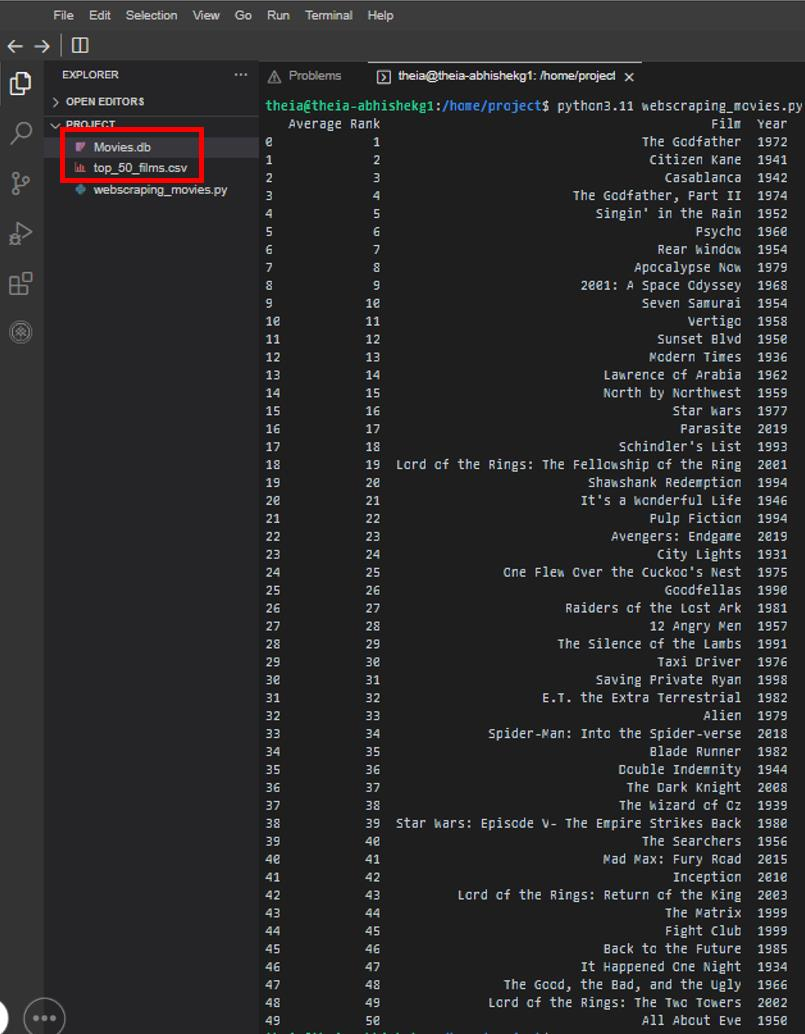
You can expect the output to look as shown below.
您会看到如下所示的输出。
Note that the CSV and the DB files are also created under the project folder.
请注意,CSV 和 DB 文件也创建在项目文件夹下。
Important Note: 重要提示:
To maintain consistency of the lab structure, the web page you access is routed through an archive database. Often, in case the archive server is busy, the users may encounter delayed execution and/or an error such as:
为了保持实验结构的一致性,您访问的网页是通过存档数据库路由的。通常,如果存档服务器繁忙,用户可能会遇到执行延迟和/或以下错误:
requests.exceptions.ConnectionError: HTTPSConnectionPool(host='web.archive.org', port=443): Max retries exceeded with url.
In such a situation, try executing the code again. In case the problem persists, you can change the URL to the live version, such as:
在这种情况下,请尝试再次执行代码。如果问题仍然存在,您可以将 URL 更改为实时版本,例如:
https://en.everybodywiki.com/100_Most_Highly-Ranked_Films
Lab solution 实验解决方案
In case you are not able to get the required output from the code or are facing some errors, the final file for webscraping_movies.py is shared below. Please note that this is for your help, and we encourage you to first try to resolve the errors on your own.
如果您无法从代码中获得所需的输出或遇到一些错误,下面提供了 webscraping_movies.py 的最终文件。请注意,这仅供您参考,我们鼓励您首先尝试自行解决错误。
webscraping_movies.py
import requests
import sqlite3
import pandas as pd
from bs4 import BeautifulSoup

url = 'https://web.archive.org/web/20230902185655/https://en.everybodywiki.com/100_Most_Highly-Ranked_Films'
db_name = 'Movies.db'
table_name = 'Top_50'
csv_path = 'top_50_films.csv'
df = pd.DataFrame(columns=["Average Rank","Film","Year"])
count = 0

html_page = requests.get(url).text
data = BeautifulSoup(html_page, 'html.parser')

tables = data.find_all('tbody')
rows = tables[0].find_all('tr')

for row in rows:
    if count < 50 :
        col = row.find_all('td')
        if len(col)!=0:
            data_dict = {"Average Rank": int(col[0].contents[0]),
                         "Film": str(col[1].contents[0]),
                         "Year": int(col[2].contents[0])}
            df1 = pd.DataFrame(data_dict, index=[0])
            df = pd.concat([df,df1], ignore_index=True)
            count+=1
    else:
        break

print(df)

df.to_csv(csv_path)

conn = sqlite3.connect(db_name)
df.to_sql(table_name, conn, if_exists='replace', index=False)
conn.close()
Practice problems 练习题
Try the following practice problems to test your understanding of the lab. Please note that the solutions for the following are not shared. You are encouraged to use the discussion forums in case you need help.
请尝试以下练习题,以测试您对本实验的理解。请注意,以下问题的解决方案不予分享。如果您需要帮助,建议您使用讨论区。
- Modify the code to extract
Film,Year, andRotten Tomatoes' Top 100headers.
修改代码以提取Film、Year和Rotten Tomatoes' Top 100标头。 - Restrict the results to only the top 25 entries.
将结果限制为仅前 25 个条目。 - Filter the output to print only the films released in the 2000s (year 2000 included).
筛选输出,仅打印在 2000 年代(包括 2000 年)发行的电影。
Conclusion 结论
In this lab, you learned how to:
在本实验中,您学习了如何:
- Analyze HTML pages for relevant data position.
分析 HTML 页面以确定相关数据位置。 - Use
BeautifulSoup,requestsandpandaslibraries for web scraping the required information.
使用BeautifulSoup、requests和pandas库抓取所需的网络信息。 - Store the extracted data as a CSV file and SQL Database.
将提取的数据存储为 CSV 文件和 SQL 数据库。