Module 02 · Final Project期末项目
Hands-on Lab: Acquiring and Processing Information on the World's Largest Banks动手实验:获取与处理全球最大银行信息

Estimated Time: 60 mins 预计时间:60 分钟
In this project, you will put all the skills acquired throughout the course and your knowledge of basic Python to test. You will work on real-world data and perform the operations of Extraction, Transformation, and Loading (ETL) as required.
在此项目中,您将运用在本课程中获得的所有技能以及您的 Python 基础知识。您将处理真实世界的数据,并根据需要执行提取、转换和加载(ETL)操作。
Disclaimer: 免责声明:
Cloud IDE is not a persistent platform, and you will lose your progress every time you restart this lab. We recommend saving a copy of your file on your local machine as a protective measure against data loss.
云 IDE 不是一个持久平台,每次重新启动此实验时,您都会丢失进度。我们建议您在本地计算机上保存文件的副本,以防止数据丢失。
Project Scenario: 项目场景
You have been hired as a data engineer by research organization. Your boss has asked you to create a code that can be used to compile the list of the top 10 largest banks in the world ranked by market capitalization in billion USD. Further, the data needs to be transformed and stored in GBP, EUR and INR as well, in accordance with the exchange rate information that has been made available to you as a CSV file. The processed information table is to be saved locally in a CSV format and as a database table.
您已被一家研究机构聘为数据工程师。您的老板要求您编写一个代码,用于编制全球市值排名前十的银行名单(以十亿美元计)。此外,根据您获得的 CSV 文件中的汇率信息,数据还需要转换为英镑、欧元和印度卢比并存储。处理后的信息表将以 CSV 格式和数据库表的形式本地保存。
Your job is to create an automated system to generate this information so that the same can be executed in every financial quarter to prepare the report.
您的工作是创建一个自动化系统来生成这些信息,以便每个财政季度都能执行相同的操作来准备报告。
Particulars of the code to be made have been shared below.
下面分享了要编写的代码的详细信息。
| Parameter 参数 | Value 值 |
|---|---|
| Code name 代码名称 | banks_project.py |
| Data URL 数据 URL | https://web.archive.org/web/20230908091635/https://en.wikipedia.org/wiki/List_of_largest_banks |
| Exchange rate CSV path 汇率 CSV 路径 |
https://cf-courses-data.s3.us.cloud-object-storage.appdomain.cloud/IBMSkillsNetwork-PY0221EN-Coursera/labs/v2/exchange_rate.csv |
| Table Attributes (upon Extraction only) 表属性(仅在提取时) |
Name, MC_USD_Billion |
| Table Attributes (final) 表属性(最终) |
Name, MC_USD_Billion, MC_GBP_Billion, MC_EUR_Billion, MC_INR_Billion |
| Output CSV Path 输出 CSV 路径 | ./Largest_banks_data.csv |
| Database name 数据库名称 | Banks.db |
| Table name 表名称 | Largest_banks |
| Log file 日志文件 | code_log.txt |
Project tasks 项目任务
Task 1: 任务 1:
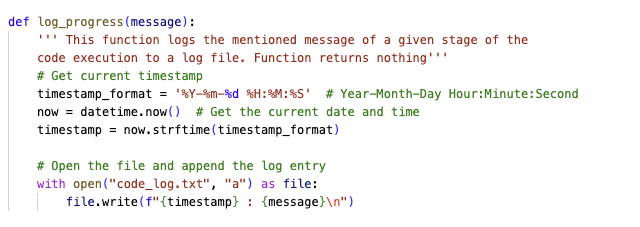
Write a function log_progress() to log the progress of the code at different stages in a file code_log.txt. Use the list of log points provided to create log entries as every stage of the code.
编写函数 log_progress() ,将代码在不同阶段的进度记录到文件 code_log.txt 中。使用提供的日志点列表,为代码的每个阶段创建日志条目。
Task 2: 任务 2:
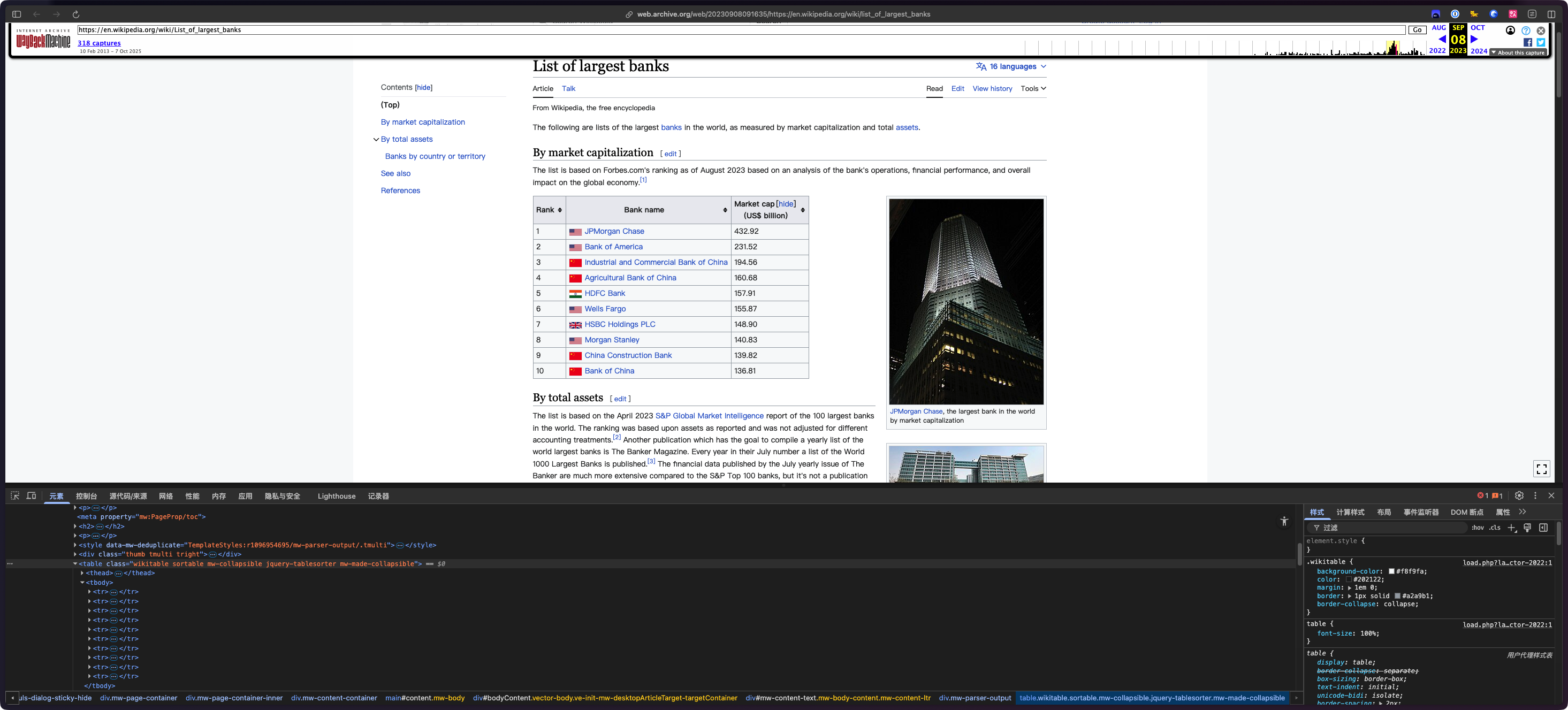
Extract the tabular information from the given URL under the heading 'By market capitalization' and save it to a dataframe.
从给定 URL 中提取标题“按市值”下的表格信息,并将其保存到数据框中。
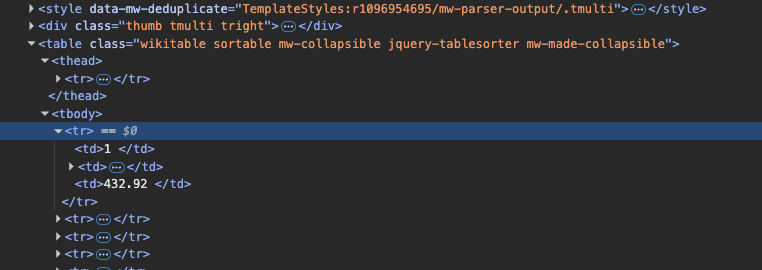
a. Inspect the webpage and identify the position and pattern of the tabular information in the HTML code
a. 检查网页并识别 HTML 代码中表格信息的位置和模式
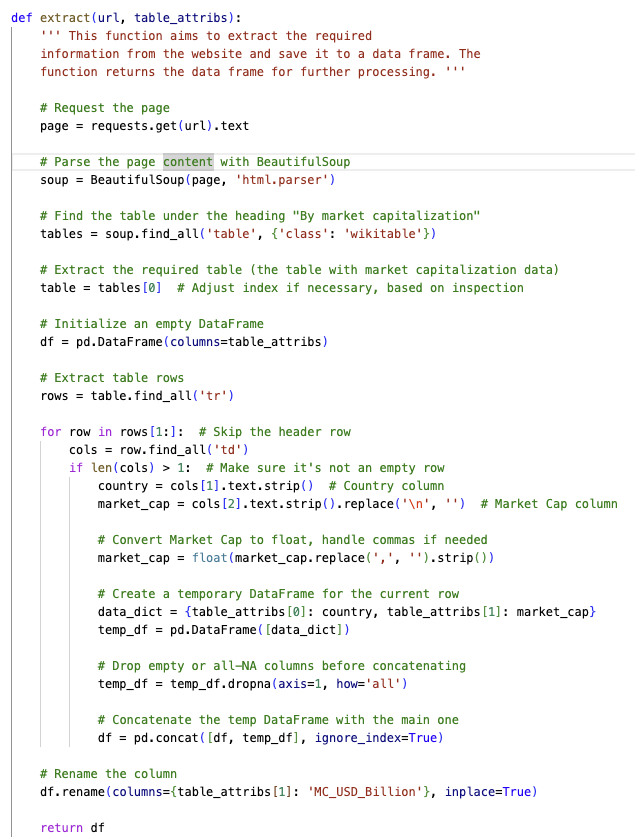
b. Write the code for a function extract() to perform the required data extraction.
b. 编写函数 extract() 的代码以执行所需的数据提取。
c. Execute a function call to extract() to verify the output.
c. 执行函数调用 extract() 以验证输出。
Task 3: 任务 3:
Transform the dataframe by adding columns for Market Capitalization in GBP, EUR and INR, rounded to 2 decimal places, based on the exchange rate information shared as a CSV file.
根据以 CSV 文件形式共享的汇率信息,通过添加以英镑、欧元和印度卢比计价的市值列(四舍五入到小数点后两位)来转换数据框。
a. Write the code for a function transform() to perform the said task.
a. 编写函数 transform() 的代码以执行所述任务。
b. Execute a function call to transform() and verify the output.
b. 执行对 transform() 的函数调用并验证输出。
Task 4: 任务 4:
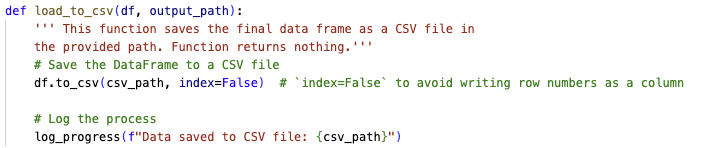
Load the transformed dataframe to an output CSV file. Write a function load_to_csv(), execute a function call and verify the output.
将转换后的数据帧加载到输出 CSV 文件。编写函数 load_to_csv() ,执行函数调用并验证输出。
Task 5: 任务 5:
Load the transformed dataframe to an SQL database server as a table. Write a function load_to_db(), execute a function call and verify the output.
将转换后的数据框作为表加载到 SQL 数据库服务器。编写函数 load_to_db() ,执行函数调用并验证输出。
Task 6: 任务 6:
Run queries on the database table. Write a function run_queries(), execute a given set of queries and verify the output.
在数据库表上运行查询。编写函数 run_queries() ,执行给定的一组查询并验证输出。
Task 7: 任务 7:
Verify that the log entries have been completed at all stages by checking the contents of the file code_log.txt.
通过检查文件 code_log.txt 的内容,验证所有阶段的日志条目均已完成。
Preliminaries: Installing libraries and downloading data 准备工作:安装库和下载数据
Before building the code, you need to install the required libraries.
在构建代码之前,您需要安装所需的库。
The libraries needed for the code are:
代码所需的库是:
requests - The library used for accessing the information from the URL.
requests - 用于从 URL 访问信息的库。
bs4 - The library containing the BeautifulSoup function used for webscraping.
bs4 - 包含用于网络抓取的 BeautifulSoup 函数的库。
pandas - The library used for processing the extracted data, storing it in required formats, and communicating with the databases.
pandas - 用于处理提取的数据、将其存储为所需格式以及与数据库通信的库。
numpy - The library required for the mathematical rounding operations.
numpy - 数学舍入操作所需的库。
datetime - The library containing the function datetime used for extracting the timestamp for logging purposes.
datetime - 包含用于提取日志时间戳的函数 datetime 的库。
lxml - The library used by BeautifulSoup as a parser to efficiently process and navigate the HTML or XML content extracted from web pages.
lxml - BeautifulSoup 用作解析器,用于高效处理和导航从网页中提取的 HTML 或 XML 内容的库。
Install the required libraries from the terminal window. The command syntax is:
从终端窗口安装所需的库。命令语法为:
python3.11 -m pip install <library_name>
Also, download the required exchange rate file using the terminal command:
另外,使用终端命令下载所需的汇率文件:
wget https://cf-courses-data.s3.us.cloud-object-storage.appdomain.cloud/IBMSkillsNetwork-PY0221EN-Coursera/labs/v2/exchange_rate.csv
Code Structure 代码结构
Create the file banks_project.py in the path \home\project\. Copy and paste the following code structure to the file:
在路径 \home\project\ 中创建文件 banks_project.py 。将以下代码结构复制并粘贴到文件中:
# Importing the required libraries

def log_progress(message):
    ''' This function logs the mentioned message of a given stage of the
    code execution to a log file. Function returns nothing'''

def extract(url, table_attribs):
    ''' This function aims to extract the required
    information from the website and save it to a data frame. The
    function returns the data frame for further processing. '''

    return df

def transform(df, csv_path):
    ''' This function accesses the CSV file for exchange rate
    information, and adds three columns to the data frame, each
    containing the transformed version of Market Cap column to
    respective currencies'''

    return df

def load_to_csv(df, output_path):
    ''' This function saves the final data frame as a CSV file in
    the provided path. Function returns nothing.'''

def load_to_db(df, sql_connection, table_name):
    ''' This function saves the final data frame to a database
    table with the provided name. Function returns nothing.'''

def run_query(query_statement, sql_connection):
    ''' This function runs the query on the database table and
    prints the output on the terminal. Function returns nothing. '''

''' Here, you define the required entities and call the relevant
functions in the correct order to complete the project. Note that this
portion is not inside any function.'''
At this stage, import the required libraries at the space mentioned in the code structure. Save the file using Ctrl+S.
在此阶段,在代码结构中提到的位置导入所需的库。使用 Ctrl+S 保存文件。
Also, initialize all the known variables as shared in the project scenario.
此外,按照项目场景中共享的内容初始化所有已知变量。
Task 1: Logging function 任务 1:日志记录功能
Write the function to log the progress of the code, log_progress(). The function accepts the message to be logged and enters it to a text file code_log.txt.
编写用于记录代码进度的函数, log_progress() 。该函数接受要记录的消息并将其输入到文本文件 code_log.txt 中。
The format to be used for logging must have the syntax:
日志记录的格式必须具有以下语法:
<time_stamp> : <message>
Each log entry must happen in the next line in the text file.
每个日志条目必须在文本文件的下一行中。
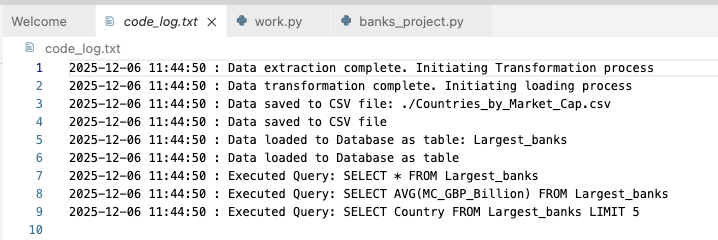
You must associate the correct log entries with each of the executed function calls. Use the following table to note the logging message at the end of each function call that follows.
您必须将正确的日志条目与每个已执行的函数调用相关联。请使用下表记录每个后续函数调用结束时的日志消息。
| Task 任务 | Log message on completion 完成时的日志消息 |
|---|---|
| Declaring known values 声明已知值 | Preliminaries complete. Initiating ETL process 准备工作完成。正在启动 ETL 过程 |
| Call extract() function 调用 extract()函数 | Data extraction complete. Initiating Transformation process 数据提取完成。正在启动转换过程 |
| Call transform() function 调用 transform() 函数 |
Data transformation complete. Initiating Loading process 数据转换完成。正在启动加载过程 |
| Call load_to_csv() 调用 load_to_csv() | Data saved to CSV file 数据已保存到 CSV 文件 |
| Initiate SQLite3 connection 初始化 SQLite3 连接 |
SQL Connection initiated SQL 连接已启动 |
| Call load_to_db() 调用 load_to_db() | Data loaded to Database as a table, Executing queries 数据已作为表加载到数据库,正在执行查询 |
| Call run_query() 调用 run_query() | Process Complete 处理完成 |
| Close SQLite3 connection 关闭 SQLite3 连接 |
Server Connection closed 服务器连接已关闭 |
At this stage, you should now make the first log entry from the table above.
在此阶段,您现在应该从上表中进行第一次日志记录。
Peer graded assignment prompt: 同伴评分作业提示
Take a screenshot of the code, as created for the log_progress() function and save it to your local machine as Task_1_log_function.png
截取为 log_progress() 函数创建的代码的屏幕截图,并将其保存到本地计算机,文件名为 Task_1_log_function.png
Task 2 : Extraction of data 任务 2:数据提取
Analyze the webpage on the given URL:
分析给定 URL 上的网页:
https://web.archive.org/web/20230908091635/https://en.wikipedia.org/wiki/List_of_largest_banks
Identify the position of the required table under the heading By market capitalization. Write the function extract() to retrieve the information of the table to a Pandas data frame.
识别标题 By market capitalization 下所需表格的位置。编写函数 extract() 以将表格信息检索到 Pandas 数据框中。
Note: Remember to remove the last character from the Market Cap column contents, like, '\n', and typecast the value to float format.
注意:请删除 Market Cap 列内容中的最后一个字符(例如“\n”),并将值转换为浮点格式。
Rename the column Market cap (US$ billion) to MC_USD_Billion
将列 Market cap (US$ billion) 重命名为 MC_USD_Billion
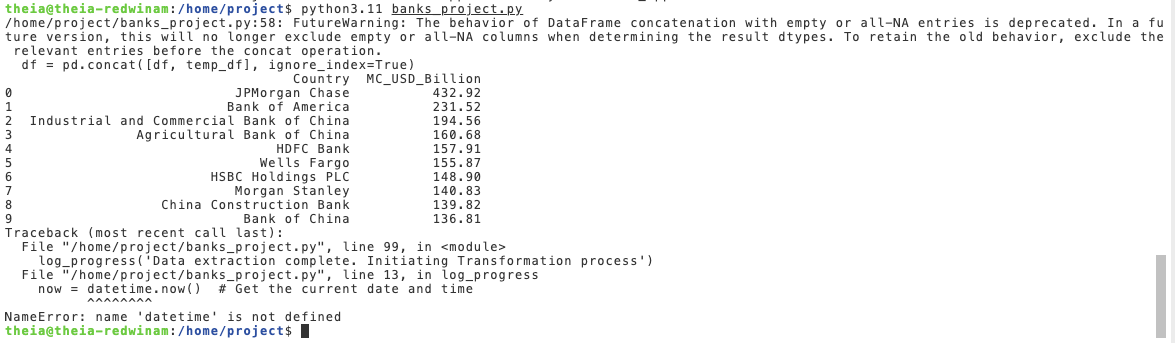
Write a function call for extract() and print the returning data frame.
为 extract() 编写函数调用并打印返回的数据帧。
Make the relevant log entry.
进行相关的日志记录。
Execute the code using the command:
使用以下命令执行代码:
python3.11 banks_project.py
Quiz question prompt: 测验问题提示
While inspecting the webpage, note the attributes of the data in the first row. There will be a quiz question based on these attributes.
检查网页时,请注意第一行数据的属性。将根据这些属性提出测验问题。
Peer graded assignment prompt: 同伴评分作业提示
Take a screenshot of the html code of the table, as obtained by inspecting the webpage. Make sure that the contents of at least the first row of the table, as entered in the HTML code, are completely visible. Save this screenshot to your local machine as Task_2a_extract.png
截取表格 HTML 代码的屏幕截图,该代码通过检查网页获得。确保 HTML 代码中输入的表格至少第一行的内容完全可见。将此屏幕截图保存到本地计算机,文件名为 Task_2a_extract.png
Take a screenshot of the code, as created for the extract() function and save it to your local machine as Task_2b_extract.png.
截取为 extract() 函数创建的代码的屏幕截图,并将其保存到本地计算机,文件名为 Task_2b_extract.png 。
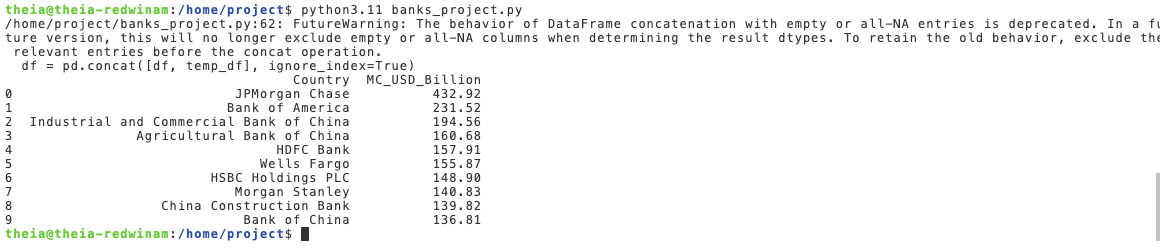
Take a screenshot of the output, as obtained upon execution in the terminal, and save it to your local machine as Task_2c_extract.png.
截取在终端执行后获得的输出的屏幕截图,并将其保存到本地计算机,文件名为 Task_2c_extract.png 。
Task 3 : Transformation of data 任务 3:数据转换
The Transform function needs to perform the following tasks:
Transform 函数需要执行以下任务:
-
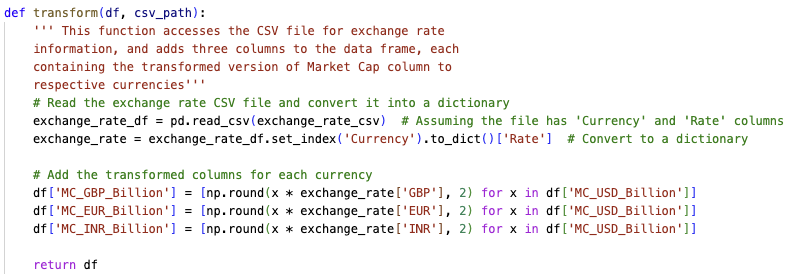
Read the exchange rate CSV file and convert the contents to a dictionary so that the contents of the first columns are the keys to the dictionary and the contents of the second column are the corresponding values.
读取汇率 CSV 文件,并将内容转换为字典,其中第一列的内容作为字典的键,第二列的内容作为相应的值。Hint 提示: You can use the below-mentioned syntax to achieve this. Remember to modify the statement as per your code.
您可以使用以下语法来实现此目的。请记住根据您的代码修改语句。dict = dataframe.set_index('Col_1_header').to_dict()['Col_2_header'] -
Add 3 different columns to the dataframe, viz.
MC_GBP_Billion,MC_EUR_BillionandMC_INR_Billion, each containing the content ofMC_USD_Billionscaled by the corresponding exchange rate factor. Remember to round the resulting data to 2 decimal places.
向数据框添加 3 个不同的列,即MC_GBP_Billion、MC_EUR_Billion和MC_INR_Billion,每个列都包含按相应汇率因子缩放的MC_USD_Billion的内容。请记住将结果数据四舍五入到小数点后 2 位。
A sample statement is being provided for adding the MC_GBP_Billion column. You can use this to add the other two statements on your own.
提供了一个用于添加 MC_GBP_Billion 列的示例语句。您可以使用此示例自行添加其他两个语句。
df['MC_GBP_Billion'] = [np.round(x*exchange_rate['GBP'],2) for x in df['MC_USD_Billion']]
Write the function call for transform() and print the contents of the returning data frame. Comment out all previous print statements.
编写 transform() 的函数调用并打印返回数据帧的内容。注释掉所有先前的打印语句。
Make the relevant log entry and execute the code.
进行相关的日志记录并执行代码。
Quiz question prompt: 测验问题提示
- Experiment with the statement provided for adding the transformed columns to the dataframe. There will be a question on this in the quiz.
尝试使用提供的语句将转换后的列添加到数据框中。测验中会有一个关于此的问题。 - Print the contents of
df['MC_EUR_Billion'][4], which is the market capitalization of the 5th largest bank in billion EUR. Note this value, as it will be the answer to a question in the final quiz.
打印df['MC_EUR_Billion'][4]的内容,它是第五大银行的市值(单位:十亿欧元)。请记下此值,因为它将是最终测验中一个问题的答案。
Peer graded assignment prompt: 同伴评分作业提示
Take a screenshot of the code, as created for the transform() function, and save it to your local machine as Task_3a_transform.png.
截取为 transform() 函数创建的代码的屏幕截图,并将其保存到本地计算机,文件名为 Task_3a_transform.png 。
Take a snapshot of the output and save it as Task_3b_tranform.png.
截取输出快照并将其保存为 Task_3b_tranform.png 。
Task 4: Loading to CSV 任务 4:加载到 CSV
Write the function to load the transformed data frame to a CSV file, like load_to_csv(), in the path mentioned in the project scenario.
编写函数,将转换后的数据帧加载到 CSV 文件(例如 load_to_csv() )中,路径如项目场景中所述。
Make the relevant log entry.
进行相关的日志记录。
Peer graded assignment prompt: 同伴评分作业提示
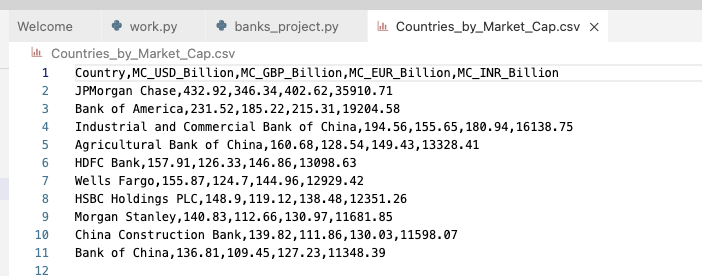
Double-click the created CSV file in the Explorer tab on the left ribbon of the programming pane in Cloud IDE. Note that its contents are displayed on the editor screen. Take a snapshot of this screen and save it as Task_4_CSV.png.
在 Cloud IDE 编程窗格左侧功能区的“ Explorer ”选项卡中双击创建的 CSV 文件。请注意,其内容会显示在编辑器屏幕上。截取此屏幕的快照并将其保存为“ Task_4_CSV.png ”。
Task 5: Loading to Database 任务 5:加载到数据库
Write the function to load the transformed data frame to an SQL database, like, load_to_db(). Use the database and table names as mentioned in the project scenario.
编写函数以将转换后的数据帧加载到 SQL 数据库,例如 load_to_db() 。使用项目场景中提到的数据库和表名。
Before calling this function, initiate the connection to the SQLite3 database server with the name Banks.db. Pass this connection object, along with the required table name Largest_banks and the transformed data frame, to the load_to_db() function in the function call.
在调用此函数之前,请使用名称 Banks.db 初始化与 SQLite3 数据库服务器的连接。在函数调用中,将此连接对象以及所需的表名 Largest_banks 和转换后的数据帧传递给 load_to_db() 函数。
Make the relevant log entry.
进行相关的日志记录。
Upon successful function call, you will have loaded the contents of the table with the required data and the file Banks.db will be visible in the Explorer tab of the IDE under the project folder.
成功调用函数后,您将加载包含所需数据的表内容,并且文件 Banks.db 将在 IDE 的 Explorer 选项卡中的 project 文件夹下可见。
Peer graded assignment prompt: 同伴评分作业提示
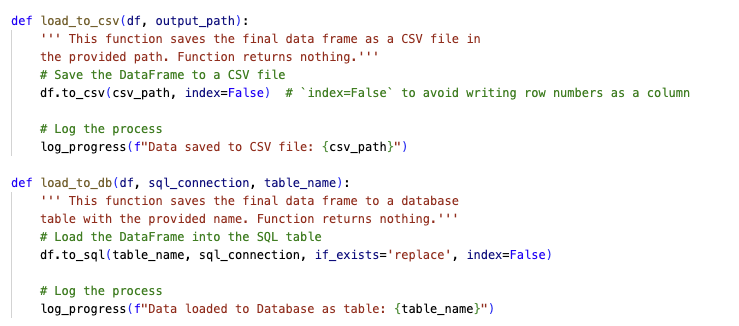
Take a single screenshot of the code, as created for load_to_csv() and load_to_db() functions, and save it to your local machine as Task_4_5_save_file.png.
截取为 load_to_csv() 和 load_to_db() 函数创建的代码的单个屏幕截图,并将其保存到本地计算机,文件名为 Task_4_5_save_file.png 。
Task 6: Function to Run queries on Database 任务 6:在数据库上运行查询的函数
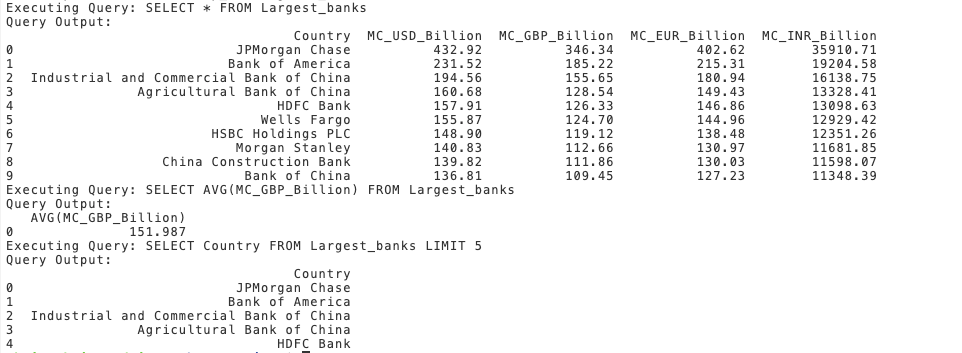
Write the function run_queries() that accepts the query statement, and the SQLite3 Connection object, and generates the output of the query. The query statement should be printed along with the query output.
编写函数 run_queries() ,该函数接受查询语句和 SQLite3 连接对象,并生成查询的输出。查询语句应与查询输出一起打印。
Execute 3 function calls using the queries as mentioned below.
使用如下所述的查询执行 3 次函数调用。
-
Print the contents of the entire table
打印整个表格的内容Query statement: 查询语句:
SELECT * FROM Largest_banks -
Print the average market capitalization of all the banks in Billion GBP.
打印所有银行的平均市值(单位:十亿英镑)。Query statement: 查询语句:
SELECT AVG(MC_GBP_Billion) FROM Largest_banks -
Print only the names of the top 5 banks
只打印前 5 家银行的名称Query statement: 查询语句:
SELECT Name from Largest_banks LIMIT 5
Make the relevant log entry.
进行相关的日志记录。
Peer graded assignment prompt: 同伴评分作业提示
Take the snapshot of the output and save it as Task_6_SQL.png. Please adjust the size of the terminal prompt in order to take a single screenshot that captures all three outputs together.
截取输出快照并将其保存为 Task_6_SQL.png 。请调整终端提示的大小,以便一次性截取包含所有三个输出的屏幕截图。
Quiz question prompt: 测验问题提示
There will be a quiz question on the output of these queries.
将针对这些查询的输出设置一个测验问题。
Task 7: Verify log entries 任务 7:验证日志条目
After updating all the log_progress() function calls, you have to run the code for a final execution. However, you will first have to remove the code_log.txt file, that would have been created and updated throughout the multiple executions of the code in this lab. You may remove the file using the following command on a terminal.
更新所有 log_progress() 函数调用后,您必须运行代码进行最终执行。但是,您首先必须删除 code_log.txt 文件,该文件是在本实验中代码的多次执行过程中创建和更新的。您可以使用终端上的以下命令删除该文件。
rm code_log.txt
Once the existing file is removed, now run the final execution. Upon successful completion of execution, open the code_log.txt file by clicking on it in the Explorer tab of the toolbar on left side of the programming pane of the IDE, under the project folder. You should see all the relevant entries made in the text file in relation to the stages of code execution.
删除现有文件后,现在运行最终执行。成功完成执行后,在 IDE 编程窗格左侧工具栏的 Explorer 选项卡中,在 project 文件夹下,单击 code_log.txt 文件将其打开。您应该会看到文本文件中与代码执行阶段相关的所有相关条目。
Peer graded assignment prompt: 同伴评分作业提示
Take the snapshot of the file contents and save it as Task_7_log_content.png.
截取文件内容的快照并将其保存为 Task_7_log_content.png 。
Conclusion 结论
Congratulations on completing this project!
恭喜您完成此项目!
With this, you are now trained to perform ETL operations on real-world data and make the processed information available for further use in different formats.
至此,您已接受培训,能够对真实世界数据执行 ETL 操作,并以不同格式提供处理后的信息以供进一步使用。
You should now be able to:
您现在应该能够:
- Use Webscraping techniques to extract information from any website as per requirement.
根据需要使用网络抓取技术从任何网站提取信息。 - Use Pandas data frames and dictionaries to transform data as per requirement.
根据需要使用 Pandas 数据帧和字典转换数据。 - Load the processed information to CSV files and as Database tables
将处理后的信息加载到 CSV 文件和数据库表中 - Query the database tables using SQLite3 and pandas libraries
使用 SQLite3 和 pandas 库查询数据库表 - Log the progress of the code properly
正确记录代码的进度
Author(s) 作者

146.86