Module 01 · Extract, Transform, Load (ETL)提取、转换与加载(ETL)
Hands-on Lab: Accessing Databases using Python script动手实验:使用 Python 脚本访问数据库

Estimated Effort: 30 mins 预计用时:30 分钟
Using databases is an important and useful method of sharing information. To preserve repeated storage of the same files containing the required data, it is a good practice to save the said data on a database on a server and access the required subset of information using database management systems.
使用数据库是共享信息的一种重要且有用的方法。为了避免重复存储包含所需数据的相同文件,一种好的做法是将所述数据保存在服务器上的数据库中,并使用数据库管理系统访问所需的信息子集。
In this lab, you'll learn how to create a database, load data from a CSV file as a table, and then run queries on the data using Python.
在本实验中,您将学习如何创建数据库、从 CSV 文件加载数据作为表,然后使用 Python 对数据运行查询。
Objectives 目标
In this lab you'll learn how to:
在本实验中,您将学习如何:
- Create a database using Python
使用 Python 创建数据库 - Load the data from a CSV file as a table to the database
将 CSV 文件中的数据作为表加载到数据库中 - Run basic "queries" on the database to access the information
对数据库运行基本“查询”以访问信息
Scenario 场景
Consider a dataset of employee records that is available with an HR team in a CSV file. As a Data Engineer, you are required to create the database called STAFF and load the contents of the CSV file as a table called INSTRUCTORS. The headers of the available data are :
假设 HR 团队有一个包含员工记录的 CSV 文件数据集。作为数据工程师,您需要创建一个名为 STAFF 的数据库,并将 CSV 文件的内容作为名为 INSTRUCTORS 的表加载。可用数据的标题是:
| Header 标题 | Description 描述 |
|---|---|
| ID | Employee ID 员工编号 |
| FNAME | First Name 名字 |
| LNAME | Last Name 姓氏 |
| CITY | City of residence 居住城市 |
| CCODE | Country code (2 letters) 国家代码(2 个字母) |
Setting Up 设置
Usually, the database for storing data would be created on a server to which the other team members would have access. For the purpose of this lab, we are going to create the database on a dummy server using SQLite3 library.
通常,用于存储数据的数据库会创建在其他团队成员可以访问的服务器上。为了本次实验的目的,我们将使用 SQLite3 库在一个虚拟服务器上创建数据库。
Note: SQLite3 is a software library that implements a self-contained, serverless, zero-configuration, transactional SQL database engine. SQLite is the most widely deployed SQL database engine in the world. SQLite3 comes bundled with Python and does not require installation.
注意:SQLite3 是一个软件库,它实现了一个独立的、无服务器的、零配置的事务性 SQL 数据库引擎。SQLite 是世界上部署最广泛的 SQL 数据库引擎。SQLite3 随 Python 捆绑提供,无需安装。
Initial steps 初始步骤
For this lab, you will need a Python file in the project folder. You can name it db_code.py. The process to create the file is shown in the images below.
对于本次实验,您需要在 project 文件夹中有一个 Python 文件。您可以将其命名为 db_code.py 。创建文件的过程如下图所示。
-
In the
Filemenu, click the optionNew File.
在File菜单中,点击选项New File。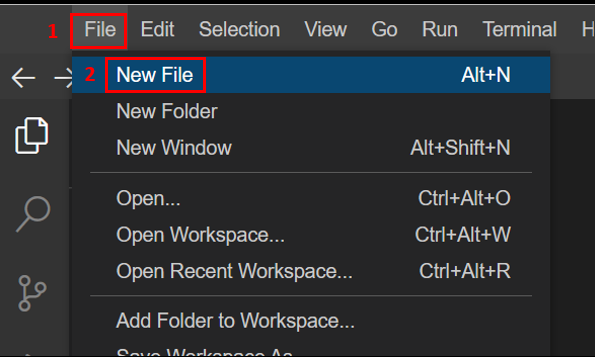
This should open an
Untitledfile in the editor tab.
这应该会在编辑器选项卡中打开一个Untitled文件。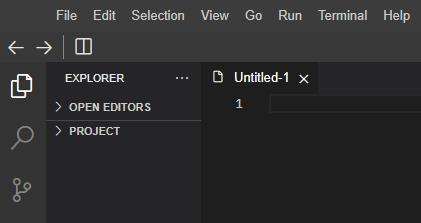
-
Use
Ctrl+Sto save the file. TheSave Asinterface would pop up. Navigate to the path/home/project/as shown in the image below and name the filedb_code.py. ClickSave.
使用Ctrl+S保存文件。Save As界面将弹出。导航到下图所示的路径/home/project/,并将文件命名为db_code.py。点击Save。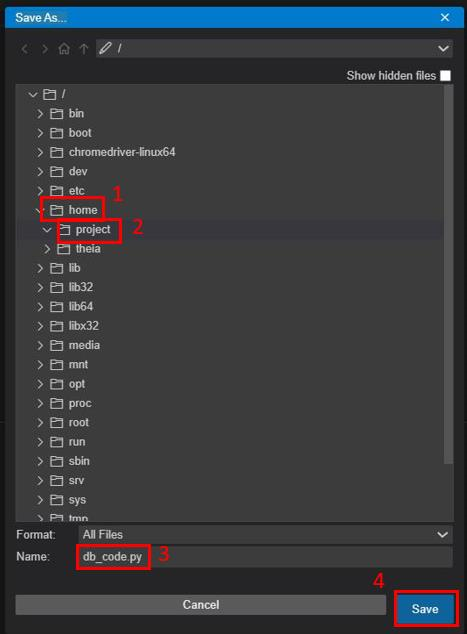
You also need the CSV data to be available in the same location /home/project/. For this, open a new terminal from the Terminal tab in the menu as shown below.
您还需要将 CSV 数据放在同一位置 /home/project/ 。为此,请从菜单中的 Terminal 选项卡打开一个新终端,如下图所示。
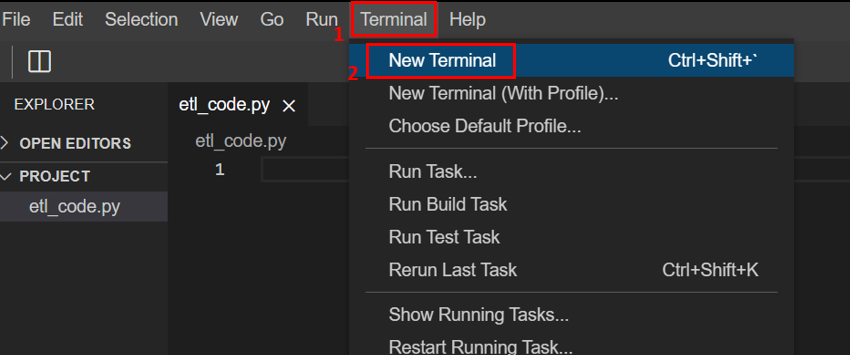
Run the following command in the terminal. Make sure the current directory in the terminal window is /home/project/.
在终端中运行以下命令。确保终端窗口中的当前目录是 /home/project/ 。
wget https://cf-courses-data.s3.us.cloud-object-storage.appdomain.cloud/IBMSkillsNetwork-PY0221EN-Coursera/labs/v2/INSTRUCTOR.csv
The file INSTRUCTOR.csv should now be available in the location /home/project/. You can check its contents by clicking it from the Explorer menu.
文件 INSTRUCTOR.csv 现在应该在位置 /home/project/ 中可用。您可以通过从 Explorer 菜单中单击它来检查其内容。
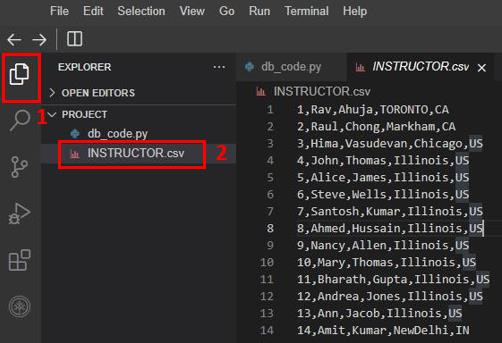
Further, to read the CSV and interact with the database, you'll need the pandas library. This library will first have to be installed in the Cloud IDE framework. For this, run the below mentioned statement in a terminal window.
此外,要读取 CSV 并与数据库交互,您需要 pandas 库。此库必须首先安装在 Cloud IDE 框架中。为此,请在终端窗口中运行以下语句。
python3.11 -m pip install pandas
Python Scripting: Database initiation Python 脚本:数据库初始化
Let us first create a database using Python.
我们首先使用 Python 创建一个数据库。
Open db_code.py and import the sqlite3 library using the below mentioned command.
打开 db_code.py 并使用以下命令导入 sqlite3 库。
import sqlite3
Import the pandas library in db_code.py using the following code.
使用以下代码在 db_code.py 中导入 pandas 库。
import pandas as pd
Now, you can use SQLite3 to create and connect your process to a new database STAFF using the following statements.
现在,您可以使用 SQLite3 通过以下语句创建新数据库 STAFF 并将您的进程连接到该数据库。
conn = sqlite3.connect('STAFF.db')
Remember to save the file using Ctrl+S.
请记得使用 Ctrl+S 保存文件。
Python Scripting: Create and Load the table Python 脚本:创建并加载表
To create a table in the database, you first need to have the attributes of the required table. Attributes are columns of the table. Along with their names, the knowledge of their data types are also required. The attributes for the required tables in this lab were shared in the Lab Scenario.
要在数据库中创建表,首先需要具备所需表的属性。属性是表的列。除了它们的名称,还需要了解它们的数据类型。本实验中所需表的属性已在实验场景中共享。
Add the following statements to db_code.py to feed the required table name and attribute details for the table.
将以下语句添加到 db_code.py 中,以提供所需表的名称和属性详细信息。
table_name = 'INSTRUCTOR'
attribute_list = ['ID', 'FNAME', 'LNAME', 'CITY', 'CCODE']
Note: This information can be updated for the case of any other kind of table.
注意:此信息可以针对任何其他类型的表进行更新。
Save the file using Ctrl+S.
使用 Ctrl+S 保存文件。
Reading the CSV file 读取 CSV 文件
Now, to read the CSV using Pandas, you use the read_csv() function. Since this CSV does not contain headers, you can use the keys of the attribute_dict dictionary as a list to assign headers to the data. For this, add the commands below to db_code.py.
现在,要使用 Pandas 读取 CSV,您可以使用 read_csv() 函数。由于此 CSV 不包含标题,因此您可以使用 attribute_dict 字典的键作为列表来为数据分配标题。为此,请将以下命令添加到 db_code.py 。
file_path = '/home/project/INSTRUCTOR.csv'
df = pd.read_csv(file_path, names = attribute_list)
Loading the data to a table 将数据加载到表中
The pandas library provides easy loading of its dataframes directly to the database. For this, you may use the to_sql() method of the dataframe object.
pandas 库提供了将其数据帧直接轻松加载到数据库的功能。为此,您可以使用 dataframe 对象的 to_sql() 方法。
However, while you load the data for creating the table, you need to be careful if a table with the same name already exists in the database. If so, and it isn't required anymore, the tables should be replaced with the one you are loading here. You may also need to append some information to an existing table. For this purpose, to_sql() function uses the argument if_exists. The possible usage of if_exists is tabulated below.
但是,在加载数据以创建表时,如果数据库中已存在同名表,则需要小心。如果存在,并且不再需要,则应将这些表替换为您在此处加载的表。您可能还需要向现有表中追加一些信息。为此, to_sql() 函数使用参数 if_exists 。 if_exists 的可能用法如下表所示。
| Argument usage 参数用法 | Description 描述 |
|---|---|
if_exists = 'fail' |
Default. The command doesn't work if a table with the same name exists in the database. 默认。如果数据库中存在同名表,则该命令不起作用。 |
if_exists = 'replace' |
The command replaces the existing table in the database with the same name. 该命令将数据库中同名现有表替换掉。 |
if_exists = 'append' |
The command appends the new data to the existing table with the same name. 该命令将新数据附加到同名现有表中。 |
As you need to create a fresh table upon execution, add the following commands to the code. The print command is optional, but helps identify the completion of the steps of code until this point.
由于您需要在执行时创建一个新表,请将以下命令添加到代码中。print 命令是可选的,但有助于识别代码步骤到此为止的完成情况。
df.to_sql(table_name, conn, if_exists = 'replace', index =False)
print('Table is ready')
Save the file using Ctrl+S.
使用 Ctrl+S 保存文件。
Python Scripting: Running basic queries on data Python 脚本:对数据运行基本查询
Now that the data is uploaded to the table in the database, anyone with access to the database can retrieve this data by executing SQL queries.
现在数据已上传到数据库中的表,任何有权访问数据库的人都可以通过执行 SQL 查询来检索此数据。
Some basic SQL queries to test this data are SELECT queries for viewing data, and COUNT query to count the number of entries.
一些用于测试此数据的基本 SQL 查询是用于查看数据的 SELECT 查询和用于计算条目数的 COUNT 查询。
SQL queries can be executed on the data using the read_sql function in pandas.
可以使用 pandas 中的 read_sql 函数对数据执行 SQL 查询。
Now, run the following tasks for data retrieval on the created database.
现在,对创建的数据库运行以下数据检索任务。
-
Viewing all the data in the table.
查看表中的所有数据。Add the following lines of code to
db_code.py
将以下代码行添加到db_code.pyquery_statement = f"SELECT * FROM {table_name}" query_output = pd.read_sql(query_statement, conn) print(query_statement) print(query_output) -
Viewing only FNAME column of data.
仅查看 FNAME 列数据。Add the following lines of code to
db_code.py
将以下代码行添加到db_code.pyquery_statement = f"SELECT FNAME FROM {table_name}" query_output = pd.read_sql(query_statement, conn) print(query_statement) print(query_output) -
Viewing the total number of entries in the table.
查看表中的条目总数。Add the following lines of code to
db_code.py
将以下代码行添加到db_code.pyquery_statement = f"SELECT COUNT(*) FROM {table_name}" query_output = pd.read_sql(query_statement, conn) print(query_statement) print(query_output)
Now try appending some data to the table. Consider the following.
现在尝试向表中追加一些数据。请考虑以下事项。
a. Assume the ID is 100.
a. 假设 ID 为 100 。
b. Assume the first name, FNAME, is John.
b. 假设名字 FNAME 是 John 。
c. Assume the last name as LNAME, Doe.
c. 假设姓氏 LNAME 是 Doe 。
d. Assume the city of residence, CITY is Paris.
d. 假设居住城市 CITY 是 Paris 。
e. Assume the country code, CCODE is FR.
e. 假设国家代码 CCODE 是 FR 。
Use the following statements to create the dataframe of the new data.
使用以下语句创建新数据的数据框。
data_dict = {'ID' : [100],
'FNAME' : ['John'],
'LNAME' : ['Doe'],
'CITY' : ['Paris'],
'CCODE' : ['FR']}
data_append = pd.DataFrame(data_dict)
Now use the following statement to append the data to the INSTRUCTOR table.
现在使用以下语句将数据附加到 INSTRUCTOR 表。
data_append.to_sql(table_name, conn, if_exists = 'append', index =False)
print('Data appended successfully')
Now, repeat the COUNT query. You will observe an increase by 1 in the output of the first COUNT query and the second one.
现在,重复执行 COUNT 查询。您将观察到第一个 COUNT 查询和第二个查询的输出都增加了 1。
Before proceeding with the final execution, you need to add the command to close the connection to the database after all the queries are executed.
在进行最终执行之前,您需要添加命令以在所有查询执行完毕后关闭与数据库的连接。
Add the following line at the end of db_code.py to close the connection to the database.
在 db_code.py 的末尾添加以下行以关闭数据库连接。
conn.close()
Save the file using Ctrl+S.
使用 Ctrl+S 保存文件。
Code Execution 代码执行
Execute db_code.py from the terminal window using the following command.
从终端窗口使用以下命令执行 db_code.py 。
python3.11 db_code.py
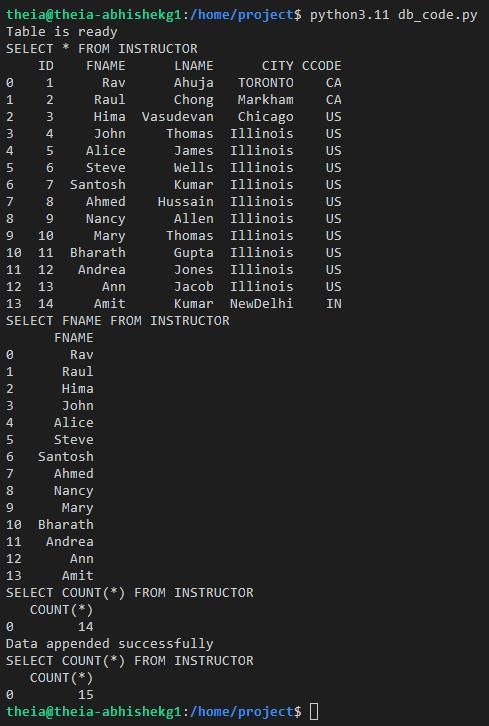
The output expected is shown in the image below.
预期输出如下图所示。
Lab Solution 实验解决方案
In case you are not able to get the required output from the code or are facing some errors, the final file for db_code.py is shared below. Please note that this is for your help, and we encourage you to first try to resolve the errors on your own.
如果您无法从代码中获得所需的输出或遇到一些错误,下面提供了 db_code.py 的最终文件。请注意,这仅供您参考,我们鼓励您首先尝试自行解决错误。
Also, you may keep a copy of db_code.py saved in your local machine since it will be useful in the projects of the course as well.
此外,您也可以在本地计算机上保存一份 db_code.py 的副本,因为它在课程项目中也会很有用。
db_code.py
import sqlite3
import pandas as pd
# Connect to the SQLite3 service
conn = sqlite3.connect('STAFF.db')
# Define table parameters
table_name = 'INSTRUCTOR'
attribute_list = ['ID', 'FNAME', 'LNAME', 'CITY', 'CCODE']
# Read the CSV data
file_path = '/home/project/INSTRUCTOR.csv'
df = pd.read_csv(file_path, names = attribute_list)
# Load the CSV to the database
df.to_sql(table_name, conn, if_exists = 'replace', index = False)
print('Table is ready')
# Query 1: Display all rows of the table
query_statement = f"SELECT * FROM {table_name}"
query_output = pd.read_sql(query_statement, conn)
print(query_statement)
print(query_output)
# Query 2: Display only the FNAME column for the full table.
query_statement = f"SELECT FNAME FROM {table_name}"
query_output = pd.read_sql(query_statement, conn)
print(query_statement)
print(query_output)
# Query 3: Display the count of the total number of rows.
query_statement = f"SELECT COUNT(*) FROM {table_name}"
query_output = pd.read_sql(query_statement, conn)
print(query_statement)
print(query_output)
# Define data to be appended
data_dict = {'ID' : [100],
             'FNAME' : ['John'],
             'LNAME' : ['Doe'],
             'CITY' : ['Paris'],
             'CCODE' : ['FR']}
data_append = pd.DataFrame(data_dict)
# Append data to the table
data_append.to_sql(table_name, conn, if_exists = 'append', index = False)
print('Data appended successfully')
# Query 4: Display the count of the total number of rows.
query_statement = f"SELECT COUNT(*) FROM {table_name}"
query_output = pd.read_sql(query_statement, conn)
print(query_statement)
print(query_output)
# Close the connection
conn.close()
Practice Problems 练习题
Try the following practice problems to test your understanding of the lab. Please note that the solutions for the following are not shared, and the learners are encouraged to use the discussion forums in case they need help.
请尝试以下练习题,以测试您对本实验的理解。请注意,以下问题的解决方案不予分享,如果学习者需要帮助,我们鼓励他们使用讨论论坛。
-
In the same database
STAFF, create another table calledDepartments. The attributes of the table are as shown below.
在同一个数据库STAFF中,创建另一个名为Departments的表。该表的属性如下所示。Header 标题 Description 描述 DEPT_ID Department ID 部门 ID DEP_NAME Department Name 部门名称 MANAGER_ID Manager ID 经理 ID LOC_ID Location ID 地点 ID -
Populate the
Departmentstable with the data available in the CSV file which can be downloaded from the link below usingwget.
使用wget将 CSV 文件中可用的数据填充到Departments表中,CSV 文件可从以下链接下载。https://cf-courses-data.s3.us.cloud-object-storage.appdomain.cloud/IBMSkillsNetwork-PY0221EN-Coursera/labs/v2/Departments.csv -
Append the
Departmentstable with the following information.
将以下信息附加到Departments表中。Attribute 属性 Value 值 DEPT_ID 9 DEP_NAME Quality Assurance 质量保证 MANAGER_ID 30010 LOC_ID L0010 -
Run the following queries on the
DepartmentsTable:
在Departments表中运行以下查询:
a. View all entries a. 查看所有条目
b. View only the department names
b. 仅查看部门名称
c. Count the total entries
c. 计算总条目数
Conclusion 结论
Congratulations on completing this lab.
恭喜您完成本实验。
In this lab, you have learned how to:
在本实验中,您已学习如何:
- Create a database using SQLite3 in Python.
使用 Python 中的 SQLite3 创建数据库。 - Create and load a table using data from a CSV file using Pandas.
使用 Pandas 从 CSV 文件中的数据创建和加载表。 - Run basic queries on the tables in the database.
对数据库中的表运行基本查询。