Module 02 · Final Project期末项目
Practice Project: Extract, Transform and Load GDP data练习项目:GDP 数据的提取、转换与加载
In this lab, you will practice your Python skills to extract, transform and load GDP data into a database for further processing.
在本实验中,您将练习您的 Python 技能,以提取、转换和加载 GDP 数据到数据库中进行进一步处理。
Estimated Effort: 60 mins
预计工作量:60 分钟
Introduction 简介
In this practice project, you will put the skills acquired through the course to use and create a complete ETL pipeline for accessing data from a website and processing it to meet the requirements.
在此实践项目中,您将运用在课程中获得的技能,创建一个完整的 ETL 管道,用于从网站访问数据并对其进行处理以满足要求。
Project Scenario: 项目场景
An international firm that is looking to expand its business in different countries across the world has recruited you. You have been hired as a junior Data Engineer and are tasked with creating an automated script that can extract the list of all countries in order of their GDPs in billion USDs (rounded to 2 decimal places), as logged by the International Monetary Fund (IMF). Since IMF releases this evaluation twice a year, this code will be used by the organization to extract the information as it is updated.
一家希望在全球不同国家拓展业务的国际公司聘请了您。您被聘为初级数据工程师,任务是创建一个自动化脚本,该脚本可以提取国际货币基金组织(IMF)记录的所有国家按其 GDP(以十亿美元计,四舍五入到小数点后两位)排序的列表。由于 IMF 每年发布两次此评估,因此该组织将使用此代码在信息更新时提取信息。
The required data seems to be available on the URL mentioned below:
所需数据似乎可在以下网址获取:
URL 网址
https://web.archive.org/web/20230902185326/https://en.wikipedia.org/wiki/List_of_countries_by_GDP_%28nominal%29
The required information needs to be made accessible as a CSV file Countries_by_GDP.csv as well as a table Countries_by_GDP in a database file World_Economies.db with attributes Country and GDP_USD_billion.
所需信息需要以 CSV 文件 Countries_by_GDP.csv 以及数据库文件 World_Economies.db 中的表 Countries_by_GDP 的形式提供,其中包含属性 Country 和 GDP_USD_billion 。
Your boss wants you to demonstrate the success of this code by running a query on the database table to display only the entries with more than a 100 billion USD economy. Also, you should log in a file with the entire process of execution named etl_project_log.txt.
你的老板希望你通过对数据库表运行查询来展示此代码的成功,以仅显示经济规模超过 1000 亿美元的条目。此外,你应该将整个执行过程记录在一个名为 etl_project_log.txt 的文件中。
You must create a Python code etl_project_gdp.py that performs all the required tasks.
您必须创建执行所有必需任务的 Python 代码 etl_project_gdp.py。
Objectives 目标
You have to complete the following tasks for this project
您必须为本项目完成以下任务
- Write a data extraction function to retrieve the relevant information from the required URL.
编写一个数据提取函数,从所需的 URL 中检索相关信息。 - Transform the available GDP information into 'Billion USD' from 'Million USD'.
将可用的 GDP 信息从“百万美元”转换为“十亿美元”。 - Load the transformed information to the required CSV file and as a database file.
将转换后的信息加载到所需的 CSV 文件和数据库文件中。 - Run the required query on the database.
在数据库上运行所需的查询。 - Log the progress of the code with appropriate timestamps.
用适当的时间戳记录代码的进度。
Initial setup 初始设置
Before you start building the code, you need to install the required libraries for it.
在开始编写代码之前,您需要安装所需的库。
The libraries needed for the code are as follows:
代码所需的库如下:
requests- The library used for accessing the information from the URL.requests- 用于从 URL 访问信息的库。bs4- The library containing theBeautifulSoupfunction used for webscraping.bs4- 包含用于网络抓取的BeautifulSoup函数的库。pandas- The library used for processing the extracted data, storing it to required formats and communicating with the databases.pandas- 用于处理提取的数据、将其存储为所需格式以及与数据库通信的库。sqlite3- The library required to create a database server connection.sqlite3- 创建数据库服务器连接所需的库。numpy- The library required for the mathematical rounding operation as required in the objectives.numpy- 根据目标要求进行数学舍入操作所需的库。datetime- The library containing the functiondatetimeused for extracting the timestamp for logging purposes.datetime- 包含用于提取时间戳以进行日志记录的函数datetime的库。
As discussed before, use the following command format in a terminal window to install the libraries.
如前所述,请在终端窗口中使用以下命令格式安装库。
python3.11 -m pip install <library_name>
While requests, sqlite3, and datetime come bundled with python, the other libraries will have to be installed.
虽然 requests 、 sqlite3 和 datetime 随 python 一起提供,但其他库必须单独安装。
Installing Libraries 安装库
python3.11 -m pip install pandas
python3.11 -m pip install numpy
python3.11 -m pip install bs4
Once the required libraries are installed, create a file etl_project_gdp.py in the path \home\project\.
安装完所需的库后,在路径 \home\project\ 中创建文件 etl_project_gdp.py 。
Code structure 代码结构
The code should be created in an organized manner such that you can perform each task with a dedicated function. For reference, you can copy paste the structure as shown below to etl_project_gdp.py.
代码的创建应井然有序,以便您可以使用专用函数执行每个任务。作为参考,您可以复制粘贴如下所示的结构到 etl_project_gdp.py 。
# Code for ETL operations on Country-GDP data

# Importing the required libraries

def extract(url, table_attribs):
    ''' This function extracts the required
    information from the website and saves it to a dataframe. The
    function returns the dataframe for further processing. '''

    return df

def transform(df):
    ''' This function converts the GDP information from Currency
    format to float value, transforms the information of GDP from
    USD (Millions) to USD (Billions) rounding to 2 decimal places.
    The function returns the transformed dataframe.'''

    return df

def load_to_csv(df, csv_path):
    ''' This function saves the final dataframe as a `CSV` file
    in the provided path. Function returns nothing.'''

def load_to_db(df, sql_connection, table_name):
    ''' This function saves the final dataframe as a database table
    with the provided name. Function returns nothing.'''

def run_query(query_statement, sql_connection):
    ''' This function runs the stated query on the database table and
    prints the output on the terminal. Function returns nothing. '''

def log_progress(message):
    ''' This function logs the mentioned message at a given stage of the code execution to a log file. Function returns nothing'''

''' Here, you define the required entities and call the relevant
functions in the correct order to complete the project. Note that this
portion is not inside any function.'''
Preliminary: Importing libraries and defining known values 预备:导入库并定义已知值
As per the requirement, write the commands in etl_project_gdp.py at the position specified in the code structure, to import the relevant libraries.
根据要求,在代码结构中指定的位置,在 etl_project_gdp.py 中写入命令,以导入相关库。
from bs4 import BeautifulSoup
import requests
import pandas as pd
import numpy as np
import sqlite3
from datetime import datetime
Further, you need to initialize all the known entities. These are mentioned below:
此外,您需要初始化所有已知实体。这些实体如下所述:
-
URL: 网址:
https://web.archive.org/web/20230902185326/https://en.wikipedia.org/wiki/List_of_countries_by_GDP_%28nominal%29 -
table_attribs: The attributes or column names for the dataframe stored as a list. Since the data available in the website is in USD Millions, the attributes should initially be 'Country' and 'GDP_USD_millions'. This will be modified in the transform function later.
table_attribs:存储为列表的数据框的属性或列名。由于网站上提供的数据以百万美元为单位,因此属性最初应为“Country”和“GDP_USD_millions”。这将在稍后的转换函数中进行修改。 -
db_name: As mentioned in the Project scenario, 'World_Economies.db'
db_name: 如项目场景中所述,'World_Economies.db' -
table_name: As mentioned in the Project scenario, 'Countries_by_GDP'
table_name: 如项目场景中所述,'Countries_by_GDP' -
csv_path: As mentioned in the Project scenario, 'Countries_by_GDP.csv'
csv_path: 如项目场景中所述,'Countries_by_GDP.csv'
You should log the initialization process
您应该记录初始化过程
url = 'https://web.archive.org/web/20230902185326/https://en.wikipedia.org/wiki/List_of_countries_by_GDP_%28nominal%29'
table_attribs = ["Country", "GDP_USD_millions"]
db_name = 'World_Economies.db'
table_name = 'Countries_by_GDP'
csv_path = './Countries_by_GDP.csv'
Task 1: Extracting information 任务 1:提取信息
Extraction of information from a web page is done using the web scraping process. For this, you'll have to analyze the link and come up with the strategy of how to get the required information. The following points are worth observing for this task.
从网页中提取信息是通过网络抓取过程完成的。为此,您需要分析链接并制定获取所需信息的策略。以下几点值得注意:
- Inspect the URL and note the position of the table. Note that even the images with captions in them are stored in tabular format. Hence, in the given webpage, our table is at the third position, or index 2. Among this, we require the entries under 'Country/Territory' and 'IMF -> Estimate'.
检查 URL 并记下表格的位置。请注意,即使是带有标题的图像也以表格格式存储。因此,在给定的网页中,我们的表格位于第三个位置,即索引 2。其中,我们需要“国家/地区”和“IMF -> 估计”下的条目。 - Note that there are a few entries in which the IMF estimate is shown to be '—'. Also, there is an entry at the top named 'World', which we do not require. Segregate this entry from the others because this entry does not have a hyperlink and all others in the table do. So you can take advantage of that and access only the rows for which the entry under 'Country/Territory' has a hyperlink associated with it.
请注意,有几个条目的 IMF 估计显示为“—”。此外,顶部有一个名为“世界”的条目,我们不需要它。将此条目与其他条目分开,因为此条目没有超链接,而表格中的所有其他条目都有。因此,您可以利用这一点,只访问“国家/地区”下的条目具有超链接的行。
Note that '—' is a special character and not a general hyphen, '-'. Copy the character from the instructions here to use in the code.
请注意,“—”是一个特殊字符,而不是一般的连字符“-”。从这里的说明中复制该字符以在代码中使用。
Assuming the function gets the URL and the table_attribs parameters as arguments, complete the function extract() in the code following the steps below.
假设函数以 URL 和 table_attribs 参数作为参数,按照以下步骤完成代码中的函数 extract() 。
-
Extract the web page as text.
将网页提取为文本。Hint 提示: Use the 'requests.get()' function with 'text' attribute.
使用带有“text”属性的“requests.get()”函数。 -
Parse the text into an
HTMLobject.
将文本解析为HTML对象。Hint 提示: Use the 'BeautifulSoup()' function with the 'html.parser' argument.
使用带有“html.parser”参数的“BeautifulSoup()”函数。 -
Create an empty pandas DataFrame named
dfwith columns as the table_attribs.
创建一个名为df的空 pandas DataFrame,其列为 table_attribs。Hint 提示: Use the 'pandas.DataFrame' function with the 'column' argument set as table_attribs.
使用 'pandas.DataFrame' 函数,并将 'column' 参数设置为 table_attribs。 -
Extract all 'tbody' attributes of the HTML object and then extract all the rows of the index 2 table using the 'tr' attribute.
提取 HTML 对象的所有 'tbody' 属性,然后使用 'tr' 属性提取索引为 2 的表格的所有行。Hint 提示: Use the 'find_all()' function of the HTML object to gather all attributes of specific type.
使用 HTML 对象的“find_all()”函数收集特定类型的所有属性。 -
Check the contents of each row, having attribute ‘td’, for the following conditions.
检查每个具有属性“td”的行的内容,以满足以下条件。
a. The row should not be empty.
a. 该行不应为空。
b. The first column should contain a hyperlink.
b. 第一列应包含一个超链接。
c. The third column should not be '—'.
c. 第三列不应为“—”。Hint 提示: Run a for loop and check the conditions using if statements.
运行一个 for 循环,并使用 if 语句检查条件。 -
Store all entries matching the conditions in step 5 to a dictionary with keys the same as entries of table_attribs. Append all these dictionaries one by one to the dataframe.
将所有符合步骤 5 条件的条目存储到一个字典中,其中键与 table_attribs 的条目相同。将所有这些字典逐一附加到数据框中。Hint 提示: You'll need the pandas.concat() function to append the dictionary. Remember to keep the ignore_index parameter as 'True'.
您需要使用 pandas.concat() 函数来追加字典。请记住将 ignore_index 参数设置为“True”。
def extract(url, table_attribs):
    page = requests.get(url).text
    data = BeautifulSoup(page,'html.parser')
    df = pd.DataFrame(columns=table_attribs)
    tables = data.find_all('tbody')
    rows = tables[2].find_all('tr')
    for row in rows:
        col = row.find_all('td')
        if len(col)!=0:
            if col[0].find('a') is not None and '—' not in col[2]:
                data_dict = {"Country": col[0].a.contents[0],
                             "GDP_USD_millions": col[2].contents[0]}
                df1 = pd.DataFrame(data_dict, index=[0])
                df = pd.concat([df,df1], ignore_index=True)
    return df
Task 2: Transform information 任务 2:转换信息
The transform function needs to modify the ‘GDP_USD_millions’. You need to cover the following points as a part of the transformation process.
转换函数需要修改“GDP_USD_millions”。您需要将以下几点作为转换过程的一部分。
-
Convert the contents of the 'GDP_USD_millions' column of
dfdataframe from currency format to floating numbers.
将df数据帧的“GDP_USD_millions”列的内容从货币格式转换为浮点数。Hint 提示: a. Save the dataframe column as a list. b. Iterate over the contents of the list and use split() and join() functions to convert the currency text into numerical text. Type cast the numerical text to float.
a. 将数据帧列保存为列表。b. 遍历列表内容,使用 split()和 join()函数将货币文本转换为数字文本。将数字文本类型转换为浮点数。 -
Divide all these values by 1000 and round it to 2 decimal places.
将所有这些值除以 1000 并四舍五入到小数点后 2 位。Hint 提示: Use the numpy.round() function for rounding. Assign the modified list back to the dataframe.
使用 numpy.round()函数进行四舍五入。将修改后的列表重新分配给数据框。 -
Modify the name of the column from 'GDP_USD_millions' to 'GDP_USD_billions'.
将列名从“GDP_USD_millions”修改为“GDP_USD_billions”。Hint 提示: You'll need the df.rename() function.
你需要使用 df.rename()函数。
def transform(df):
    GDP_list = df["GDP_USD_millions"].tolist()
    GDP_list = [float("".join(x.split(','))) for x in GDP_list]
    GDP_list = [np.round(x/1000,2) for x in GDP_list]
    df["GDP_USD_millions"] = GDP_list
    df=df.rename(columns = {"GDP_USD_millions":"GDP_USD_billions"})
    return df
Task 3: Loading information 任务 3:加载信息
Loading process for this project is two fold.
此项目的加载过程分为两部分。
-
You have to save the transformed dataframe to a CSV file. For this, pass the dataframe
dfand the CSV file path to the functionload_to_csv()and add the required statements there.
您必须将转换后的数据帧保存到 CSV 文件中。为此,请将数据帧df和 CSV 文件路径传递给函数load_to_csv(),并在其中添加所需的语句。Hint 提示: Use the 'to_csv()' function object for the pandas dataframe.
使用 pandas 数据帧的“to_csv()”函数对象。def load_to_csv(df, csv_path): df.to_csv(csv_path) -
You have to save the transformed dataframe as a table in the database. This needs to be implemented in the function
load_to_db(), which accepts the dataframedf, the connection object to the SQL databaseconn, and the table name variabletable_nameto be used.
您必须将转换后的数据帧作为表保存到数据库中。这需要在函数load_to_db()中实现,该函数接受数据帧df、到 SQL 数据库的连接对象conn和要使用的表名变量table_name。Hint 提示: Use the 'to_sql()' function object for the pandas dataframe.
使用 pandas 数据框的“to_sql()”函数对象。def load_to_db(df, sql_connection, table_name): df.to_sql(table_name, sql_connection, if_exists='replace', index=False)
Task 4: Querying the database table 任务 4:查询数据库表
Assuming that the appropriate query was initiated and the query statement has been passed to the function run_query(), along with the SQL connection object sql_connection and the table name variable table_name, this function should run the query statement on the table and retrieve the output as a filtered dataframe. This dataframe can then be simply printed.
假设已启动适当的查询,并且查询语句已连同 SQL 连接对象 sql_connection 和表名变量 table_name 一起传递给函数 run_query() ,则此函数应在表上运行查询语句并检索输出作为过滤后的数据框。然后可以直接打印此数据框。
Hint 提示: Use the
pandas.read_sql()function to run the query on the database table.
使用pandas.read_sql()函数在数据库表上运行查询。
def run_query(query_statement, sql_connection):
    print(query_statement)
    query_output = pd.read_sql(query_statement, sql_connection)
    print(query_output)
Task 5: Logging progress 任务 5:记录进度
Logging needs to be done using the log_progress() function. This function will be called multiple times throughout the execution of this code and will be asked to add a log entry in a .txt file, etl_project_log.txt. The entry is supposed to be in the following format:
日志记录需要使用 log_progress() 函数完成。此函数将在代码执行过程中被多次调用,并被要求在 .txt 文件 etl_project_log.txt 中添加日志条目。条目应采用以下格式:
<Time_stamp> : <message_text>
<时间戳> : <消息文本>
Here, message text is passed to the function as an argument. Each entry must be in a separate line.
其中,消息文本作为参数传递给函数。每个条目必须单独成行。
Hint 提示: Use
datetime.now()function to get the current timestamp.
使用datetime.now()函数获取当前时间戳。
def log_progress(message):
    timestamp_format = '%Y-%h-%d-%H:%M:%S' # Year-Monthname-Day-Hour-Minute-Second
    now = datetime.now() # get current timestamp
    timestamp = now.strftime(timestamp_format)
    with open("./etl_project_log.txt","a") as f:
        f.write(timestamp + ' : ' + message + '\n')
Function calls 函数调用
Now, you have to set up the sequence of function calls for your assigned tasks. Follow the sequence below.
现在,您必须为您分配的任务设置函数调用序列。请遵循以下序列。
| Task 任务 | Log message on completion 完成时的日志消息 |
|---|---|
| Declaring known values 声明已知值 | Preliminaries complete. Initiating ETL process. 准备工作完成。正在启动 ETL 过程。 |
Call extract() function 调用 extract() 函数 |
Data extraction complete. Initiating Transformation process. 数据提取完成。正在启动转换过程。 |
Call transform() function调用 transform() 函数 |
Data transformation complete. Initiating loading process. 数据转换完成。正在启动加载过程。 |
Call load_to_csv() 调用 load_to_csv() |
Data saved to CSV file. 数据已保存到 CSV 文件。 |
| Initiate SQLite3 connection 初始化 SQLite3 连接 |
SQL Connection initiated. SQL 连接已启动。 |
Call load_to_db() 调用 load_to_db() |
Data loaded to Database as table. Running the query. 数据已作为表加载到数据库。正在运行查询。 |
Call run_query() * 调用 run_query() * |
Process Complete. 处理完成。 |
| Close SQLite3 connection 关闭 SQLite3 连接 |
- |
Note: The query statement to be executed here is
注:此处要执行的查询语句是
f"SELECT * from {table_name} WHERE GDP_USD_billions >= 100"
log_progress('Preliminaries complete. Initiating ETL process')

df = extract(url, table_attribs)

log_progress('Data extraction complete. Initiating Transformation process')

df = transform(df)

log_progress('Data transformation complete. Initiating loading process')

load_to_csv(df, csv_path)

log_progress('Data saved to CSV file')

sql_connection = sqlite3.connect('World_Economies.db')

log_progress('SQL Connection initiated.')

load_to_db(df, sql_connection, table_name)

log_progress('Data loaded to Database as table. Running the query')

query_statement = f"SELECT * from {table_name} WHERE GDP_USD_billions >= 100"
run_query(query_statement, sql_connection)

log_progress('Process Complete.')

sql_connection.close()
Code Execution and expected output 代码执行和预期输出
Once the code is complete, execute it through the terminal using the following command:
一旦代码完成,通过终端使用以下命令执行:
python3.11 etl_project_gdp.py
You should be able to make the following observations.
您应该能够观察到以下几点。
-
Output of the terminal 终端输出
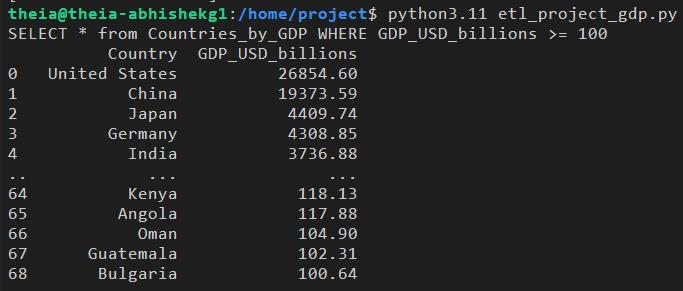
-
Created files and the log contents
创建的文件和日志内容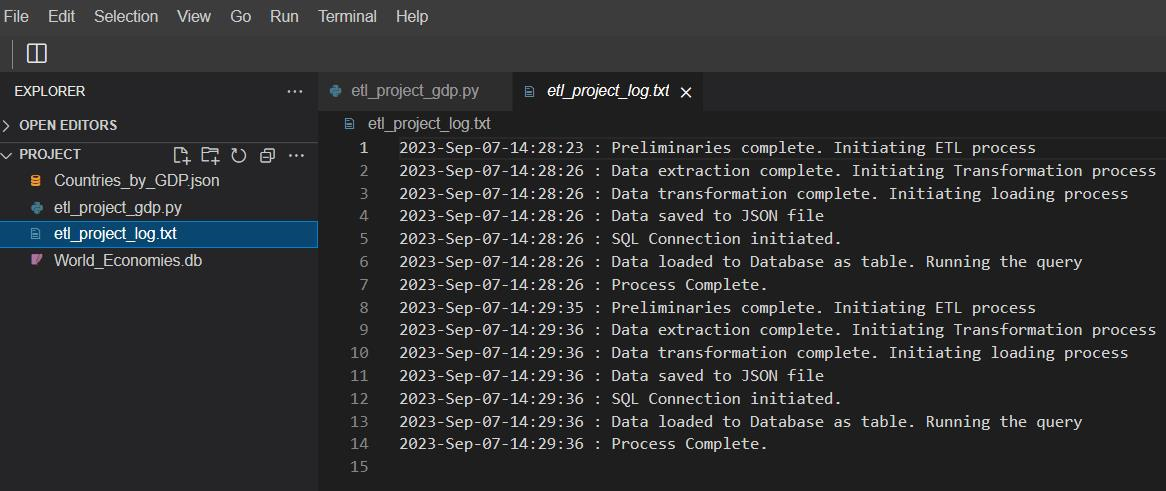
Important Note: 重要提示:
Maintaining consistency of the lab structure, the webpage being accessed is routed through an archive database. Often, in case the archive server is busy, the users may encounter delayed execution and/or an error such as:
为了保持实验室结构的一致性,被访问的网页通过一个存档数据库进行路由。通常,如果存档服务器繁忙,用户可能会遇到执行延迟和/或错误,例如:
requests.exceptions.ConnectionError: HTTPSConnectionPool(host='web.archive.org', port=443): Max retries exceeded with url.
In such a situation, try executing the code again. In case the problem persists, you can change the URL to the live version, such as:
在这种情况下,请尝试再次执行代码。如果问题仍然存在,您可以将 URL 更改为实时版本,例如:
https://en.wikipedia.org/wiki/List_of_countries_by_GDP_%28nominal%29
Practice project solution 实践项目解决方案
In case you are not able to get the required output from the code or are facing some errors, the final file for etl_project_gdp.py is shared below. Please note that this is for your help, and we encourage you to first try to resolve the errors on your own.
如果您无法从代码中获得所需的输出或遇到一些错误,下面提供了 etl_project_gdp.py 的最终文件。请注意,这仅供您参考,我们鼓励您首先尝试自行解决错误。
etl_project_gdp.py
# Code for ETL operations on Country-GDP data

# Importing the required libraries

from bs4 import BeautifulSoup
import requests
import pandas as pd
import numpy as np
import sqlite3
from datetime import datetime

def extract(url, table_attribs):
    ''' The purpose of this function is to extract the required
    information from the website and save it to a dataframe. The
    function returns the dataframe for further processing. '''

    page = requests.get(url).text
    data = BeautifulSoup(page,'html.parser')
    df = pd.DataFrame(columns=table_attribs)
    tables = data.find_all('tbody')
    rows = tables[2].find_all('tr')
    for row in rows:
        col = row.find_all('td')
        if len(col)!=0:
            if col[0].find('a') is not None and '—' not in col[2]:
                data_dict = {"Country": col[0].a.contents[0],
                             "GDP_USD_millions": col[2].contents[0]}
                df1 = pd.DataFrame(data_dict, index=[0])
                df = pd.concat([df,df1], ignore_index=True)
    return df

def transform(df):
    ''' This function converts the GDP information from Currency
    format to float value, transforms the information of GDP from
    USD (Millions) to USD (Billions) rounding to 2 decimal places.
    The function returns the transformed dataframe.'''

    GDP_list = df["GDP_USD_millions"].tolist()
    GDP_list = [float("".join(x.split(','))) for x in GDP_list]
    GDP_list = [np.round(x/1000,2) for x in GDP_list]
    df["GDP_USD_millions"] = GDP_list
    df=df.rename(columns = {"GDP_USD_millions":"GDP_USD_billions"})
    return df

def load_to_csv(df, csv_path):
    ''' This function saves the final dataframe as a `CSV` file
    in the provided path. Function returns nothing.'''

    df.to_csv(csv_path)

def load_to_db(df, sql_connection, table_name):
    ''' This function saves the final dataframe to as a database table
    with the provided name. Function returns nothing.'''

    df.to_sql(table_name, sql_connection, if_exists='replace', index=False)

def run_query(query_statement, sql_connection):
    ''' This function runs the stated query on the database table and
    prints the output on the terminal. Function returns nothing. '''

    print(query_statement)
    query_output = pd.read_sql(query_statement, sql_connection)
    print(query_output)

def log_progress(message):
    ''' This function logs the mentioned message at a given stage of the
    code execution to a log file. Function returns nothing.'''

    timestamp_format = '%Y-%h-%d-%H:%M:%S' # Year-Monthname-Day-Hour-Minute-Second
    now = datetime.now() # get current timestamp
    timestamp = now.strftime(timestamp_format)
    with open("./etl_project_log.txt","a") as f:
        f.write(timestamp + ' : ' + message + '\n')

''' Here, you define the required entities and call the relevant
functions in the correct order to complete the project. Note that this
portion is not inside any function.'''

url = 'https://web.archive.org/web/20230902185326/https://en.wikipedia.org/wiki/List_of_countries_by_GDP_%28nominal%29'
table_attribs = ["Country", "GDP_USD_millions"]
db_name = 'World_Economies.db'
table_name = 'Countries_by_GDP'
csv_path = './Countries_by_GDP.csv'

log_progress('Preliminaries complete. Initiating ETL process')

df = extract(url, table_attribs)

log_progress('Data extraction complete. Initiating Transformation process')

df = transform(df)

log_progress('Data transformation complete. Initiating loading process')

load_to_csv(df, csv_path)

log_progress('Data saved to CSV file')

sql_connection = sqlite3.connect('World_Economies.db')

log_progress('SQL Connection initiated.')

load_to_db(df, sql_connection, table_name)

log_progress('Data loaded to Database as table. Running the query')

query_statement = f"SELECT * from {table_name} WHERE GDP_USD_billions >= 100"
run_query(query_statement, sql_connection)

log_progress('Process Complete.')

sql_connection.close()
Conclusion 结论
Congratulations on completing this project!
恭喜您完成此项目!
In this project, you performed complex Extract, Transform, and Loading operations on real world data. By now, you should be able to:
在此项目中,您对真实世界数据执行了复杂的提取、转换和加载操作。现在,您应该能够:
- Extract relevant information from websites using Webscraping and requests API.
使用网络抓取和请求 API 从网站提取相关信息。 - Transform the data to a required format.
将数据转换为所需格式。 - Load the processed data to a local file or as a database table.
将处理后的数据加载到本地文件或作为数据库表。 - Query the database table using Python.
使用 Python 查询数据库表。 - Create detailed logs of all operations conducted.
创建所有操作的详细日志。