Module 02 · Web App Deployment using Flask
Hands-on Lab: Building and Deploying a Web App using Flask App动手实验:使用 Flask 构建和部署 Web 应用
In this section, you will work with routes and HTTP requests in Flask. When you click the Launch Application button below, the Theia tool in Skills Networks Labs along with the lab instructions will open in a new browser tab.
在本节中,您将学习如何在 Flask 中处理路由和 HTTP 请求。当您点击下方的"启动应用程序"按钮时,Skills Networks Labs 中的 Theia 工具以及实验说明将在新的浏览器标签页中打开。

Introduction 引言
In this lab, we createa a basic application of mathematical functions and deploy it over a web interface using Flask. The purpose is to connect all the pieces of knowledge gained in the course till now, and see the application development and deployment steps in action.
在本实验中,我们创建一个基本的数学函数应用程序,并使用 Flask 通过 Web 界面进行部署。目的是将课程至今所学的所有知识联系起来,并实际观察应用程序开发和部署步骤。
Estimated time needed: 30 minutes
预计所需时间:30 分钟
Objectives 目标
In this assignment you will:
在本作业中,你将:
- Task 1: Create the mathematical functions.
任务 1:创建数学函数。 - Task 2: Package the functions and test the package.
任务 2:打包函数并测试包。 - Task 3: Web Deployment of the application package using Flask.
任务 3:使用Flask 进行应用程序包的 Web 部署。
Task 1: Write the mathematical functions 任务 1:写出数学函数
In this task, you arre required to write a script that has functions to add, subtract and multiply two values. Let's call this script mathematics.py
在这个任务中,你需要编写一个脚本,该脚本具有添加、减去和乘以两个值的函数。我们将这个脚本命名为 mathematics.py 。
Follow the steps for this task.
按照以下步骤完成任务。
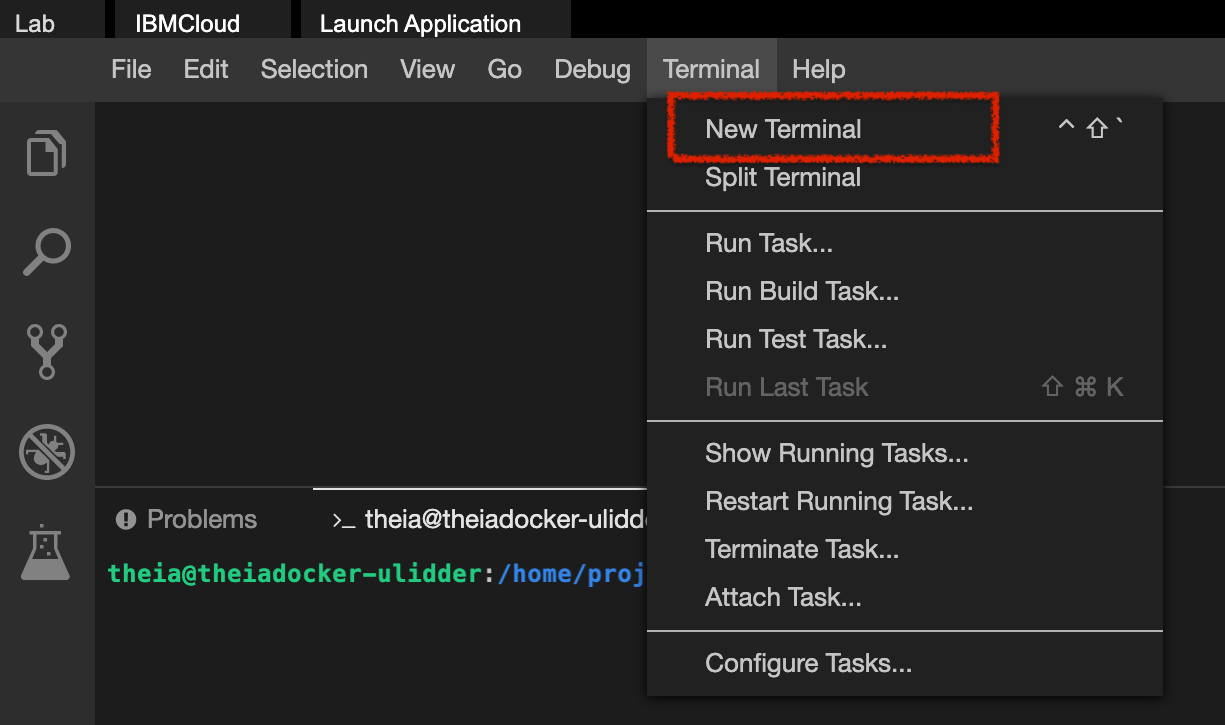
- Open a terminal window by using the menu in the editor: Terminal > New Terminal.
通过编辑器中的菜单打开一个终端窗口:终端 > 新建终端。
- Go to the project home directory.
前往project主目录。
cd /home/project- Run the following command to Git clone the project directory from the clone URL you had copied in the prework lab.
运行以下命令,从您在预备实验中复制的克隆 URL 克隆项目目录。
git clone https://github.com/ibm-developer-skills-network/hjbsk-build_deploy_app_flask- Change to the
practice_projectfolder.
切换到practice_project文件夹。
cd /home/project/hjbsk-build_deploy_app_flask- Create folder named
Mathsand change to that directory.
创建名为Maths的文件夹并切换到该目录。
mkdir Mathscd Maths- In the explorer, go to the
Mathsdirectory and create a new file calledmathematics.py.
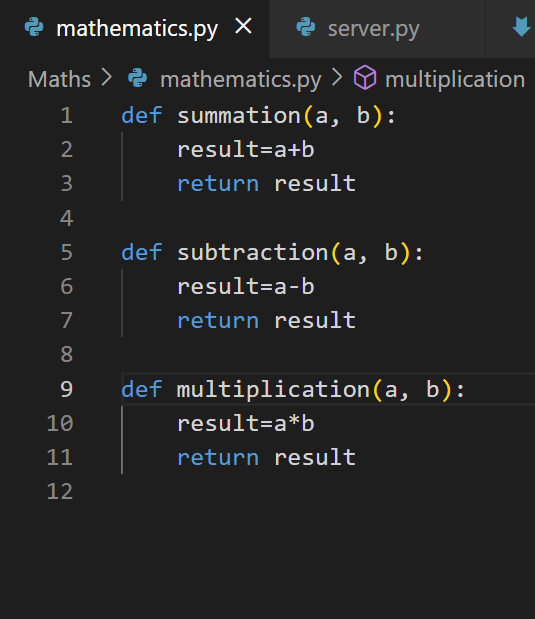
在资源管理器中,进入Maths目录并创建一个名为mathematics.py的新文件。 - Add function summation which takes in the
aandbas a number arguments, inmathematics.py.
添加求和函数,该函数接收a和b作为数值参数,在mathematics.py中。
Click here for solution
点击此处查看解决方案
def summation(a, b):
    result = a + b
    return result
- Add function subtraction which takes in the
aandbas a number arguments, inmathematics.py.
添加减法函数,该函数接收a和b作为数值参数,在mathematics.py中。
Click here for solution
点击此处查看解决方案
def subtraction(a, b):
    result = a - b
    return result
- Add function multiplication which takes in the
aandbas a number arguments, inmathematics.py.
添加乘法函数,该函数接收a和b作为数值参数,在mathematics.py中。
Click here for solution
点击此处查看解决方案
def multiplication(a, b):
    result = a * b
    return result
Task 2Package the functions 任务 2:打包函数
- Create
__init__.pyfile in the directoryMaths.
在目录Maths中创建__init__.py文件。 - Import the file
mathematics.pyto the__init__.pyfile.
将文件mathematics.py导入__init__.py文件。
from . import mathematics
- Import the package
Mathsinserver.py.
在server.py中导入包Maths。
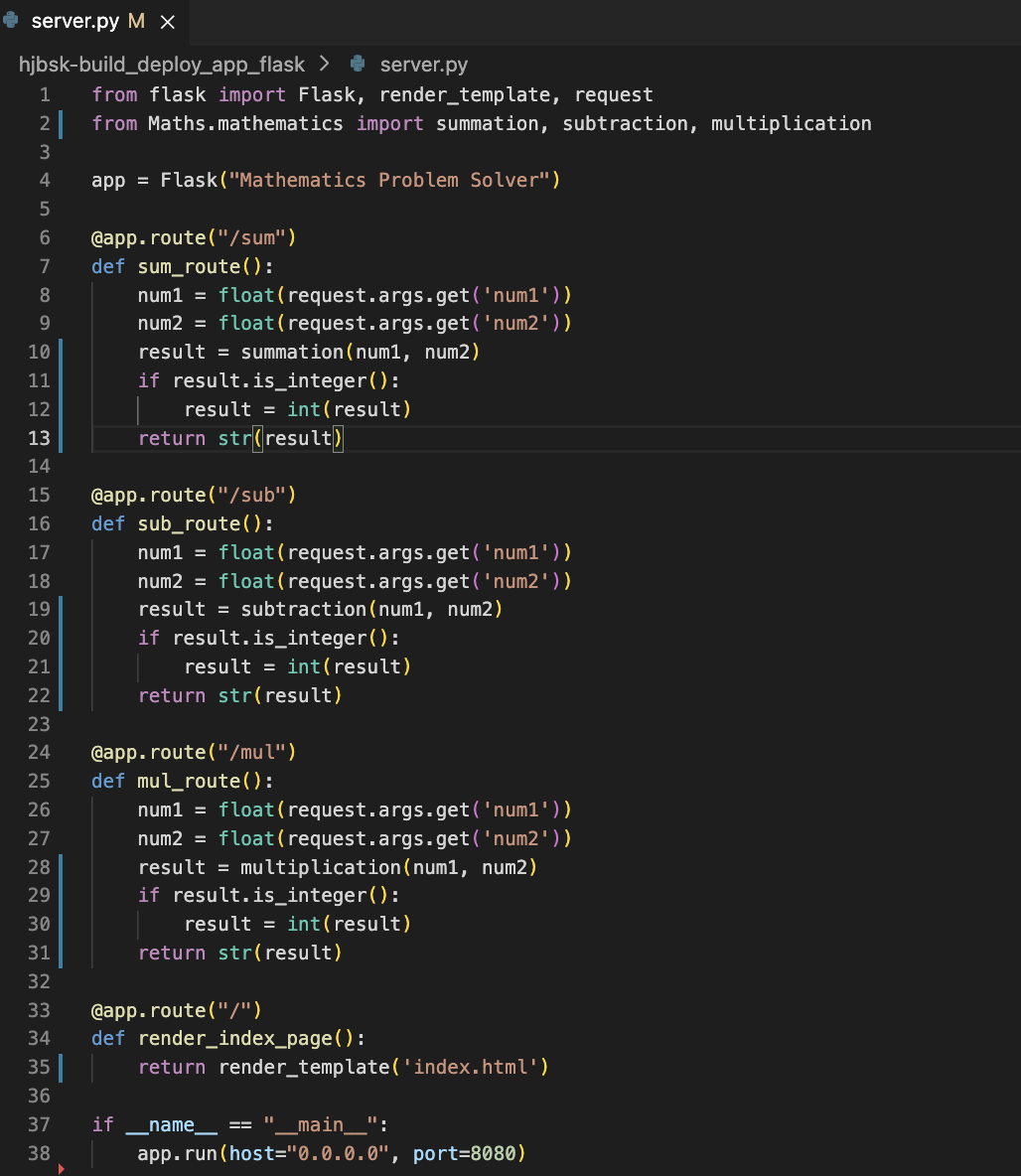
from Maths.mathematics import summation, subtraction, multiplication
- In the
server.py, for end-point/, implement a method that renders theindex.html.
在server.py中,针对端点/,实现一个渲染index.html的方法。
@app.route("/")
def render_index_page():
    return render_template('index.html')
- In the space provided in
server.pyfor the endpoint/sumimplement a function that uses the appropriate summation function from the package you created in the previous part. The function should retrievenum1andnum2as float inputs from the request parameters. It should then check if the result is a whole number using theis_integer()method. If it is, convert the result to an integer before returning it as a string.
在server.py提供的空间中,为端点/sum实现一个函数,该函数使用你在上一部分创建的包中的适当求和函数。该函数应从请求参数中获取num1和num2作为浮点数输入。然后,它应使用is_integer()方法检查结果是否为整数。如果是,则在将其作为字符串返回之前将其转换为整数。 - In the space provided in
server.pyfor the endpoint/subimplement a function that uses the appropriate subtraction function from the package you created in the previous part. The function should retrievenum1andnum2as float inputs from the request parameters. It should then check if the result is a whole number using theis_integer()method. If it is, convert the result to an integer before returning it as a string.
在server.py提供的空间中,为端点/sub实现一个函数,该函数使用你在上一部分创建的包中的适当减法函数。该函数应从请求参数中获取num1和num2作为浮点数输入。然后,它应使用is_integer()方法检查结果是否为整数。如果是,则在将其作为字符串返回之前将其转换为整数。 - In the space provided in
server.pyfor the endpoint/mulimplement a function that uses the appropriate multiplication function from the package you created in the previous part. The function should retrievenum1andnum2as float inputs from the request parameters. It should then check if the result is a whole number using theis_integer()method. If it is, convert the result to an integer before returning it as a string.
在server.py提供的空间中,为端点/mul实现一个函数,该函数应使用你在上一部分创建的包中的适当乘法函数。该函数应从请求参数中获取num1和num2作为浮点数输入。然后,它应使用is_integer()方法检查结果是否为整数。如果是,则在将其作为字符串返回之前将其转换为整数。
Task 3Web Deployment of the application package using Flask 任务 3:使用Flask 部署应用程序包到 Web
- Change current directory on the terminal to the hjbsk-build_deploy_app_flask directory and run the server from your terminal.
在终端中将当前目录更改为 hjbsk-build-deploy_app_flask 目录,并从您的终端运行服务器。
cd /home/project/hjbsk-build_deploy_app_flask && python3.11 server.py
- You will see that the server starts up in port 8080.
您将看到服务器在端口 8080 上启动。 - Click on the
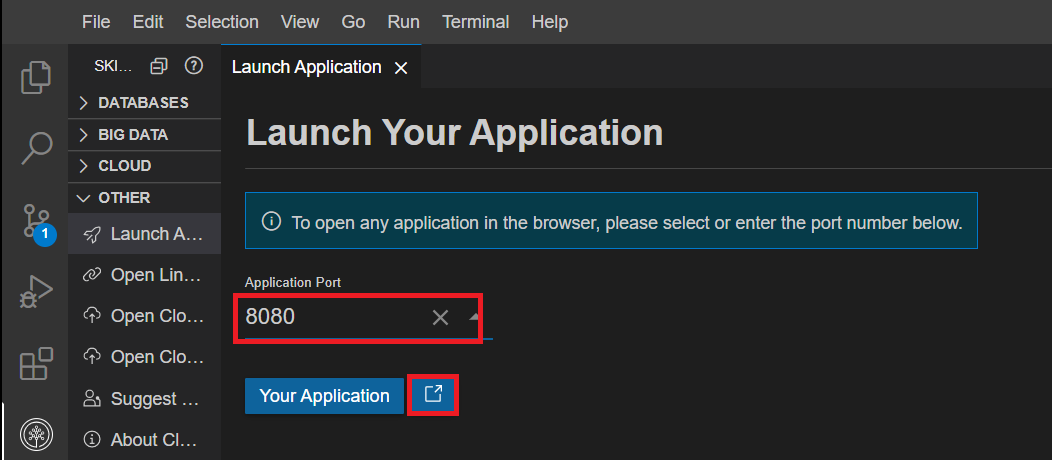
Skills Network buttonon the left, it will open theSkills Network Toolbox. Then click theOtherthenLaunch Application.
点击左侧的Skills Network button,它将打开Skills Network Toolbox。然后点击Other,再点击Launch Application。
From there you should be able to enter the port number.
从那里您应该能够输入端口号。
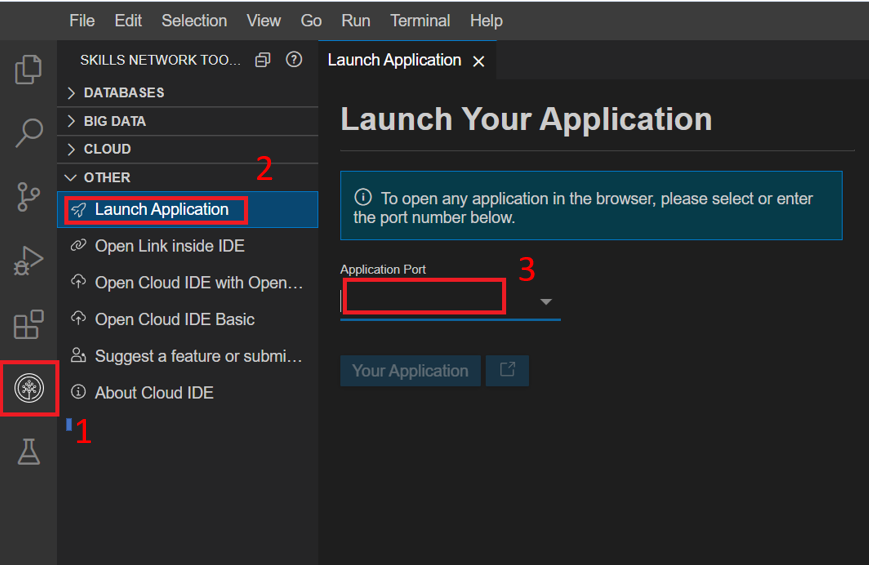
Connect to port 8080and click Launch button.
连接到端口 8080 并点击 Launch 按钮。
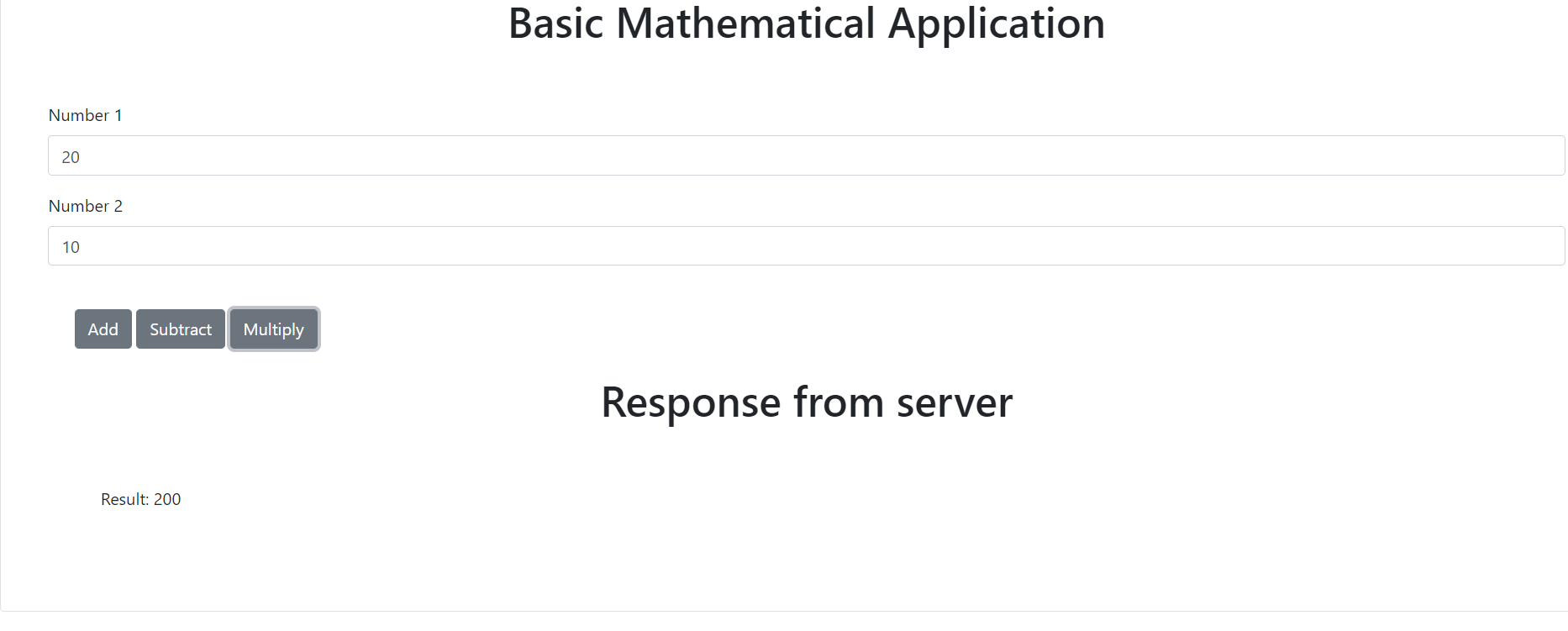
- A new browser window opens up with the index page as shown below.
将打开一个新的浏览器窗口,显示如下索引页面。
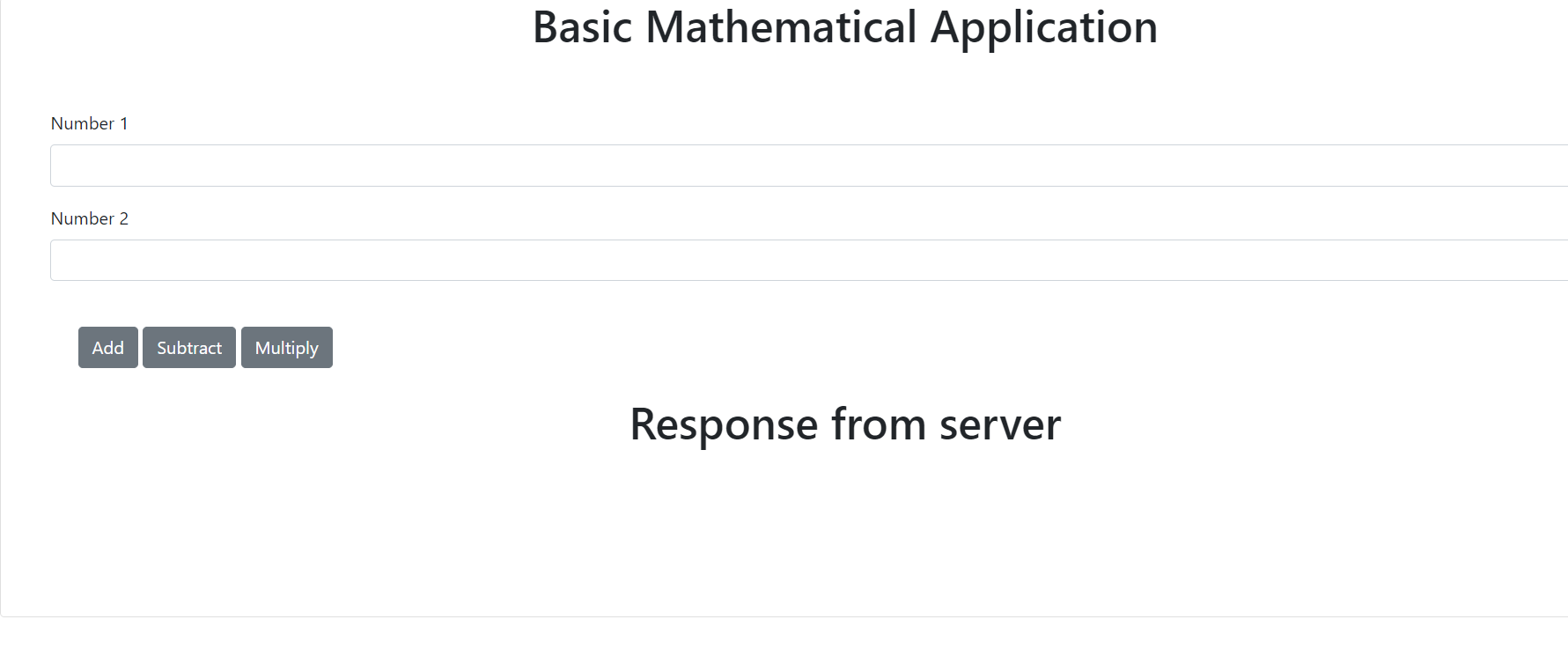
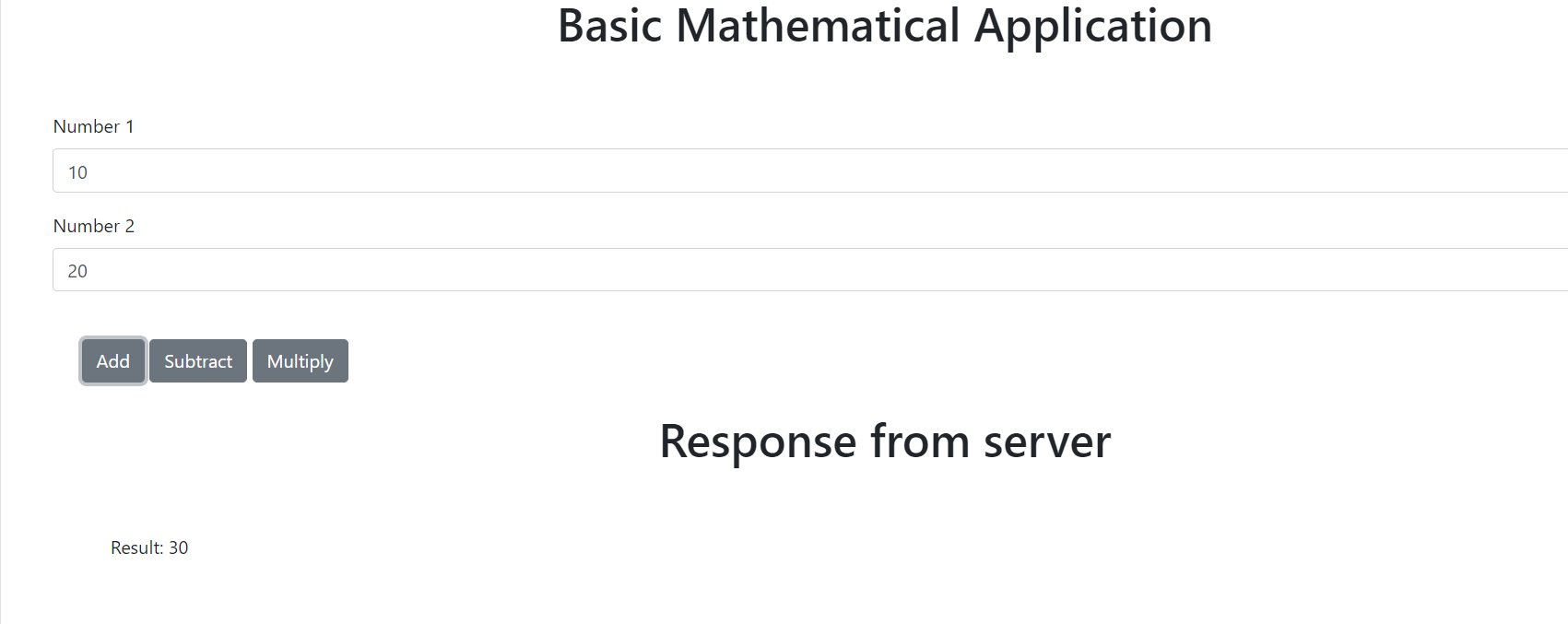
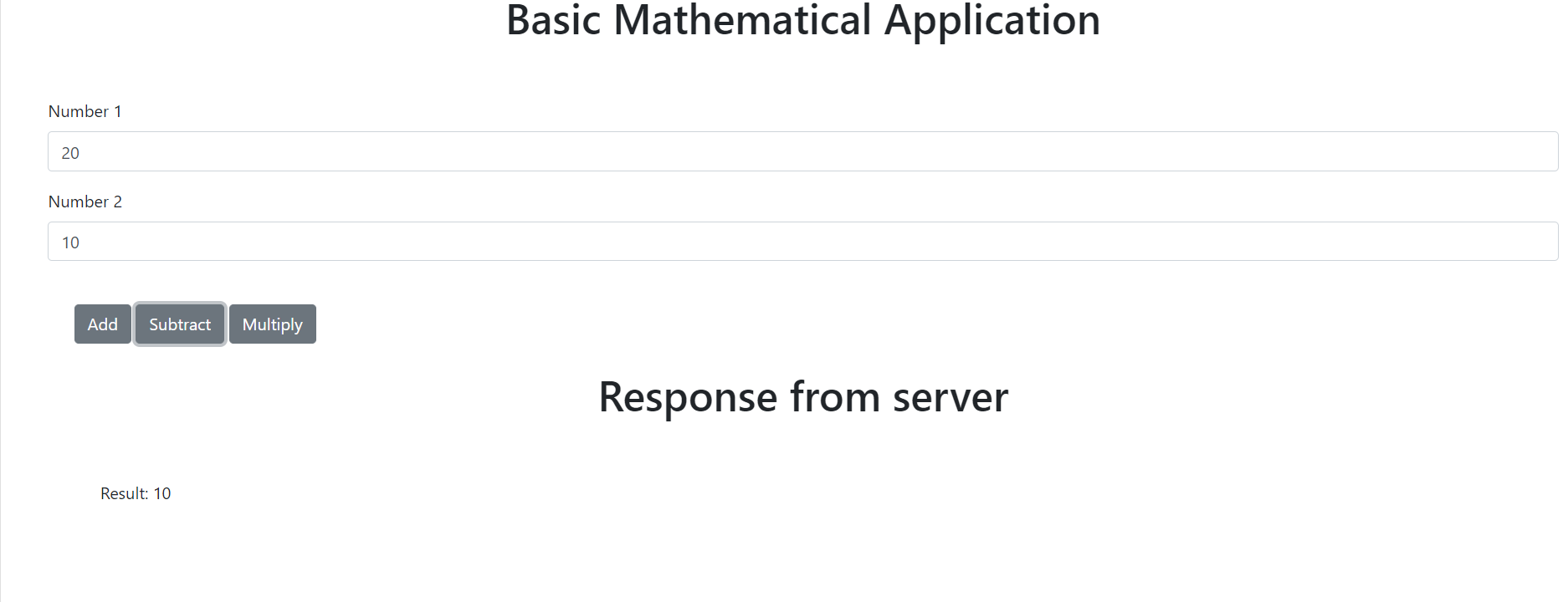
Test your application for the desired outputs. Some examples are shown below.
测试您的应用程序以获得预期输出。以下是一些示例。
(Optional) Practice exercise (可选)练习练习
Interested learners can try to incorporate error handling capability in this deployed application. For e.g. in case the interface receives non numerical entries for mathematical operations, what should the system response be?
感兴趣的学员可以尝试在这个已部署的应用程序中添加错误处理功能。对于e.g,如果接口在数学运算中接收到非数字输入,系统应该如何响应?
Conclusion 结论
Congratulations! You have completed the tasks for this project.
恭喜!您已完成此项目的任务。
By the end of this lab, you have:
在本实验结束时,您将:
- Created functions that perform mathematical operations.
创建了执行数学运算的函数。 - Created a package for these functions.
为这些函数创建了一个软件包。 - Deployed the application that uses this package on
localhostusing Flask.
在本地使用 Flask 部署了使用该软件包的应用程序。
Authors 作者
Shivam
Change Log 变更日志
| Date (YYYY-MM-DD) 日期(YYYY-MM-DD) | Version 版本 | Changed By 更改者 | Change Description 更改描述 |
|---|---|---|---|
| 2025-05-22 | 1.2 | Ritika Joshi | Modified the instructions as part of Content Analysis 在内容分析中修改了说明 |
| 2023-07-13 | 1.1 | Abhishek Gagneja | Modified the instruction set 修改了指令集 |
| 2023-06-28 | 1.0 | Shivam | Created initial version of the lab 创建了实验的初始版本 |