Module 02 · Web App Deployment using Flask
Hands-on Lab: Building an API with Flask: Route Creation, Error Handling, and HTTP Requests动手实验:使用 Flask 构建 API:路由创建、错误处理和 HTTP 请求

Estimated time needed: 45 minutes
预计所需时间:45 分钟
Welcome to part 2 of Flask lab. You will work with routes and HTTP requests in this lab. You will practice creating a small RESTful API. Finally, you will work with application level error handlers for common errors like:
欢迎来到Flask 实验的第二天。在这个实验中,你将学习路由和 HTTP 请求。你将练习创建一个小型 RESTful API。最后,你将学习如何处理应用程序级别的错误处理,例如:
- 404 NOT FOUND 404 未找到
- 500 INTERNAL SERVER ERROR
500 内部服务器错误
You should know all the concepts you require for this lab from the previous set of videos. Feel free to pause the lab and review the module if you are unclear on how to perform a task or need more information.
你应该从上一系列视频中了解所有本实验所需的概念。如果你不清楚如何执行任务或需要更多信息,可以随时暂停实验并复习模块。
Learning Objectives 学习目标
After completing this lab, you will be able to:
完成此实验后,您将能够:
- Write routes to process requests to the Flask server at specific URLs
编写路由以处理对 Flask 服务器在特定 URL 的请求 - Handle parameters and arguments sent to the URLs
处理发送到 URL 的参数和参数 - Write error handlers for server and user errors
编写服务器和用户错误的错误处理程序
About Skills Network Cloud IDE
Skills Network Cloud IDE (based on Theia and Docker) provides an environment for hands on labs for course and project related labs. Theia is an open source IDE (Integrated Development Environment) that runs on desktop or the cloud. To complete this lab, you will use the Cloud IDE based on Theia and MongoDB running in a Docker container.
Important Notice about this lab environment
Please be aware that sessions do not persist for this lab environment. Every time you connect to this lab, a new environment is created for you. Any data saved in earlier sessions will be lost. Plan to complete these labs in a single session to avoid losing your data.
Set Up the Lab Environment
There are some required prerequisite preparations before you start the lab.
Open a Terminal
Open a terminal window using the menu in the editor: Terminal > New Terminal.
In the terminal, if you are not in the /home/project folder, change to your project folder now.
cd /home/project
Create the lab directory
You should have a lab directory from Part 1 of the lab. If you do not have the directory, create it now.
mkdir lab
Change to the lab directory:
cd lab
You created a server.py file in the lab directory in Part 1 of the lab. Create the file if it is not present and add the following starting code snippet to it.
# Import the Flask class from the flask module
from flask import Flask

# Create an instance of the Flask class, passing in the name of the current module
app = Flask(__name__)

# Define a route for the root URL ("/")
@app.route("/")
def index():
    # Function that handles requests to the root URL
    # Return a plain text response
    return "hello world"
Note: Ensure that all code uses 4-space indentation to avoid
IndentationError.
Recall that the above code creates a Flask server and adds a home endpoint “/“ that returns the string hello world. You will now add more code to this file in this lab.
As a recap, use the following command to run the server from the terminal:
flask --app server --debug run
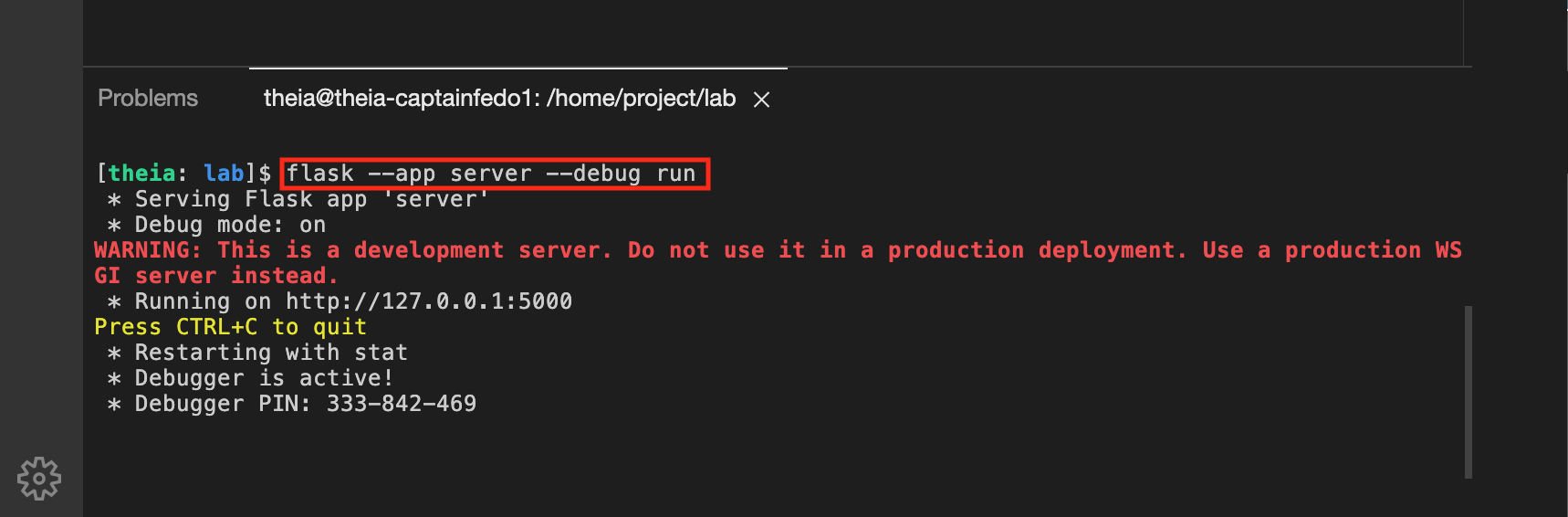
Note: If port
5000is in use, try a different port like5001. If the server fails to start, checkserver.pyfor syntax errors or missing imports.
You should now use the CURL command with localhost:5000/. Note that the terminal is running the server. You can use the Split Terminal button to split the terminal and run the following command in the second tab.
curl -X GET -i -w '\n' localhost:5000
Optional
If working in the terminal becomes difficult because the command prompt is long, you can shorten the prompt using the following command:
export PS1="[\[\033[01;32m\]\u\[\033[00m\]: \[\033[01;34m\]\W\[\033[00m\]]\$ "
Step 1: Set response status code
In the last part, you saw Flask automatically sends an HTTP 200 OK successful response when you sent back a message. However, you can also set the return status explicitly. Recall that there are two ways to do this, as discussed in the video:
- Send a tuple back with the message
- Use the make_response() method to create a custom response and set the status
Your Tasks
- Send custom HTTP code back with a tuple.
You will reuse theserver.pyfile you worked on in the last part. Create a new method namedno_contentwith the@app.routedecorator and URL of/no_content. The method does not have any arguments. Return a tuple with the JSON messageNo content found.
Click here for a hint.
You can use the following skeleton code as a start:
{insert @app decorator}
def {insert method name}():
    """return 'No content found' with a status of 204

    Returns:
        string: No content found
        status code: 204
    """
    return ({insert dictionary here}, {insert HTTP code here})
You can test the endpoint with the following CURL command:
curl -X GET -i -w '\n' localhost:5000/no_content
You should see an output similar to the following. Note the status of 204 and the Content-Type of application/json. Note that even though you returned a JSON message, it is not sent back to the client as 204. By default, nothing is returned.
HTTP/1.1 204 NO CONTENTServer: Werkzeug/2.2.2 Python/3.7.16Date: Wed, 28 Dec 2022 19:49:18 GMTContent-Type: application/jsonConnection: close
Why Use 204?
The 204 No Content status is used in REST APIs when a request succeeds but no data needs to be returned. For example:
- After deleting a resource (e.g., a user), the server confirms success without sending the deleted data.
- When confirming an action (e.g., updating settings) without additional information.
- Here we are returning a JSON message.But because we are telling the client via the status code 204 that no content will be returned, most HTTP clients will ignore the body.If you need to show a message ,use status code 200
- Send custom HTTP code back with the
make_response()method.Themake_response()method in Flask is used to create a full HTTP response object manually, giving you more control over the response than just returning a value or a tuple.
Create a second method namedindex_explicitwith the@app.routedecorator and a URL of/exp. The method does not have any arguments. Use themake_response()method to create a new response. Set the status to 200.
Click here for a hint.
Import the Flask class from the flask module
Import the make_response method from the flask module.
{insert @app decorator}
def {insert method name here}:
    """return 'Hello World' message with a status code of 200

    Returns:
        string: Hello World
        status code: 200
    """
    resp = make_response({insert ditionary here})
    resp.status_code = {insert status code here}
    return resp
You can test the endpoint with the following CURL command:
curl -X GET -i -w '\n' localhost:5000/exp
You should see an output similar to the one given below. Note the status of 200, Content-Type of application/json, and JSON output of {"message": "Hello World"}:
HTTP/1.1 200 OKServer: Werkzeug/2.2.2 Python/3.7.16Date: Wed, 28 Dec 2022 19:55:46 GMTContent-Type: application/jsonContent-Length: 31Connection: close{"message": "Hello World"}
Solution
Double-check that your work matches the following solution.
Click here for the answer.
from flask import Flask, make_response

# Create an instance of the Flask class, passing in the name of the current module
app = Flask(__name__)

# Define a route for the root URL ("/")
@app.route("/")
def index():
    # Function that handles requests to the root URL
    # Return a plain text response
    return "hello world"

# Define a route for the "/no_content" URL
@app.route("/no_content")
def no_content():
    """Return 'no content found' with a status of 204.

    Returns:
        tuple: A tuple containing a dictionary and a status code.
    """
    # Create a dictionary with a message and return it with a 204 No Content status code
    return ({"message": "No content found"}, 204)

# Define a route for the "/exp" URL
@app.route("/exp")
def index_explicit():
    """Return 'Hello World' message with a status code of 200.

    Returns:
        response: A response object containing the message and status code 200.
    """
    # Create a response object with the message "Hello World"
    resp = make_response({"message": "Hello World"})
    # Set the status code of the response to 200
    resp.status_code = 200
    # Return the response object
    return resp
Step 2: Process input arguments
It is common for clients to pass arguments in the URL. You will learn how to process arguments in this lab. The lab provides a list of people with their id, first name, last name, and address information in an object. Normally, this information is stored in a database, but you are using a hard coded list for your simple use case. This data was generated with Mockaroo.
The client will send in requests in the form of http://localhost:5000?q=first_name. You will create a method that will accept a first_name as the input and return a person with that first name.
Click here to copy the data into the file.
Copy the following list to the
server.pyfile:
from flask import Flask, make_responseapp = Flask(__name__)data = [{"id": "3b58aade-8415-49dd-88db-8d7bce14932a","first_name": "Tanya","last_name": "Slad","graduation_year": 1996,"address": "043 Heath Hill","city": "Dayton","zip": "45426","country": "United States","avatar": "http://dummyimage.com/139x100.png/cc0000/ffffff",},{"id": "d64efd92-ca8e-40da-b234-47e6403eb167","first_name": "Ferdy","last_name": "Garrow","graduation_year": 1970,"address": "10 Wayridge Terrace","city": "North Little Rock","zip": "72199","country": "United States","avatar": "http://dummyimage.com/148x100.png/dddddd/000000",},{"id": "66c09925-589a-43b6-9a5d-d1601cf53287","first_name": "Lilla","last_name": "Aupol","graduation_year": 1985,"address": "637 Carey Pass","city": "Gainesville","zip": "32627","country": "United States","avatar": "http://dummyimage.com/174x100.png/ff4444/ffffff",},{"id": "0dd63e57-0b5f-44bc-94ae-5c1b4947cb49","first_name": "Abdel","last_name": "Duke","graduation_year": 1995,"address": "2 Lake View Point","city": "Shreveport","zip": "71105","country": "United States","avatar": "http://dummyimage.com/145x100.png/dddddd/000000",},{"id": "a3d8adba-4c20-495f-b4c4-f7de8b9cfb15","first_name": "Corby","last_name": "Tettley","graduation_year": 1984,"address": "90329 Amoth Drive","city": "Boulder","zip": "80305","country": "United States","avatar": "http://dummyimage.com/198x100.png/cc0000/ffffff",}]
Let's confirm that the data has been copied to the file. Copy the following code into the server.py file to create an end point that returns the person’s data to the client in JSON format.
@app.route("/data")
def get_data():
    try:
        # Check if 'data' exists and has a length greater than 0
        if data and len(data) > 0:
            # Return a JSON response with a message indicating the length of the data
            return {"message": f"Data of length {len(data)} found"}
        else:
            # If 'data' is empty, return a JSON response with a 500 Internal Server Error status code
            return {"message": "Data is empty"}, 500
    except NameError:
        # Handle the case where 'data' is not defined
        # Return a JSON response with a 404 Not Found status code
        return {"message": "Data not found"}, 404
The above code simply checks if the variable data exits. If it does not, the NameError is raised and an HTTP 404 is returned. If data exists and is empty, an HTTP 500 is returned. If data exists and is not empty, an HTTP 200 success message is returned.
Run a CURL command to confirm you get the success message back:
curl -X GET -i -w '\n' localhost:5000/data
Expected result:
HTTP/1.1 200 OKServer: Werkzeug/2.2.2 Python/3.7.16Date: Wed, 28 Dec 2022 20:51:56 GMTContent-Type: application/jsonContent-Length: 42Connection: close{"message": "Data of length 5 found"}
Your Tasks
Create a method called name_search with the @app.route decorator. This method should be called when a client requests for the /name_search URL. The method will not accept any parameter, however, will look for the argument q in the incoming request URL. This argument holds the first_name the client is looking for. The method returns:
- Person information with a status of
HTTP 200if the first_name is found in the data - Message of
Invalid input parameterwith a status ofHTTP 400if the argumentqis missing from the request - Message of
Person not foundwith a status code ofHTTP 404if the person is not found in the data
Hint
Ensure you import the request module from Flask. You will use this to get the first name from the HTTP request.
from flask import request
You can use the following code as your starting point:
Click here for a hint.
@app.route("/name_search")
def name_search():
    """Find a person in the database.

    Returns:
        json: Person if found, with status of 200
        404: If not found
        400: If argument 'q' is missing
        422: If argument 'q' is present but invalid
    """
    # Get the argument 'q' from the query parameters of the request
    query = request.args.get('q')

    # Check if the query parameter 'q' is missing
    if query is None:
        return {"message": "Query parameter 'q' is missing"}, 400

    # Check if the query parameter is present but invalid (e.g., empty or numeric)
    if query.strip() == "" or query.isdigit():
        return {"message": "Invalid input parameter"}, 422

    # Iterate through the 'data' list to look for the person whose first name matches the query
    for person in data:
        if query.lower() in person["first_name"].lower():
            # If a match is found, return the person as a JSON response with a 200 OK status code
            return person, 200

    # If no match is found, return a JSON response with a message indicating the person was not found and a 404 Not Found status code
    return {"message": "Person not found"}, 404
You can test the endpoint with the following CURL command. Ensure that the server is running in the terminal as in the previous steps.
curl -X GET -i -w '\n' "localhost:5000/name_search?q=Abdel"
You should see an output similar to the one given below. Note the status of 200, Content-Type of application/json, and JSON output of person with first name Abdel:
HTTP/1.1 200 OKServer: Werkzeug/2.2.2 Python/3.7.16Date: Wed, 28 Dec 2022 21:14:31 GMTContent-Type: application/jsonContent-Length: 295Connection: close{"address": "2 Lake View Point","avatar": "http://dummyimage.com/145x100.png/dddddd/000000","city": "Shreveport","country": "United States","first_name": "Abdel","graduation_year": 1995,"id": "0dd63e57-0b5f-44bc-94ae-5c1b4947cb49","last_name": "Duke","zip": "71105"}
Next, test that the method returns HTTP 422 if the argument q is invalid:
curl -X GET -i -w '\n' "localhost:5000/name_search?q=123"
or
curl -X GET -i -w '\n' "localhost:5000/name_search?q="
Note: Use
HTTP 400(Bad Request) when the required query parameter is missing. UseHTTP 422(Unprocessable Entity) only if the parameter is present but has invalid or unacceptable content.
You should see an output similar to the one given below. Note the status of 422, Content-Type of application/json, and JSON output of Invalid input parameter:
HTTP/1.1 422 UNPROCESSABLE ENTITYServer: Werkzeug/2.2.2 Python/3.7.16Date: Wed, 28 Dec 2022 21:16:07 GMTContent-Type: application/jsonContent-Length: 43Connection: close{"message": "Invalid input parameter"}
Finally, let's test the case where the first_name is not present in our list of people:
curl -X GET -i -w '\n' "localhost:5000/name_search?q=qwerty"
You should see an output similar to the one given below. Note the status of 404, Content-Type of application/json, and JSON output of Person not found:
HTTP/1.1 404 NOT FOUNDServer: Werkzeug/2.2.2 Python/3.7.16Date: Wed, 28 Dec 2022 21:17:28 GMTContent-Type: application/jsonContent-Length: 36Connection: close{"message": "Person not found"}
Solution
Double-check that your work matches the following solution. There are other ways to implement this solution as well.
Click here for the answer.
@app.route("/name_search")
def name_search():
    """Find a person in the database based on the provided query parameter.

    Returns:
        json: Person if found, with status of 200
        404: If not found
        400: If the argument 'q' is missing
        422: If the argument 'q' is present but invalid (e.g., empty or numeric)
    """
    # Get the 'q' query parameter from the request URL
    query = request.args.get("q")

    # Check if the query parameter 'q' is missing
    if query is None:
        return {"message": "Query parameter 'q' is missing"}, 400

    # Check if the query parameter is present but invalid (empty or numeric)
    if query.strip() == "" or query.isdigit():
        return {"message": "Invalid input parameter"}, 422

    # Iterate through the 'data' list to search for a matching person
    for person in data:
        # Check if the query string is present in the person's first name (case-insensitive)
        if query.lower() in person["first_name"].lower():
            # Return the matching person as a JSON response with a 200 OK status code
            return person, 200

    # If no matching person is found, return a JSON response with a message and a 404 Not Found
    return {"message": "Person not found"}, 404
Step 3: Add dynamic URLs
An important part of back-end programming is creating APIs. An API is a contract between a provider and a user. It is common to create RESTful APIs that can be called by the front end or other clients. In a REST based API, the resource information is sent as part of the request URL. For example, with your resource or persons, the client can send the following request:
GET http://localhost/person/unique_identifier
This request asks for a person with a unique identifier. Another example is:
DELETE http://localhost/person/unique_identifier
In this case, the client asks to delete the person with this unique identifier.
Your Tasks
You are asked to implement both of these endpoints in this exercise. You will also implement a count method that returns the total number of persons in the data list. This will help confirm that the two methods GET and DELETE work, as required.
Task 1: Create GET /count endpoint
- Create /count endpoint.
Add the@app.get()decorator for the/countURL. Define the count function that simply returns the number of items in thedatalist.
Click here for a hint.
Use the len() method to return the number of items in the data list.
@app.route("/count")
def count():
    try:
        # Attempt to return a JSON response with the count of items in 'data'
        # Replace {insert code to find length of data} with len(data) to get the length of the 'data' collection
        return {"data count": len(data)}, 200
    except NameError:
        # If 'data' is not defined and raises a NameError
        # Return a JSON response with a message and a 500 Internal Server Error status code
        return {"message": "data not defined"}, 500
Test the count method by calling the endpoint.
curl -X GET -i -w '\n' "localhost:5000/count"
You should see an ouput with the number of items in the data list.
HTTP/1.1 200 OKServer: Werkzeug/2.2.2 Python/3.7.16Date: Sat, 31 Dec 2022 22:41:35 GMTContent-Type: application/jsonContent-Length: 22Connection: close{"data count": 5}
Task 2: Create GET /person/id endpoint
- Implement the GET endpoint to ask for a person by id.
Create a new endpoint forhttp://localhost/person/unique_identifier. The method should be namedfind_by_uuid. It should take an argument of type UUID and return the person JSON if found. If the person is not found, the method should return a 404 with a message of person not found. Finally, the client (curl) should only be able to call this method by passing a valid UUID type id.
Click here for a hint.
- use the type:name syntax to only allow callers to pass in a valid UUID.
- comparing uuid with string returns False. Make sure you convert UUID into str when comparing with the id attribute of the person.
@app.route("/person/<var_name>")
def find_by_uuid(var_name):
    # Iterate through the 'data' list to search for a person with a matching ID
    for person in data:
        # Check if the 'id' field of the person matches the 'var_name' parameter
        if person["id"] == str(var_name):
            # Return the person as a JSON response if a match is found
            return person

    # Return a JSON response with a message and a 404 Not Found status code if no matching person is found
    return {"message": "Person not found"}, 404
Test the /person/uuid URL by calling the endpoint.
curl -X GET -i localhost:5000/person/66c09925-589a-43b6-9a5d-d1601cf53287
You should see an ouput with the person and HTTP code of 200.
HTTP/1.1 200 OKServer: Werkzeug/2.2.2 Python/3.7.16Date: Sat, 31 Dec 2022 22:48:32 GMTContent-Type: application/jsonContent-Length: 294Connection: close{"address": "637 Carey Pass","avatar": "http://dummyimage.com/174x100.png/ff4444/ffffff","city": "Gainesville","country": "United States","first_name": "Lilla","graduation_year": 1985,"id": "66c09925-589a-43b6-9a5d-d1601cf53287","last_name": "Aupol","zip": "32627"}
If you pass in an invalid UUID, the server should return a 404 message.
curl -X GET -i localhost:5000/person/not-a-valid-uuid
You should see an error in the output with a code of 404. Flask automatically returns HTML, you will change the HTML in the next part of the lab to return JSON by default on all errors, including 404.
HTTP/1.1 404 NOT FOUNDServer: Werkzeug/2.2.2 Python/3.7.16Date: Sat, 31 Dec 2022 22:50:52 GMTContent-Type: text/html; charset=utf-8Content-Length: 207Connection: close<!doctype html><html lang=en><title>404 Not Found</title><h1>Not Found</h1><p>The requested URL was not found on the server. If you entered the URL manually, please check your spelling and try again.</p>
Finally, pass in a valid UUID that does not exist in the data list. The method should return a 404 with a message of person not found.
curl -X GET -i localhost:5000/person/11111111-589a-43b6-9a5d-d1601cf51111
You should see a JSON response with an HTTP code of 404 and a message of person not found.
HTTP/1.1 404 NOT FOUNDServer: Werkzeug/2.2.2 Python/3.7.16Date: Sat, 31 Dec 2022 22:52:24 GMTContent-Type: application/jsonContent-Length: 36Connection: close{"message": "person not found"}
Task 3: Create DELETE /person/id endpoint
- Implement the DELETE endpoint to delete a person resource.
Create a new endpoint for DELETEhttp://localhost/person/unique_identifier. The method should be nameddelete_by_uuid. It should take in an argument of type UUID and delete the person from the data list with that id. If the person is not found, the method should return a 404 with a message of person not found. Finally, the client (curl) should call this method by passing a valid UUID type id.
Click here for a hint.
- use the type:name syntax to only allow callers to pass in a valid UUID.
- comparing uuid with string returns False. Make sure you convert UUID into str when comparing with the id attribute of the person.
- pass the DELETE method tpye as the second argument to @app decorator or use the @app.delete() decorator.
@app.route("/person/<uuid:id>", methods=['DELETE'])
def delete_person(var_name):
    for person in data:
        if person["id"] == str(var_name):
            # Remove the person from the data list
            data.remove(person)
            # Return a JSON response with a message and HTTP status code 200 (OK)
            return {"message": "Person with ID deleted"}, 200
    # If no person with the given ID is found, return a JSON response with a message and HTTP status code 404 (Not Found)
    return {"message": "Person not found"}, 404
Test the DELETE /person/uuid URL by calling the endpoint.
curl -X DELETE -i localhost:5000/person/66c09925-589a-43b6-9a5d-d1601cf53287
You should see an ouput with the id of the person deleted and a status code of 200.
HTTP/1.1 200 OKServer: Werkzeug/2.2.2 Python/3.7.16Date: Sat, 31 Dec 2022 23:00:17 GMTContent-Type: application/jsonContent-Length: 56Connection: close{"message": "Person with ID 66c09925-589a-43b6-9a5d-d1601cf53287 deleted"}
You can now use the count endpoint you added earlier to test if the number of persons has reduced by one.
curl -X GET -i localhost:5000/count
You should see the count returned reduced by one.
HTTP/1.1 200 OKServer: Werkzeug/2.2.2 Python/3.7.16Date: Sat, 31 Dec 2022 23:06:55 GMTContent-Type: application/jsonContent-Length: 22Connection: close{"data count": 4}
If you pass an invalid UUID, the server should return a 404 message.
curl -X DELETE -i localhost:5000/person/not-a-valid-uuid
You should see an error in the output with a code of 404. Flask automatically returns HTML, and we will change the HTML in the next part of the lab to return JSON by default on all errors, including 404.
HTTP/1.1 404 NOT FOUNDServer: Werkzeug/2.2.2 Python/3.7.16Date: Sat, 31 Dec 2022 23:05:09 GMTContent-Type: text/html; charset=utf-8Content-Length: 207Connection: close<!doctype html><html lang=en><title>404 Not Found</title><h1>Not Found</h1><p>The requested URL was not found on the server. If you entered the URL manually please check your spelling and try again.</p>
Finally, pass in a valid UUID that does not exist in the data list. The method should return a 404 with a message of person not found.
curl -X DELETE -i localhost:5000/person/11111111-589a-43b6-9a5d-d1601cf51111
You should see a JSON response with an HTTP code of 404 and a message of person not found.
HTTP/1.1 404 NOT FOUNDServer: Werkzeug/2.2.2 Python/3.7.16Date: Sat, 31 Dec 2022 23:05:43 GMTContent-Type: application/jsonContent-Length: 36Connection: close{"message": "person not found"}
Solution
Double-check that your work matches the following solution.
Click here for the answer.
@app.route("/count")
def count():
    try:
        # Attempt to return the count of items in 'data' as a JSON response
        return {"data count": len(data)}, 200
    except NameError:
        # Handle the case where 'data' is not defined
        # Return a JSON response with a message and a 500 Internal Server Error status code
        return {"message": "data not defined"}, 500

@app.route("/person/<uuid:id>")
def find_by_uuid(id):
    # Iterate through the 'data' list to search for a person with a matching ID
    for person in data:
        # Check if the 'id' field of the person matches the 'id' parameter
        if person["id"] == str(id):
            # Return the matching person as a JSON response with a 200 OK status code
            return person
    # If no matching person is found, return a JSON response with a message and a 404 Not Found status code
    return {"message": "person not found"}, 404

@app.route("/person/<uuid:id>", methods=['DELETE'])
def delete_by_uuid(id):
    # Iterate through the 'data' list to search for a person with a matching ID
    for person in data:
        # Check if the 'id' field of the person matches the 'id' parameter
        if person["id"] == str(id):
            # Remove the person from the 'data' list
            data.remove(person)
            # Return a JSON response with a message confirming deletion and a 200 OK status code
            return {"message": f"Person with ID {id} deleted"}, 200
    # If no matching person is found, return a JSON response with a message and a 404 Not Found status code
    return {"message": "person not found"}, 404
Step 4: Parse JSON from Request body
Let's create another RESTful API. The client can send a POST request to http://localhost:5000/person with the person detail JSON as the body. The server should parse the request for the body and then create a new person with that detail. In your case, to create the person, simply add to the data list.
Your Tasks
Create a method called add_by_uuid with the @app.route decorator. This method should be called when a client requests with the POST method for the /person URL. The method will not accept any parameter but will grab the person details from the JSON body of the POST request. The method returns:
- The person’s
idwith an HTTP 200 status code if the person is successfully added to thedatalist. - A message
"Invalid input parameter"with an HTTP 422 status code if the JSON body is missing or empty.
Hint
Ensure you import the request module from Flask. You will use this to get the first name from the HTTP request.
from flask import request
You can use the following code as your starting point. In production code, you will put in some logic to validate the JSON coming in. You would not want to store any random data coming from a client. You can omit this validation for your simple use case.
Click here for a hint.
@app.route("/person", methods=['POST'])
def create_person():
    # Get the JSON data from the incoming request
    new_person = request.get_json()

    # Check if the JSON data is empty or None
    if not new_person:
        # Return a JSON response indicating that the request data is invalid
        # with a status code of 422 (Unprocessable Entity)
        return {"message": "Invalid input, no data provided"}, 422

    # Proceed with further processing of 'new_person', such as adding it to a database
    # or validating its contents before saving it

    # Assuming the processing is successful, return a success message with status code 200 (Created)
    return {"message": "Person created successfully"}, 200
You can test the endpoint with the following CURL command. Ensure that the server is running in the terminal as in the previous steps.
curl -X POST -i -w '\n' \--url http://localhost:5000/person \--header 'Content-Type: application/json' \--data '{"id": "4e1e61b4-8a27-11ed-a1eb-0242ac120002","first_name": "John","last_name": "Horne","graduation_year": 2001,"address": "1 hill drive","city": "Atlanta","zip": "30339","country": "United States","avatar": "http://dummyimage.com/139x100.png/cc0000/ffffff"}'
You should see an output similar to the one given below. Note the status of 200, Content-Type of application/json, and JSON output of person with the first name Abdel:
HTTP/1.1 200 OKServer: Werkzeug/2.2.2 Python/3.7.16Date: Sun, 01 Jan 2023 23:14:34 GMTContent-Type: application/jsonContent-Length: 56Connection: close{"message": "4e1e61b4-8a27-11ed-a1eb-0242ac120002"}
You can also test the case where you send an empty JSON to the enpoint by using the following command:
curl -X POST -i -w '\n' \--url http://localhost:5000/person \--header 'Content-Type: application/json' \--data '{}'
The server should return a code of 422 with a message of Invalid input parameter.
HTTP/1.1 422 UNPROCESSABLE ENTITYServer: Werkzeug/2.2.2 Python/3.7.16Date: Sun, 01 Jan 2023 23:15:54 GMTContent-Type: application/jsonContent-Length: 43Connection: close{"message": "Invalid input parameter"}
Solution
Double-check that your work matches the following solution. There is more than one way to implement this solution. Note that you also check if the list data exists in the solution and returns a 500 if it does not.
Click here for the answer.
@app.route("/person", methods=['POST'])
def add_by_uuid():
    new_person = request.json
    if not new_person:
        return {"message": "Invalid input parameter"}, 422
    # code to validate new_person ommited
    try:
        data.append(new_person)
    except NameError:
        return {"message": "data not defined"}, 500

    return {"message": f"{new_person['id']}"}, 200
Step 5: Add error handlers
In this final part of the lab, you will add application level global handlers to handle errors like 404 (not found) and 500 (internal server error). Recall from the video that Flask makes it easy to handle these global error handlers using the errorhandler() decorator.
If you make an invalid request to the server now, Flask will return an HTML page with the 404 error. Something like this:
Command:
curl -X POST -i -w '\n' http://localhost:5000/notvalid
Response:
HTTP/1.1 404 NOT FOUNDServer: Werkzeug/2.2.2 Python/3.7.16Date: Sun, 01 Jan 2023 23:21:54 GMTContent-Type: text/html; charset=utf-8Content-Length: 207Connection: close<!doctype html><html lang=en><title>404 Not Found</title><h1>Not Found</h1><p>The requested URL was not found on the server. If you entered the URL manually, please check your spelling and try again.</p>
This is great, but you want to return a JSON response for all invalid requests.
Your Tasks
Create a method called api_not_found with the @app.errorhandler decorator. This method will return a message of API not found with an HTTP status code of 404 whenever the client requests a URL that does not lead to any endpoints defined by the server.
Hint
Use the @app.errorhandler decorator and pass in the HTTP code of 404.
You can use the following code as your starting point:
Click here for a hint.
{insert errorhandler decorator here}({insert error code here})
def {insert method name here}(error):
    return {"message": "{insert error message here}"}, {insert error code here}
You can test the endpoint with the following CURL command. Ensure that the server is running in the terminal, as in the previous steps.
curl -X POST -i -w '\n' http://localhost:5000/notvalid
You should see an output similar to the one below. Note the status of 404, Content-Type of application/json, and JSON output message of API not found:
HTTP/1.1 404 NOT FOUNDServer: Werkzeug/2.2.2 Python/3.7.16Date: Sun, 01 Jan 2023 23:25:35 GMTContent-Type: application/jsonContent-Length: 33Connection: close{"message": "API not found"}
Note that the server no longer returns HTML but JSON as required.
Solution
Double-check that your work matches the solution below. There is more than one way to implement this solution.
Click here for the answer.
@app.errorhandler(404)
def api_not_found(error):
    # This function is a custom error handler for 404 Not Found errors
    # It is triggered whenever a 404 error occurs within the Flask application
    return {"message": "API not found"}, 404
Similarly you can add a global Error Handler for 500 (internal server error) also.
You can register a global error handler in Flask for any unhandled exceptions by using:
@app.errorhandler(Exception)
def handle_exception(e):
    return {"message": str(e)}, 500
This tells Flask to catch any unhandled Exception raised anywhere in your app and route it to this handler, returning a 500 Internal Server Error response with the error message.
You can deliberately raise an exception to test the global handler. Add the following route before your error handlers:
@app.route("/test500")
def test500():
    raise Exception("Forced exception for testing")
Then run this curl command in your terminal:
curl http://localhost:5000/test500
You should see a response like:
{"message": "Forced exception for testing"}
Author(s)
CF