Module 02 · Web App Deployment using Flask
Hands-on Lab: Exploring Additional Features Flask动手实验:探索 Flask 的附加功能
For this lab, you will develop a financial transaction recording system. The system must be capable of Creating a new entry, Reading existing entries, Updating existing entries, and Deleting existing entries. When you click the Launch Application button below, the Theia tool in Skills Networks Labs along with the lab instructions will open in a new browser tab.
在这个实验中,您将开发一个金融交易记录系统。该系统必须能够创建新条目、读取现有条目、更新现有条目和删除现有条目。当您点击下方的启动应用程序按钮时,Skills Networks Labs 中的 Theia 工具以及实验说明将在新浏览器标签页中打开。
Hands-on Lab: CRUD Application Design using Additional Features in Flask 动手实验:使用 Flask 的附加功能进行CRUD应用程序设计

Estimated time needed: 60 minutes
预计所需时间:60 分钟
Overview 概述
CRUD, which stands for Create, Read, Update, Delete, are basic functionalities that any application based on a database must possess. The development of these features requires additional knowledge of handling routes and requests. You also require multiple endpoint HTML interfaces to accommodate different requests. The purpose of this lab, therefore, is to give you some additional practice on the usage of Flask and develop a fully functional, CRUD operation-capable web application.
CRUD代表创建、读取、更新、删除,是任何基于数据库的应用程序都必须具备的基本功能。这些功能的开发需要额外的路由和请求处理知识。您还需要多个端点 HTML 界面来适应不同的请求。因此,本实验的目的是让您在 Flask 的使用上得到一些额外的练习,并开发一个功能完整、能够进行CRUD操作的 Web 应用程序。
Objectives 目标
After completing this lab, you will be able to:
完成此实验后,您将能够:
- Implement "Create" operation to add transaction entry
实现"创建"操作以添加交易条目 - Implement "Read" operation to access the list of transaction entries
实现"读取"操作以访问交易条目列表 - Implement "Update" operation to update the details of a given transaction entry
实现"更新"操作以更新给定交易条目的详细信息 - Implement "Delete" operation to delete a transaction entry.
实现"删除"操作以删除一个交易条目。
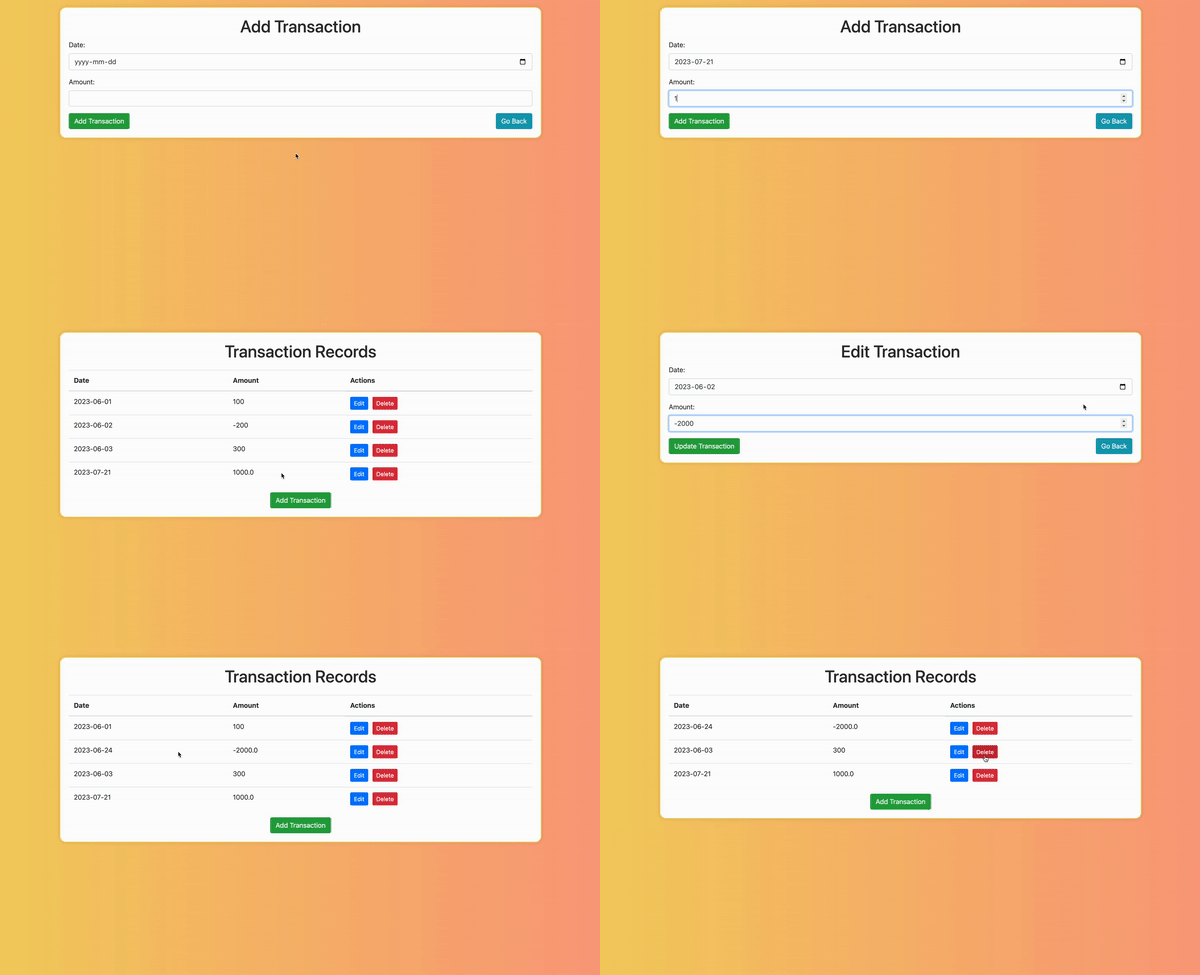
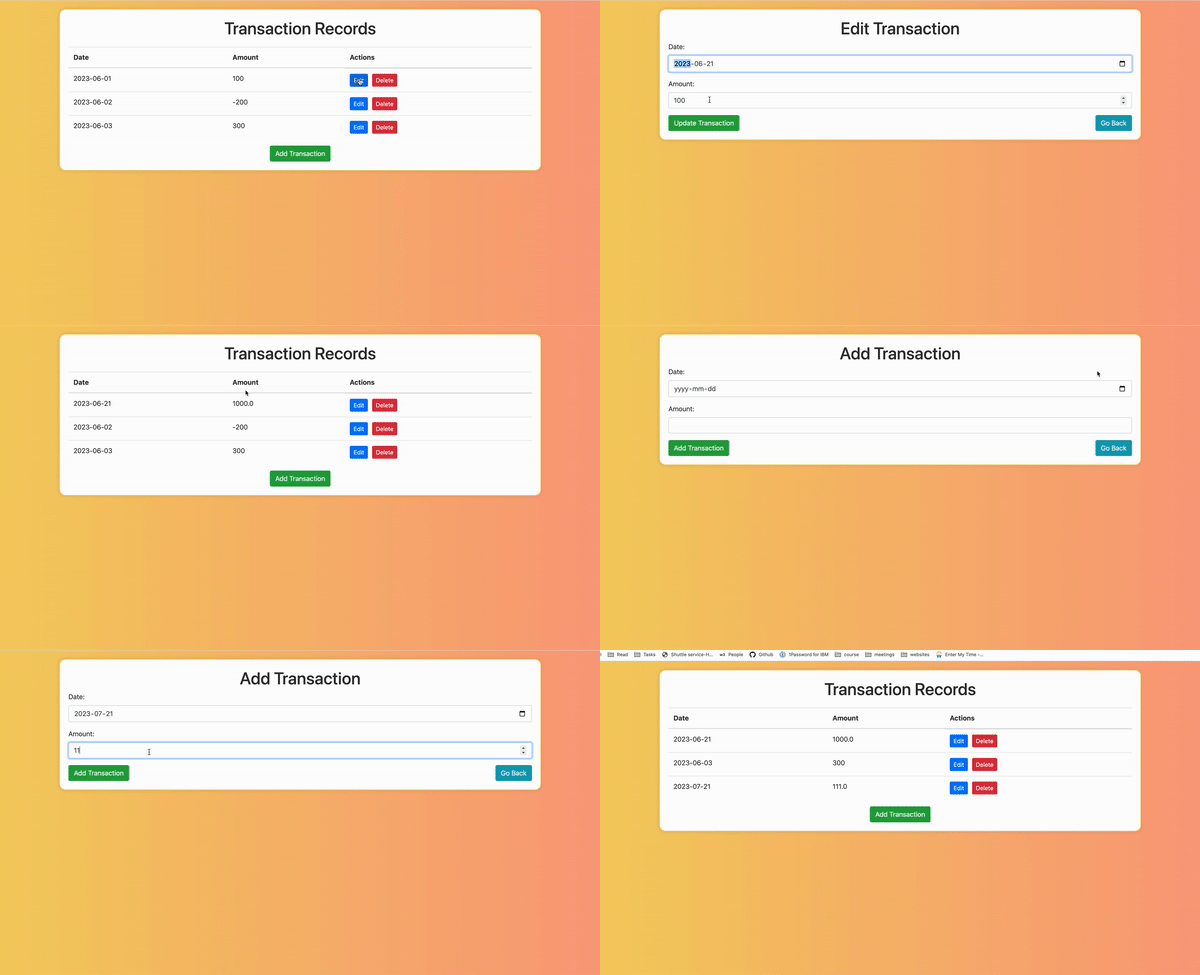
After you complete developing the application, it will function as displayed in the animation.
在您完成应用程序开发后,它将按动画中显示的功能运行。
The application has three different web pages. The first one displays all the recorded transactions. This page is called Transaction Records and displays all the transactions entries created in the system. This page also gives an option to Edit and Delete the available entries. The option of adding an entry is also available on this page. The second page is Add Transaction which is used when the user chooses to add the entry on the previous page. The user adds the Date and Amount values for the new entry. The third page is Edit Transaction which is user navigated to upon clicking the edit entry option. On this page also, the date and amount are accepted as entries; however, these entries are then reflected against the ID that was being edited.
该应用程序有三个不同的网页。第一个页面显示所有记录的交易。该页面称为交易记录,显示系统中创建的所有交易条目。该页面还提供编辑和删除可用条目的选项。该页面还提供添加条目的选项。第二个页面是添加交易,当用户选择在之前页面添加条目时使用。用户为新的条目添加日期和金额值。第三个页面是编辑交易,当用户点击编辑条目选项时进入。在该页面中,日期和金额也作为条目接受;但是,这些条目将针对正在编辑的 ID 反映。
Note: This platform is not persistent. It is recommended that you keep a copy of your code on your local machines and save changes from time to time. In case you revisit the lab, you will need to recreate the files in this lab environment using the saved copies from your machines.
注意:该平台不是持久的。建议您在本地计算机上保留代码副本,并定期保存更改。如果您再次访问实验室,您需要使用从您的计算机保存的副本在该实验室环境中重新创建文件。
Let's get started! 让我们开始吧!
Clone the Project Repository 克隆项目仓库
This lab requires multiple HTML interface files, which have been pre-created for you. You will need to clone the folder structure to the IDE interface using the following command in a terminal shell.
本实验需要多个 HTML 界面文件,这些文件已为您预先创建。您需要使用终端 shell 中的以下命令将文件夹结构克隆到 IDE 界面。
git clone https://github.com/ibm-developer-skills-network/obmnl-flask_assignment.git
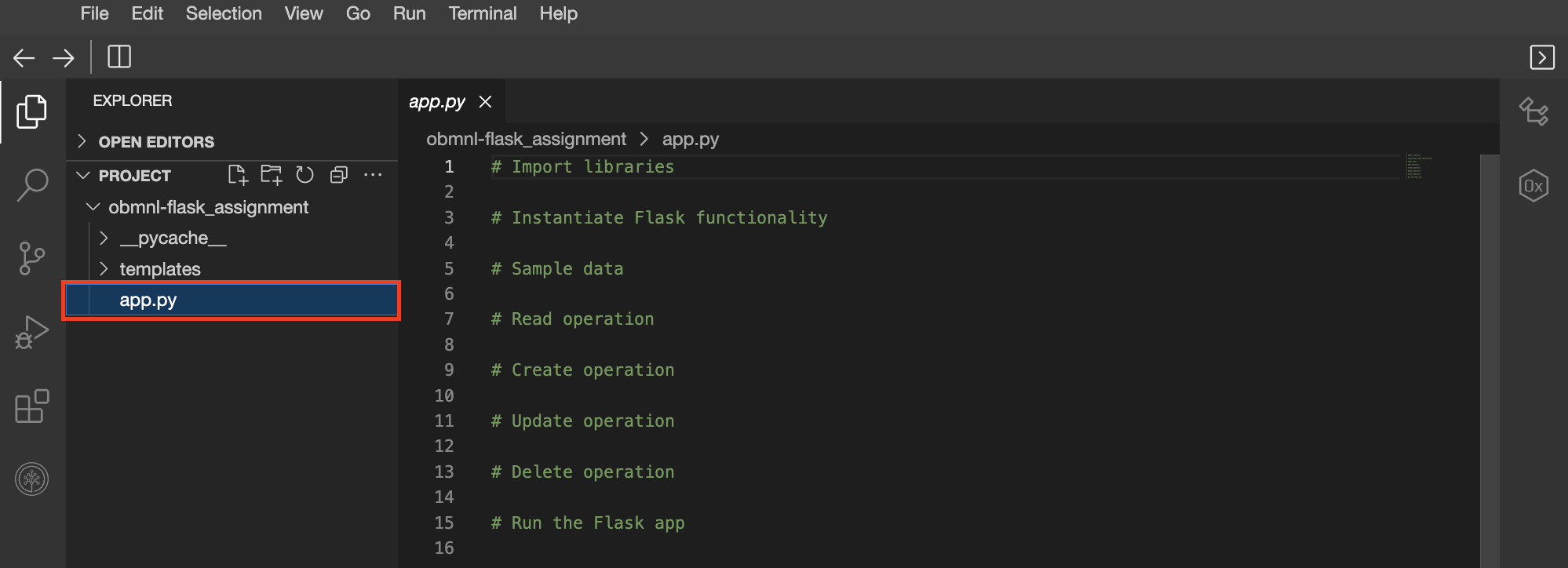
When the command is successfully executed, the Project tab must have the folder structure as shown in the image. The root folder, obmnl-flask_assignment should have the templates folder and a file app.py. The templates folder has all the required HTML files, edit.html, form.html, and transactions.html. Throughout this lab, you will implement the required functions in app.py.
当命令成功执行后,项目选项卡必须显示与图像中相同的文件夹结构。根文件夹 obmnl-flask_assignment 应包含 templates 文件夹和 app.py 文件。 templates 文件夹包含所有必需的 HTML 文件, edit.html 、 form.html 和 transactions.html 。在本实验中,您将在 app.py 中实现所需的函数。
Initial set up 初始设置
In the app.py file, you need to import necessary modules from Flask and instantiate the Flask application.
在 app.py 文件中,您需要从 Flask 导入必要的模块,并实例化Flask 应用程序。
For this lab, you will need to import the following functions from the flask library.
对于本次实验,您需要从flask库中导入以下函数。
- Flask - to instantiate the application
Flask - 用于实例化应用程序 - request - to process the
GETandPOSTrequests
请求 - 处理GET和POST请求 - url_for - to access the url for a given function using its decorator
url_for - 使用装饰器访问给定函数的 URL - redirect - to redirect access requests according to requirement
重定向 - 根据需求重定向访问请求 - render_template - to render the html page
render_template - 渲染 HTML 页面
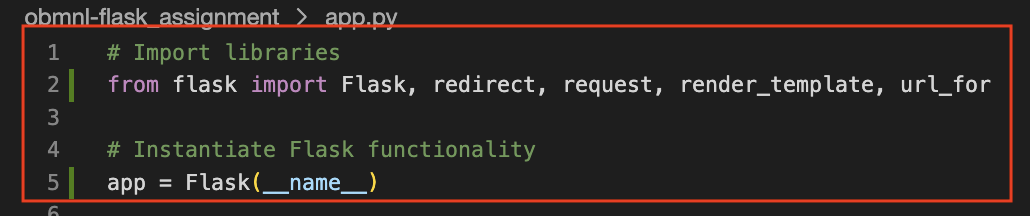
After importing the functions, instantiate the application to a variable app.
导入函数后,将应用程序实例化为变量 app 。
Click here for hint 点击此处获取提示
from flask import <functions>
Click here for solution 点击此处获取解决方案
# Import librariesfrom flask import Flask, redirect, request, render_template, url_for# Instantiate Flask functionalityapp = Flask(__name__)
Now, the code will look like this:
现在,代码将如下所示:
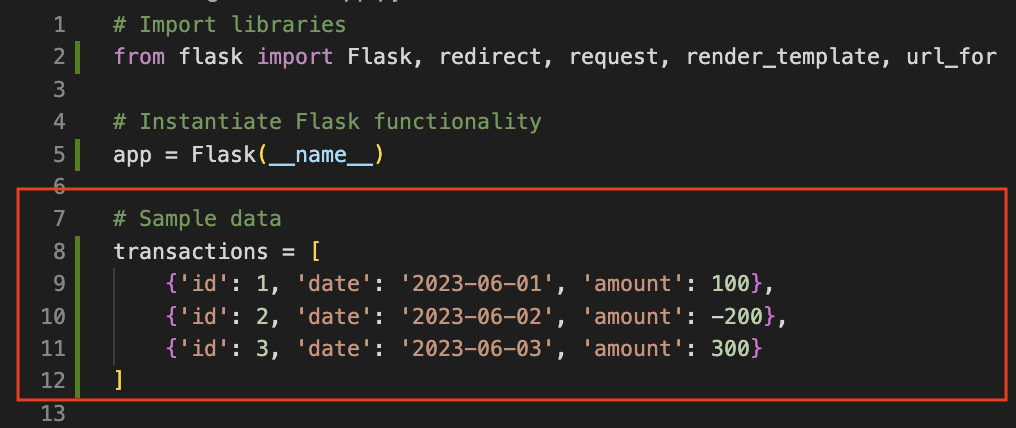
Next, let's create a list of sample transactions for testing purposes. You can assume that the transactions already exist on the interface when it is executed for the first time. Please note that this step is completely optional and does not affect the functionality you will develop in this lab. Add the code snippet as shown below to app.py.
接下来,让我们创建一个用于测试的示例交易列表。您可以在接口首次执行时假设这些交易已经存在。请注意,此步骤完全是可选的,并且不会影响您在本实验中开发的功能。将以下代码片段添加到 app.py 。
# Sample datatransactions = [{'id': 1, 'date': '2023-06-01', 'amount': 100},{'id': 2, 'date': '2023-06-02', 'amount': -200},{'id': 3, 'date': '2023-06-03', 'amount': 300}]
Click here for solution 点击此处查看解决方案
The order in which you will develop the functions is as follows:
您将按以下顺序开发函数:
- Read 1. 读取
- Create 2. 创建
- Update 3. 更新
- Delete 4. 删除
The reason to implement Read before the other functions is to be able to redirect to the page with all transactions every time a new transaction is created, updated, or deleted. Therefore, the function to read the existing transactions must exist before the others are implemented.
之所以要在其他功能之前实现读取功能,是为了在每次创建、更新或删除交易时能够重定向到包含所有交易的页面。因此,必须先实现读取现有交易的功能,才能实现其他功能。
Read Operation 读取操作
To implement the Read operation, you need to implement a route that displays a list of all transactions. This route will handle GET requests, which are used to retrieve and display data in app.py.
要实现读取操作,您需要实现一个显示所有交易的路线。该路线将处理 GET 请求,这些请求用于在 app.py 中检索和显示数据。
The key steps to implement the Read operation are as follows:
实现读取操作的关键步骤如下:
- Create a function named
get_transactionsthat usesrender_templateto return an HTML template namedtransactions.html. This function should pass the transactions to the template for display.
创建一个名为get_transactions的函数,该函数使用render_template返回一个名为transactions.html的 HTML 模板。此函数应将交易传递给模板以进行显示。 - Use the Flask
@app.routedecorator to map this function to the root (/) URL. This means that when a user visits the base URL of your application, Flask will execute theget_transactionsfunction and return its result.
使用 Flask@app.route装饰器将此函数映射到根(/)URL。这意味着当用户访问应用程序的基本 URL 时,Flask 将执行get_transactions函数并返回其结果。
Click here for hint 点击此处获取提示
This function is a basic render_template function as implemented in the previous labs.
此函数是先前实验室中实现的 basic render_template 函数。
Click here for solution 点击此处获取解决方案
# Read operation: List all transactions
@app.route("/")
def get_transactions():
    return render_template("transactions.html", transactions=transactions)
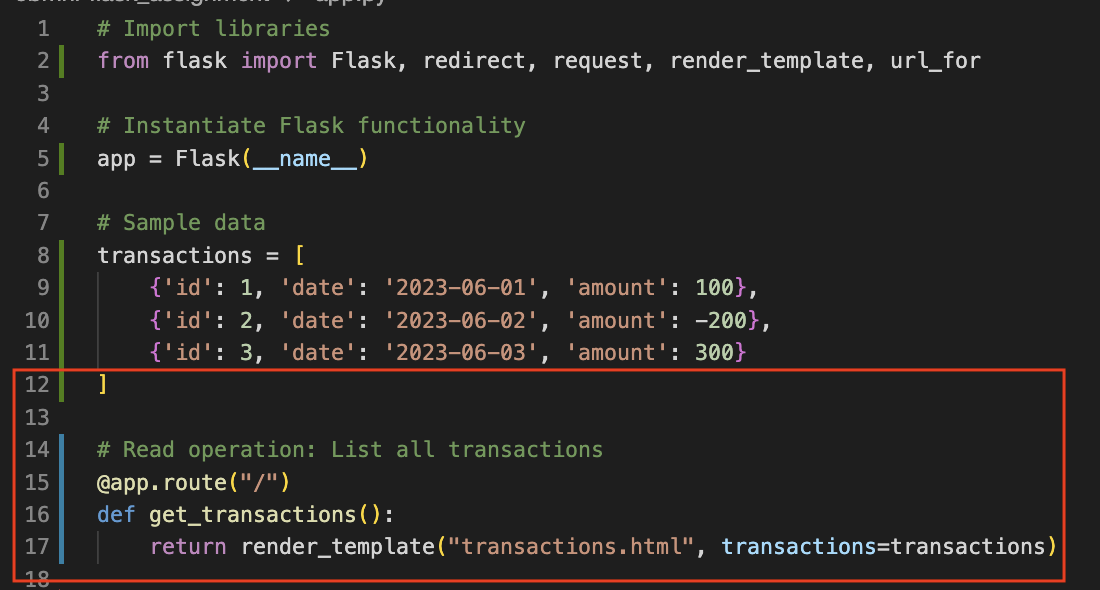
Now, the code will look like this:
现在代码将如下所示:
Create Operation 创建操作
For the Create operation, you will implement a route that allows users to add new transactions. This will involve handling both GET and POST HTTP requests - GET for displaying the form to the user and POST for processing the form data sent by the user.
对于创建操作,您将实现一个路由,允许用户添加新的事务。这将涉及处理 GET 和 POST HTTP 请求 - GET 用于向用户显示表单,以及 POST 用于处理用户发送的表单数据。
Here is the list of steps to implement the Create operation.
以下是实现创建操作的步骤列表。
- Create a function named
add_transaction.
创建一个名为add_transaction的函数。 - Use
addas the decorator for this function. Make sure to pass bothGETandPOSTas possible methods.
将add用作该函数的装饰器。确保将GET和POST作为可能的函数传递。 - If the request method is
GET, use therender_templatefunction to display an HTML form using a template namedform.html. This form will allow users to input data for a new transaction.
如果请求方法为GET,使用render_template函数通过名为form.html的模板显示一个 HTML 表单。该表单将允许用户输入新交易的数据。 - If the request method is
POST, userequest.formto extract the form data, create a new transaction, append it to the transactions list, and then useredirectandurl_forto send the user back to the list of transactions.
如果请求方法为POST,使用request.form提取表单数据,创建一个新交易,将其追加到交易列表中,然后使用redirect和url_for将用户返回到交易列表。 - The new transaction is passed on to the reading function in the following format.
新的交易信息以以下格式传递给读取函数。
transaction = {
    'id': len(transactions)+1,
    'date': request.form['date'],
    'amount': float(request.form['amount'])
}
Here, request.form function parses the information received from the entry made in the form.
此处,request.form 函数解析从表单中输入接收到的信息。
Click here for hint 点击此处获取提示
The add_transaction function content needs the following implementations.
add_交易函数内容需要以下实现。
For POST method, create the new transaction as shown above, append it to the existing list of transactions and redirect to the URL for Read operation.
对于 POST 方法,创建如上所示的新交易,将其追加到现有的交易列表中,并重定向到用于读取操作的 URL。
For GET method, render the form.html page that accepts the information from the interface.
对于 GET 方法,渲染接受界面信息的 form.html 页面。
Click here for solution 点击此处查看解决方案
# Create operation: Display add transaction form
# Route to handle the creation of a new transaction
@app.route("/add", methods=["GET", "POST"])
def add_transaction():
    # Check if the request method is POST (form submission)
    if request.method == 'POST':
        # Create a new transaction object using form field values
        transaction = {
            'id': len(transactions) + 1,            # Generate a new ID based on the current length of the transactions list
            'date': request.form['date'],           # Get the 'date' field value from the form
            'amount': float(request.form['amount']) # Get the 'amount' field value from the form and convert it to a float
        }
        # Append the new transaction to the transactions list
        transactions.append(transaction)

        # Redirect to the transactions list page after adding the new transaction
        return redirect(url_for("get_transactions"))

    # If the request method is GET, render the form template to display the add transaction form
    return render_template("form.html")
Now, the code will look like this:
现在,代码将如下所示:
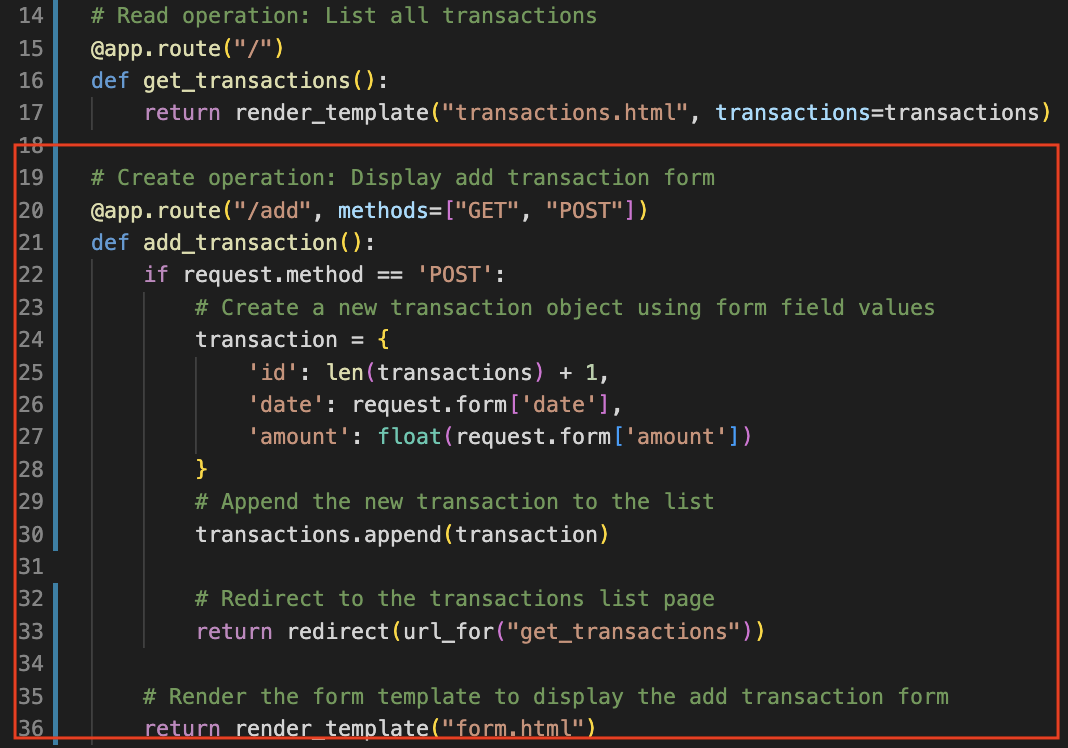
Note: The statements outside the if case are, by default, the else case. The statements in the if case end with a return statement; hence only one of the two cases will run at a time.
注意: if 情况之外的语句默认为 else 情况。 if 情况的语句以 return 语句结束;因此一次只有一个情况会运行。
Update Operation 更新操作
For the Update operation, you need to implement a route that allows users to update existing transactions. You'll again handle both GET and POST HTTP requests - GET for displaying the current transaction data in a form, and POST for processing the updated data sent by the user.
对于更新操作,您需要实现一个允许用户更新现有交易的路径。您将再次处理 GET 和 POST 的 HTTP 请求—— GET 用于以表单形式显示当前交易数据, POST 用于处理用户发送的更新数据。
Complete the following steps to implement the Update operation.
按照以下步骤实现更新操作。
- Create a function named
edit_transactionthat handles bothGETandPOSTrequests. This function should accept a parameter,transaction_id.
创建一个名为edit_transaction的函数,该函数处理GET和POST请求。此函数应接受一个参数transaction_id。 - Decorate the function with
@app.routeand use the route string/edit/<int:transaction_id>. The<int:transaction_id>part in the URL is a placeholder for any integer. Flask will pass this integer to your function as thetransaction_idargument.
使用@app.route装饰该函数,并使用路由字符串/edit/<int:transaction_id>。URL中的<int:transaction_id>部分是一个任何整数的占位符。Flask 会将此整数作为transaction_id参数传递给您的函数。 - If the request method is
GET, find the transaction with the ID that matchestransaction_idand userender_templateto display a form pre-populated with the current data of the transaction using a template namededit.html.
如果请求方法为GET,则查找 ID 与transaction_id匹配的交易,并使用render_template显示一个预填充当前交易数据的表单,使用名为edit.html的模板。 - If the request method is
POST, use request.form to get the updated data, find the transaction with the ID that matchestransaction_idand modify its data, then redirect the user back to the list of transactions.
如果请求方法为POST,则使用 request.form 获取更新数据,查找 ID 与transaction_id匹配的交易并修改其数据,然后重定向用户返回交易列表。
Click here for solution 点击此处查看解决方案
# Update operation: Display edit transaction form
# Route to handle the editing of an existing transaction
@app.route("/edit/<int:transaction_id>", methods=["GET", "POST"])
def edit_transaction(transaction_id):
    # Check if the request method is POST (form submission)
    if request.method == 'POST':
        # Extract the updated values from the form fields
        date = request.form['date']           # Get the 'date' field value from the form
        amount = float(request.form['amount'])# Get the 'amount' field value from the form and convert it to a float

        # Find the transaction with the matching ID and update its values
        for transaction in transactions:
            if transaction['id'] == transaction_id:
                transaction['date'] = date       # Update the 'date' field of the transaction
                transaction['amount'] = amount   # Update the 'amount' field of the transaction
                break                            # Exit the loop once the transaction is found and updated

        # Redirect to the transactions list page after updating the transaction
        return redirect(url_for("get_transactions"))

    # If the request method is GET, find the transaction with the matching ID and render the edit form
    for transaction in transactions:
        if transaction['id'] == transaction_id:
            # Render the edit form template and pass the transaction to be edited
            return render_template("edit.html", transaction=transaction)

    # If the transaction with the specified ID is not found, handle this case (optional)
    return {"message": "Transaction not found"}, 404
Now, the code will look like this:
现在代码将如下所示:
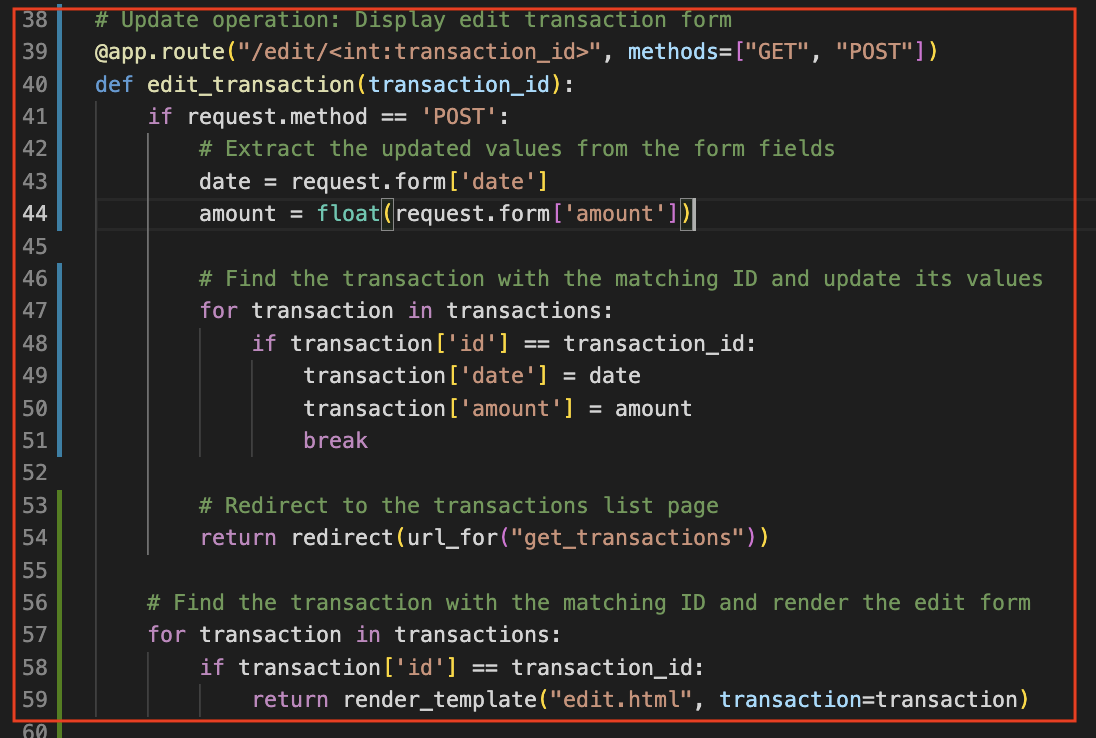
Note: There may be multiple ways of achieving the same result. Please use the solution given above only as a reference.
注意:可能有多种方法可以实现相同的结果。请仅将上述解决方案用作参考。
Delete Operation 删除操作
Finally, you need to implement a route that allows users to delete existing transactions.
最后,您需要实现一个允许用户删除现有交易的路径。
Complete the following steps to implement the Delete operation.
完成以下步骤以实现删除操作。
- Create a function named
delete_transactionthat takes a parameter,transaction_id.
创建一个名为delete_transaction的函数,该函数接受一个参数transaction_id。 - Decorate the function with
@app.routeand use the route string/delete/<int:transaction_id>. The<int:transaction_id>part in the URL is a placeholder for any integer. Flask will pass this integer to your function as thetransaction_idargument.
使用@app.route装饰该函数,并使用路由字符串/delete/<int:transaction_id>。URL中的<int:transaction_id>部分是一个占位符,用于任何整数。Fl会把这个整数作为transaction_id参数传递给您的函数。 - In the function body, find the transaction with the ID that matches
transaction_idand remove it from the transactions list, thenredirectthe user back to the list of transactions.
在函数体中,找到 ID 与transaction_id匹配的交易,并将其从交易列表中移除,然后redirect将用户返回到交易列表中。
Click here for solution 点击此处查看解决方案
# Delete operation: Delete a transaction
# Route to handle the deletion of an existing transaction
@app.route("/delete/<int:transaction_id>")
def delete_transaction(transaction_id):
    # Find the transaction with the matching ID and remove it from the list
    for transaction in transactions:
        if transaction['id'] == transaction_id:
            transactions.remove(transaction)  # Remove the transaction from the transactions list
            break  # Exit the loop once the transaction is found and removed

    # Redirect to the transactions list page after deleting the transaction
    return redirect(url_for("get_transactions"))
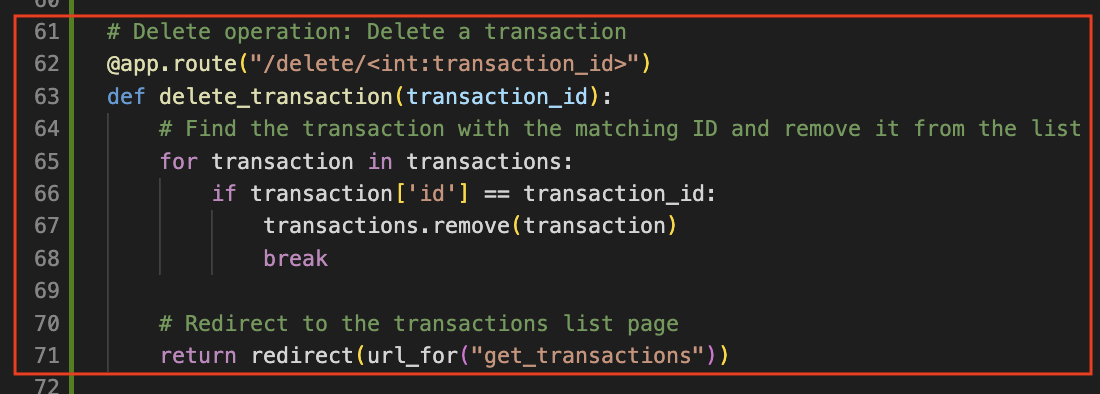
Now, the code will look like this:
现在,代码将如下所示:
Finishing Steps and Running the Application 完成步骤和运行应用程序
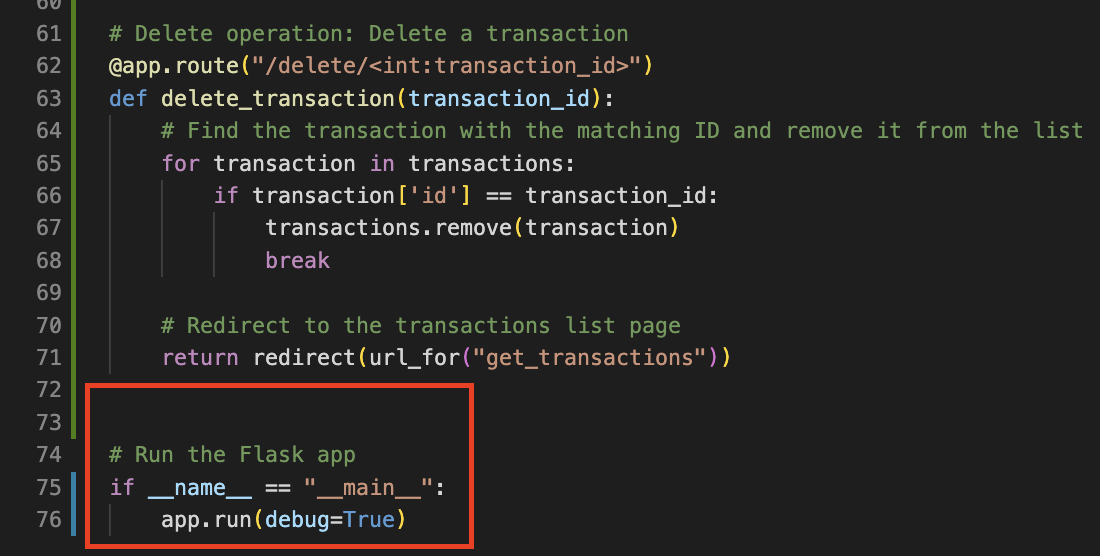
Check if the current script is the main program (that is, it wasn't imported from another script) with the conditional if __name__ == "__main__":.
检查当前脚本是否是主程序(即,它不是从另一个脚本导入的)使用条件 if __name__ == "__main__": 。
If the condition is true, call app.run(debug=True) to start the Flask development server with debug mode enabled. This will allow you to view detailed error messages in your browser if something goes wrong.
如果条件为真,调用 app.run(debug=True) 以启用调试模式启动 Flask 开发服务器。如果出现错误,这将允许您在浏览器中查看详细错误消息。
# Run the Flask app
if __name__ == "__main__":
    app.run(debug=True)
Now, the code will look like this:
现在,代码将如下所示:
The code is now complete. Run the file app.py from a terminal shell using the command:
代码现已完成。使用以下命令从终端 shell 运行文件 app.py :
python3.11 app.py
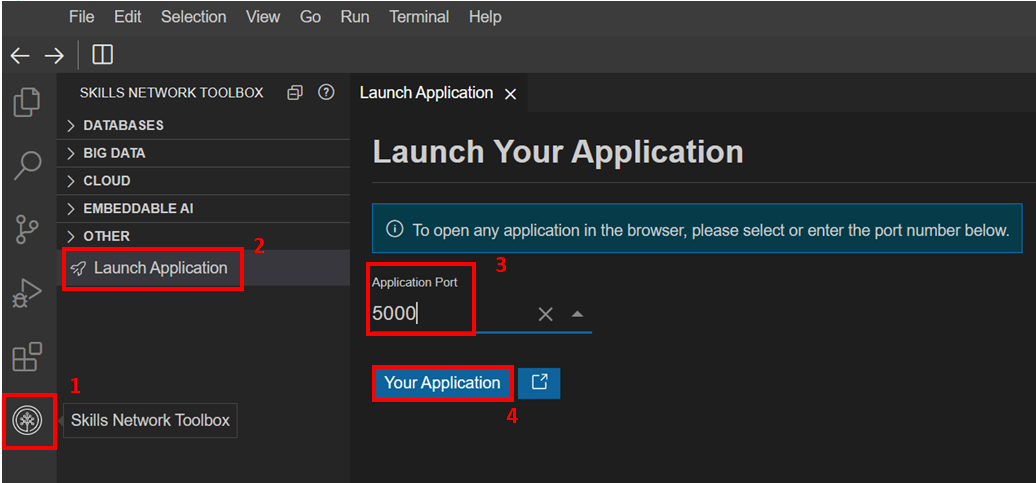
By default, Flask launches the application on LocalHost:5000. As displayed in the image,
默认情况下,Flask 在 LocalHost:5000 上启动应用程序。如图片所示,
- Launch the application by going to the Skills Network Library, going to
Launch Application.
通过前往技能网络库,前往Launch Application来启动应用程序。 - Enter
5000in the port number and launch the application window.
在端口号中输入5000并启动应用程序窗口。
The final application looks like this.
最终应用程序的外观如下。
Lab Help 实验帮助
In case you face an error while going through all the steps, the final code for app.py is being shared here as a ready reference. Please note that this should be used only as a last resort to ensure that you gain the learning intended through this lab.
如果在执行所有步骤时遇到错误,此处将共享 app.py 的最终代码作为参考。请注意,这仅应作为最后手段使用,以确保您通过此实验获得预期的学习效果。
Final code for app.py app.py 的最终代码
# Import necessary libraries from Flask
from flask import Flask, redirect, request, render_template, url_for

# Instantiate Flask application
app = Flask(__name__)

# Sample data representing transactions
transactions = [
    {'id': 1, 'date': '2023-06-01', 'amount': 100},
    {'id': 2, 'date': '2023-06-02', 'amount': -200},
    {'id': 3, 'date': '2023-06-03', 'amount': 300}
]

# Read operation: Route to list all transactions
@app.route("/")
def get_transactions():
    # Render the transactions list template and pass the transactions data
    return render_template("transactions.html", transactions=transactions)

# Create operation: Route to display and process add transaction form
@app.route("/add", methods=["GET", "POST"])
def add_transaction():
    if request.method == 'POST':
        # Extract form data to create a new transaction object
        transaction = {
            'id': len(transactions) + 1,         # Generate a new ID based on the current length of the transactions list
            'date': request.form['date'],        # Get the 'date' field value from the form
            'amount': float(request.form['amount']) # Get the 'amount' field value from the form and convert it to a float
        }

        # Append the new transaction to the transactions list
        transactions.append(transaction)

        # Redirect to the transactions list page after adding the new transaction
        return redirect(url_for("get_transactions"))

    # Render the form template to display the add transaction form if the request method is GET
    return render_template("form.html")

# Update operation: Route to display and process edit transaction form
@app.route("/edit/<int:transaction_id>", methods=["GET", "POST"])
def edit_transaction(transaction_id):
    if request.method == 'POST':
        # Extract the updated values from the form fields
        date = request.form['date']
        amount = float(request.form['amount'])

        # Find the transaction with the matching ID and update its values
        for transaction in transactions:
            if transaction['id'] == transaction_id:
                transaction['date'] = date       # Update the 'date' field of the transaction
                transaction['amount'] = amount   # Update the 'amount' field of the transaction
                break                            # Exit the loop once the transaction is found and updated

        # Redirect to the transactions list page after updating the transaction
        return redirect(url_for("get_transactions"))

    # Find the transaction with the matching ID and render the edit form if the request method is GET
    for transaction in transactions:
        if transaction['id'] == transaction_id:
            # Render the edit form template and pass the transaction to be edited
            return render_template("edit.html", transaction=transaction)

# Delete operation: Route to delete a transaction
@app.route("/delete/<int:transaction_id>")
def delete_transaction(transaction_id):
    # Find the transaction with the matching ID and remove it from the list
    for transaction in transactions:
        if transaction['id'] == transaction_id:
            transactions.remove(transaction)  # Remove the transaction from the transactions list
            break                            # Exit the loop once the transaction is found and removed

    # Redirect to the transactions list page after deleting the transaction
    return redirect(url_for("get_transactions"))

# Run the Flask application
if __name__ == "__main__":
    app.run(debug=True)
Testing the Interface 测试界面
Once your application is ready, try the CRUD operations on the launched application. Possible tasks for testing the application could be:
一旦您的应用程序准备就绪,请尝试在已启动的应用程序上执行CRUD操作。测试应用程序的可能任务包括:
- Click on the “Add” button to open the form and add a new transaction.
点击“添加”按钮以打开表单并添加新交易。 - Click on the “Edit” button for any transaction and update the information (date and amount) for the transaction.
点击任何交易的“编辑”按钮以更新交易信息(日期和金额)。 - Click on the “Delete” button for any transaction to delete it from the list.
点击任何交易的“删除”按钮以将其从列表中删除。 - Verify the transactions are displayed correctly.
验证交易是否正确显示。
Practice Exercises 练习题
The following are some practice exercises for the interested learners. We are not providing the solutions for these exercises to encourage the learners to try them on their own. Please feel free to use the course discussion forum for sharing your opinions on the solution with other interested learners.
以下是一些供有兴趣的学习者练习的练习题。我们不为这些练习题提供答案,以鼓励学习者自行尝试。请随时使用课程讨论区与其他有兴趣的学习者分享您对答案的看法。
Exercise 1: Search Transactions 练习题 1:搜索交易
In this exercise, you will add a new feature to the application that allows users to search for transactions within a specified amount range. You will create a new route called /search that handles both GET and POST requests in app.py.
在这个练习中,你将为应用程序添加一个新功能,允许用户在指定的金额范围内搜索交易。你将创建一个名为 /search 的新路由,该路由处理 GET 和 POST 请求在 app.py 中。
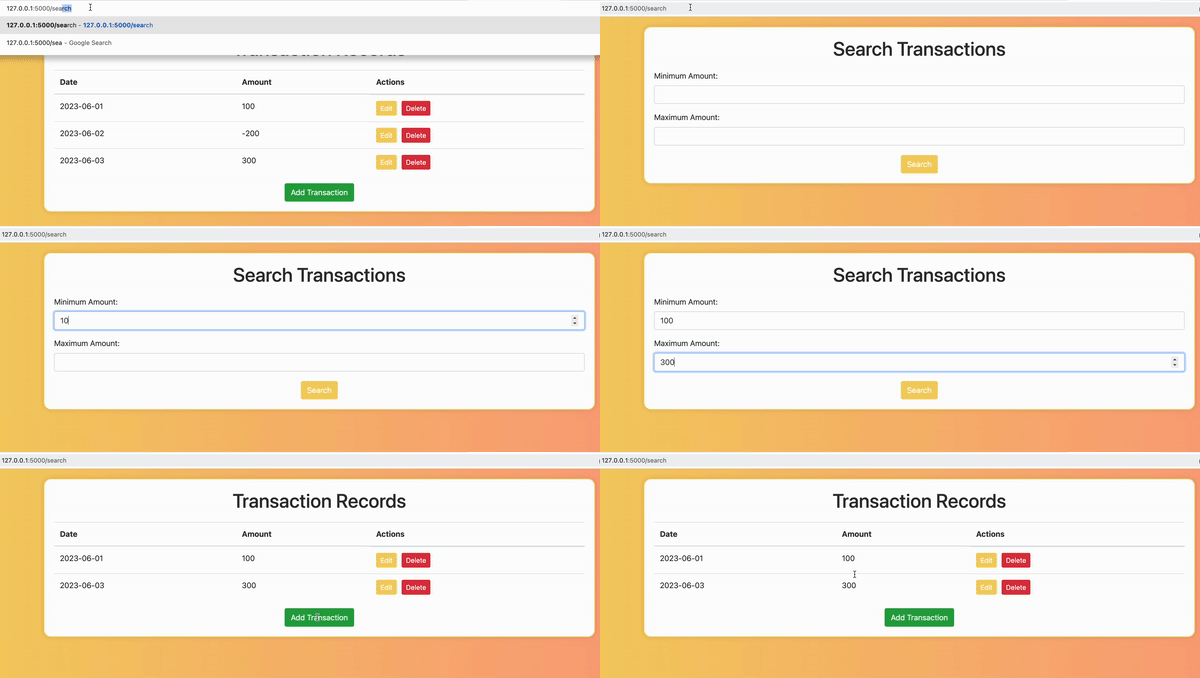
Instructions: 说明:
- Create a new function named
search_transactionsand use the@app.routedecorator to map it to the URL/search.
创建一个名为search_transactions的新函数,并使用@app.route装饰器将其映射到 URL/search。 - Inside the function, check if the request method is
POST. If it is, retrieve the minimum and maximum amount values from the form data submitted by the user. Convert these values to floating-point numbers.
在函数内部,检查请求方法是否为POST。如果是,从用户提交的表单数据中检索最小和最大金额值。将这些值转换为浮点数。 - Filter the transactions list based on the amount range specified by the user. Create a new list,
filtered_transactions, that contains only the transactions whose amount falls within the specified range. You can use a list comprehension for this.
根据用户指定的金额范围筛选交易列表。创建一个新列表filtered_transactions,其中仅包含金额在指定范围内的交易。您可以使用列表推导式来完成此操作。 - Pass the
filtered_transactionslist to thetransactions.htmltemplate using therender_templatefunction. In this template, display the transactions similar to the existingtransactions.htmltemplate.
使用render_template函数将filtered_transactions列表传递给transactions.html模板。在该模板中,类似于现有的transactions.html模板,显示交易信息。 - If the request method is
GET, render a new template calledsearch.html. This template should contain a form that allows users to input the minimum and maximum amount values for the search.
如果请求方法为GET,则渲染一个名为search.html的新模板。该模板应包含一个表单,允许用户输入搜索的最小和最大金额值。
Exercise 2: Total Balance 练习 2:总余额
In this exercise, you will add a new feature that calculates and displays the total balance of all transactions. You will create the route in app.py.
在这个练习中,你将添加一个新功能,用于计算并显示所有交易的总余额。你将在 app.py 中创建该路由。
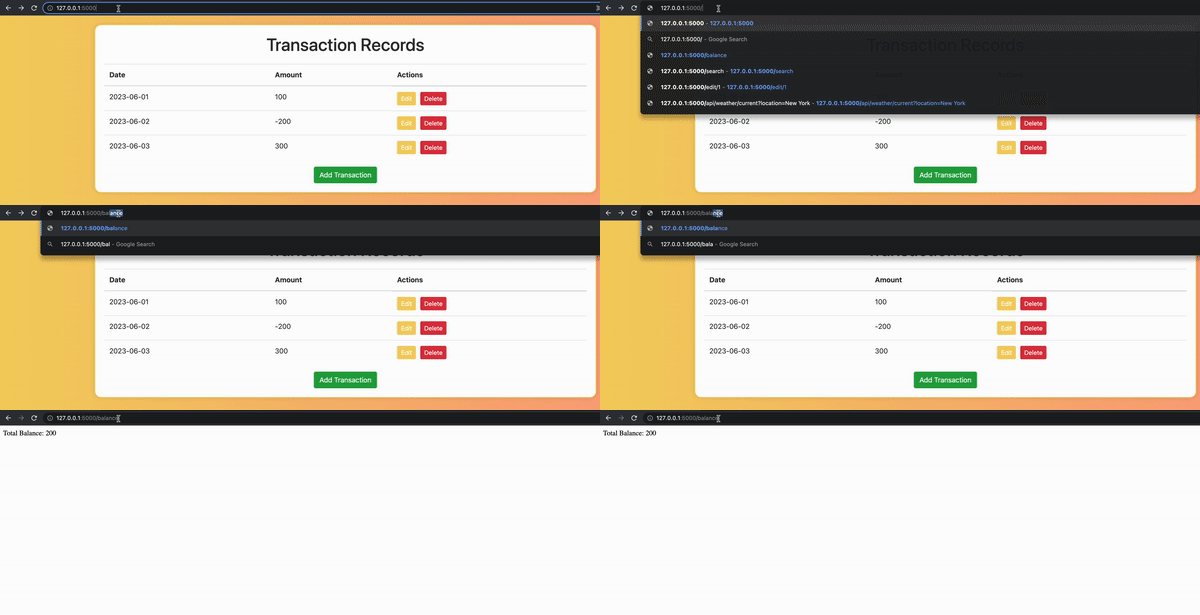
Instructions: 说明:
- Create a new function named
total_balanceand use the@app.routedecorator to map it to the URL/balance.
创建一个名为total_balance的新函数,并使用@app.route装饰器将其映射到 URL/balance。 - Inside the function, calculate the total balance by summing the amount values of all transactions in the transactions list.
在函数内部,通过将交易列表中所有交易的金额值相加来计算总余额。 - Return the total balance as a string in the format “Total Balance: {balance}”.
返回总余额,格式为“Total Balance: {balance}”。 - To display the total balance, you do not need to create a new template. Instead, you will modify the
transactions.htmltemplate to include the total balance value at the bottom of the table.
要显示总余额,无需创建新模板。您只需修改transactions.html模板,在表格底部添加总余额值。 - After displaying the list of transactions in the
transactions.htmltemplate, add a new row to display the total balance. You can use the samerender_templatefunction as before, passing both the transactions list and the total balance value.
在transactions.html模板中显示交易列表后,添加一行以显示总余额。您可以使用之前的render_template函数,传入交易列表和总余额值。
Conclusion 结论
Congratulations on completing this lab.
祝贺您完成本次实验。
In this lab, you have learned how to:
在本实验中,您学习了如何:
- Implement CRUD functionality in a database application.
在数据库应用程序中实现CRUD 功能。 - Use additional functions from Flask library for advanced routing and request management.
使用Flask库中的其他函数进行高级路由和请求管理。 - Manage routing between multiple HTML files as per requirement.
根据需求管理多个 HTML 文件之间的路由。
Author(s) 作者
Additional Contributor 额外贡献者
Changelog 变更日志
| Date 日期 | Version 版本 | Changed by 被更改 | Change Description 变更描述 |
|---|---|---|---|
| 2023-07-24 | 2.0 | Steve Hord | QA pass with edits 通过修改通过 QA |
| 2023-07-15 | 1.0 | Vicky Kuo | Initial version created 初始版本创建 |
© IBM Corporation 2023. All rights reserved. © IBM Corporation 2023。版权所有。
MIT License
本笔记本及其源代码根据MIT许可协议发布。