Module 04 · NoSQL Databases in Cloud云端 NoSQL 数据库
Hands-On Lab: Accessing MongoDB from Python (Optional)可选动手实验:使用 Python 访问 MongoDB
After completing this lab you will be able to:
完成本实验后,您将能够:
- Access the MongoDB database from Python with the pymongo driver
使用 pymongo 驱动从 Python 访问 MongoDB 数据库 - Perform basic operations such as selecting, inserting and listing using Python
执行基本操作,如使用 Python 选择、插入和列出 - Create a Python program to run the MongoDB operations
创建一个 Python 程序以运行 MongoDB 操作
使用 Python 访问 MongoDB
估计所需时间:30 分钟
这个动手实验将帮助你理解 Python 与 MongoDB 之间的交互,使你能够高效地开发基于 NoSQL 的应用程序。
目标
完成此实验后,你将能够:
- 使用 pymongo 驱动从 Python 访问 MongoDB 数据库
- 使用 Python 执行基本操作,如选择、插入和列出
- 创建一个 Python 程序以运行 MongoDB 操作
先决条件
在开始此实验之前,了解基本的 Python 和 MongoDB 操作将会很有帮助。如果你对 MongoDB 不熟悉,可以查看 MongoDB 入门 和 MongoDB CRUD 实验!
关于技能网络云 IDE
技能网络云 IDE(基于 Theia 和 Docker)为课程和项目相关实验提供了一个动手实验的环境。Theia 是一个开源的 IDE(集成开发环境),可以在桌面或云端运行。为了完成这个实验,我们将使用技能网络提供的基于 Theia 和 MongoDB 的云 IDE。
关于此实验环境的重要通知
请注意,此实验环境的会话不会被保存。每次您连接到此实验时,都会为您创建一个新的环境。您在之前会话中保存的任何数据都将丢失。请计划在单个会话中完成这些实验,以避免丢失数据。
练习 1 - 安装 pymongo 驱动
我们需要安装 pymongo 驱动,以便从 Python 访问 mongodb 数据库。
在终端运行以下命令。
python3 -m pip install pymongo
如果上述命令出现错误 /usr/bin/python3: No module named pip,我们首先需要安装 pip(PIP 是 Python 包(或模块)的包管理器)。然后安装 pymongo。
curl https://bootstrap.pypa.io/get-pip.py -o get-pip.py
python3 get-pip.py
python3 -m pip install pymongo
这将安装Python的mongodb驱动,如下图所示。

练习 2 - 启动服务器
通过点击下面的按钮打开 MongoDB 数据库页面:
Open MongoDB Page in IDE
在该页面上,点击 Create 按钮以创建一个 MongoDB 数据库。
记下 Connection Information 标签中的用户名和密码。
练习 3 - 使用 Python 连接到 mongodb 服务器
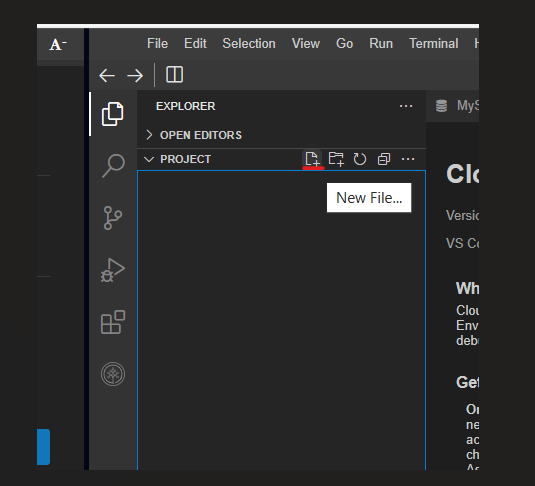
在项目资源管理器中,点击 新建文件 图标以创建一个新文件,如下图所示。
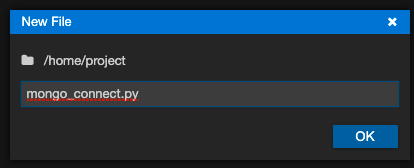
将文件命名为 mongo_connect.py,如下面的图示所示,然后点击 确定。
将下面的代码复制并粘贴到新打开的文件中。
from pymongo import MongoClient
user = 'root'
password = 'MjQwOTgtcnNhbm5h' # CHANGE THIS TO THE PASSWORD YOU NOTED IN THE EARLIER EXCERCISE - 2
host='mongo'
#create the connection url
connecturl = "mongodb://{}:{}@{}:27017/?authSource=admin".format(user,password,host)
# connect to mongodb server
print("Connecting to mongodb server")
connection = MongoClient(connecturl)
# get database list
print("Getting list of databases")
dbs = connection.list_database_names()
# print the database names
for db in dbs:
    print(db)
print("Closing the connection to the mongodb server")
# close the server connecton
connection.close()
注意:请确保您已在上述文件中将密码值替换为您在启动后复制的mongodb服务器的密码。
使用文件->保存菜单选项保存代码文件,如下图所示。
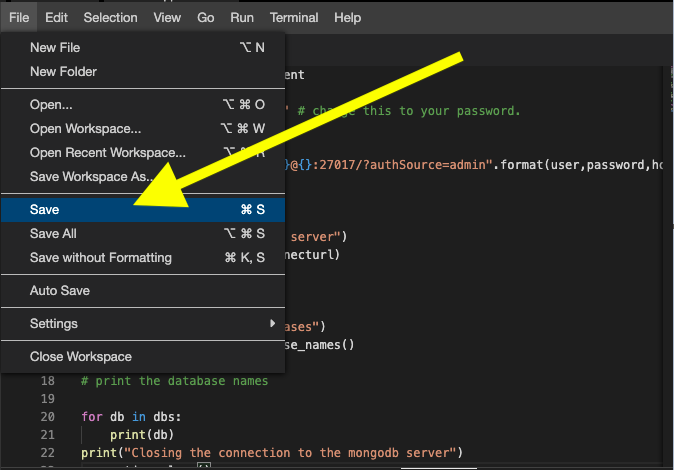
在终端中复制并粘贴以下代码以执行此文件。
python3 mongo_connect.py
您应该看到如下图像所示的输出。
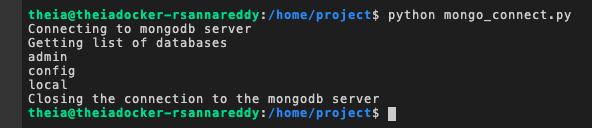
练习 4 - 处理文档
在本练习中,我们将使 Python 程序执行以下任务:
- 连接到 mongodb 服务器。
- 选择一个名为 training 的数据库。
- 选择一个名为 python 的集合。
- 插入一个示例文档。
- 查询 training 数据库和 python 集合中的所有文档。
- 关闭与服务器的连接。
打开一个名为 mongo_query.py 的新文件。
将以下代码复制并粘贴到 mongo_query.py 中。
from pymongo import MongoClient
user = 'root'
password = 'MjQwOTgtcnNhbm5h' # CHANGE THIS TO THE PASSWORD YOU NOTED IN THE EARLIER EXCERCISE - 2
host='mongo'
#create the connection url
connecturl = "mongodb://{}:{}@{}:27017/?authSource=admin".format(user,password,host)
# connect to mongodb server
print("Connecting to mongodb server")
connection = MongoClient(connecturl)
# select the 'training' database
db = connection.training
# select the 'python' collection
collection = db.python
# create a sample document
doc = {"lab":"Accessing mongodb using python", "Subject":"No SQL Databases"}
# insert a sample document
print("Inserting a document into collection.")
db.collection.insert_one(doc)
# query for all documents in 'training' database and 'python' collection
docs = db.collection.find()
print("Printing the documents in the collection.")
for document in docs:
    print(document)
# close the server connecton
print("Closing the connection.")
connection.close()
注意:请确保您已将上面文件中的密码值替换为您在启动mongodb服务器后复制的密码。
保存文件。
使用以下命令运行文件。
python3 mongo_query.py
您应该看到如下图所示的输出。

练习
编写一个 Python 程序,可以:
- 连接到 mongodb 服务器。
- 选择名为 training 的数据库。
- 选择名为 mongodb_glossary 的集合。
- 将以下文档插入到 mongodb_glossary 集合中。
{“database”:”一个包含集合的数据库”}
{“collection”:”一个存储文档的集合”}
{“document”:”一个以键值对形式包含数据的文档。”}
- 查询并打印 training 数据库和 mongodb_glossary 集合中的所有文档。
- 关闭与服务器的连接。
练习题解答
from pymongo import MongoClient
user = 'root'
password = 'MjQwOTgtcnNhbm5h' # CHANGE THIS TO THE PASSWORD YOU NOTED IN THE EARLIER EXCERCISE - 2
host='mongo'
#create the connection url
connecturl = "mongodb://{}:{}@{}:27017/?authSource=admin".format(user,password,host)
# connect to mongodb server
print("Connecting to mongodb server")
connection = MongoClient(connecturl)
# select the 'training' database
db = connection.training
# select the 'python' collection
collection = db.mongodb_glossary
# create documents
doc1 = {"database":"a database contains collections"}
doc2 = {"collection":"a collection stores the documents"}
doc3 = {"document":"a document contains the data in the form or key value pairs."}
# insert documents
print("Inserting documents into collection.")
db.collection.insert_one(doc1)
db.collection.insert_one(doc2)
db.collection.insert_one(doc3)
# query for all documents in 'training' database and 'python' collection
docs = db.collection.find()
print("Printing the documents in the collection.")
for document in docs:
    print(document)
# close the server connecton
print("Closing the connection.")
connection.close()