Module 03 · Intermediate SQL
Hands-on Lab: String Patterns, Sorting and Grouping动手实验:字符串模式、排序和分组
Estimated time needed: 30 minutes 预计所需时间:30 分钟
In this lab, you will learn how to create tables and load data in the MySQL database service using the phpMyAdmin graphical user interface (GUI) tool.
在本实验中,您将学习如何使用 phpMyAdmin 图形用户界面(GUI)工具在 MySQL 数据库服务中创建表和加载数据。
Objectives 目标
After completing this lab, you will be able to:
完成此实验后,您将能够:
- Filter the output of a SELECT query by using string patterns, ranges, or sets of values.
使用字符串模式、范围或值集对 SELECT 查询的输出进行过滤。 - Sort the result set in either ascending or descending order in accordance with a pre-determined column.
根据预定的列对结果集进行升序或降序排序。 - Group the outcomes of a query based on a selected parameter to further refine the response.
根据选定的参数对查询结果进行分组,以进一步细化响应。
Software Used in this Lab 本实验中使用的软件
In this lab, you will use MySQL. MySQL is a Relational Database Management System (RDBMS) designed to efficiently store, manipulate, and retrieve data.
在这个实验中,你将使用 MySQL。MySQL 是一种关系型数据库管理系统 (RDBMS),设计用于高效地存储、操作和检索数据。
To complete this lab you will utilize MySQL relational database service available as part of IBM Skills Network Labs (SN Labs) Cloud IDE. SN Labs is a virtual lab environment used in this course.
完成此实验,您将使用 IBM 技能网络实验室 (SN Labs) 云集成开发环境 (Cloud IDE) 中提供的 MySQL 关系型数据库服务。SN Labs 是本课程中使用的虚拟实验室环境。
Database Used in this Lab 本次实验使用的数据库
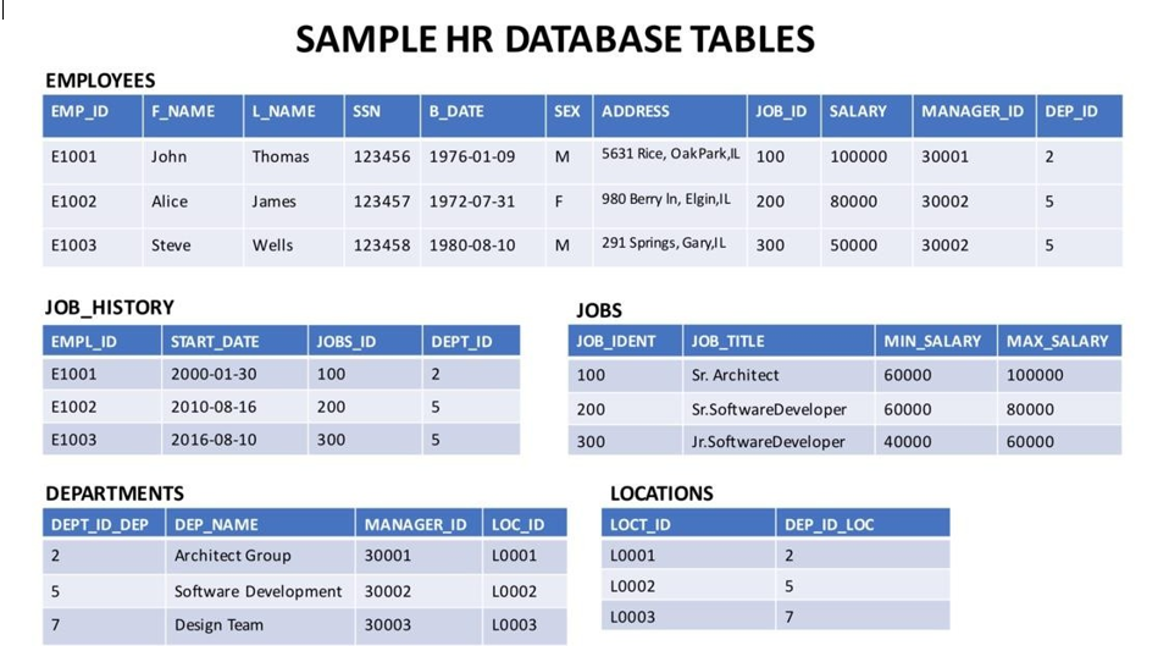
The database used in this lab is an internal database. You will be working on a sample HR database. This HR database schema consists of 5 tables called EMPLOYEES, JOB_HISTORY, JOBS, DEPARTMENTS and LOCATIONS. Each table has a few rows of sample data. The following diagram shows the tables for the HR database:
本实验中使用的数据库是内部数据库。您将处理一个示例人力资源 (HR) 数据库。该 HR 数据库模式由 5 个表组成,分别称为 EMPLOYEES(员工)、JOB_HISTORY(工作历史)、JOBS(职位)、DEPARTMENTS(部门)和 LOCATIONS(位置)。每个表都包含几行示例数据。下图显示了 HR 数据库的表:
Load the database 加载数据库
Using the skills acquired in the previous modules, you should first create the database in MySQL. Follow the steps below:
运用前几个模块所学的技能,您首先应该在 MySQL 中创建数据库。按照以下步骤操作:
- Open the phpMyAdmin interface from the Skills Network Toolbox in Cloud IDE.
从云 IDE 中的 Skills Network Toolbox 中打开 phpMyAdmin 界面。 - Create a blank database named ‘HR’. Use the script shared in the link below to create the required tables.
创建一个名为“HR”的空数据库。使用以下链接中提供的脚本创建所需的表。
Script_Create_Tables.sql - Download the files in the links below to your local machine (if not already done in previous labs).
将以下链接中的文件下载到您的本地计算机(如果之前实验室尚未完成)。
Departments.csv 部门.csv
Jobs.csv 职位.csv
JobsHistory.csv 职位历史.csv
Locations.csv 位置.csv
Employees.csv - Use each of these files to the iterface as data for respective tables in the ‘HR’ database.
使用这些文件中的每一个作为数据,将它们输入到‘HR’数据库中相应的表中。
String Patterns 字符串模式
You can use string patterns to filter the response of a query. Let's look at the following example:
您可以使用字符串模式来过滤查询的响应。让我们看一下以下示例:
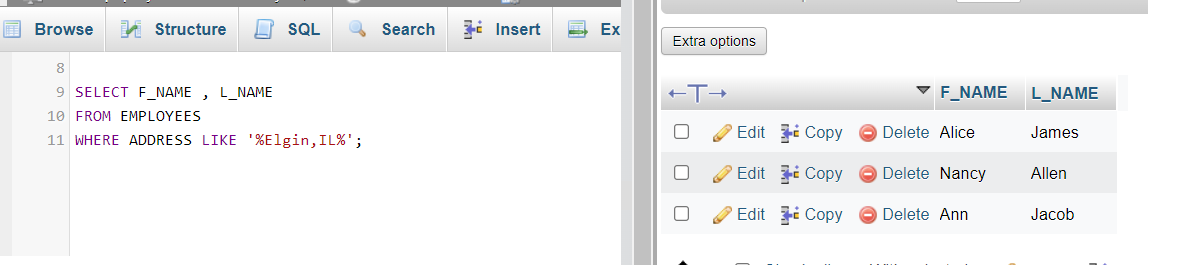
Say you need to retrieve the first names F_NAME and last names L_NAME of all employees who live in Elgin, IL. You can use the LIKE operator to retrieve strings that contain the said text. The code will look as shown below.
假设您需要检索居住在 Elgin, IL 的所有员工的 F_NAME 名字和 L_NAME 姓氏。您可以使用 LIKE 运算符来检索包含所述文本的字符串。代码如下所示。
SELECT F_NAME, L_NAMEFROM EMPLOYEESWHERE ADDRESS LIKE '%Elgin,IL%';
Upon execution, the query output should appear as shown below:
执行后,查询输出应如下所示:
Now assume that you want to identify the employees who were born during the 70s. The query above can be modified to:
现在假设您想要识别出生于 70 年代的所有员工。上述查询可以修改为:
SELECT F_NAME, L_NAMEFROM EMPLOYEESWHERE B_DATE LIKE '197%';
The output for this query will be:
此查询的输出将是:

Note that in the first example, % sign is used both before and after the required text. This is to indicate, that the address string can have more characters, both before and after, the required text.
请注意,在第一个示例中, % 符号在所需文本之前和之后都使用。这是为了表明,地址字符串在所需文本之前和之后可以包含更多字符。
In the second example, since the date of birth in Eployees records starts with the birth year, the % sign is applied after 197%, indicating that the birth year can be anything between 1970 to 1979. Further the % sign also allows any possible date throughout the selected years.
在第二个示例中,由于 Eployees 记录中的出生日期以出生年份开头,因此 % 符号应用于 197% 之后,表示出生年份可以是 1970 年至 1979 年之间的任何年份。此外, % 符号也允许在选定年份中的任何可能日期。
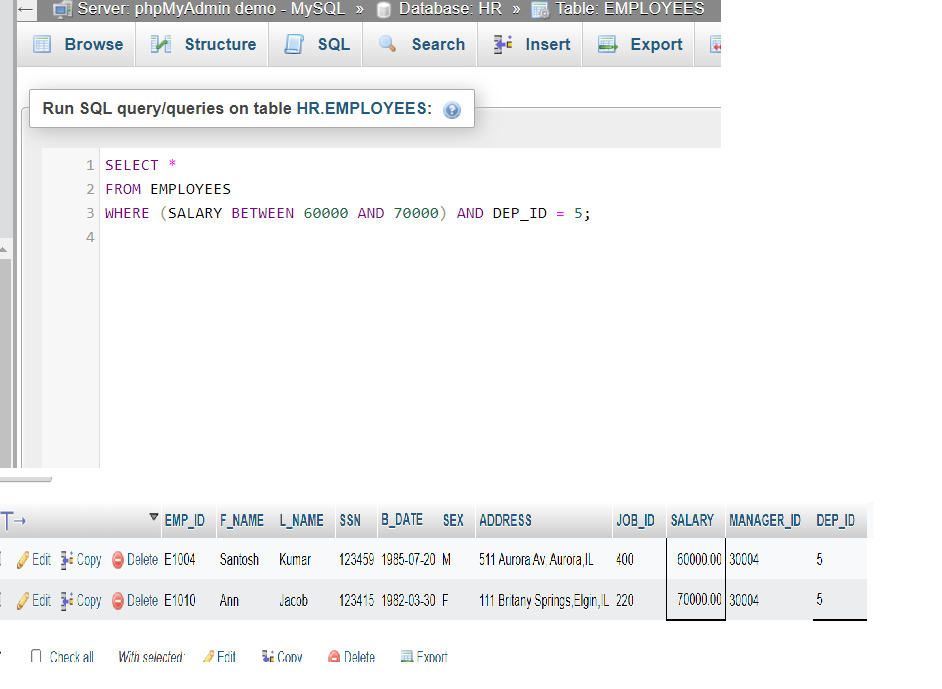
Consider a more specific example. Let us retrieve all employee records in department 5 where salary is between 60000 and 70000. The query that will be used is
考虑一个更具体的示例。让我们检索部门 5 中所有工资在 60000 至 70000 之间的员工记录。将要使用的查询是
SELECT *FROM EMPLOYEESWHERE (SALARY BETWEEN 60000 AND 70000) AND DEP_ID = 5;
Output for the query can be seen in the image below.
查询结果可见下图。
Sorting 排序
You can sort the retrieved entries on the basis of one or more parameters.
您可以根据一个或多个参数对检索到的条目进行排序。
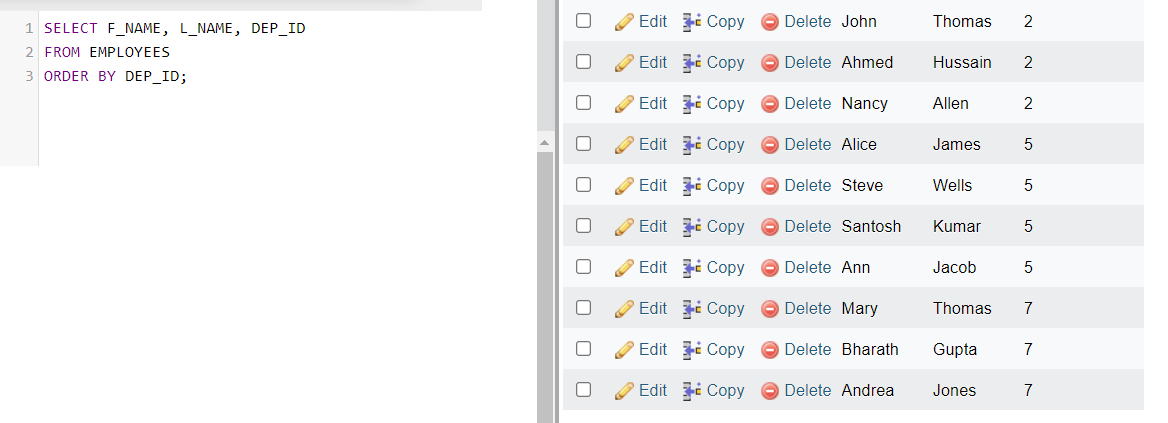
First, assume that you have to retrieve a list of employees ordered by department ID.
首先,假设您需要按部门 ID 检索员工列表。
Sorting is done using the ORDER BY clause in your SQL query. By default, the ORDER BY clause sorts the records in ascending order.
排序是通过在您的 SQL 查询中使用 ORDER BY 子句来完成的。默认情况下,ORDER BY 子句按升序对记录进行排序。
SELECT F_NAME, L_NAME, DEP_IDFROM EMPLOYEESORDER BY DEP_ID;
The output for this query will be as shown below.
此查询的输出将如下所示。
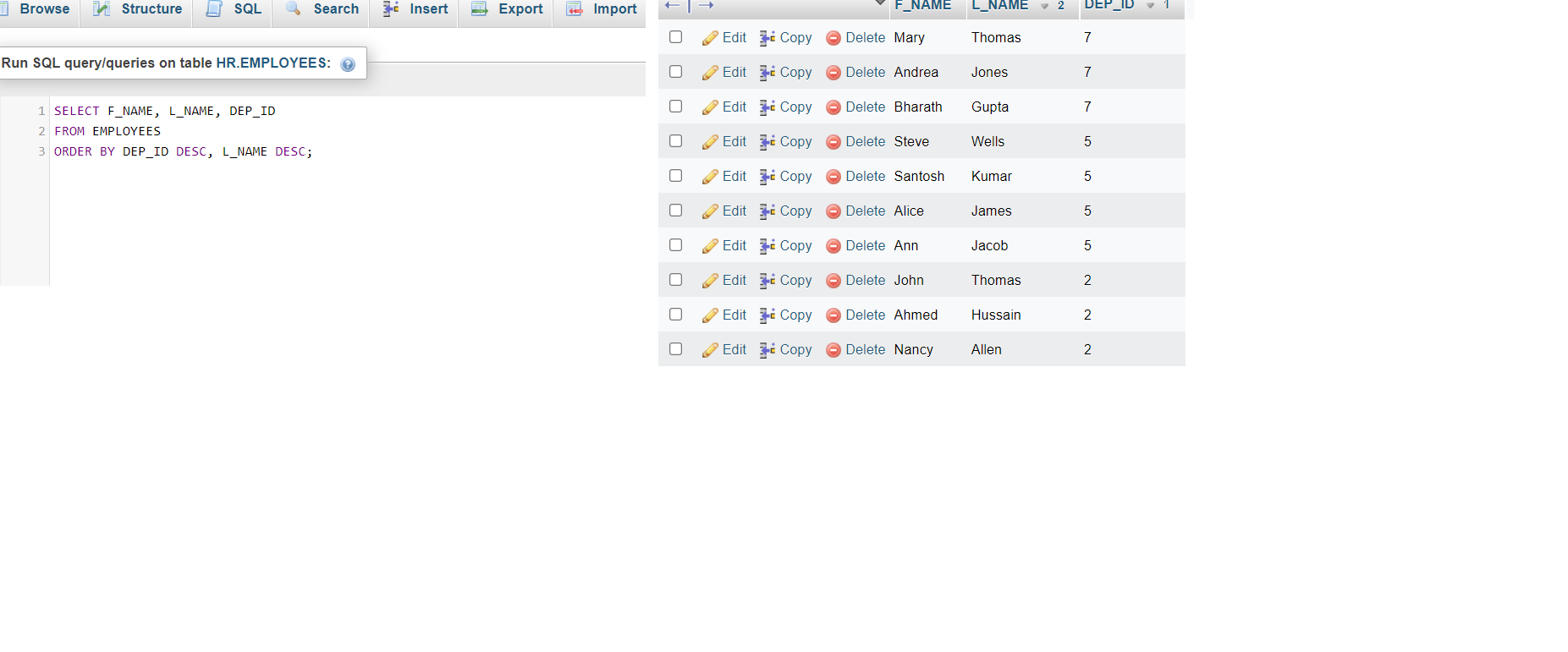
Now, get the output of the same query in descending order of department ID, and within each deaprtment, the records should be ordered in descending alphabetical order by last name. For descending order, you can make use of the DESC clause.
现在,按部门 ID 降序获取相同查询的输出,并且在每个部门内,应按姓氏的降序排列记录。对于降序,可以使用 DESC 子句。
SELECT F_NAME, L_NAME, DEP_IDFROM EMPLOYEESORDER BY DEP_ID DESC, L_NAME DESC;
The output will be as shown in the image below.
输出将如下所示。
Grouping 分组
In this exercise, you will go through some SQL problems on Grouping.
在这个练习中,你将学习一些关于分组(Grouping)的 SQL 问题。
NOTE: The SQL problems in this exercise involve usage of SQL Aggregate functions AVG and COUNT. COUNT has been covered earlier. AVG is a function that can be used to calculate the Average or Mean of all values of a specified column in the result set. For example, to retrieve the average salary for all employees in the EMPLOYEES table, issue the query:
SELECT AVG(SALARY) FROM EMPLOYEES;.
注意:本练习中的 SQL 问题涉及使用 SQL 聚合函数 AVG 和 COUNT。COUNT 已在之前介绍。AVG 是一个函数,用于计算结果集中指定列的所有值的平均值或均值。例如,要检索 EMPLOYEES 表中所有员工的平均工资,请执行查询:SELECT AVG(SALARY) FROM EMPLOYEES;。
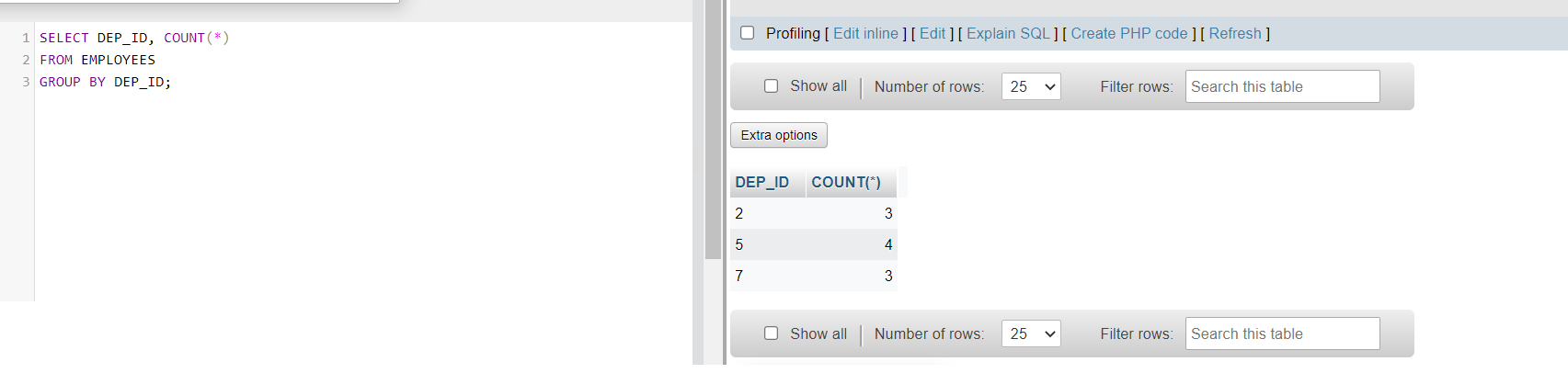
A good example of grouping would be if For each department ID, we wish to retrieve the number of employees in the department.
一个关于分组的良好示例是,如果我们希望为每个部门 ID 检索该部门中的员工数量。
SELECT DEP_ID, COUNT(*)FROM EMPLOYEESGROUP BY DEP_ID;
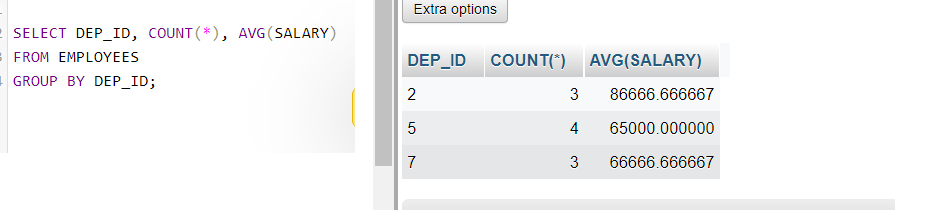
Now, for each department, retrieve the number of employees in the department and the average employee salary in the department. For this, you can use COUNT() to retrieve the total count of a column, and AVG() function to compute average salaries, and then GROUP BY.
现在,为每个部门检索该部门中的员工数量和平均员工工资。为此,你可以使用 COUNT()来检索列的总计数,使用 AVG()函数来计算平均工资,然后使用 GROUP BY 进行分组。
SELECT DEP_ID, COUNT(*), AVG(SALARY)FROM EMPLOYEESGROUP BY DEP_ID;
You can refine your outut by using appropriate labels for the columns of data retrieved. Label the computed columns in the result set of the last problem as NUM_EMPLOYEES and AVG_SALARY.
您可以通过为检索到的数据列使用适当的标签来优化输出。将最后一个问题的结果集中的计算列标记为 NUM_EMPLOYEES 和 AVG_SALARY。
SELECT DEP_ID, COUNT(*) AS "NUM_EMPLOYEES", AVG(SALARY) AS "AVG_SALARY"FROM EMPLOYEESGROUP BY DEP_ID;

You can also combine the usage of GROUP BY and ORDER BY statements to sort the output of each group in accordance with a specific parameter. It is important to note that in such a case, ORDER BY clause muct be used after the GROUP BY clause. For example, we can sort the result of the previous query by average salary. The SQL query would thus become
您还可以结合使用 GROUP BY 和 ORDER BY 语句,根据特定参数对每个组的输出进行排序。需要注意的是,在这种情况下,ORDER BY 子句必须位于 GROUP BY 子句之后。例如,我们可以按平均工资对上一个查询的结果进行排序。因此,SQL 查询将变为
SELECT DEP_ID, COUNT(*) AS "NUM_EMPLOYEES", AVG(SALARY) AS "AVG_SALARY"FROM EMPLOYEESGROUP BY DEP_IDORDER BY AVG_SALARY;
The output of the query should look like:
查询的输出应如下所示:

In case you need to filter a grouped response, you have to use the HAVING clause. In the previous example, if we wish to limit the result to departments with fewer than 4 employees, We will have to use HAVING after the GROUP BY, and use the count() function in the HAVING clause instead of the column label.
如果您需要过滤分组后的响应,您必须使用 HAVING 子句。在之前的示例中,如果我们希望将结果限制在员工少于 4 个的部门,我们将需要在 GROUP BY 之后使用 HAVING,并在 HAVING 子句中使用 count()函数,而不是列标签。
SELECT DEP_ID, COUNT(*) AS "NUM_EMPLOYEES", AVG(SALARY) AS "AVG_SALARY"FROM EMPLOYEESGROUP BY DEP_IDHAVING count(*) < 4ORDER BY AVG_SALARY;

Practice Questions 练习题
- Retrieve the list of all employees, first and last names, whose first names start with ‘S’.
检索所有姓氏以“S”开头员工的列表,包括其名和姓。
Click here for Solution
点击此处查看解决方案
SELECT F_NAME, L_NAME
FROM EMPLOYEES
WHERE F_NAME LIKE 'S%';
- Arrange all the records of the EMPLOYEES table in ascending order of the date of birth.
将 EMPLOYEES 表中的所有记录按出生日期升序排列。
Click here for Solution
点击此处查看解决方案
SELECT *
FROM EMPLOYEES
ORDER BY B_DATE;
- Group the records in terms of the department IDs and filter them of ones that have average salary more than or equal to 60000. Display the department ID and the average salary.
按部门 ID 对记录进行分组,并过滤掉平均工资大于或等于 60000 的记录。显示部门 ID 和平均工资。
Click here for Solution
点击此处查看解决方案
SELECT DEP_ID, AVG(SALARY)
FROM EMPLOYEES
GROUP BY DEP_ID
HAVING AVG(SALARY) >= 60000;
- For the problem above, sort the results for each group in descending order of average salary.
对于上述问题,对每个分组的结果按平均工资降序排列。
Click here for Solution
点击此处查看解决方案
SELECT DEP_ID, AVG(SALARY)
FROM EMPLOYEES
GROUP BY DEP_ID
HAVING AVG(SALARY) >= 60000
ORDER BY AVG(SALARY) DESC;
Conclusion 结论
Congratulations! You have completed this lab.
恭喜!您已完成此实验。
By the end of this lab, you are able to:
在本实验结束时,您将能够:
- Use string patterns for filtering the data retrieved.
使用字符串模式对检索到的数据进行过滤。 - Sort the data retrieved upon one or more parameters using ORDER BY statement.
使用 ORDER BY 语句根据一个或多个参数对检索到的数据进行排序。 - Group the data with respect to a parameter.
根据某个参数对数据进行分组。
Author(s) 作者
