Module 03 · Intermediate SQL
Hands-on Lab: Working with Multiple Tables动手实验:处理多个表格

Estimated time needed: 20 minutes
预计所需时间:20 分钟
Objectives 目标
After completing this lab, you will be able to:
完成此实验后,您将能够:
- Write SQL queries that access more than one table
编写访问多个表的 SQL 查询 - Compose queries that access multiple tables using a nested statement in the WHERE clause
使用 WHERE 子句中的嵌套语句编写访问多个表的查询 - Build queries with multiple tables in the FROM clause
在 FROM 子句中构建包含多个表的查询 - Write Implicit Join queries with join criteria specified in the WHERE clause
编写在 WHERE 子句中指定连接条件的隐式连接查询 - Specify aliases for table names and qualify column names with table aliases
为表名指定别名,并使用表别名限定列名
In this lab, you will complete SQL practice problems that will provide hands-on experience with SQL queries that access multiple tables. You will be:
在本实验中,你将完成 SQL 练习题,通过这些练习题,你将获得使用访问多个表的 SQL 查询的实践经验。你将:
- Accessing Multiple Tables with Sub-Queries
使用子查询访问多个表 - Accessing Multiple Tables with Implicit Joins
使用隐式连接访问多个表
Software used in this lab 本实验使用的软件
In this lab, you will use MySQL. MySQL is a Relational Database Management System (RDBMS) designed to store, manipulate, and retrieve data efficiently.
在这个实验室中,您将使用 MySQL。MySQL 是一个关系型数据库管理系统(RDBMS),设计用于高效地存储、操作和检索数据。
To complete this lab, you will utilize MySQL relational database service available as part of IBM Skills Network Labs (SN Labs) Cloud IDE. SN Labs is a virtual lab environment used in this course.
要完成此实验,您将使用作为 IBM 技能网络实验室 (SN Labs) 云集成开发环境 (Cloud IDE) 的一部分的 MySQL 关系数据库服务。SN Labs 是本课程中使用的虚拟实验室环境。
Database used in this lab 本实验使用的数据库
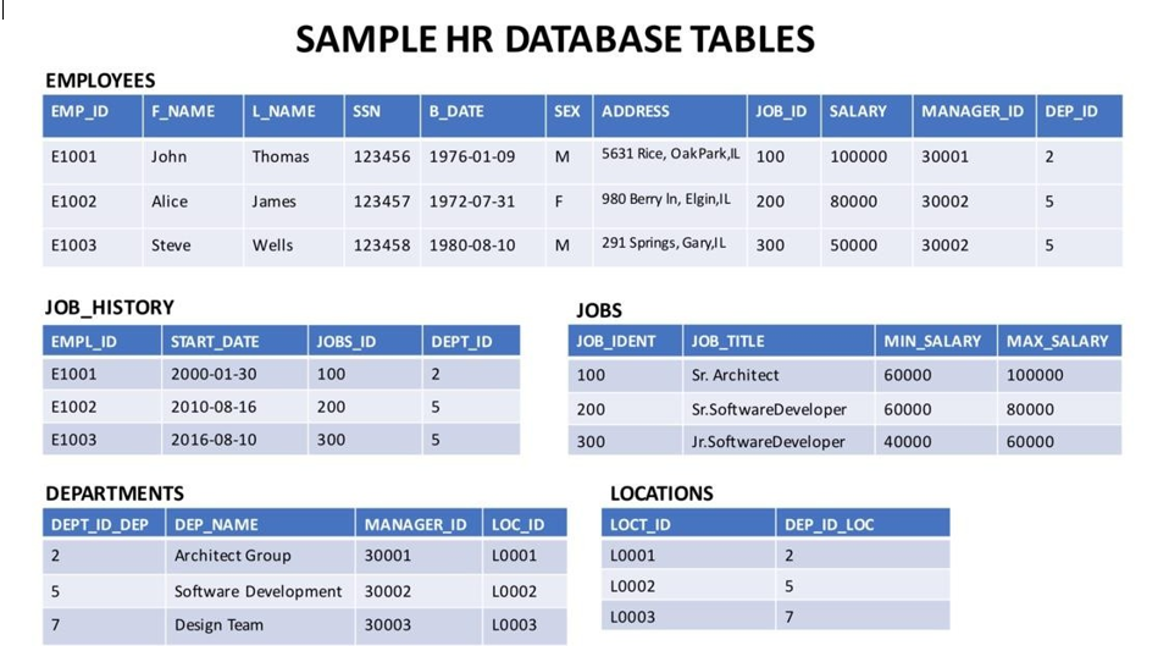
The database used in this lab is internal. You will be working on a sample HR database. This HR database schema consists of 5 tables called EMPLOYEES, JOB_HISTORY, JOBS, DEPARTMENTS and LOCATIONS. Each table has a few rows of sample data. The following diagram shows the tables for the HR database:
本实验中使用的数据库是内部的。您将使用一个示例人力资源数据库。该人力资源数据库模式由 5 个表组成,分别称为 EMPLOYEES、JOB_HISTORY、JOBS、DEPARTMENTS 和 LOCATIONS。每个表都包含几行示例数据。下图显示了人力资源数据库的表:
Load the database 加载数据库
Using the skills acquired in the previous modules, you should first create the database in MySQL. Follow the steps below:
运用前几个模块所学的技能,您首先应该在 MySQL 中创建数据库。按照以下步骤操作:
- Open the phpMyAdmin interface from the Skills Network Toolbox in Cloud IDE.
从云 IDE 中的 Skills Network Toolbox 中打开 phpMyAdmin 界面。 - Create a blank database named HR. Use the script shared in the link below to create the required tables.
创建一个名为 HR 的空数据库。使用以下链接中共享的脚本创建所需的表。
Script_Create_Tables.sql - Download the files in the links below to your local machine (if not already done in previous labs).
将以下链接中的文件下载到您的本地计算机(如果之前实验室尚未完成)。
Departments. csv
Jobs. csv 工作。csv
JobsHistory.csv 工作历史。csv
Locations. csv 地点。csv
Employees. csv 员工。csv - Use these files to the interface as data for respective tables in the HR database.
使用这些文件作为 HR 数据库中相应表的数据接口。
Accessing multiple tables with sub-queries 使用子查询访问多个表
Let us see some examples of queries requiring multiple table access using sub-queries.
让我们看一些需要使用子查询访问多个表的查询示例。
- Retrieve only the EMPLOYEES records corresponding to jobs in the JOBS table.
仅检索与 JOBS 表中工作对应的 EMPLOYEES 记录。
For such a question, you can implement the sub-query in the WHERE clause, such that the overlapping column of JOD ID can identify the required entries.
对于此类问题,您可以在 WHERE 子句中实现子查询,以便通过 JOD ID 的重叠列来识别所需条目。
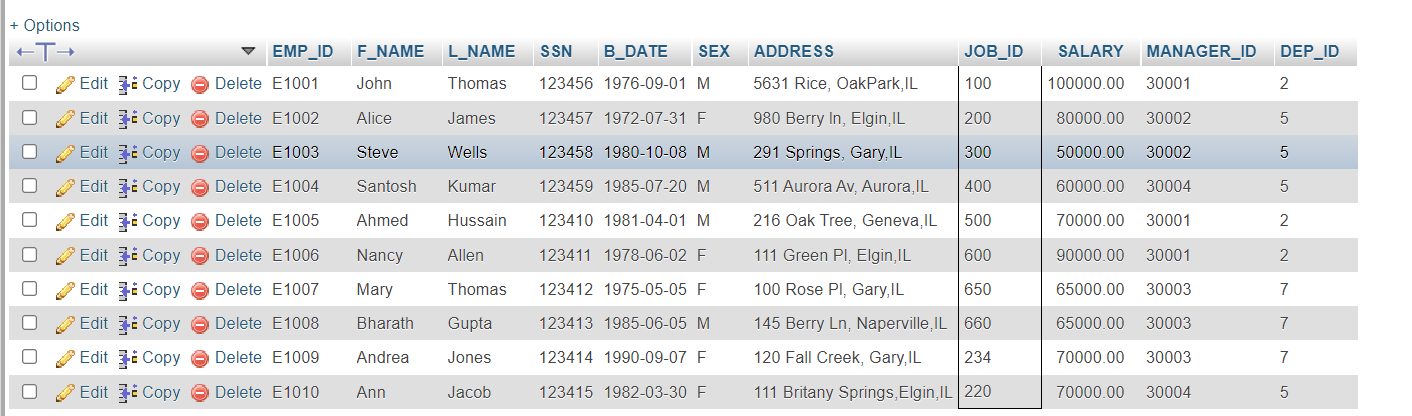
SELECT * FROM EMPLOYEES WHERE JOB_ID IN (SELECT JOB_IDENT FROM JOBS);
The expected output would look as shown below.
预期输出如下所示。
- Retrieve JOB information for employees earning over $70,000.
检索收入超过 70,000 美元的员工的职位信息。
For this example, retrieve the details from the JOBS table, which has common IDs with those available in the EMPLOYEES table, provided the salary in the EMPLOYEES table is greater than $70,000. You can write the query as:
在此示例中,从具有与 EMPLOYEES 表中可用的 ID 相同的 JOBS 表检索详细信息,前提是 EMPLOYEES 表中的工资大于 70,000 美元。您可以编写查询如下:
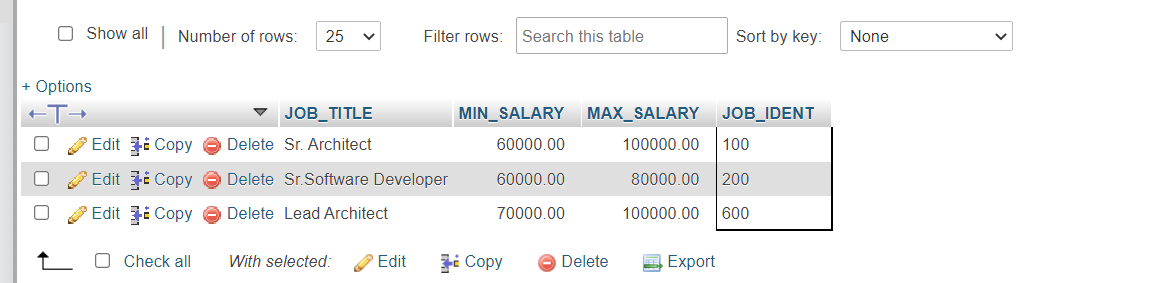
SELECT JOB_TITLE, MIN_SALARY, MAX_SALARY, JOB_IDENTFROM JOBSWHERE JOB_IDENT IN (select JOB_ID from EMPLOYEES where SALARY > 70000 );
The expected output would look as shown below.
预期输出将如下所示。
Accessing multiple tables with Implicit Joins 使用隐式连接访问多个表
Let us see some examples of queries that require access of multiple tables using Implicit Joins.
让我们看一些需要使用隐式连接访问多个表的查询示例。
- Retrieve only the EMPLOYEES records corresponding to jobs in the JOBS table.
仅检索与 JOBS 表中工作对应的 EMPLOYEES 记录。
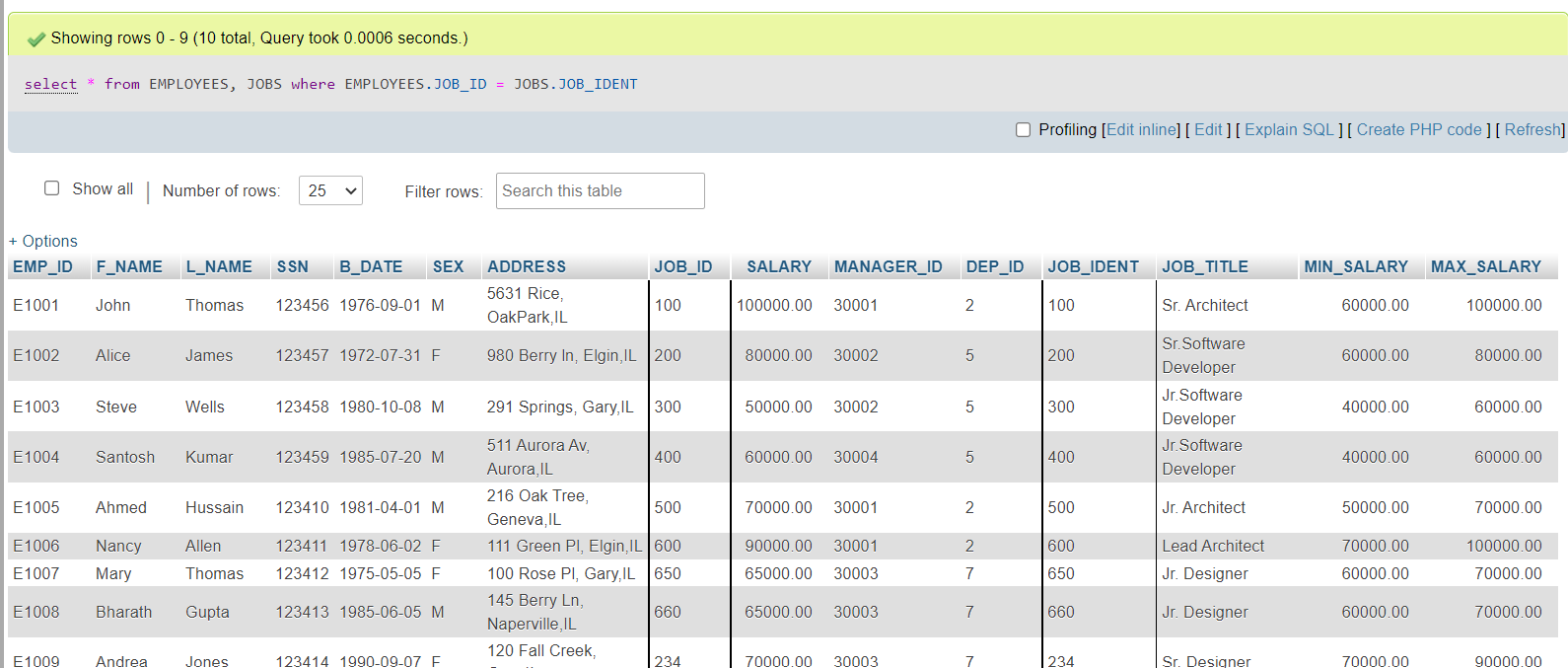
The same question as before, but now we will use Implicit Join to retrieve the required information. For this, you will combine the tables based on job IDs. Using the following query for this:
之前相同的问题,但现在我们将使用隐式连接来检索所需信息。为此,您将根据工作 ID 合并表。使用以下查询进行此操作:
SELECT *FROM EMPLOYEES, JOBSWHERE EMPLOYEES.JOB_ID = JOBS.JOB_IDENT;
The expected output is shown below.
预期输出如下所示。
- Redo the previous query using shorter aliases for table names.
使用更短的别名重做之前的查询。
Note that the tables in question can be assigned shorter aliases. This is especially helpful in cases where specific columns are to be accessed from different tables. The query would be modified to:
请注意,所讨论的表可以分配更短的别名。这在需要从不同表中访问特定列的情况下特别有帮助。查询将修改为:
SELECT *FROM EMPLOYEES E, JOBS JWHERE E.JOB_ID = J.JOB_IDENT;
The output would look like:
输出如下:
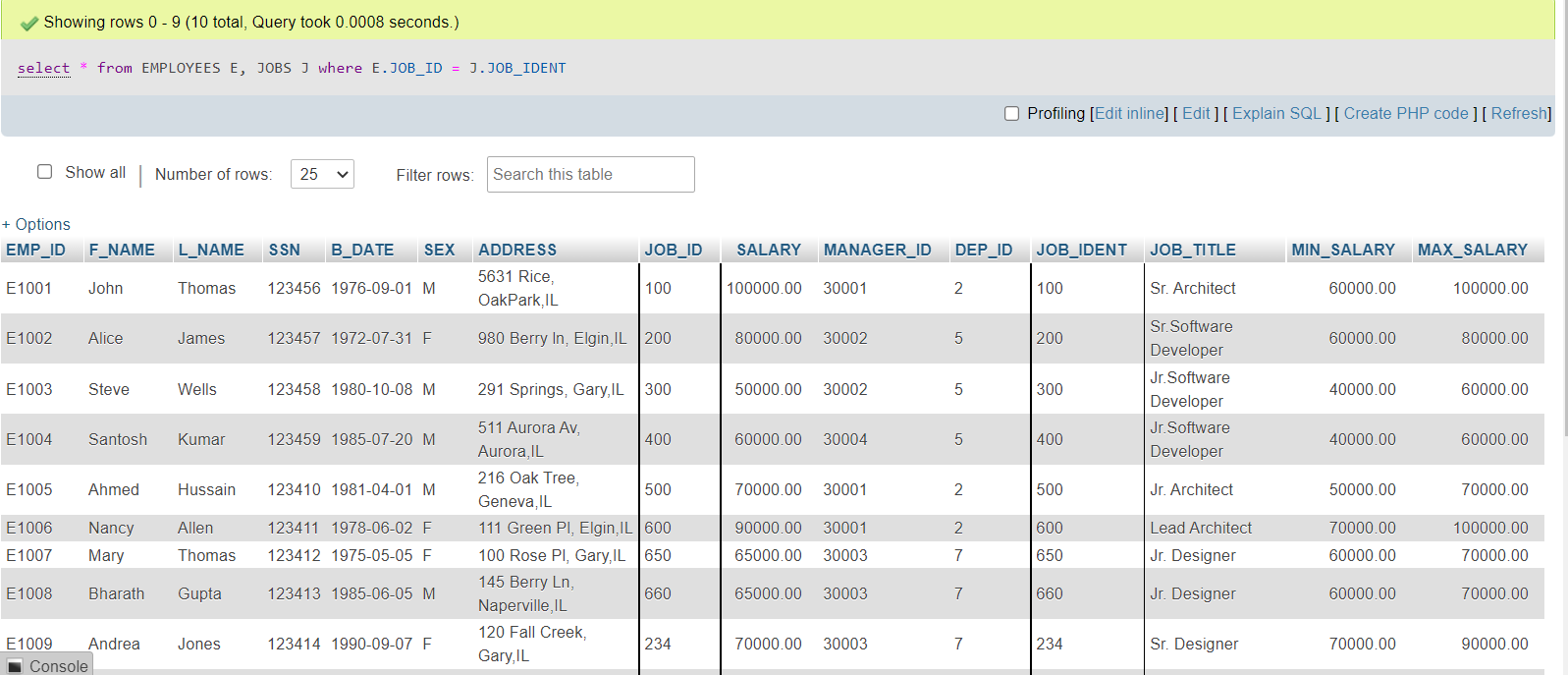
Notice that the two queries are giving the same response.
请注意,这两个查询正在给出相同的响应。
- In the previous query, retrieve only the Employee ID, Name, and Job Title.
在之前的查询中,仅检索员工 ID、姓名和职位。
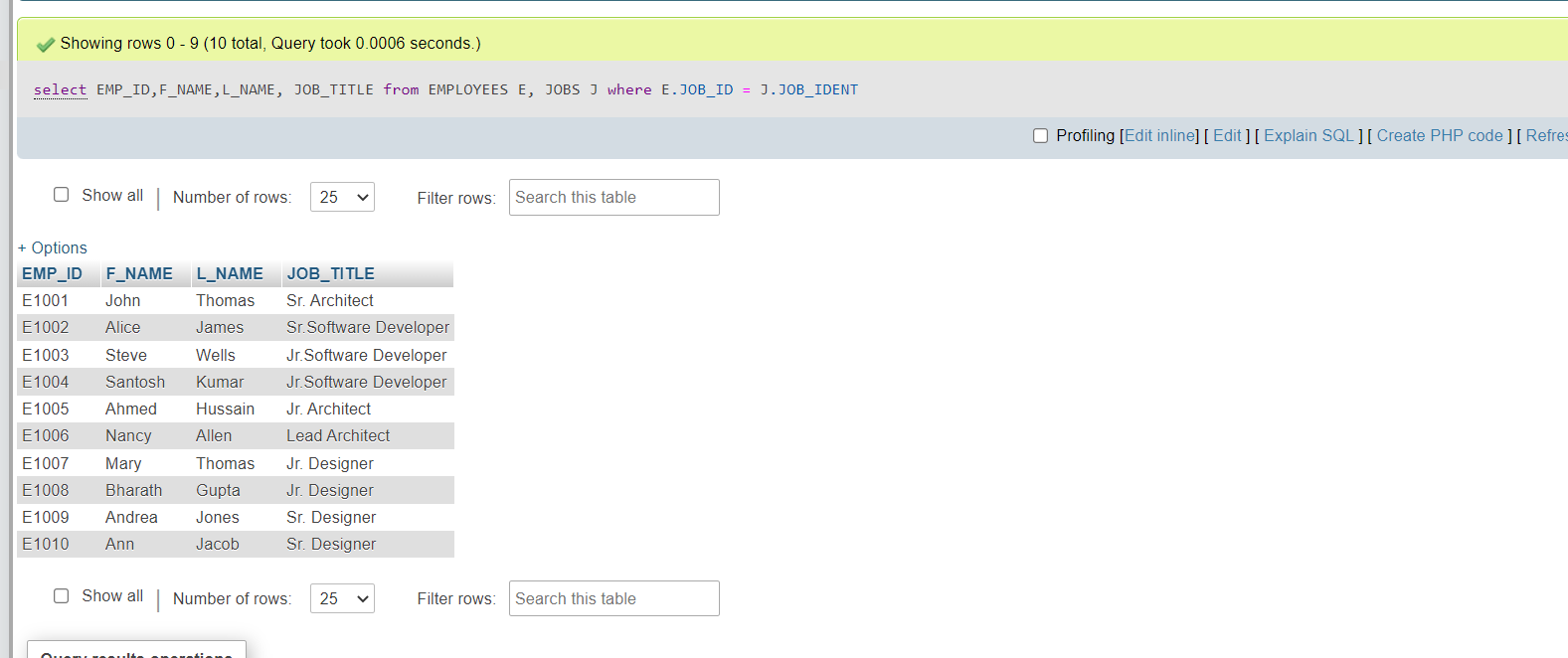
Notice that Job Title is a column of the JOBS table, and other details are coming from the EMPLOYEES table. The two tables will be joined on Job ID. The query would be as follows:
请注意,职位名称是 JOBS 表中的一列,其他详细信息来自 EMPLOYEES 表。这两个表将按职位 ID 进行连接。查询如下:
SELECT EMP_ID,F_NAME,L_NAME, JOB_TITLEFROM EMPLOYEES E, JOBS JWHERE E.JOB_ID = J.JOB_IDENT;
The output would look as shown below.
输出将如下所示。
- Redo the previous query, but specify the fully qualified column names with aliases in the SELECT clause.
在 SELECT 子句中指定完全限定的列名和别名。
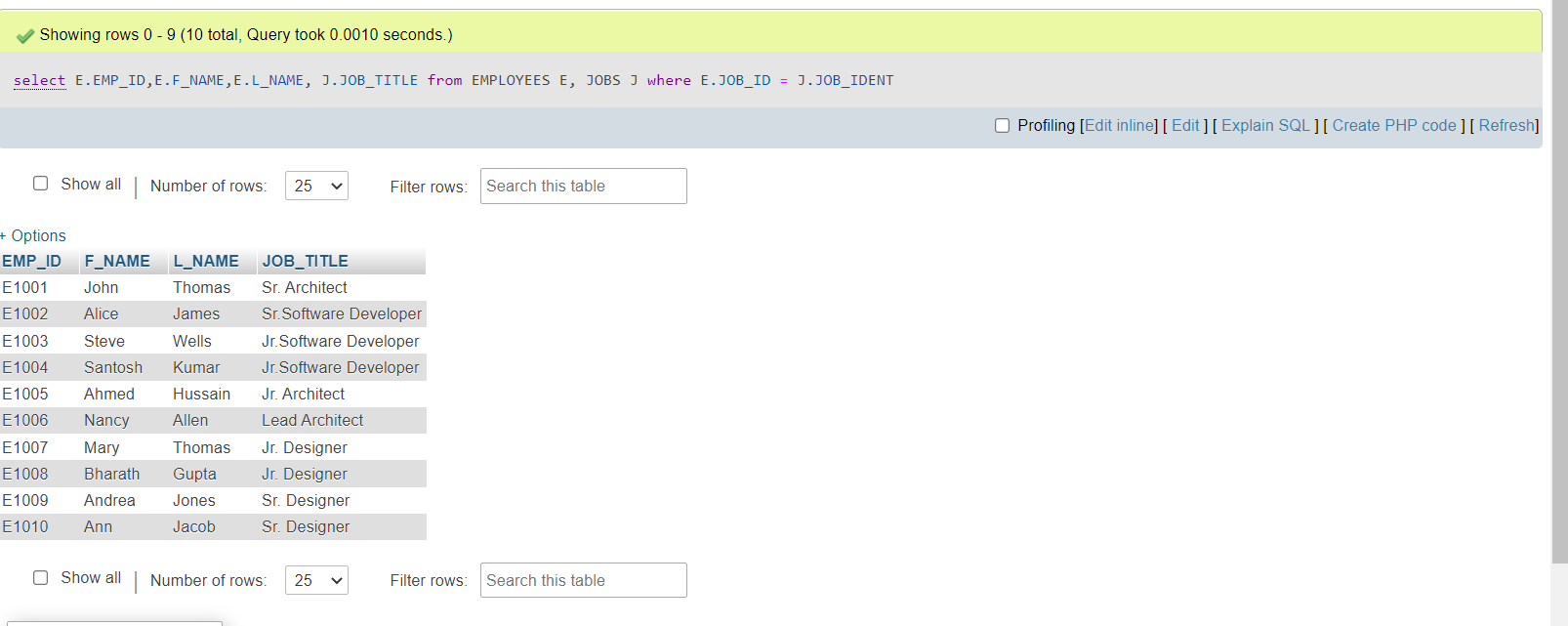
The column names can also be prefixed with table aliases to keep track of where each column is coming from. The above query will be modified as shown below.
列名也可以用表别名作为前缀,以跟踪每个列的来源。上述查询将按如下所示进行修改。
SELECT E.EMP_ID, E.F_NAME, E.L_NAME, J.JOB_TITLEFROM EMPLOYEES E, JOBS JWHERE E.JOB_ID = J.JOB_IDENT;
The expected output is:
预期输出是:
Practice problems 练习题
- Retrieve only the list of employees whose JOB_TITLE is Jr. Designer.
仅检索 JOB_TITLE 为 Jr. Designer 的员工列表。
a. Using sub-queries a. 使用子查询
Solution 解决方案
SELECT *FROM EMPLOYEESWHERE JOB_ID IN (SELECT JOB_IDENTFROM JOBSWHERE JOB_TITLE= 'Jr. Designer');
b. Using Implicit Joins
b. 使用隐式连接
Solution 解决方案
SELECT *
FROM EMPLOYEES E, JOBS J
WHERE E.JOB_ID = J.JOB_IDENT AND J.JOB_TITLE= 'Jr. Designer';
- Retrieve JOB information and a list of employees whose birth year is after 1976.
检索 JOB 信息以及出生年份在 1976 年之后的员工列表。
a. Using sub-queries a. 使用子查询
Solution 解决方案
SELECT JOB_TITLE, MIN_SALARY, MAX_SALARY, JOB_IDENTFROM JOBSWHERE JOB_IDENT IN (SELECT JOB_IDFROM EMPLOYEESWHERE YEAR(B_DATE)>1976 );
b. Using implicit join
b. 使用隐式连接
Solution 解决方案
SELECT J.JOB_TITLE, J.MIN_SALARY, J.MAX_SALARY, J.JOB_IDENTFROM JOBS J, EMPLOYEES EWHERE E.JOB_ID = J.JOB_IDENT AND YEAR(E.B_DATE)>1976;
Conclusion 结论
Congratulations! You have completed this lab and are ready for the next topic.
恭喜!您已完成此实验,可以进入下一个主题。
At the end of this lab, you are now able to:
在本实验结束时,您现在能够:
- Write SQL queries that access more than one table
编写访问多个表的 SQL 查询 - Compose queries that access multiple tables using a nested statement in the WHERE clause
编写使用嵌套语句在 WHERE 子句中访问多个表的查询 - Build queries with multiple tables in the FROM clause
在 FROM 子句中构建涉及多个表的查询 - Write Implicit Join queries with join criteria specified in the WHERE clause
编写在 WHERE 子句中指定连接条件的隐式连接查询 - Specify aliases for table names and qualify column names with table aliases
为表名指定别名,并使用表别名限定列名