Module 02 · Introduction to Relational Databases and Tables
SQL Scripts - Uses and ApplicationsSQL 脚本 - 应用与使用
Here are some of the things that you can do with SQL scripts:
这里是一些你可以使用 SQL 脚本完成的事情:
- Create tables 创建表
You can use SQL scripts to create new tables in your database. This is useful when you need to add new functionality to your application or when you want to store new types of data.
你可以使用 SQL 脚本在你的数据库中创建新表。当你需要为你的应用程序添加新功能或想要存储新类型的数据时,这很有用。 - Drop tables 删除表
SQL scripts often have commands to Drop tables from databases. This is especially important before Create table commands to make sure that a table with the same name doesnt exist in the database already.
SQL 脚本通常包含从数据库中删除表的命令。这在执行 Create table 命令之前尤其重要,以确保数据库中已经不存在同名的表。 - Insert data 插入数据
SQL scripts can also be used to insert data into your tables. This is useful when you need to populate your database with test data or when you want to import data from an external source.
SQL 脚本也可以用于将数据插入到您的表中。当您需要用测试数据填充数据库或从外部源导入数据时,这非常有用。 - Update data 更新数据
You can use SQL scripts to update existing data in your tables. This is useful when you need to correct errors or update records based on changing business requirements.
您可以使用 SQL 脚本来更新表中的现有数据。当您需要纠正错误或根据不断变化的业务需求更新记录时,这很有用。 - Delete data 删除数据
SQL scripts can also be used to delete data from your tables. This is useful when you need to remove old or obsolete records from your database.
SQL 脚本还可以用于从您的表中删除数据。当您需要从数据库中删除旧或过时的记录时,这很有用。 - Create views 创建视图
Views are virtual tables that allow you to query data from multiple tables as if they were a single table. You can use SQL scripts to create views that simplify complex queries and make it easier to work with your data.
视图是虚拟表,允许您将多个表查询为单个表。您可以使用 SQL 脚本来创建视图,简化复杂的查询并使数据操作更便捷。 - Create stored procedures 创建存储过程
Stored procedures are precompiled SQL statements that can be executed on demand. You can use SQL scripts to create stored procedures that encapsulate complex business logic and make it easier to manage your database.
存储过程是预编译的 SQL 语句,可以按需执行。您可以使用 SQL 脚本来创建存储过程,封装复杂的业务逻辑,使数据库管理更轻松。 - Create triggers 创建触发器
Triggers are special types of stored procedures that are automatically executed in response to certain events, such as an insert, update, or delete operation. You can use SQL scripts to create triggers that enforce business rules and maintain data integrity.
触发器是存储过程的一种特殊类型,它们会在响应特定事件(如插入、更新或删除操作)时自动执行。您可以使用 SQL 脚本创建触发器,以强制执行业务规则并维护数据完整性。
Example: Creating Tables 示例:创建表
Let us execute a script containing the CREATE TABLE commands for all the tables in a given dataset, rather than create each table manually by typing the DDL commands in the SQL editor.
让我们执行一个包含给定数据集中所有表的 CREATE TABLE 命令的脚本,而不是在 SQL 编辑器中手动输入 DDL 命令来创建每个表。
Note the following points about these scripts.
注意这些脚本的相关要点。
- SQL scripts are basically a set of SQL commands compiled in a single file.
SQL 脚本基本上是编译在单个文件中的一组 SQL 命令。 - Each command must be terminated with a delimiter or terminator. Most often, the default delimiter is a semicolon
;.
每个命令必须以分隔符或终止符结束。通常,默认分隔符是分号;。 - It is advisable to keep the extension of the file as
.sql.
建议保留文件的扩展名为.sql。 - Upon importing this file in the phpMyAdmin interface, the commands in the file are run sequentially.
在 phpMyAdmin 界面导入此文件时,文件中的命令将按顺序执行。
Consider the following script
考虑以下脚本
DROP TABLE IF EXISTS PATIENTS;
DROP TABLE IF EXISTS MEDICAL_HISTORY;
DROP TABLE IF EXISTS MEDICAL_PROCEDURES;
DROP TABLE IF EXISTS MEDICAL_DEPARTMENTS;
DROP TABLE IF EXISTS MEDICAL_LOCATIONS;

CREATE TABLE PATIENTS (
  PATIENT_ID CHAR(9) NOT NULL,
  FIRST_NAME VARCHAR(15) NOT NULL,
  LAST_NAME VARCHAR(15) NOT NULL,
  SSN CHAR(9),
  BIRTH_DATE DATE,
  SEX CHAR,
  ADDRESS VARCHAR(30),
  DEPT_ID CHAR(9) NOT NULL,
  PRIMARY KEY (PATIENT_ID)
);

CREATE TABLE MEDICAL_HISTORY (
  MEDICAL_HISTORY_ID CHAR(9) NOT NULL,
  PATIENT_ID CHAR(9) NOT NULL,
  DIAGNOSIS_DATE DATE,
  DIAGNOSIS_CODE VARCHAR(10),
  MEDICAL_CONDITION VARCHAR(100),
  DEPT_ID CHAR(9),
  PRIMARY KEY (MEDICAL_HISTORY_ID)
);

CREATE TABLE MEDICAL_PROCEDURES (
  PROCEDURE_ID CHAR(9) NOT NULL,
  PROCEDURE_NAME VARCHAR(30),
  PROCEDURE_DATE DATE,
  PATIENT_ID CHAR(9) NOT NULL,
  DEPT_ID CHAR(9),
  PRIMARY KEY (PROCEDURE_ID)
);

CREATE TABLE MEDICAL_DEPARTMENTS (
  DEPT_ID CHAR(9) NOT NULL,
  DEPT_NAME VARCHAR(15),
  MANAGER_ID CHAR(9),
  LOCATION_ID CHAR(9),
  PRIMARY KEY (DEPT_ID)
);

CREATE TABLE MEDICAL_LOCATIONS (
  LOCATION_ID CHAR(9) NOT NULL,
  DEPT_ID CHAR(9) NOT NULL,
  LOCATION_NAME VARCHAR(50),
  PRIMARY KEY (LOCATION_ID, DEPT_ID)
);
This script incorporates commands to first drop any tables with the mentioned names in the database. After that, the script contains commands to create 5 different tables. All these commands are executed sequentially on the interface.
该脚本包含命令,首先删除数据库中具有所提及名称的任何表。之后,该脚本包含创建 5 个不同表的命令。所有这些命令在界面上按顺序执行。
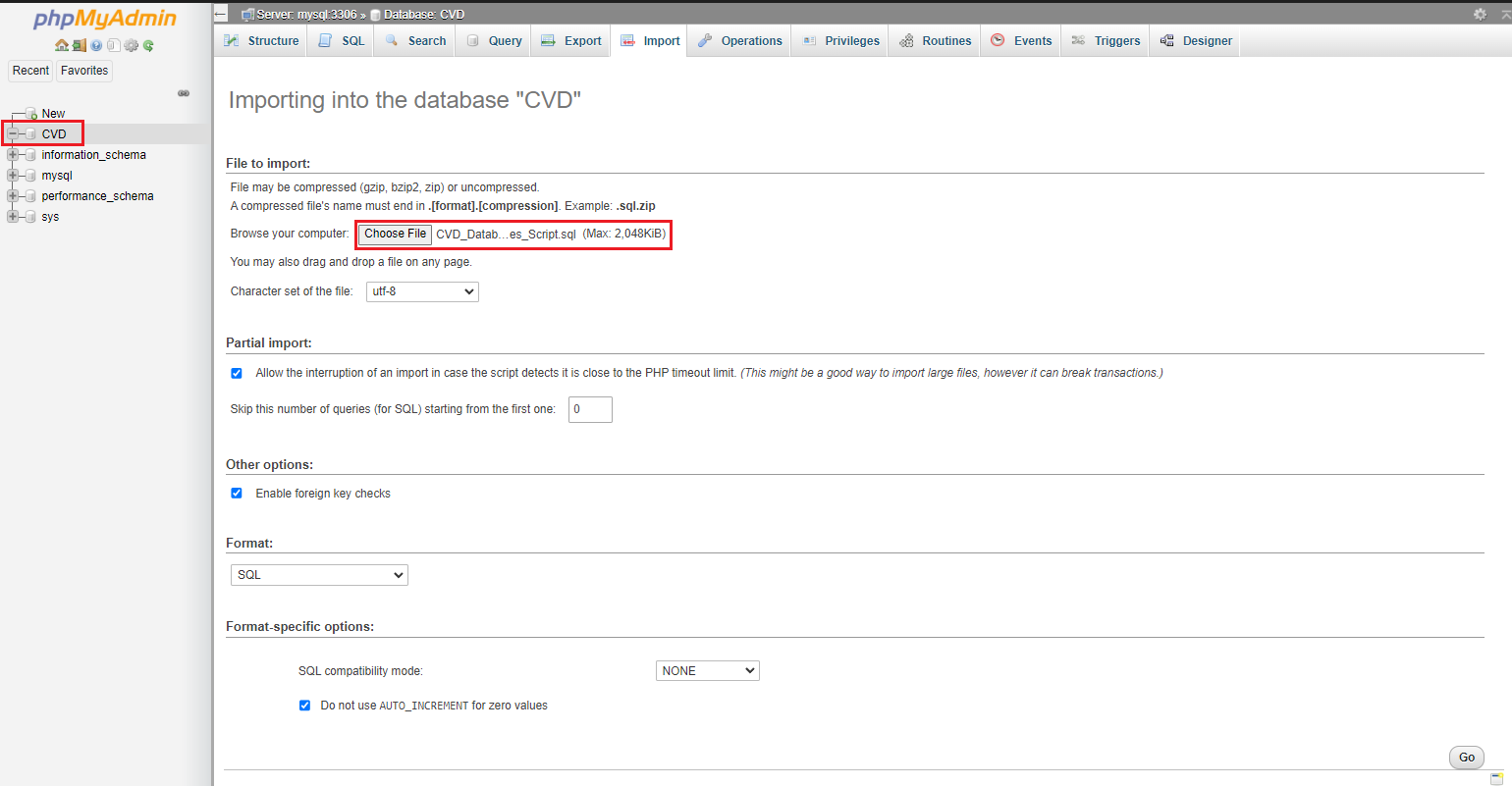
The contents of this file can be saved in a .sql file format and executed on the phpMyAdmin interface. This can be done by first selecting the database, uploading the SQL script in the provided space, and executing it, as shown in the image below.
该文件的内容可以保存为 .sql 文件格式,并在 phpMyAdmin 界面上执行。这可以通过首先选择数据库,在提供的空间中上传 SQL 脚本,然后执行它,如下面的图片所示。
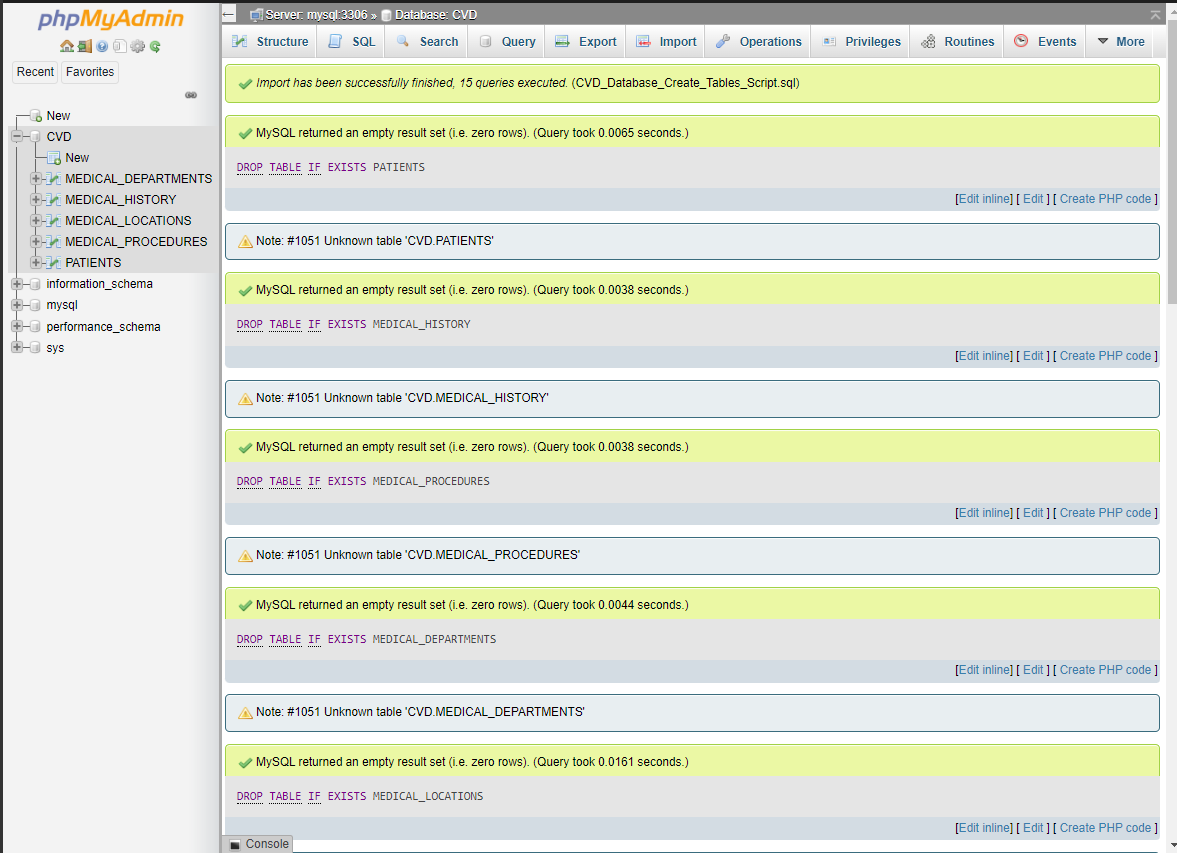
Upon successful execution of each statement in sequence, an note appears on the interface as shown in the image below. It is also prudent to note that the tables created are now visible in the tree structure on the left under the selected database.
当每个语句按顺序成功执行时,界面上会显示一个提示,如下面的图片所示。此外,还应注意,创建的表现在左侧所选数据库的树状结构中可见。
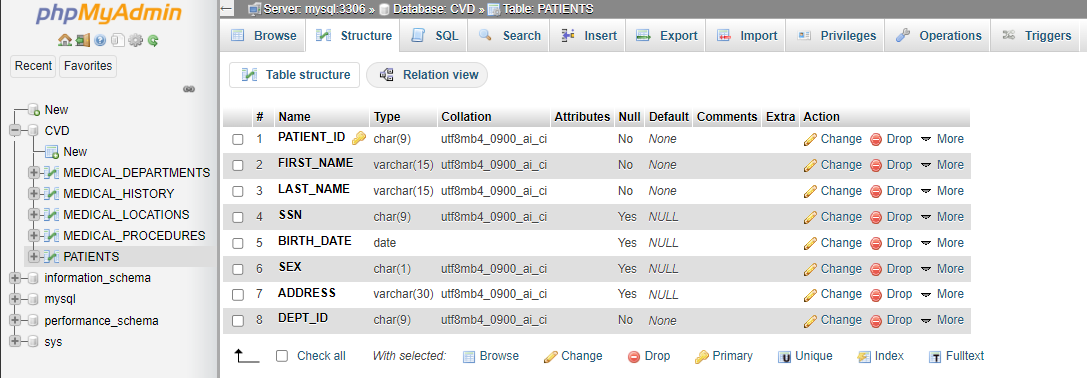
You may click any of the tables to see its Table Definition (its list of columns, data types, and so on). The image below displays the structure of the table PATIENTS.
您可以点击任何表格查看其表定义(其列、数据类型等列表)。下图显示了表 PATIENTS 的结构。