Module 02 · Introduction to Relational Databases and Tables
Hands-on Lab: Create and Load Tables using SQL Scripts动手实验:使用 SQL 脚本创建和加载数据表
In this lab, you will learn how to create tables and load data using the phpMyAdmin graphical user interface (GUI) tool in the MySQL database service.
在这个实验中,你将学习如何使用 MySQL 数据库服务中的 phpMyAdmin 图形用户界面 (GUI) 工具创建表和加载数据。
To launch the lab, check the box below indicating "I agree to use this app responsibly.", and then click on the "Launch App" button. This will open up the lab environment in a new browser tab.
要启动实验,请勾选下方的 "我同意负责任地使用此应用程序" 复选框,然后点击 "启动应用程序" 按钮。这将在新浏览器标签页中打开实验环境。
Estimated time needed: 20 minutes
预计所需时间:20 分钟
Objectives 目标
After completing this lab, you will be able to use phpMyAdmin with MySQL to:
完成这个实验后,你将能够使用 phpMyAdmin 与 MySQL 来:
- Create a database on MySQL
在 MySQL 上创建数据库 - Create tables using SQL scripts
使用 SQL 脚本创建表 - Load data into tables directly from CSV files
直接从 CSV 文件加载数据到表中
MySQL
In this lab, you will use MySQL. MySQL is a Relational Database Management System (RDBMS) designed to efficiently store, manipulate, and retrieve data.
在这个实验中,你将使用 MySQL。MySQL 是一种关系型数据库管理系统 (RDBMS),设计用于高效地存储、操作和检索数据。
To complete this lab, you will use MySQL relational database service available as part of IBM Skills Network Labs (SN Labs) Cloud IDE, the virtual lab environment used in this course.
要完成此实验,您将使用 IBM Skills Network Labs(SN Labs)云 IDE 中提供的 MySQL 关系型数据库服务,该虚拟实验室环境是本课程中使用的。
Database Used in this Lab 本实验使用的数据库
The database used in this lab is internal. You will be working on a sample Cardio-Vascular Diseases (CVD) database. This CVD database schema consists of five tables: PATIENTS, MEDICAL_HISTORY, MEDICAL_PROCEDURES, MEDICAL_DEPARTMENTS, and MEDICAL_LOCATIONS.
本实验使用的数据库是内部的。您将使用一个心血管疾病(CVD)样本数据库进行工作。该 CVD 数据库模式由五个表组成: PATIENTS 、 MEDICAL_HISTORY 、 MEDICAL_PROCEDURES 、 MEDICAL_DEPARTMENTS 和 MEDICAL_LOCATIONS 。
Each table has a few rows of sample data. The following diagram shows the contents of the CVD database:
每个表都包含一些样本数据。以下图表显示了 CVD 数据库的内容:
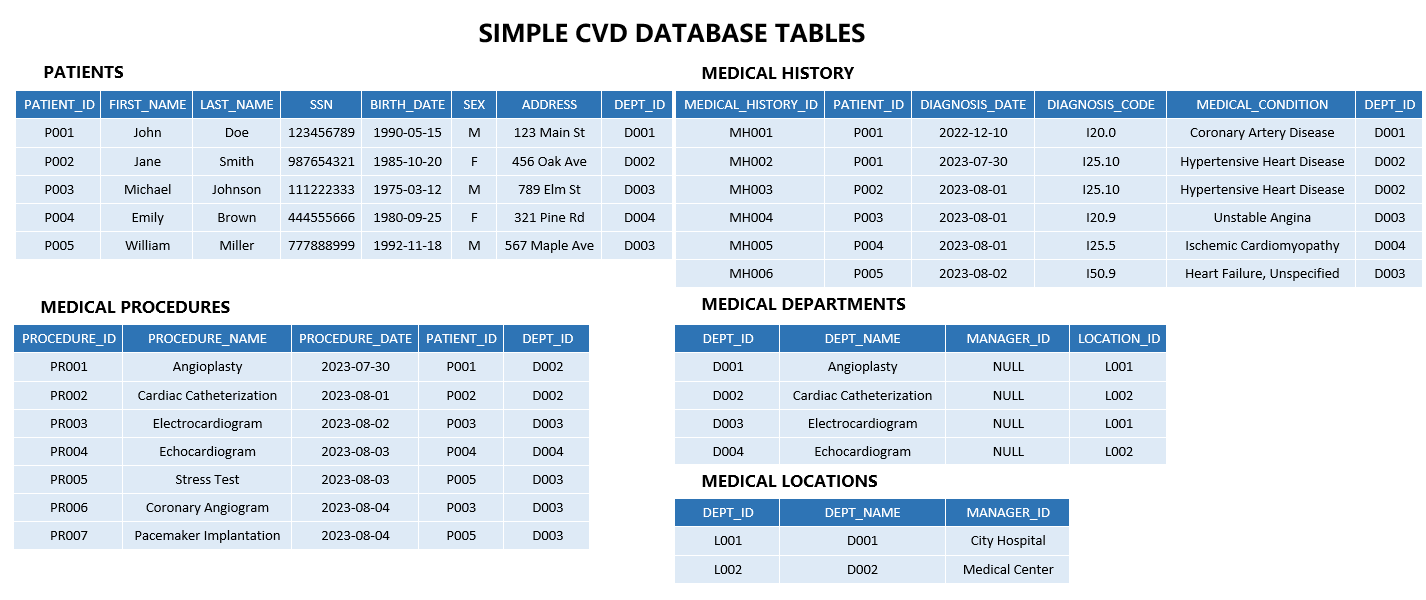
Your task is to create this database in MySQL. This task is divided into three parts.
您的任务是使用 MySQL 创建此数据库。此任务分为三个部分。
Task 1: Create the database on MySQL using the phpMyAdmin GUI.
任务 1:使用 phpMyAdmin 图形界面在 MySQL 中创建数据库。
Task 2: Create all the tables in MySQL using an SQL script.
任务 2:使用 SQL 脚本在 MySQL 中创建所有表格。
Task 3: Populate each table with the data in respective CSV files.
任务 3:使用相应的 CSV 文件中的数据为每个表格填充数据。
Task 1 : Create the database 任务 1:创建数据库
Follow the instructions shared below to create the database CVD in MySQL.
按照以下说明在 MySQL 中创建数据库 CVD 。
Launch phpMyAdmin 启动 phpMyAdmin
- Click on Skills Network Toolbox. In the Database section, click MySQL.
点击 Skills Network 工具箱。在数据库部分,点击 MySQL。
To start the MySQL, click Create.
要开始 MySQL,请点击创建。
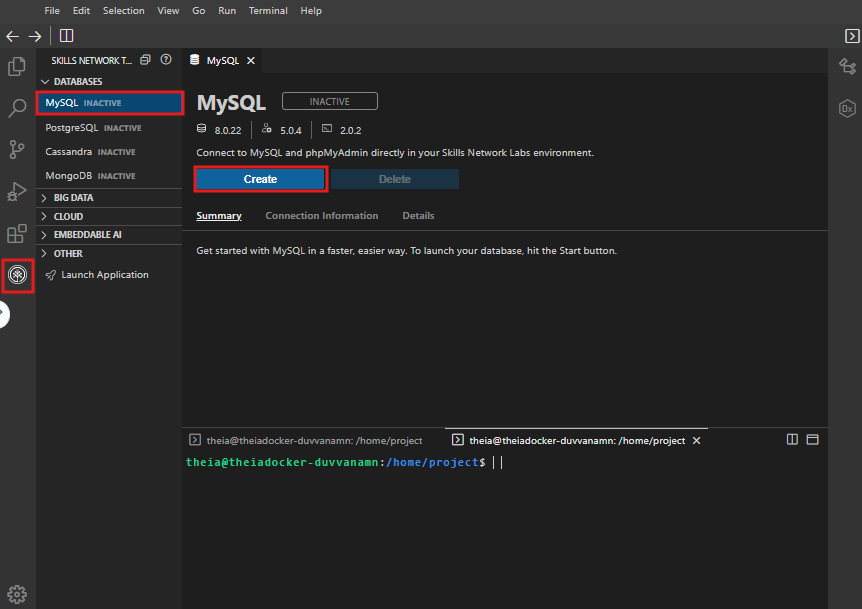
- Once MySQL has started, click the phpMyAdmin button to open phpMyAdmin in the same window. Alternatively, click the toggle button next to the phpMyAdmin button to open phpMyAdmin in a new browser tab.
一旦 MySQL 启动,点击 phpMyAdmin 按钮在同一窗口中打开 phpMyAdmin。或者,点击 phpMyAdmin 按钮旁边的切换按钮在新浏览器标签页中打开 phpMyAdmin。
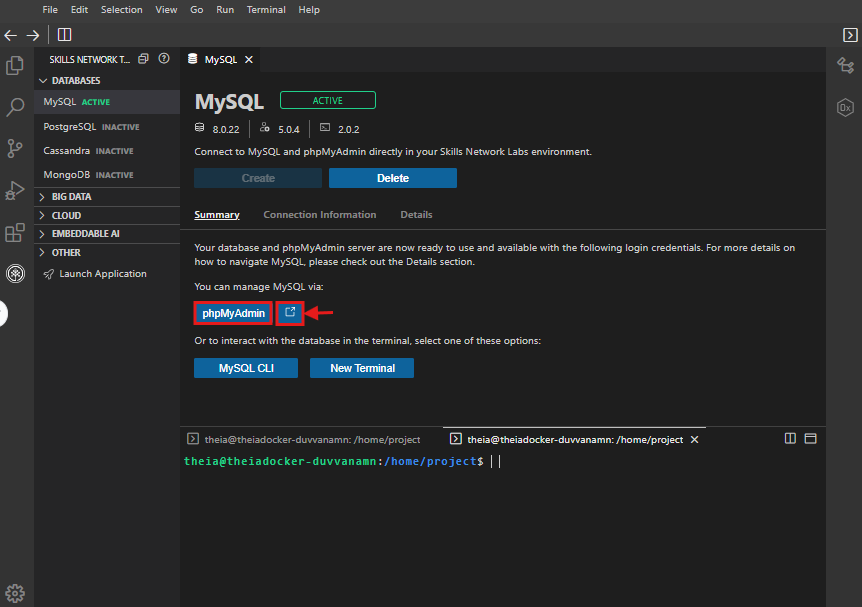
- You will see the phpMyAdmin GUI tool.
您将看到 phpMyAdmin 图形界面工具。
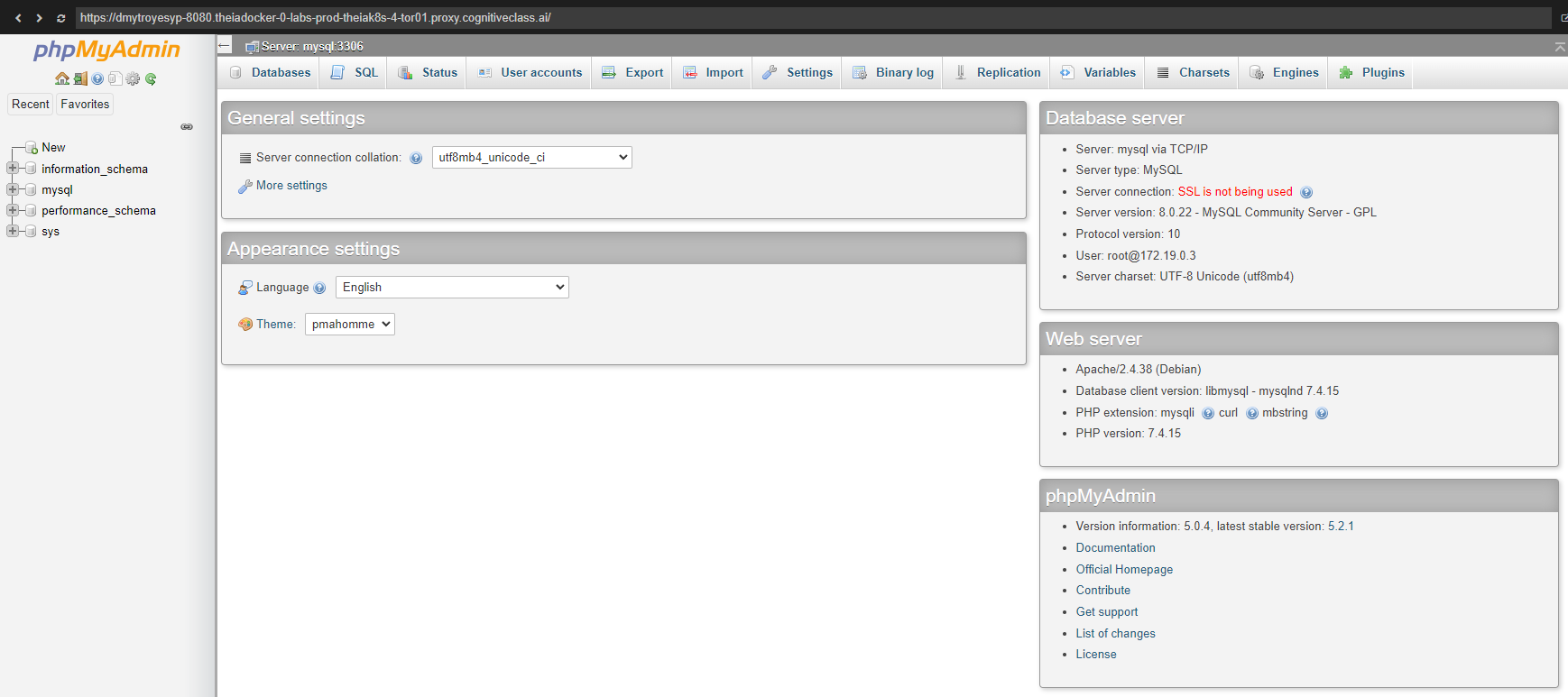
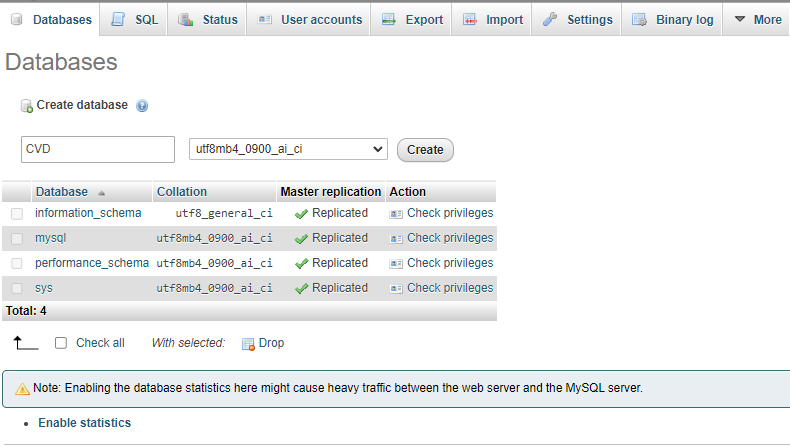
2. In the tree view, click New to create a new empty database. Then, enter CVD as the name of the database and click Create.
在树形视图中,点击“新建”以创建一个新的空数据库。然后,将数据库命名为“CVD”,并点击“创建”。
Leave the default utf8 encoding. UTF-8 is the most commonly used character encoding for content or data.
保留默认的 utf8 编码。UTF-8 是用于内容或数据最常用的字符编码。
Task 2 : Create tables using SQL script 任务 2:使用 SQL 脚本创建表格
In this exercise, you will learn how to execute a script containing the CREATE TABLE commands for all the tables rather than create each table manually by typing the DDL commands in the SQL editor.
在这个练习中,你将学习如何执行包含所有表的 CREATE TABLE 命令的脚本,而不是通过在 SQL 编辑器中手动输入 DDL 命令来创建每个表。
Note: SQL scripts are basically a set of SQL commands compiled in a single file. Each command must be terminated with a semicolon
;. The extension of the file is to be kept as.sql. Upon importing this file in the phpMyAdmin interface, the commands in the file are run sequentially.
注意:SQL 脚本基本上是一组 SQL 命令编译在单个文件中。每个命令必须以分号;结束。文件的扩展名应保持为.sql。在 phpMyAdmin 界面中导入此文件时,文件中的命令将按顺序执行。
Follow the steps shared below.
按照以下步骤操作。
- Download the script file to your local machine:
将脚本文件下载到本地计算机:
CVD_Database_Create_Tables_Script.sql - Select the CVD database. Then click the Import tab.
选择 CVD 数据库。然后点击导入选项卡。 - Click Choose File, browse for the file and upload it.
点击选择文件,浏览文件并上传。 - Once uploaded, scroll down and click Go.
上传完成后,向下滚动并点击继续。
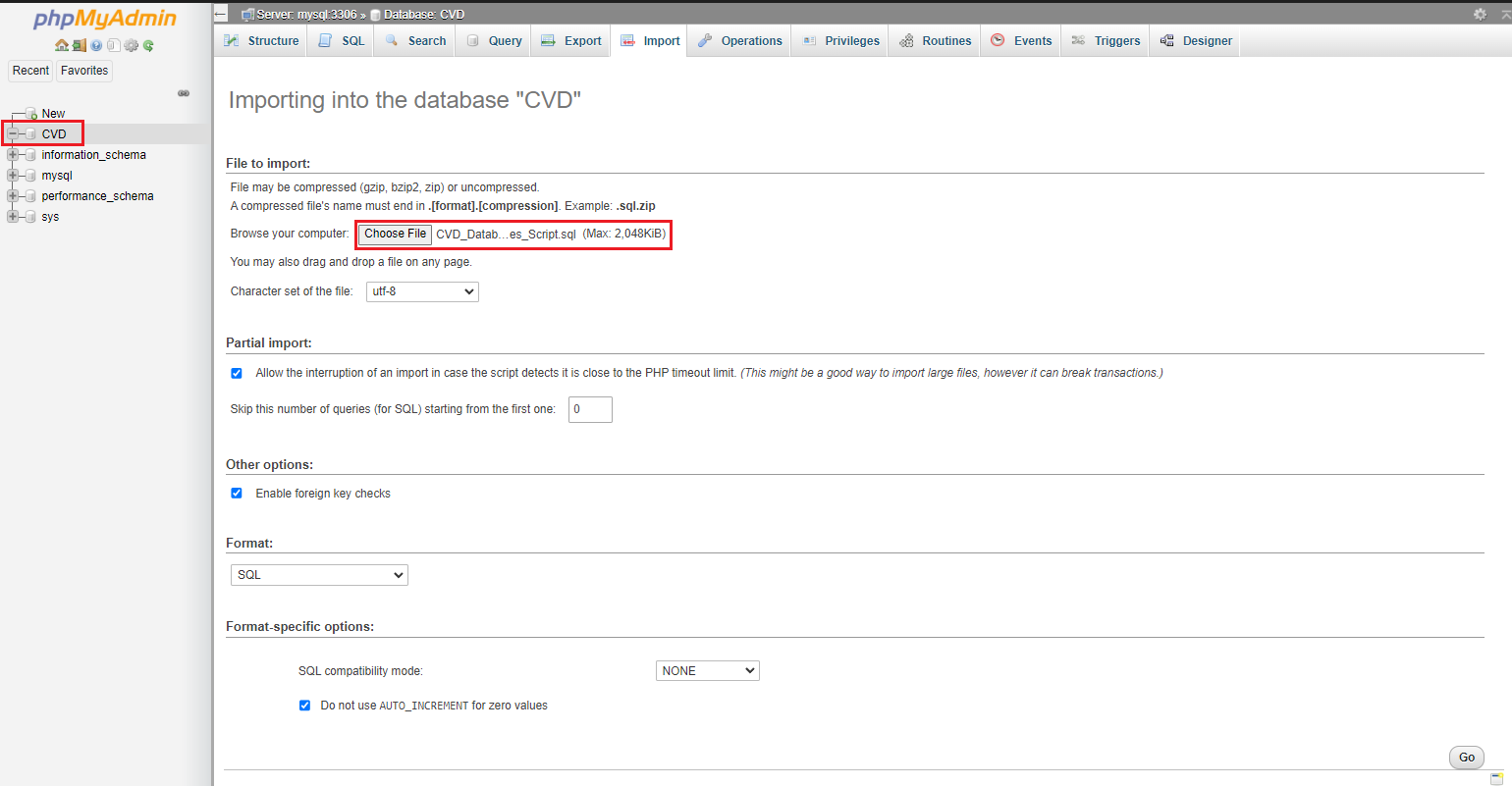
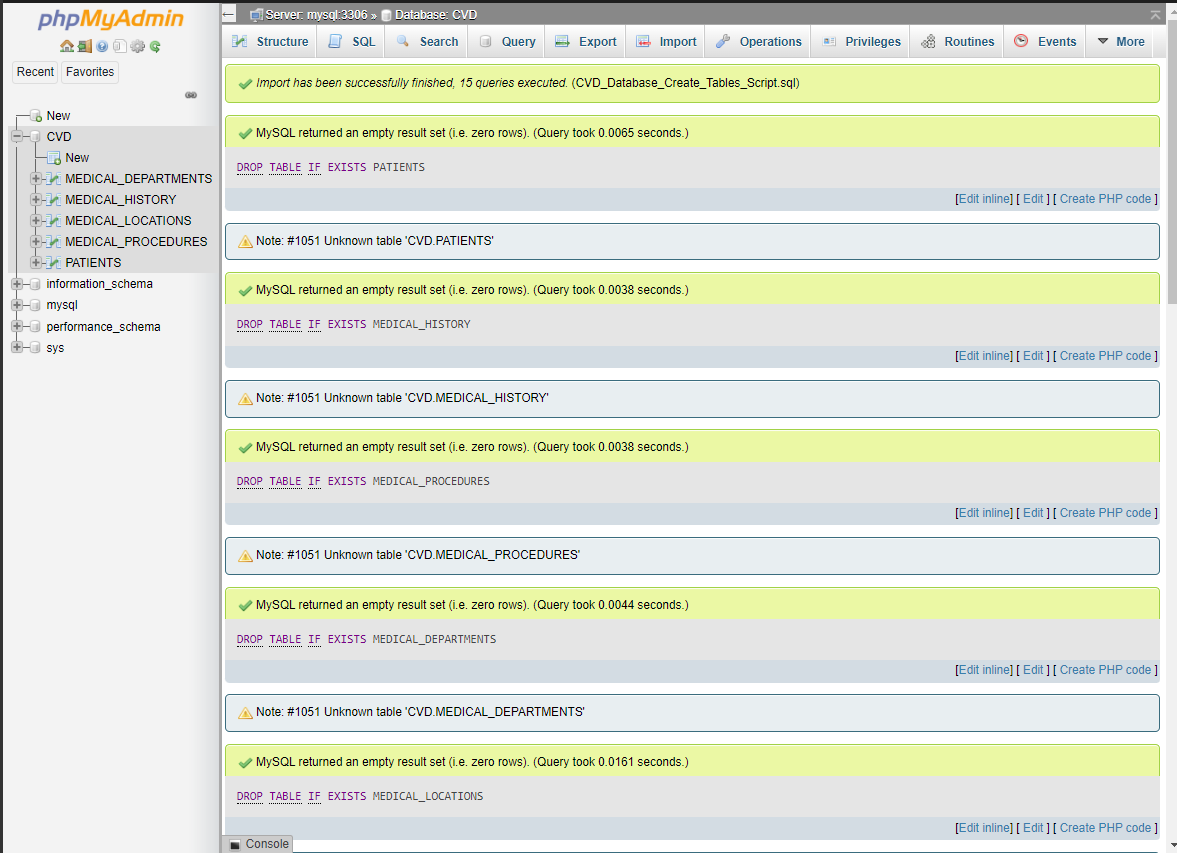
- The script then gets executed successfully, and the interface shows entries in the image below.
脚本成功执行,界面显示下图中的条目。
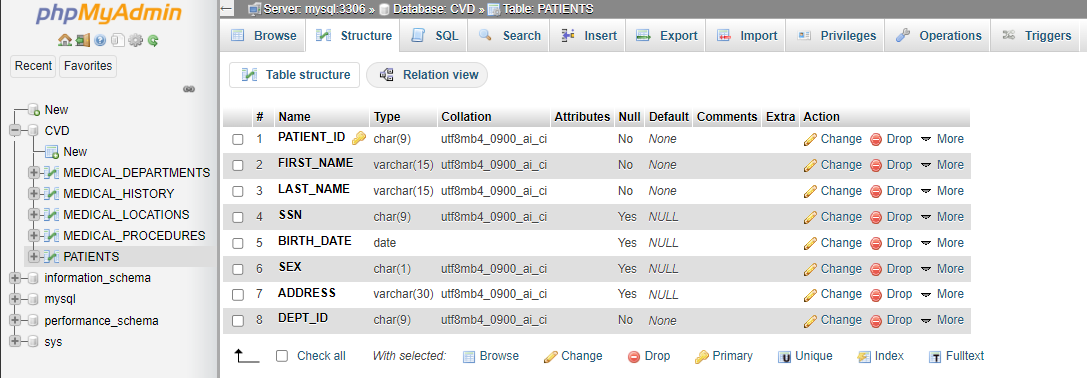
- Click any of the tables to see its Table Definition (its list of columns, data types, and so on). The image below displays the structure of the table PATIENTS.
点击任意表格可查看其表定义(其列、数据类型等列表)。下图显示了表 PATIENTS 的结构。
Task 3 : Load data into tables 任务 3:将数据加载到表格中
You now need to load the data to the tables. You could manually insert each row into the table one by one, but that is highly inefficient. Instead, MySQL (and almost every other database) lets you load data from CSV files directly to the tables.
您现在需要将数据加载到表中。您可以手动逐行将数据插入表中,但这非常低效。相反,MySQL(以及几乎所有其他数据库)允许您直接从 CSV 文件加载数据到表中。
The steps below explain loading data into the tables you created in Task 2.
以下步骤将说明如何将数据加载到您在任务 2 中创建的表中。
- Download the 5 CSV files below to your local machine.
将下面的 5 个 CSV 文件下载到您的本地计算机。
The steps to load a CSV to a table are as follows.
将 CSV 文件加载到表格中的步骤如下。
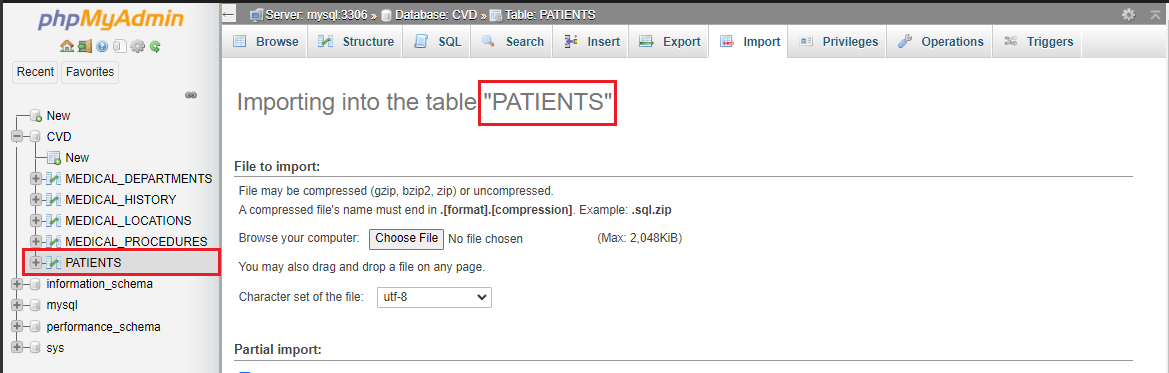
- Select the table. 选择表格。
- Click the Import tab.
点击导入标签页。 - Browse to the location of the CSV file and click ‘Go’ to load the CSV file.
浏览到 CSV 文件的位置,点击“Go”以加载 CSV 文件。
The images below share how to load the CSV data to the PATIENTS table.
下面的图片展示了如何将 CSV 数据加载到 PATIENTS 表中。
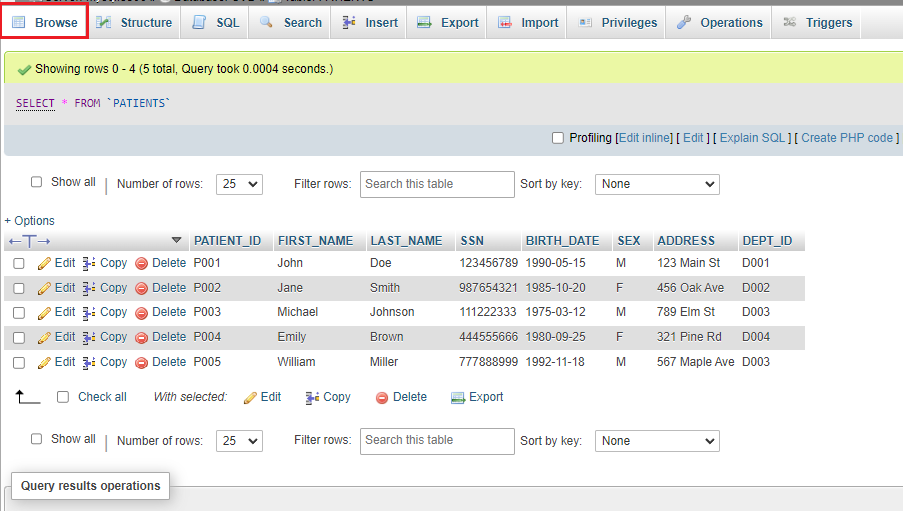
Once the table is loaded, you will get a message that the records are inserted successfully.
表加载完成后,您将收到一条记录插入成功的消息。
Further, you can click on browse and view the table's data.
此外,您可以点击浏览来查看表中的数据。
Practice exercise 练习练习
Repeat the same process for all of the other tables.
对所有其他表格重复相同的过程。
Conclusion 结论
Congratulations on completing this lab.
祝贺您完成本次实验。
In this lab, you learned how to :
在这个实验中,你学习了如何:
- Use phpMyAdmin GUI to operate on MySQL servers
使用 phpMyAdmin 图形界面操作 MySQL 服务器 - Create a new database in phpMyAdmin.
在 phpMyAdmin 中创建新数据库。 - Create the tables for the dataset using SQL scripts
使用 SQL 脚本为数据集创建表。 - Load data from a CSV file directly to a table in MySQL.
从 CSV 文件直接加载数据到 MySQL 的表中。