Module 06 · Bonus Module: Advanced SQL for Data Engineers
Hands-on Lab: Using Views动手实验:使用视图

Estimated time needed: 20 minutes
预计所需时间:20 分钟
In this lab, you will learn about using views. In SQL, a view is an alternative way of representing data that exists in one or more tables. Just like a real table, it contains rows and columns. The fields in a view are fields from one or more real tables in the database. Though views can be queried like a table, views are dynamic; only the definition of the view is stored, not the data.
在本实验中,您将学习如何使用视图。在 SQL 中,视图是一种表示一个或多个表中存在数据的方式。就像一个真实的表一样,它包含行和列。视图中的字段来自数据库中的一个或多个真实表。虽然视图可以像表一样进行查询,但视图是动态的;存储的是视图的定义,而不是数据。
Objectives 目标
After completing this lab, you will be able to:
完成此实验后,您将能够:
- Create a View and show a selection of data for a given table
创建视图并展示给定表的部分数据 - Update a View to combine two or more tables in meaningful ways
更新视图以将两个或多个表以有意义的方式组合起来 - Drop a created View 创建一个视图并放下
Software Used in this Lab 本实验中使用的软件
In this lab, you will use MySQL. MySQL is a Relational Database Management System (RDBMS) designed to efficiently store, manipulate, and retrieve data.
在这个实验中,你将使用 MySQL。MySQL 是一种关系型数据库管理系统 (RDBMS),设计用于高效地存储、操作和检索数据。
To complete this lab you will utilize MySQL relational database service available as part of IBM Skills Network Labs (SN Labs) Cloud IDE. SN Labs is a virtual lab environment used in this course.
完成此实验,您将使用 IBM 技能网络实验室 (SN Labs) 云集成开发环境 (Cloud IDE) 中提供的 MySQL 关系型数据库服务。SN Labs 是本课程中使用的虚拟实验室环境。
Database Used in this Lab 本实验使用的数据库
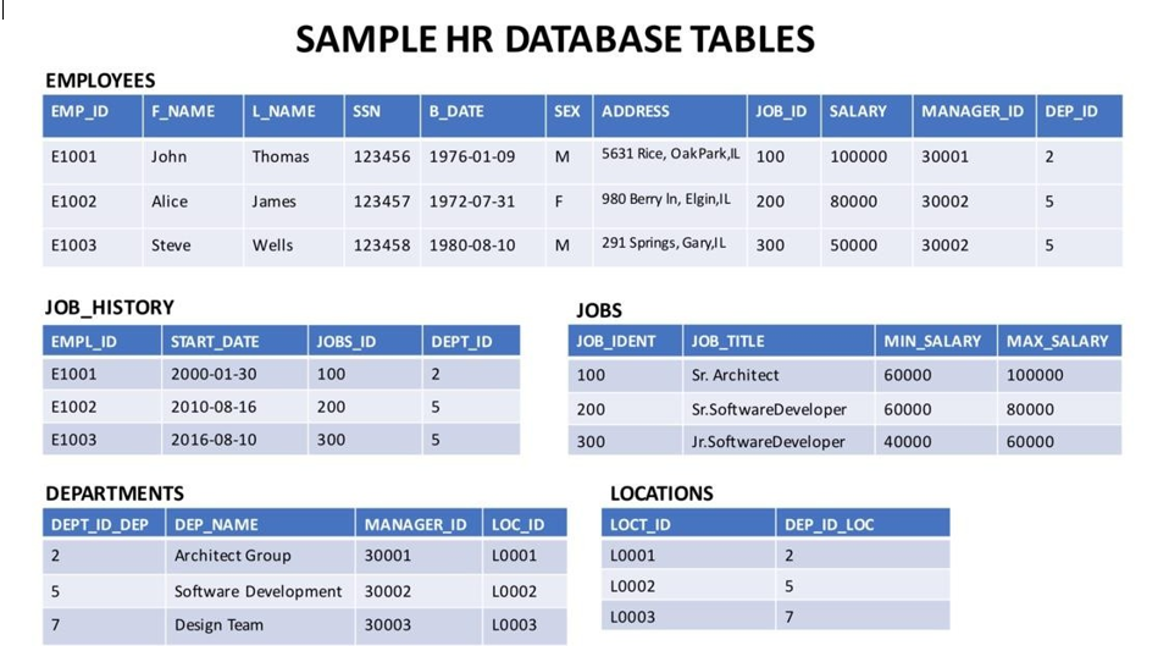
The database used in this lab is a sample HR database. This HR database schema consists of five tables called EMPLOYEES, JOB_HISTORY, JOBS, DEPARTMENTS, and LOCATIONS. Each table has a few rows of sample data. The following diagram shows the tables for the HR database:
本实验中使用的数据库是一个示例人力资源数据库。该人力资源数据库模式由五个名为 EMPLOYEES 、 JOB_HISTORY 、 JOBS 、 DEPARTMENTS 和 LOCATIONS 的表组成。每个表都包含一些示例数据。下图显示了人力资源数据库的表:
Follow the steps below to create the database and the tables.
按照以下步骤创建数据库和表。
- Open the MySQL interface from Skills Network menu.
从 Skills Network 菜单中打开 MySQL 界面。 - Create a new database and name it
HR.
创建一个新的数据库,并将其命名为HR。 - Load and execute the script shared in the link below to create the necessary tables.
加载并执行下方链接中共享的脚本以创建必要的表。
HR_Database_Create_Tables_Script.sql - Load all the tables with the data available in the CSV files shared below.
加载所有表格,其中包含下方共享的 CSV 文件中的数据。
Departments.csv
Employees.csv
Jobs.csv
Locations.csv 位置.csv
JobsHistory.csv 工作历史.csv
Note: Please refer to the instruction in the lab "Create and Load Tables using SQL Scripts" for instructions regarding loading scripts in MySQL.
注意:有关在 MySQL 中加载脚本的说明,请参阅实验室“使用 SQL 脚本创建和加载数据表”中的说明。
Task 1: Create a View 任务 1:创建视图
In this exercise, you will create a View and show a selection of data for a given table.
在本练习中,您将创建一个视图,并展示给定表的特定数据。
- Let's create a view called
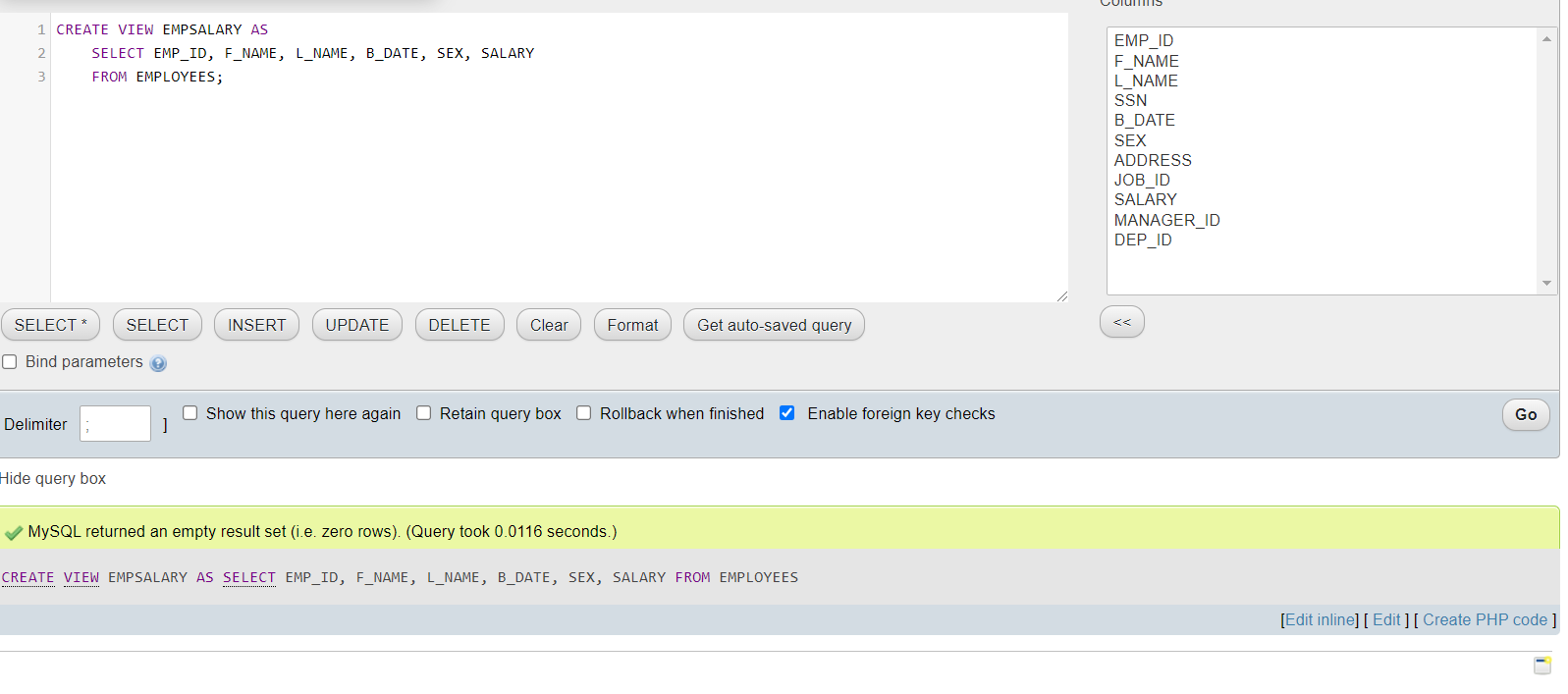
EMPSALARYto display salary along with some basic sensitive data of employees from the HR database. To create theEMPSALARYview from theEMPLOYEEStable, Copy the code below and paste it to the textarea of the SQL page. ClickGo.
让我们创建一个名为EMPSALARY的视图,用于显示员工 HR 数据库中的薪资以及一些基本的敏感数据。要从EMPLOYEES表创建EMPSALARY视图,复制下面的代码并将其粘贴到 SQL 页面的文本区域中。点击Go。
CREATE VIEW EMPSALARY ASSELECT EMP_ID, F_NAME, L_NAME, B_DATE, SEX, SALARYFROM EMPLOYEES;
- Using SELECT, query the
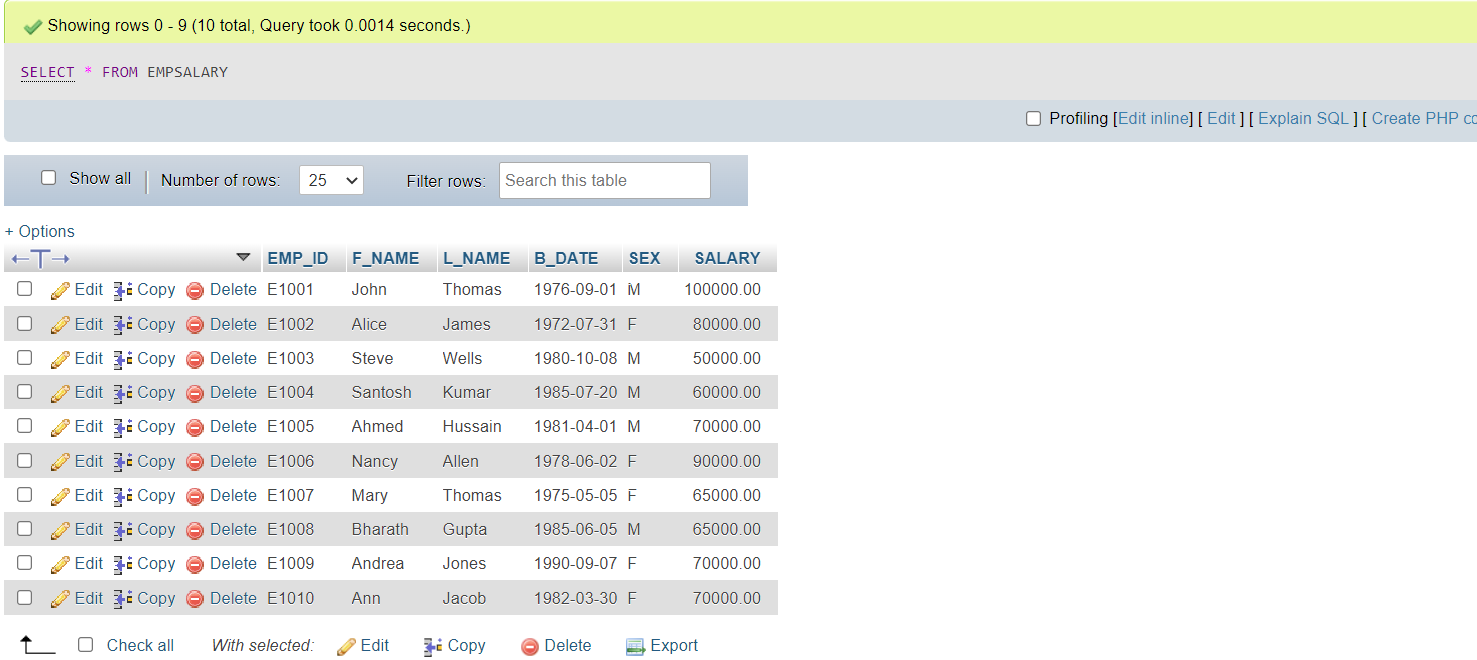
EMPSALARYview to retrieve all the records. Use the following statement.
使用 SELECT 语句查询EMPSALARY视图以检索所有记录。使用以下语句。
SELECT * FROM EMPSALARY;
Task 2: Update a View 任务 2:更新视图
In this exercise, you will update a View to combine two or more tables in meaningful ways.
在本练习中,您将更新视图,以有意义的方式组合两个或多个表。
Assume that the EMPSALARY view we created in Task 1 doesn't contain enough salary information, such as max/min salary and the job title of the employees. For this, we need to get information from other tables in the database. You need all columns from EMPLOYEES table used above, except for SALARY. You also need the columns JOB_TITLE, MIN_SALARY, MAX_SALARY of the JOBS table.
假设我们在任务 1 中创建的 EMPSALARY 视图不包含足够的薪资信息,例如最高/最低薪资和员工的职位。为此,我们需要从数据库中的其他表获取信息。您需要使用上述 EMPLOYEES 表的所有列,除了 SALARY 。您还需要 JOBS 表的 JOB_TITLE 、 MIN_SALARY 、 MAX_SALARY 列。
The command to be used is as follows:
要使用的命令如下:
CREATE OR REPLACE VIEW EMPSALARY ASSELECT EMP_ID, F_NAME, L_NAME, B_DATE, SEX, JOB_TITLE,MIN_SALARY, MAX_SALARYFROM EMPLOYEES, JOBSWHERE EMPLOYEES.JOB_ID = JOBS.JOB_IDENT;
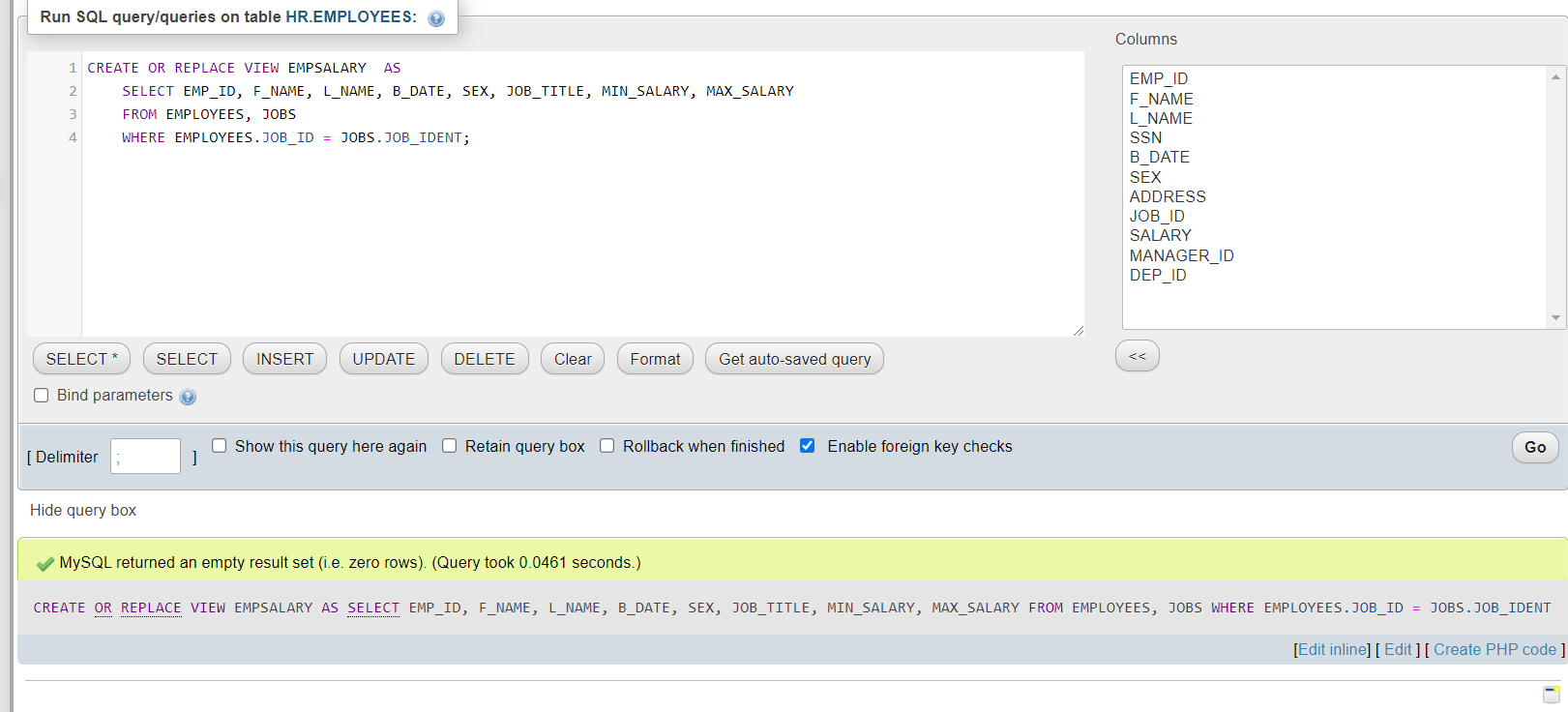
NOTE: The technique used here to combine data from two tables is called implicit inner join. You will learn more about joins later on. For now, just assume you are combining the data of two different tables,
EMPLOYEESandJOBSby connecting their respective columnsJOB_IDandJOB_IDENT, since both the columns contain common unique data. You can have a look at the database description, shared at the beginning of the lab, to verify this.
注意:此处用于合并两个表数据的技术称为隐式内连接。稍后您将了解更多关于连接的内容。目前,只需假设您通过连接各自的列JOB_ID和JOB_IDENT来合并两个不同表EMPLOYEES和JOBS的数据,因为这两列都包含共同的唯一数据。您可以查看实验开始时共享的数据库描述来验证这一点。
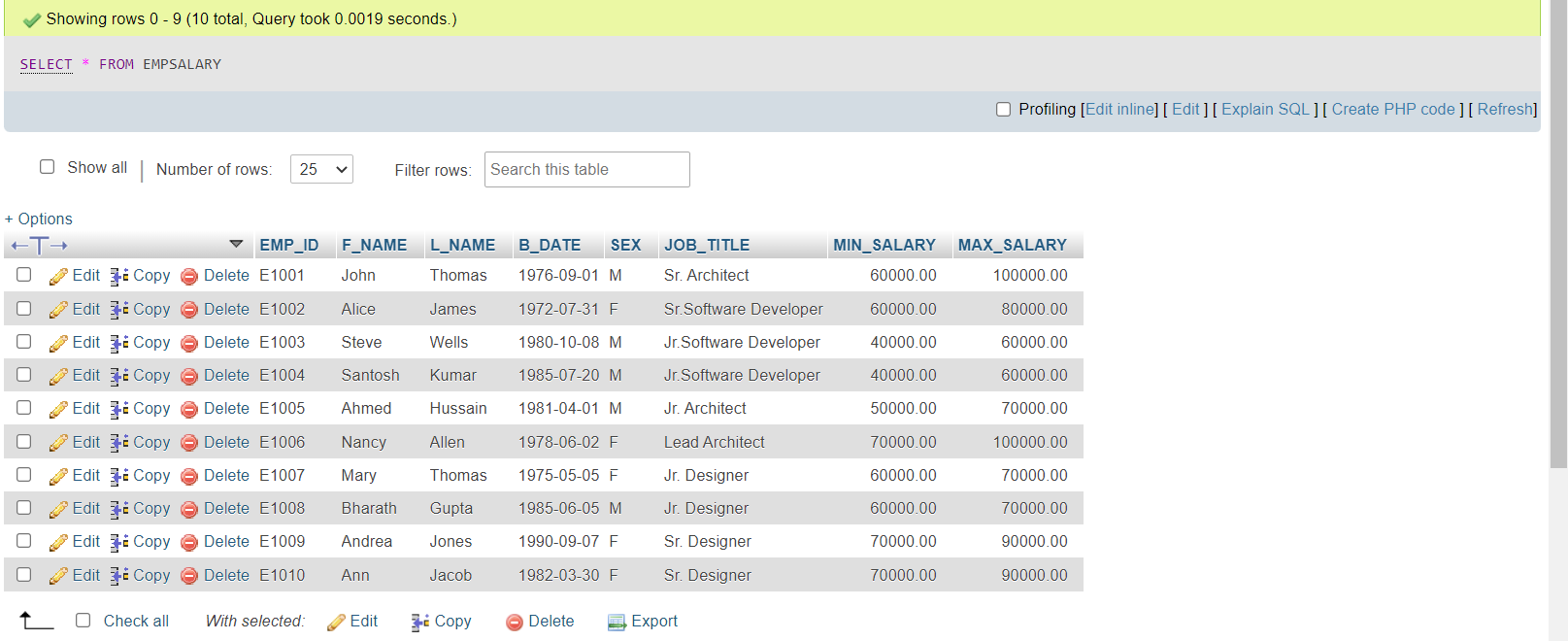
- Using
SELECT, query the updatedEMPSALARYview to retrieve all the records. Copy the code below and paste it to the textarea of the SQL page. ClickGo.
使用SELECT,查询更新的EMPSALARY视图以检索所有记录。将以下代码复制并粘贴到 SQL 页面的文本区域中。点击Go。
SELECT * FROM EMPSALARY;
Task 3: Drop a View 任务 3:删除视图
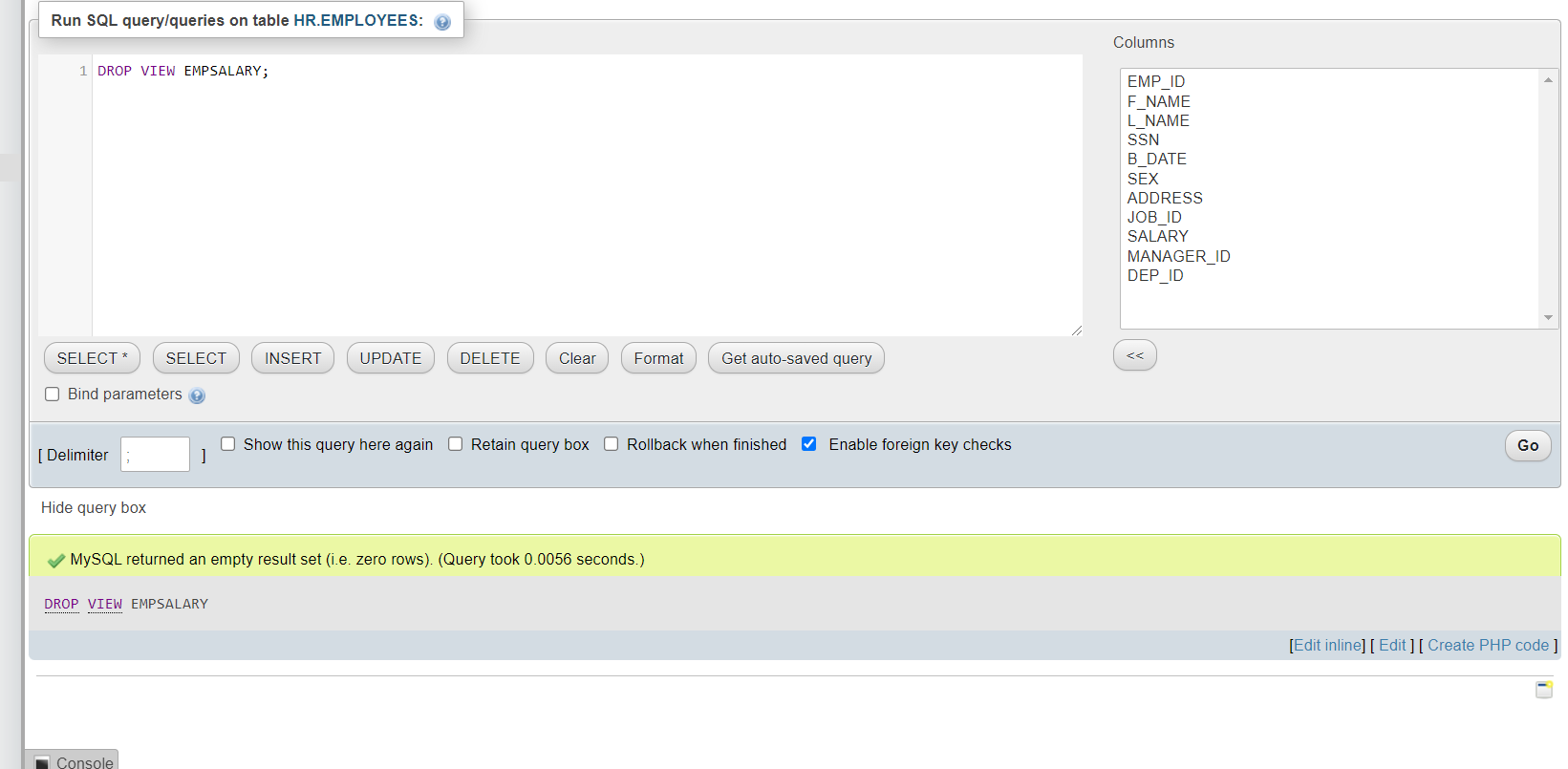
In this exercise, you will drop the created View EMPSALARY.
在这个练习中,您将删除创建的视图 EMPSALARY 。
Use the code below. 使用以下代码。
DROP VIEW EMPSALARY;
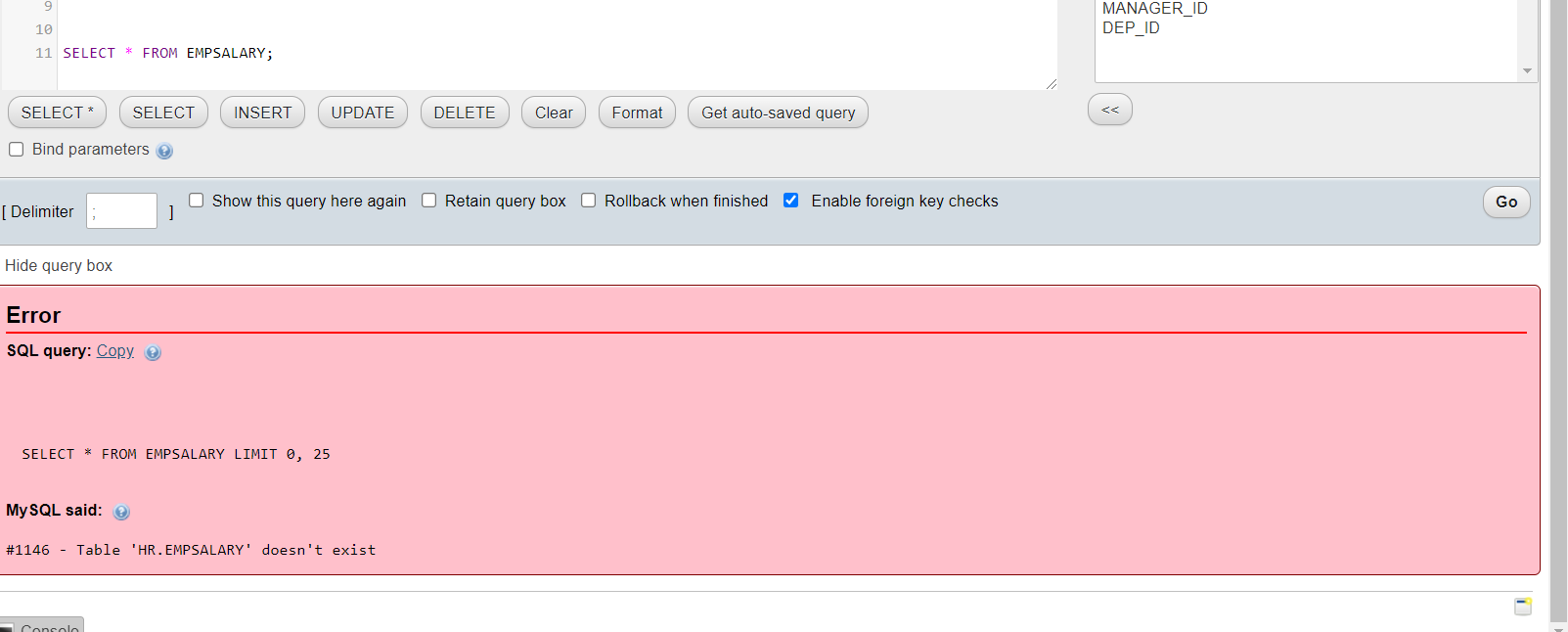
Using SELECT, you can verify whether the EMPSALARY view has been deleted or not. Copy the code below and paste it to the textarea of the SQL page. Click Go.
使用 SELECT,您可以验证 EMPSALARY 视图是否已被删除。复制下面的代码并将其粘贴到 SQL 页面的文本区域中。点击 Go 。
SELECT * FROM EMPSALARY;
Practice Problems 练习题
Try to solve the following practice problems based on your learning in this lab.
尝试根据本次实验中的学习内容,解决以下练习题。
- Create a view “EMP_DEPT” which has the following information.
创建一个名为“EMP_DEPT”的视图,该视图包含以下信息。EMP_ID,FNAME,LNAMEandDEP_IDfromEMPLOYEEStableEMP_ID、FNAME、LNAME和DEP_ID来自EMPLOYEES表
Click here for the solution
点击此处获取答案
CREATE VIEW EMP_DEPT AS
SELECT EMP_ID, F_NAME, L_NAME, DEP_ID
FROM EMPLOYEES;
- Modify “EMP_DEPT” such that it displays Department names instead of Department IDs. For this, we need to combine information from
EMPLOYEESandDEPARTMENTSas follows.
修改“EMP_DEPT”,使其显示部门名称而不是部门 ID。为此,我们需要结合来自EMPLOYEES和DEPARTMENTS的信息,如下所示。
EMP_ID, FNAME, LNAME from EMPLOYEES table and
EMP_ID , FNAME , LNAME 来自 EMPLOYEES 表和
DEP_NAME from DEPARTMENTS table, combined over the columns DEP_ID and DEPT_ID_DEP.
DEP_NAME 从 DEPARTMENTS 表格中,结合 DEP_ID 和 DEPT_ID_DEP 列。
Click here for the solution
点击此处获取答案
CREATE OR REPLACE VIEW EMP_DEPT AS
SELECT EMP_ID, F_NAME, L_NAME, DEP_NAME
FROM EMPLOYEES, DEPARTMENTS
WHERE EMPLOYEES.DEP_ID = DEPARTMENTS.DEPT_ID_DEP;
- Drop the view “EMP_DEPT”.
删除视图“EMP_DEPT”。
Click here for the solution
点击此处获取答案
DROP VIEW EMP_DEPT
Conclusion 结论
Congratulations on completing this lab. You now have hands-on knowledge of how to use Views in SQL.
恭喜您完成本次实验。现在您已经掌握了如何在 SQL 中使用视图的实际操作知识。
You have now learned how to:
现在你已经学习了如何:
- Create a new View as per the requirement
根据要求创建一个新的视图 - Modify a view to include data from multiple tables in the data set
修改视图以包含数据集中的多个表的数据 - Drop a view 放下一个视图