Module 02 · Introduction to Relational Databases and Tables
Reading: Examples to ALTER and TRUNCATE tables using MySQL阅读:使用 MySQL 修改和截断表的示例
Estimated time to complete: 5 minutes
预计完成时间:5 分钟
In the previous video, the ALTER and TRUNCATE syntax applies to DB2. There are variations in syntax between different databases. This reading will explore some examples of ALTER and TRUNCATE statements using MySQL.
在之前的视频中,ALTER 和 TRUNCATE 语法适用于 DB2。不同数据库之间的语法存在差异。本阅读将探讨使用 MySQL 的 ALTER 和 TRUNCATE 语句的一些示例。
Objective(s) 目标
At the end of this reading, you will be able to:
在本阅读结束时,您将能够:
- Use the ALTER TABLE statement in the correct syntax.
使用正确的语法编写 ALTER TABLE 语句。 - Use TRUNCATE statements in syntax.
使用 TRUNCATE 语句的语法。 - Execute examples of ALTER and TRUNCATE statements.
执行 ALTER 和 TRUNCATE 语句的示例。
ALTER TABLE
ALTER TABLE statements can be used to add or remove columns from a table, to modify the data type of columns, to add or remove keys, and to add or remove constraints. The syntax of the ALTER TABLE statement is:
ALTER TABLE 语句可用于向表中添加或删除列,修改列的数据类型,添加或删除键,以及添加或删除约束。ALTER TABLE 语句的语法为:
ADD COLUMN syntax 添加列语法
ALTER TABLE table_name
ADD column_name data_type;
A variation of the syntax for adding column is:
添加列语法的变体为:
ALTER TABLE table_name
ADD COLUMN column_name data_type;
By default, all the entries are initially assigned the value NULL. You can then use UPDATE statements to add the necessary column values.
默认情况下,所有条目最初被分配的值为 NULL 。然后,您可以使用 UPDATE 语句添加必要的列值。
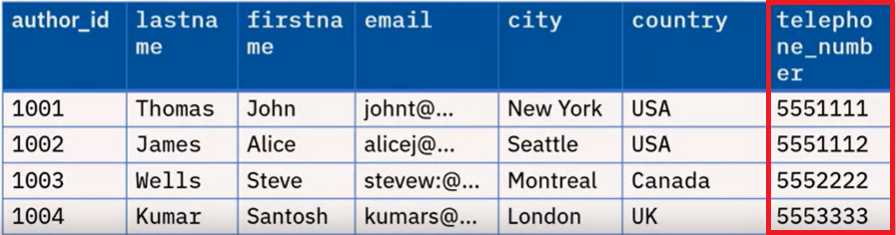
For example, to add a telephone_number column to the author table in the library database, the statement will be written as:
例如,要在图书馆数据库中的作者表中添加一个 telephone_number 列,语句将编写为:
ALTER TABLE author
ADD telephone_number BIGINT;
Here, BIGINT is a data type for Big Integer.
这里,BIGINT 是用于大整数的数据类型。
After adding the entries to the new column, a sample output is shown below.
将条目添加到新列后,显示以下示例输出。
Modify column data type 修改列数据类型
ALTER TABLE table_name
MODIFY column_name data_type;
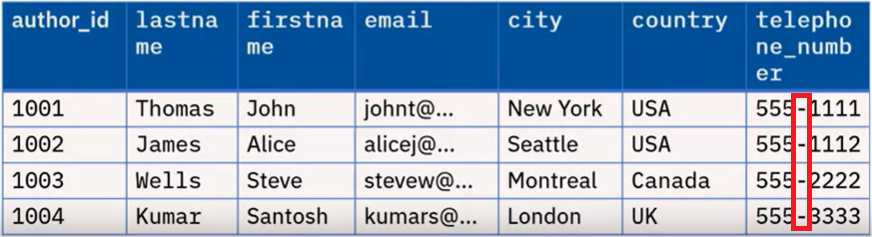
Sometimes, the data presented may be in a different format than required. In such a case, we need to modify the data_type of the column. For example, using a numeric data type for telephone_number means you cannot include parentheses, plus signs, or dashes as part of the number. For such entries, the appropriate choice of data_type is CHAR.
有时,呈现的数据可能与所需格式不同。在这种情况下,我们需要修改列的 data_type。例如,使用数值数据类型存储电话号码意味着不能将括号、加号或连字符作为数字的一部分包含在内。对于此类条目,合适的数据类型选择是 CHAR。
To modify the data type, the statement will be written as:
要修改数据类型,语句将编写为:
ALTER TABLE author
MODIFY telephone_number CHAR(20);
The entries can then be updated using UPDATE statements. An updated version of the "author" table is shown below.
然后可以使用 UPDATE 语句更新条目。下面显示了更新后的"author"表。
TRUNCATE Table
TRUNCATE TABLE statements are used to delete all of the rows in a table. The syntax of the statement is:
TRUNCATE TABLE 语句用于删除表中的所有行。该语句的语法为:
TRUNCATE TABLE table_name;
So, to truncate the "author" table, the statement will be written as:
因此,要截断"作者"表,语句将编写为:
TRUNCATE TABLE author;
The output would be as shown in the image below.
输出将如下所示:
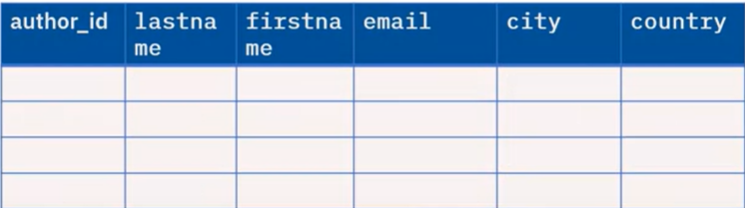
Note: The TRUNCATE statement will delete the rows and not the table.
注意:TRUNCATE 语句将删除行而不是表。