Module 02 · Introduction to Relational Databases and Tables
Hands-on Lab: CREATE, ALTER, TRUNCATE, DROP动手实验:创建、修改、截断、删除
Estimated time needed: 20 minutes
预计所需时间:20 分钟
In this lab, you will learn how to create tables and load data using the phpMyAdmin graphical user interface (GUI) tool in the MySQL database service.
在这个实验中,你将学习如何使用 MySQL 数据库服务中的 phpMyAdmin 图形用户界面 (GUI) 工具创建表格和加载数据。
Software Used in this Lab 本实验中使用的软件
In this lab, you will use MySQL. MySQL is a Relational Database Management System (RDBMS) designed to efficiently store, manipulate, and retrieve data.
在这个实验中,你将使用 MySQL。MySQL 是一种关系型数据库管理系统 (RDBMS),设计用于高效地存储、操作和检索数据。
To complete this lab. you will use MySQL relational database service available as part of IBM Skills Network Labs (SN Labs) Cloud IDE. SN Labs is a virtual lab environment used in this course.
要完成这个实验,你将使用作为 IBM Skills Network Labs (SN Labs) 云 IDE 的一部分的 MySQL 关系型数据库服务。SN Labs 是本课程中使用的虚拟实验室环境。
Objectives 目标
After completing this lab, you will be able to use phpMyAdmin with MySQL to:
完成这个实验后,你将能够使用 phpMyAdmin 和 MySQL 来:
- Create a database. 创建数据库。
- Create a new table in a database.
在数据库中创建一个新表。 - Add, delete, or modify columns in an existing table.
在现有表中添加、删除或修改列。 - Remove all rows from an existing table without deleting the table itself.
从现有表中删除所有行,同时不删除表本身。 - Delete an existing table in a database.
从数据库中删除一个现有表。
Task 1: Create a database 任务 1:创建数据库
Follow the steps below to create a new database in the phpMyAdmin GUI of MySQL.
按照以下步骤在 MySQL 的 phpMyAdmin 图形界面中创建一个新的数据库。
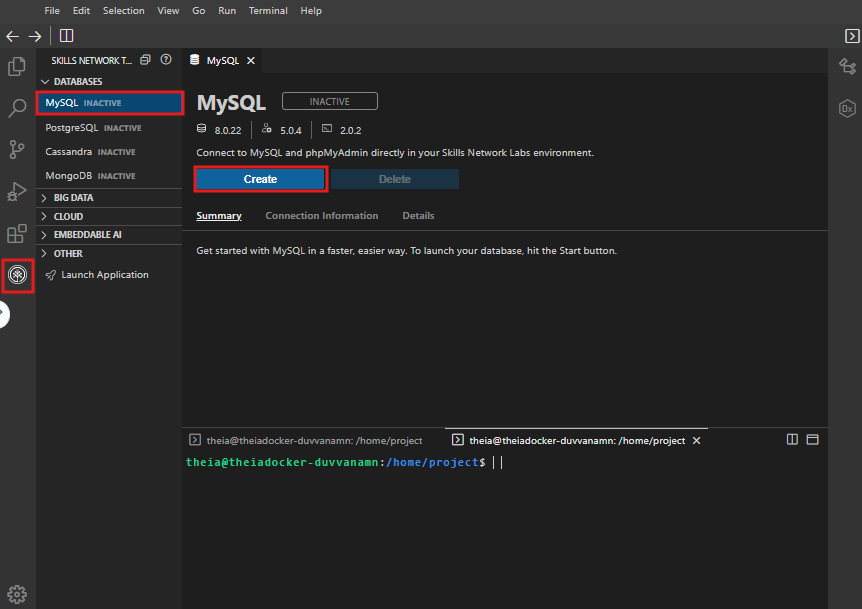
- Click on Skills Network Toolbox. In the Database section, click MySQL.
点击 Skills Network 工具箱。在数据库部分,点击 MySQL。
To start the MySQL, click Create.
要开始 MySQL,点击创建。
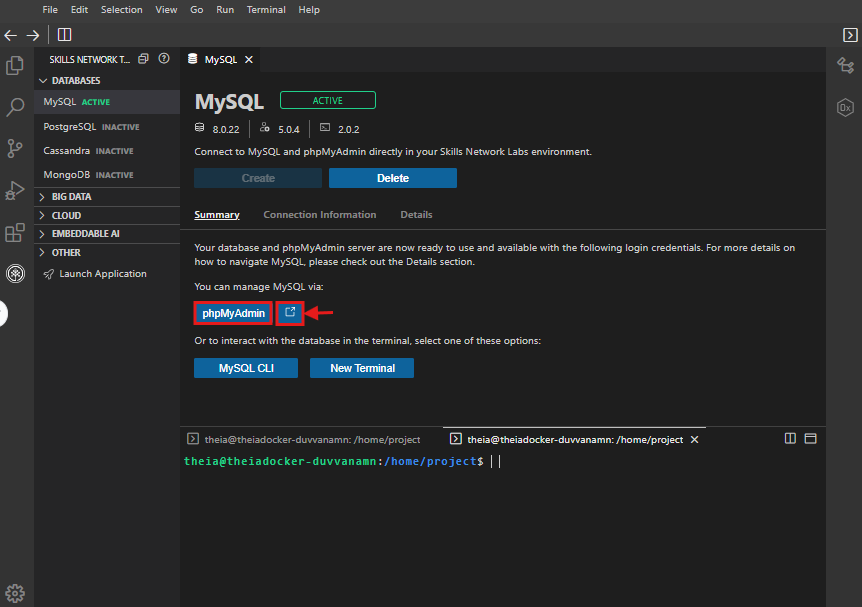
- Once MySQL has started, click the phpMyAdmin button to open phpMyAdmin in the same window. Alternatively, click the toggle button next to the phpMyAdmin button to open phpMyAdmin in a new browser tab.
一旦 MySQL 启动,点击 phpMyAdmin 按钮在同一窗口中打开 phpMyAdmin。或者,点击 phpMyAdmin 按钮旁边的切换按钮在新浏览器标签页中打开 phpMyAdmin。
- You will see the phpMyAdmin GUI tool.
你会看到 phpMyAdmin 图形界面工具。
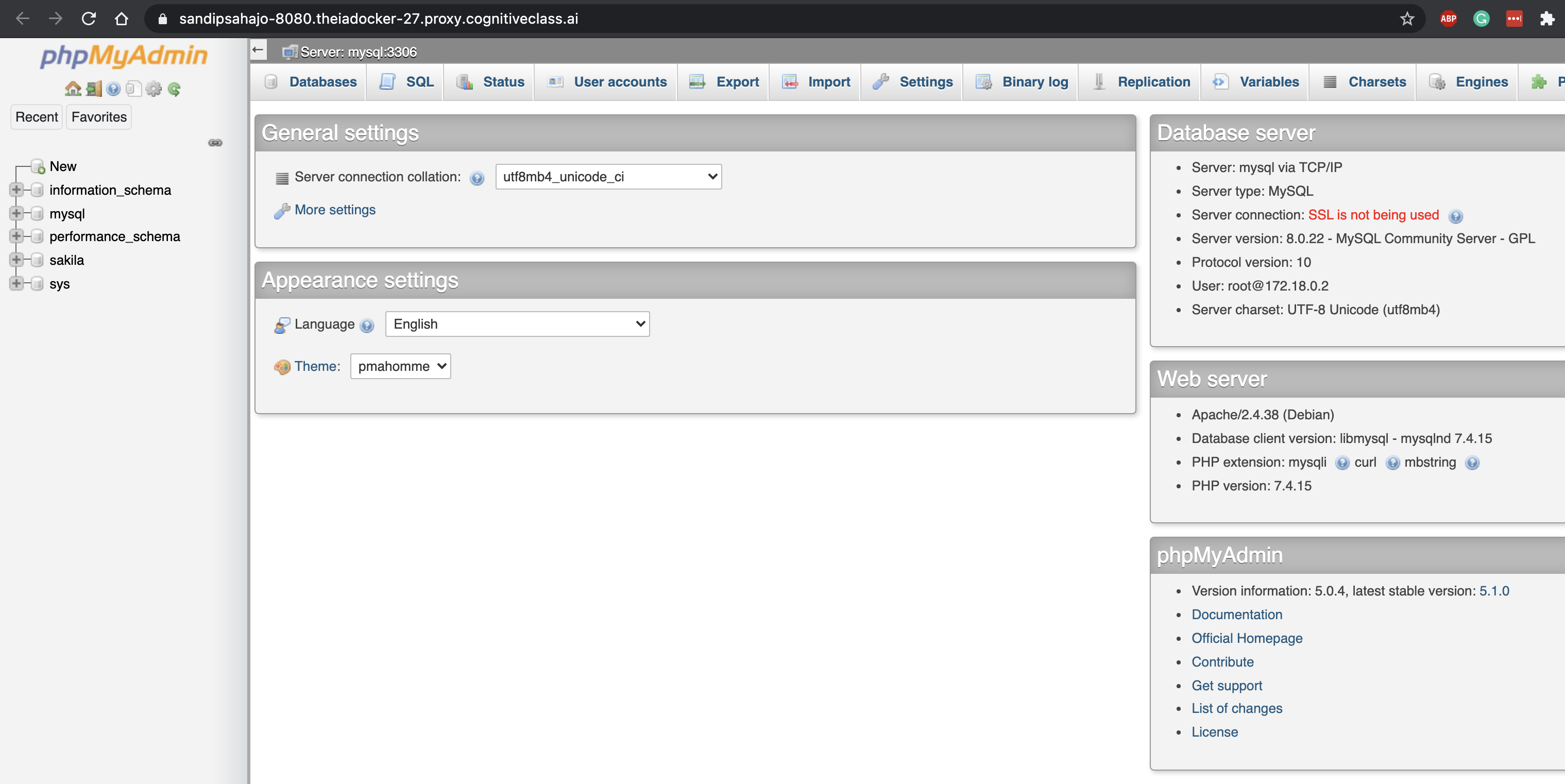
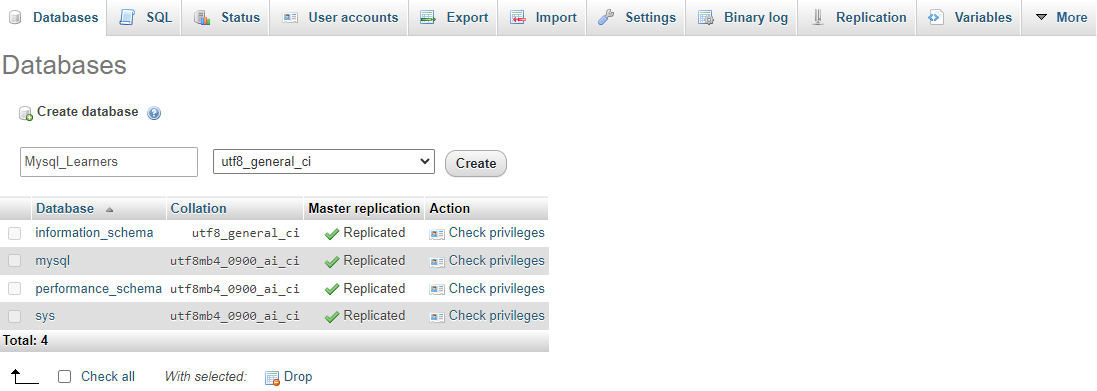
- In the tree view, click
Newto create a new empty database. Then, enterMysql_Learnersas the name of the database, leave the defaultutf8encoding, and clickCreate.
在树形视图中,点击New创建一个新的空数据库。然后,将Mysql_Learners作为数据库名称输入,保持默认的utf8编码,并点击Create。
UTF-8 is the most commonly used character encoding for content or data.
UTF-8 是用于内容或数据的常用字符编码。
Task 2a : CREATE statement 任务 2a:CREATE 语句
Now, you will use the CREATE statement to create two new tables.
现在,您将使用 CREATE 语句创建两个新表。
Follow the instructions to complete this task.
按照说明完成此任务。
- You need to create two tables,
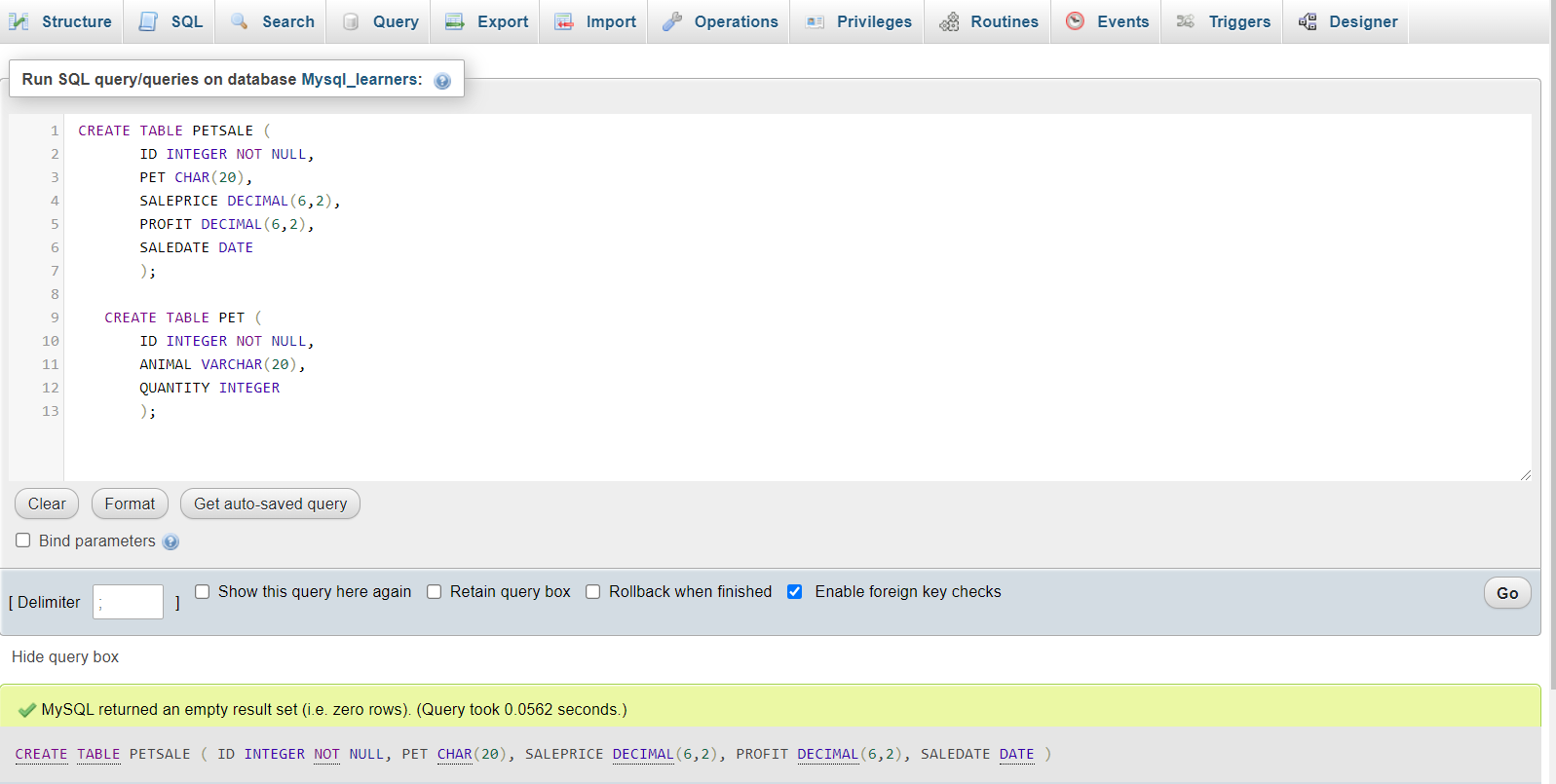
PETSALEandPET. To create the two tables, copy the code below and paste it into the text area of theSQLtab. ClickGo.
您需要创建两个表,PETSALE和PET。要创建这两个表,请复制下面的代码并将其粘贴到SQL标签的文本区域中。点击Go。
CREATE TABLE PETSALE (ID INTEGER NOT NULL,PET CHAR(20),SALEPRICE DECIMAL(6,2),PROFIT DECIMAL(6,2),SALEDATE DATE);CREATE TABLE PET (ID INTEGER NOT NULL,ANIMAL VARCHAR(20),QUANTITY INTEGER);
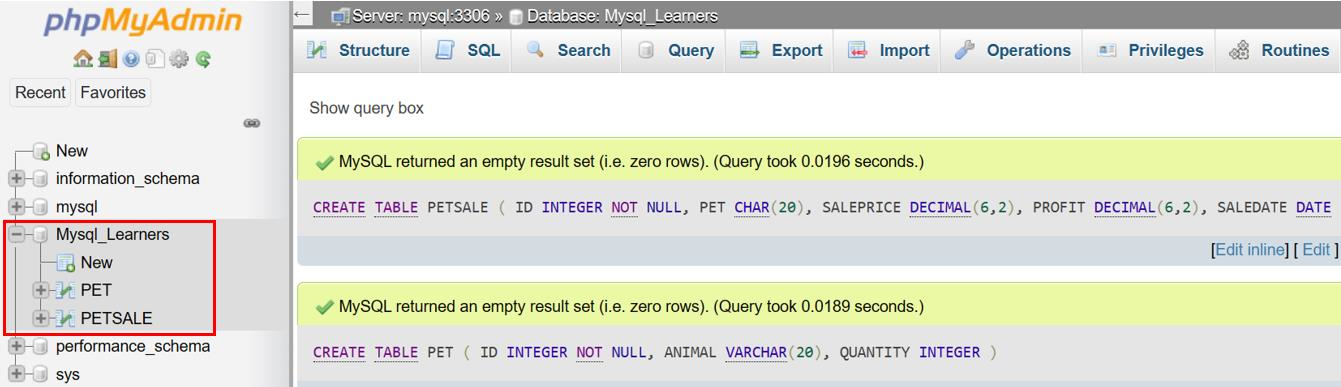
验证这两个表现在是否已在左侧的树状结构中可用,如下面的图片所示。
Task 2b: INSERT statement 任务 2b:INSERT 语句
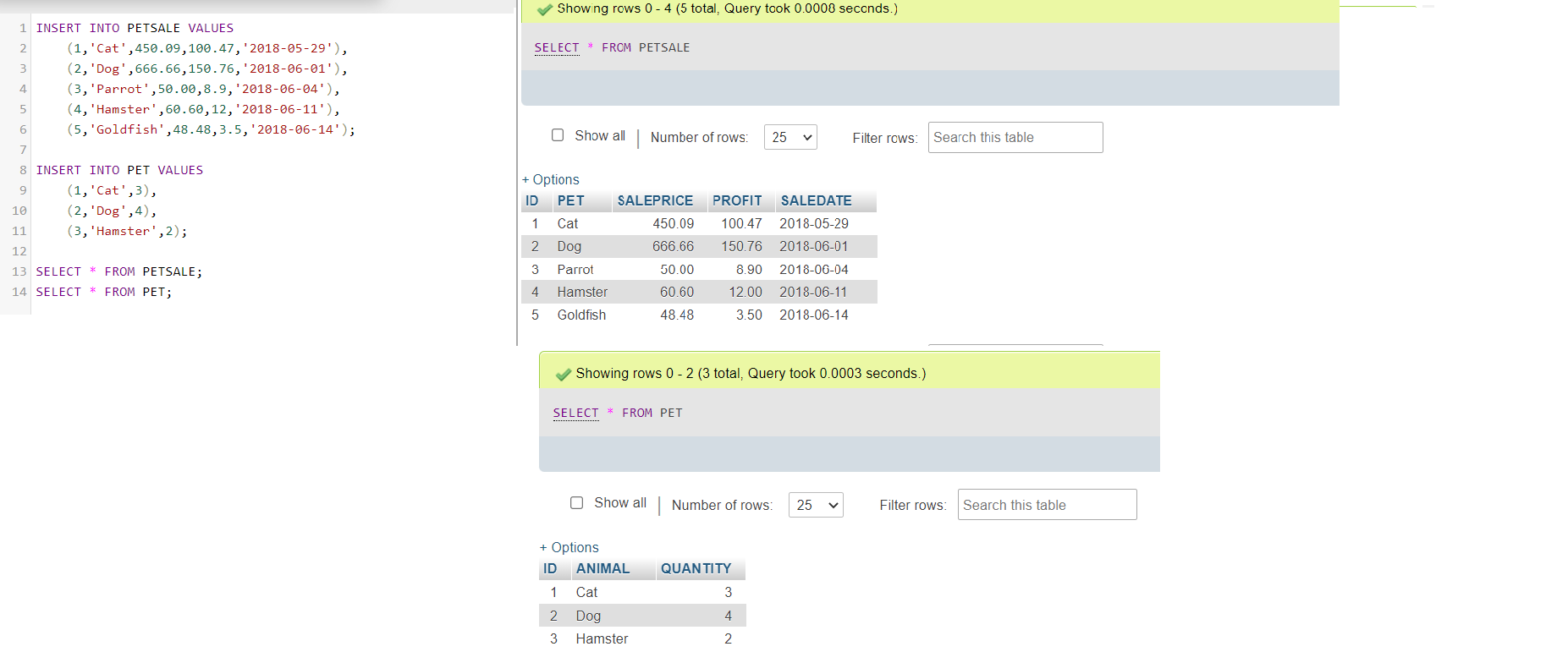
Now, insert some records into the two newly created tables. You can also add SELECT statements to print the contents of the tables once they are loaded with data.
现在向这两个新创建的表中插入一些记录。你也可以添加 SELECT 语句,在表被数据加载后打印表的内容。
Copy the code below and paste it into the text area of the SQL tab. Then, click Go.
将下面的代码复制并粘贴到 SQL 标签的文本区域中。然后,点击 Go 。
INSERT INTO PETSALE VALUES(1,'Cat',450.09,100.47,'2018-05-29'),(2,'Dog',666.66,150.76,'2018-06-01'),(3,'Parrot',50.00,8.9,'2018-06-04'),(4,'Hamster',60.60,12,'2018-06-11'),(5,'Goldfish',48.48,3.5,'2018-06-14');INSERT INTO PET VALUES(1,'Cat',3),(2,'Dog',4),(3,'Hamster',2);SELECT * FROM PETSALE;SELECT * FROM PET;
Task 3: ALTER statement 任务 3:ALTER 语句
In this exercise, you will use the ALTER statement to add, delete, or modify columns in the existing tables.
在这个练习中,你将使用 ALTER 语句来添加、删除或修改现有表中的列。
1. Adding a column 1. 添加列
Add a new column named QUANTITY to the PETSALE table and display the altered table.
向 PETSALE 表添加一个名为 QUANTITY 的新列,并显示修改后的表。
For this, copy the code below and paste it into the text area of the SQL page. Click Go..
为此,请复制下面的代码并将其粘贴到 SQL 页面的文本区域中。点击 Go..
ALTER TABLE PETSALEADD COLUMN QUANTITY INTEGER;SELECT * FROM PETSALE;
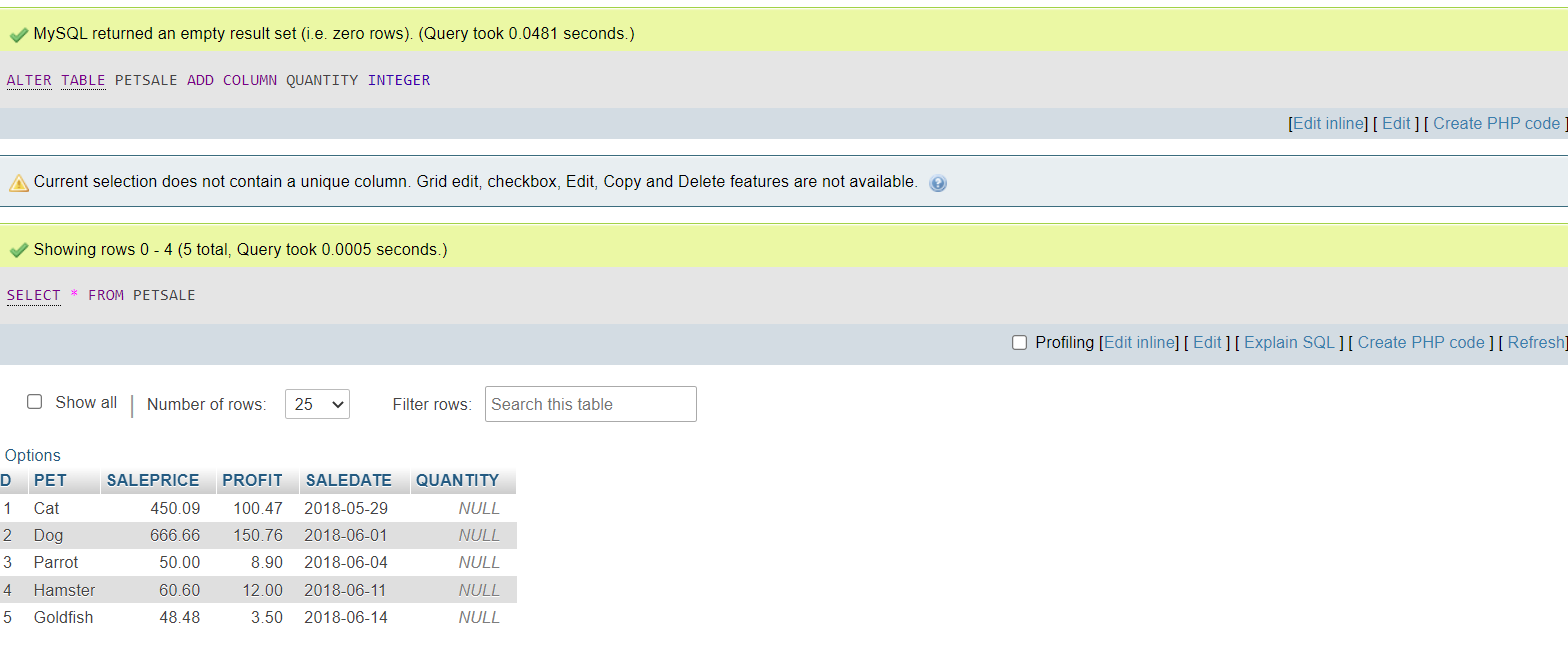
Now update the newly added QUANTITY column of the PETSALE table with some values and show all the table records. Copy the code below and paste it into text area of the SQL page. Click Go.
现在更新 PETSALE 表中新添加的 QUANTITY 列的某些值,并显示所有表记录。将下面的代码复制并粘贴到 SQL 页面的文本区域中。点击 Go。
UPDATE PETSALE SET QUANTITY = 9 WHERE ID = 1;UPDATE PETSALE SET QUANTITY = 3 WHERE ID = 2;UPDATE PETSALE SET QUANTITY = 2 WHERE ID = 3;UPDATE PETSALE SET QUANTITY = 6 WHERE ID = 4;UPDATE PETSALE SET QUANTITY = 24 WHERE ID = 5;SELECT * FROM PETSALE;

2. Deleting a column 2. 删除列
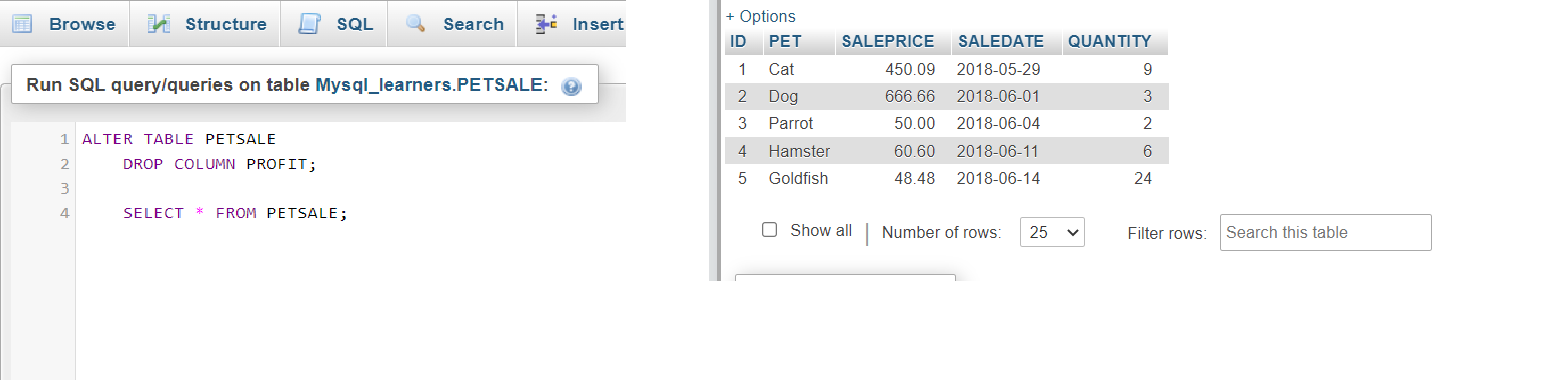
Delete the PROFIT column from the PETSALE table and show the altered table. Copy the code below and paste it into the text area of the SQL page. Click Go.
从 PETSALE 表中删除 PROFIT 列,并显示修改后的表。将下面的代码复制并粘贴到 SQL 页面的文本区域中。点击 Go。
ALTER TABLE PETSALEDROP COLUMN PROFIT;SELECT * FROM PETSALE;
3. Modify a column 3. 修改列
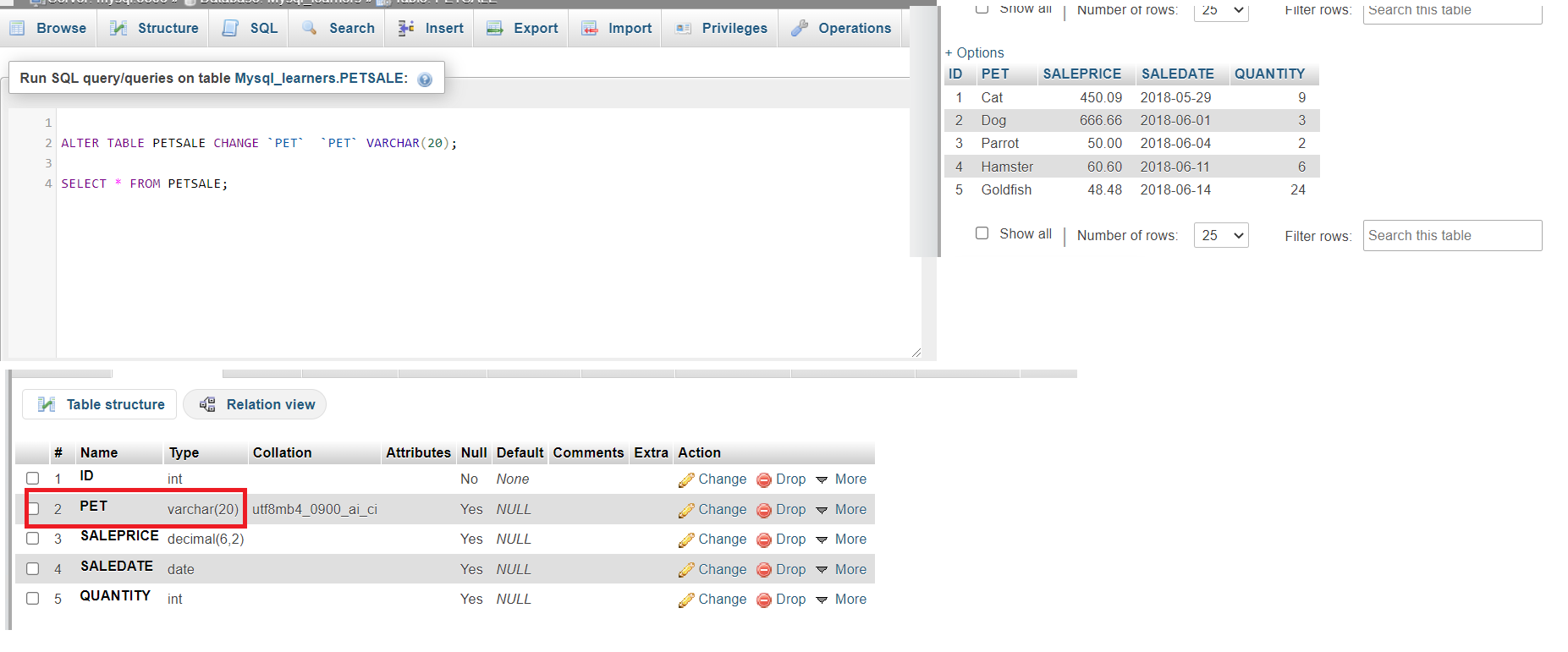
Change the data type to VARCHAR(20) type of the column PET of the table PETSALE and show the altered table. Copy the code below and paste it into the text area of the SQL page. Click Go.
将列 PET 的数据类型更改为 VARCHAR(20) 类型,并显示修改后的表。将以下代码复制并粘贴到 SQL 页面的文本区域中。点击 Go 。
ALTER TABLE PETSALEMODIFY PET VARCHAR(20);SELECT * FROM PETSALE;
You can click on the table name PETSALE in the tree structure on the left and then click on the Structure tab in the interface. You can then see the table structure shows the modified column data type, as shown in the image below.
您可以在左侧的树状结构中点击表名 PETSALE ,然后点击界面中的 Structure 标签页。您可以看到表结构显示了修改后的列数据类型,如下面的图片所示。
4. Rename a Column 4. 重命名列
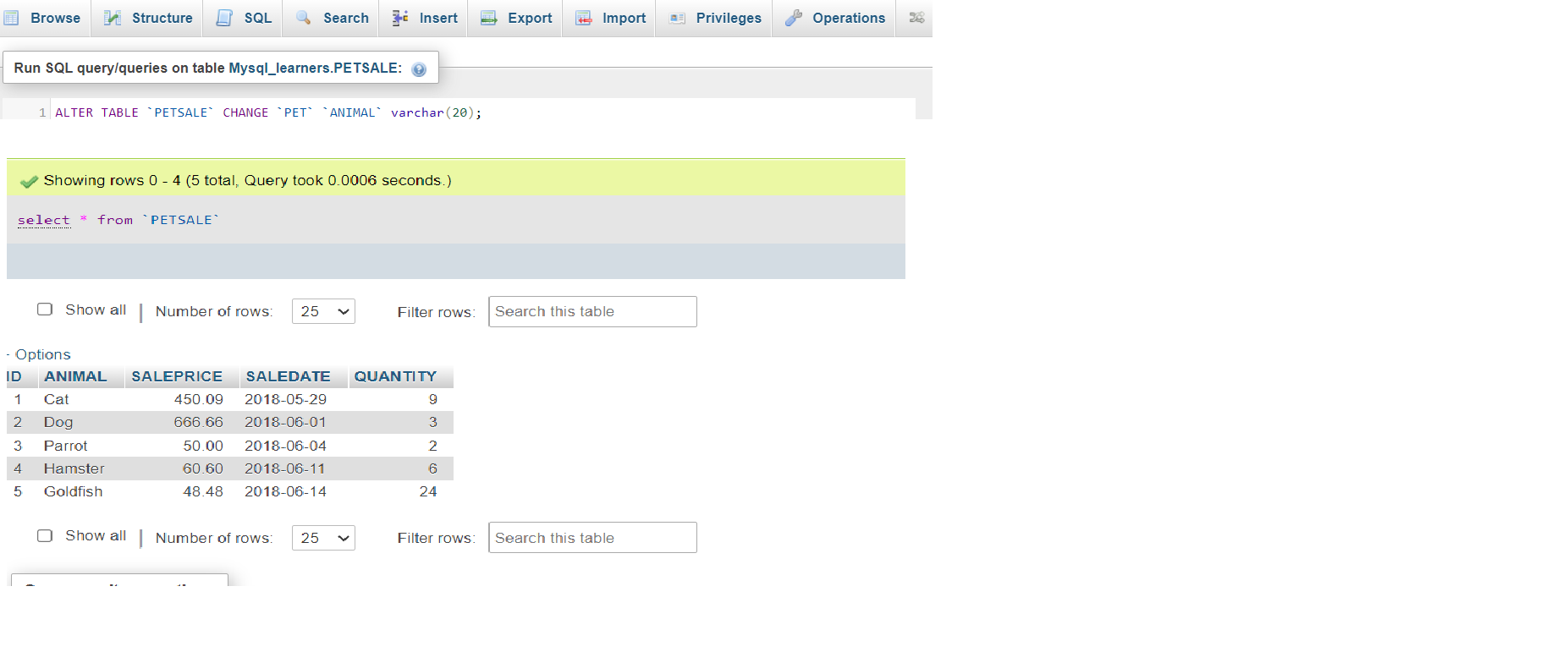
Rename the column PET to ANIMAL of the PETSALE table and show the altered table. Copy the code below and paste it into the text area of the SQL page. Click Go.
将表 PETSALE 的列 PET 重命名为 ANIMAL 并显示修改后的表。将以下代码复制并粘贴到 SQL 页面的文本区域中。点击 Go 。
ALTER TABLE `PETSALE` CHANGE `PET` `ANIMAL` varchar(20);SELECT * FROM PETSALE;
Task 4: TRUNCATE statement 任务 4:TRUNCATE 语句
In this exercise, you will use the TRUNCATE statement to remove all rows from an existing table without deleting it.
在这个练习中,你将使用 TRUNCATE 语句来删除现有表中的所有行,而不会删除该表。
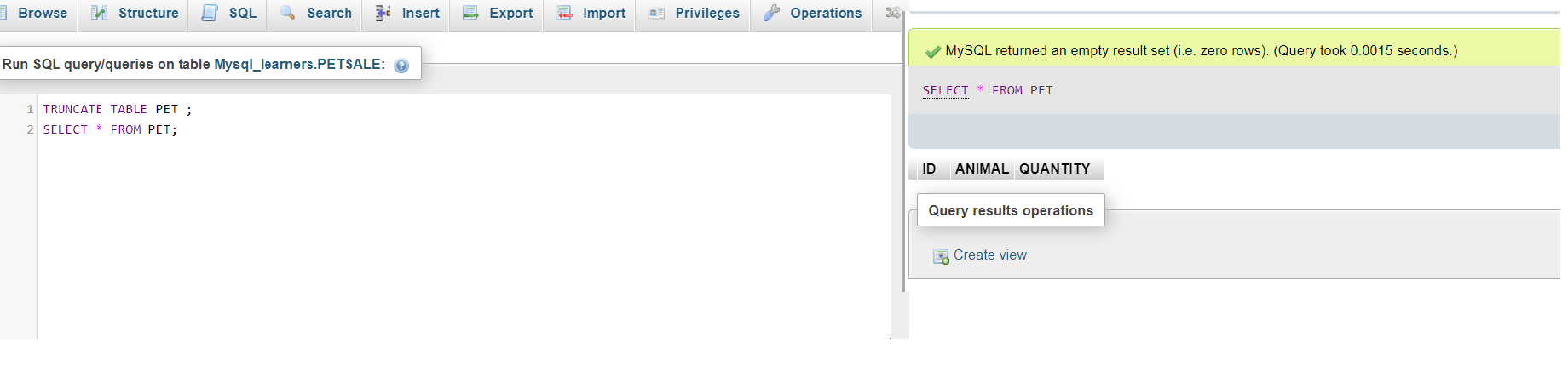
Let's remove all rows from the PET table and show the empty table. Copy the code below and paste it into the text area of the SQL page. Click Go.
让我们删除 PET 表中的所有行,并显示空表。将下面的代码复制并粘贴到 SQL 页面的文本区域中。点击 Go 。
TRUNCATE TABLE PET ;SELECT * FROM PET;
Task 5: DROP statement 任务 5:DROP 语句
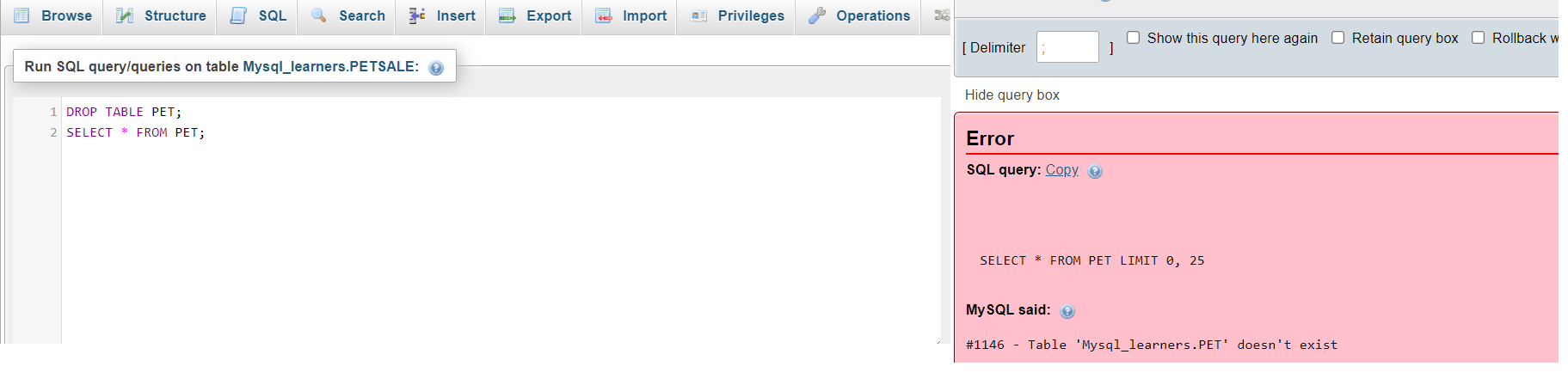
Finally, you will use the DROP statement to delete an existing table. Let's delete the PET table and verify if the table still exists or not (the SELECT statement should give an error if a table doesn't exist). Copy the code below and paste it into the text area of the SQL page. Click Go.
最后,您将使用 DROP 语句删除一个现有的表。让我们删除 PET 表,并验证该表是否仍然存在(如果表不存在,SELECT 语句应该会给出错误)。将下面的代码复制并粘贴到 SQL 页面的文本区域中。点击 Go 。
DROP TABLE PET;SELECT * FROM PET;
Practice problems 练习题
Try the following problems for an enhanced practice of the concepts learned in this lab.
尝试以下问题,以加强本实验中学到的概念练习。
- Create a new table in the database named
Toyswith attributes as ID (integer), Variety (variable length string), and Quantity (integer). Make sure the ID is not Null.
在数据库中创建一个名为Toys的新表,属性为 ID(整数)、Variety(可变长度字符串)和 Quantity(整数)。确保 ID 不为空。
Click here for the solution
点击此处获取答案
CREATE TABLE Toys (
        ID INTEGER NOT NULL,
        Variety VARCHAR(20),
        Quantity INTEGER
);
- Add the below-mentioned entries to the table using the INSERT statement.
使用 INSERT 语句将以下提到的条目添加到表中。
| ID | Variety | Quantity 数量 |
|---|---|---|
| 1 | Chew toy 咬咬玩具 | 20 |
| 2 | Balls 球 | 50 |
| 3 | Bowls 碗 | 30 |
| 4 | Foldable bed 可折叠床 | 40 |
Click here for the solution
点击此处获取答案
INSERT INTO Toys VALUES
(1, 'Chew toy', 20),
(2, 'Balls', 50),
(3, 'Bowls', 30),
(4, 'Foldable bed', 40);
- ALTER the length of 'Variety' in the table to 30 characters.
将表格中'Variety'的长度修改为 30 个字符。
Click here for the solution
点击此处获取答案
ALTER TABLE Toys
MODIFY Variety VARCHAR(30);
- TRUNCATE the table 'Toys'
截断表'Toys'
Click here for the solution
点击此处获取答案
TRUNCATE TABLE Toys;
- DROP the table 'Toys' 删除表'Toys'
Click here for the solution
点击此处获取答案
DROP TABLE Toys;
Conclusion 结论
Congratulations on successfully completing this lab.
祝贺您成功完成此实验。
By now, you have learned how to:
到目前为止,您已经学习了如何:
- Create a database in phpMyAdmin GUI on MySQL.
在 MySQL 的 phpMyAdmin 图形界面中创建数据库。 - Use the CREATE statement to create new tables in the database.
使用 CREATE 语句在数据库中创建新表。 - Use the INSERT statement to add records to the tables.
使用 INSERT 语句向表中添加记录。 - Use the ALTER statement to add, delete, rename, or modify the columns of an existing table.
使用 ALTER 语句添加、删除、重命名或修改现有表的列。 - Use the TRUNCATE statement to delete the contents of an existing table (but not the table).
使用 TRUNCATE 语句删除现有表的内容(但不是表本身)。 - Use the DROP statement to delete an entire table.
使用 DROP 语句删除整个表。