Module 06 · Bonus Module: Advanced SQL for Data Engineers
Hands-on Lab: Stored Procedures动手实验:存储过程

Estimated time needed: 20 minutes
预计所需时间:20 分钟
Stored Procedures in SQL are a type of database object that allow you to encapsulate a series of SQL statements into a single routine. They are stored in the database data dictionary and can be invoked from an application program or from the database command interface. Stored procedures can accept input parameters and return multiple values of output parameters. They can also include control-of-flow constructs such as loops and conditional statements. Stored procedures offer several benefits including improved performance, higher productivity, ease of use, and increased scalability. They also provide a mechanism for enforcing business rules and data integrity in the database system.
SQL 中的存储过程是一种数据库对象,可以将一系列 SQL 语句封装成一个单一的过程。它们存储在数据库数据字典中,并可以从应用程序程序或数据库命令界面调用。存储过程可以接受输入参数并返回多个输出参数的值。它们还可以包括流程控制结构,如循环和条件语句。存储过程提供了多种好处,包括提高性能、提高生产力、易于使用和增强可扩展性。它们还提供了一种机制来强制执行数据库系统中的业务规则和数据完整性。
Objectives 目标
After completing this lab, you will be able to:
完成此实验后,您将能够:
- Create stored procedures 创建存储过程
- Execute stored procedures
执行存储过程
Software Used in this Lab 本实验中使用的软件
In this lab, you will use MySQL. MySQL is a Relational Database Management System (RDBMS) designed to efficiently store, manipulate, and retrieve data.
在这个实验中,你将使用 MySQL。MySQL 是一种关系型数据库管理系统 (RDBMS),设计用于高效地存储、操作和检索数据。
To complete this lab you will utilize MySQL relational database service available as part of IBM Skills Network Labs (SN Labs) Cloud IDE. SN Labs is a virtual lab environment used in this course.
完成此实验,您将使用 IBM 技能网络实验室 (SN Labs) 云集成开发环境 (Cloud IDE) 中提供的 MySQL 关系型数据库服务。SN Labs 是本课程中使用的虚拟实验室环境。
Database Used in this Lab 本次实验使用的数据库
Mysql_learners database has been used in this lab.
本实验使用了 Mysql_learners 数据库。
Data Used in this Lab 本实验使用的数据
The data used in this lab is internal data. You will be working on the PETSALE table.
本实验使用的数据为内部数据。您将使用 PETSALE 表进行操作。

This lab requires you to have the PETSALE table populated with sample data on mysql phpadmin interface. You might have created and populated a PETSALE table in a previous lab.
本实验要求您在 mysql phpadmin 界面中将 PETSALE 表填充为示例数据。您可能在之前的实验中已经创建并填充了 PETSALE 表。
For this lab, you need to create a database PETS in the phpMyAdmin interface. Download the PETSALE-CREATE-v2.sql script below, upload it to console under the PETS database. Upon execution, the script will create a new PETSALE table dropping any previous PETSALE table if exists, and will populate it with the required sample data.
对于本实验,您需要在 phpMyAdmin 界面中创建一个 PETS 数据库。下载下面的 PETSALE-CREATE-v2.sql 脚本,将其上传到 PETS 数据库下的控制台。执行脚本后,将创建一个新的 PETSALE 表,如果存在之前的 PETSALE 表则会被删除,并填充所需示例数据。
Stored Procedure: Exercise 1 存储过程:练习 1
In this exercise, you will create and execute a stored procedure to read data from a table on mysql phpadmin using SQL.
在这个练习中,你将创建并执行一个存储过程,使用 SQL 从 mysql phpadmin 上的表中读取数据。
- You will create a stored procedure routine named RETRIEVE_ALL.
你将创建一个名为 RETRIEVE_ALL 的存储过程。
- This RETRIEVE_ALL routine will contain an SQL query to retrieve all the records from the PETSALE table, so you don't need to write the same query over and over again. You just call the stored procedure routine to execute the query everytime.
这个 RETRIEVE_ALL 过程将包含一个 SQL 查询,用于检索 PETSALE 表中的所有记录,因此你不需要重复编写相同的查询。你只需调用存储过程来执行查询。 - To create the stored procedure routine, copy the code below and paste it to the textarea of the SQL page. Click Go.
要创建存储过程,请复制下面的代码并将其粘贴到 SQL 页面的文本区域中。点击 Go。
DELIMITER //CREATE PROCEDURE RETRIEVE_ALL()BEGINSELECT * FROM PETSALE;END //DELIMITER ;
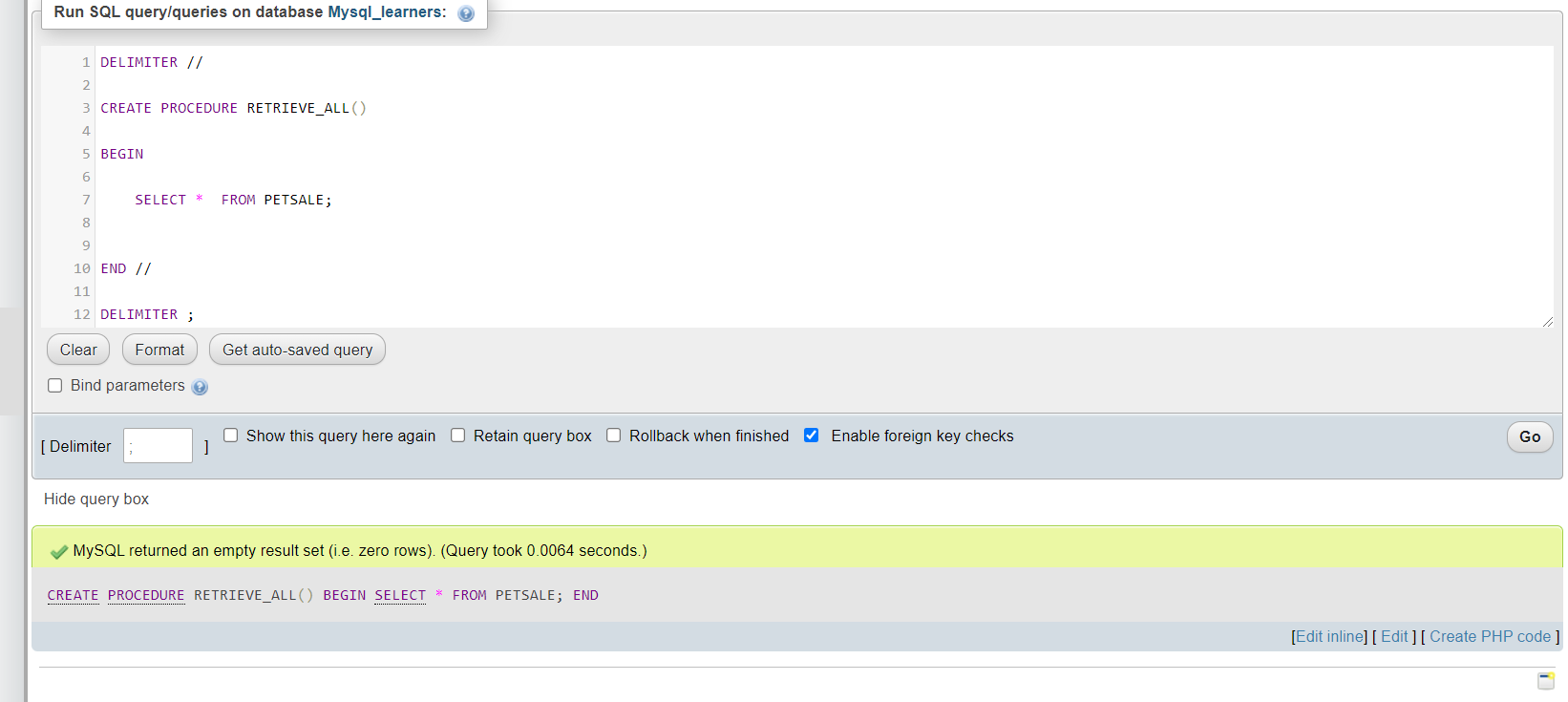
- To call the RETRIEVE_ALL routine, open another SQL tab by clicking Open in new Tab
调用 RETRIEVE_ALL 过程,通过点击“在新标签页中打开”来打开另一个 SQL 标签页
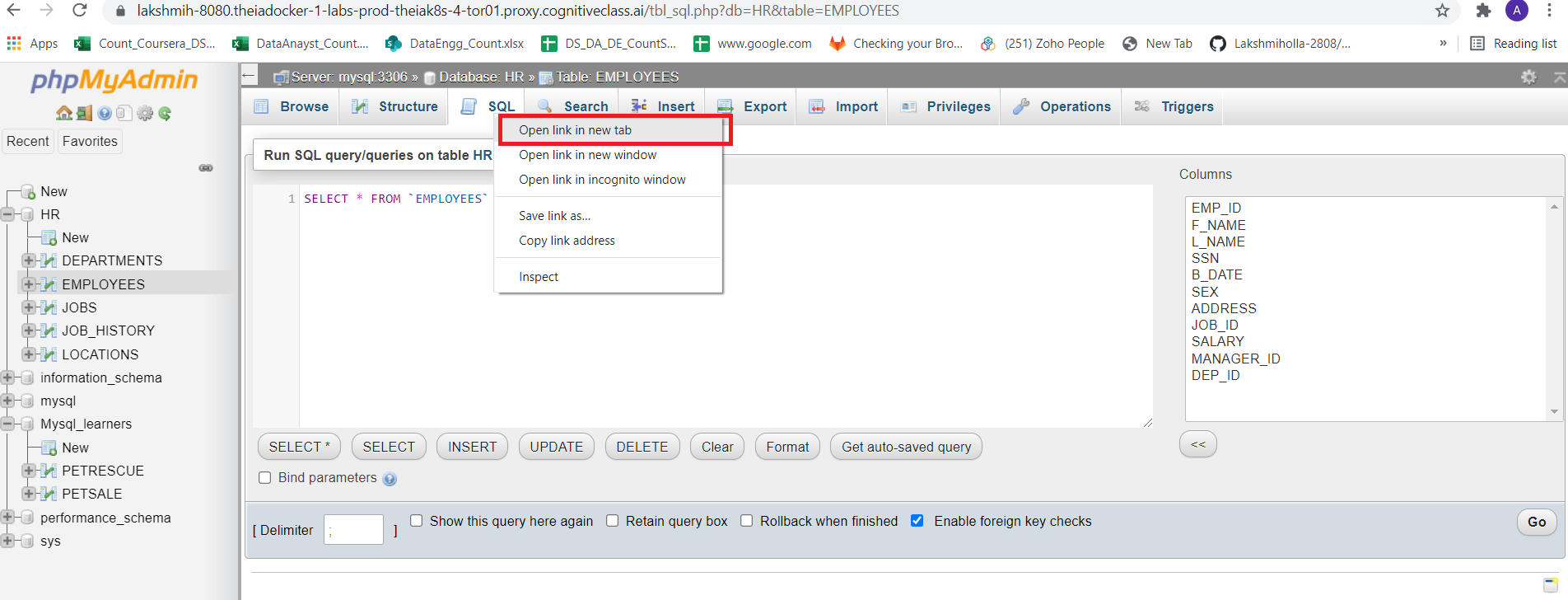
Delete the default line which appears so that you will get a blank window.
删除出现的默认行,以便获得一个空白窗口。
Copy the code below and paste it to the textarea of the SQL page. Click Go.
复制下方代码并将其粘贴到 SQL 页面的文本区域中。点击“Go”。
CALL RETRIEVE_ALL;
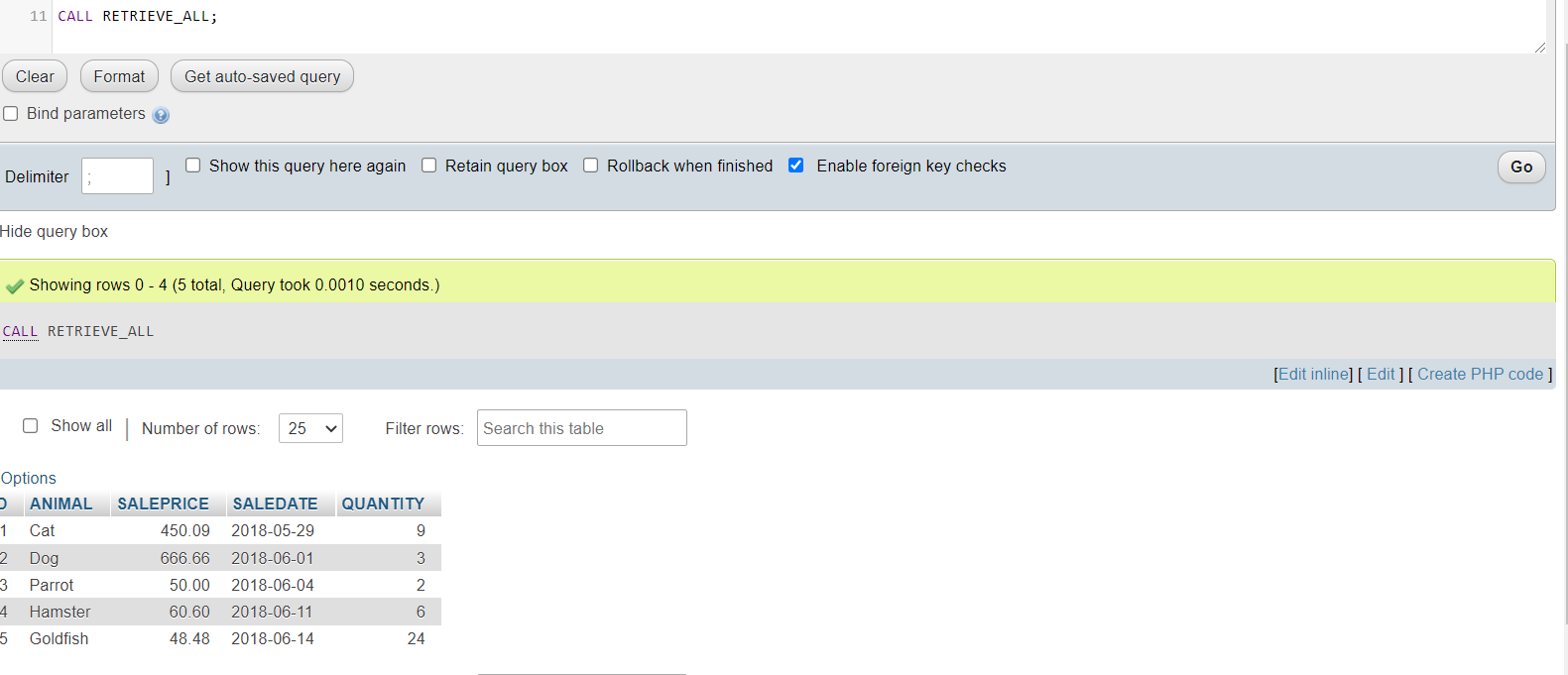
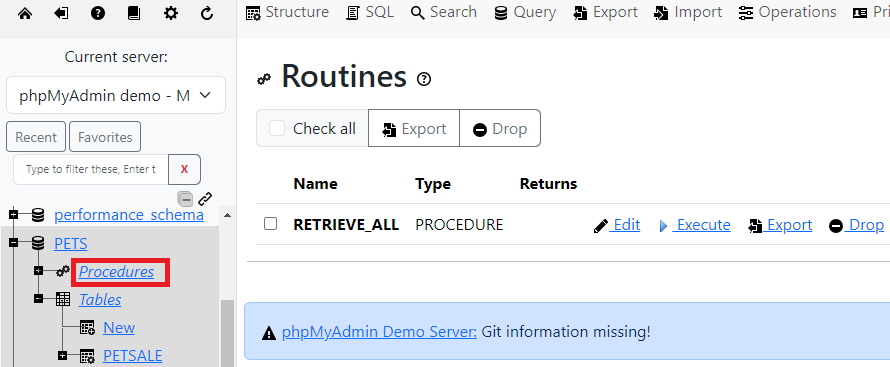
- You can view the created stored procedure routine RETRIEVE_ALL. On the left panel, expand the PETS database option and click on Procedures to view the procedure.
您可以查看创建的存储过程 RETRIEVE_ALL。在左侧面板中,展开 PETS 数据库选项并点击“过程”以查看该过程。
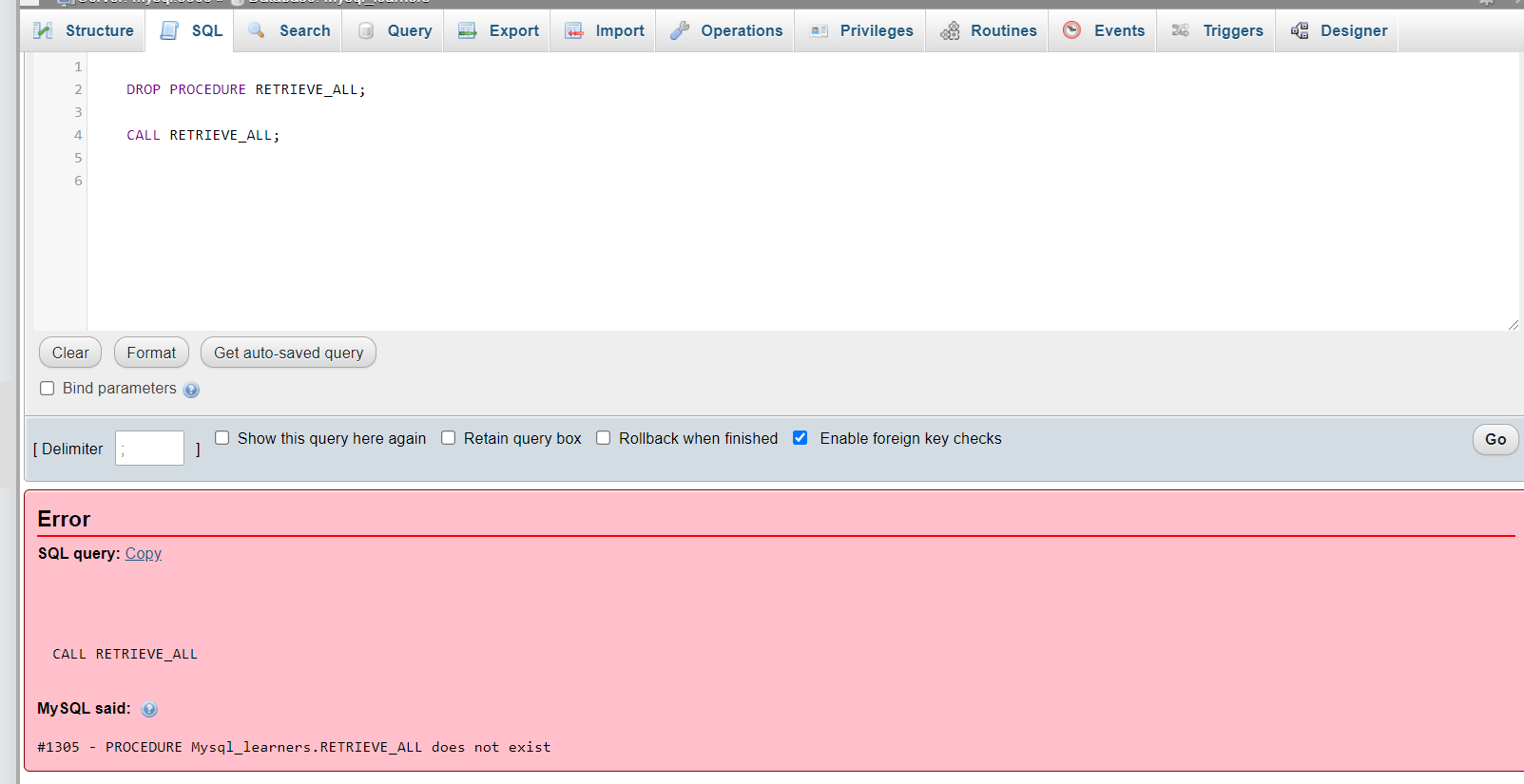
- If you wish to drop the stored procedure routine RETRIEVE_ALL, copy the code below and paste it to the textarea of the SQL page. Click Go.
如果您希望删除存储过程例程 RETRIEVE_ALL,请复制下方代码并将其粘贴到 SQL 页面的文本区域中。点击 Go。
DROP PROCEDURE RETRIEVE_ALL;CALL RETRIEVE_ALL;
Stored Procedure: Exercise 2 存储过程:练习 2
In this exercise, you will create and execute a stored procedure to write/modify data in a table on MySQL using SQL.
You will create a stored procedure routine named UPDATE_SALEPRICE with parameters Animal_ID and Animal_Health.
- This UPDATE_SALEPRICE routine will contain SQL queries to update the sale price of the animals in the PETSALE table depending on their health conditions, BAD or WORSE.
- This procedure routine will take animal ID and health conditon as parameters which will be used to update the sale price of animal in the PETSALE table by an amount depending on their health condition. Suppose that:
- For animal with ID XX having BAD health condition, the sale price will be reduced further by 25%.
对于 ID 为 XX 的动物,若健康状况为 BAD,售价将进一步降低 25%。 - For animal with ID YY having WORSE health condition, the sale price will be reduced further by 50%.
对于 ID 为 YY 的动物,若健康状况更差,售价将进一步降低 50%。 - For animal with ID ZZ having other health condition, the sale price won't change.
对于 ID 为 ZZ 的动物,若健康状况为其他类型,售价将保持不变。
- For animal with ID XX having BAD health condition, the sale price will be reduced further by 25%.
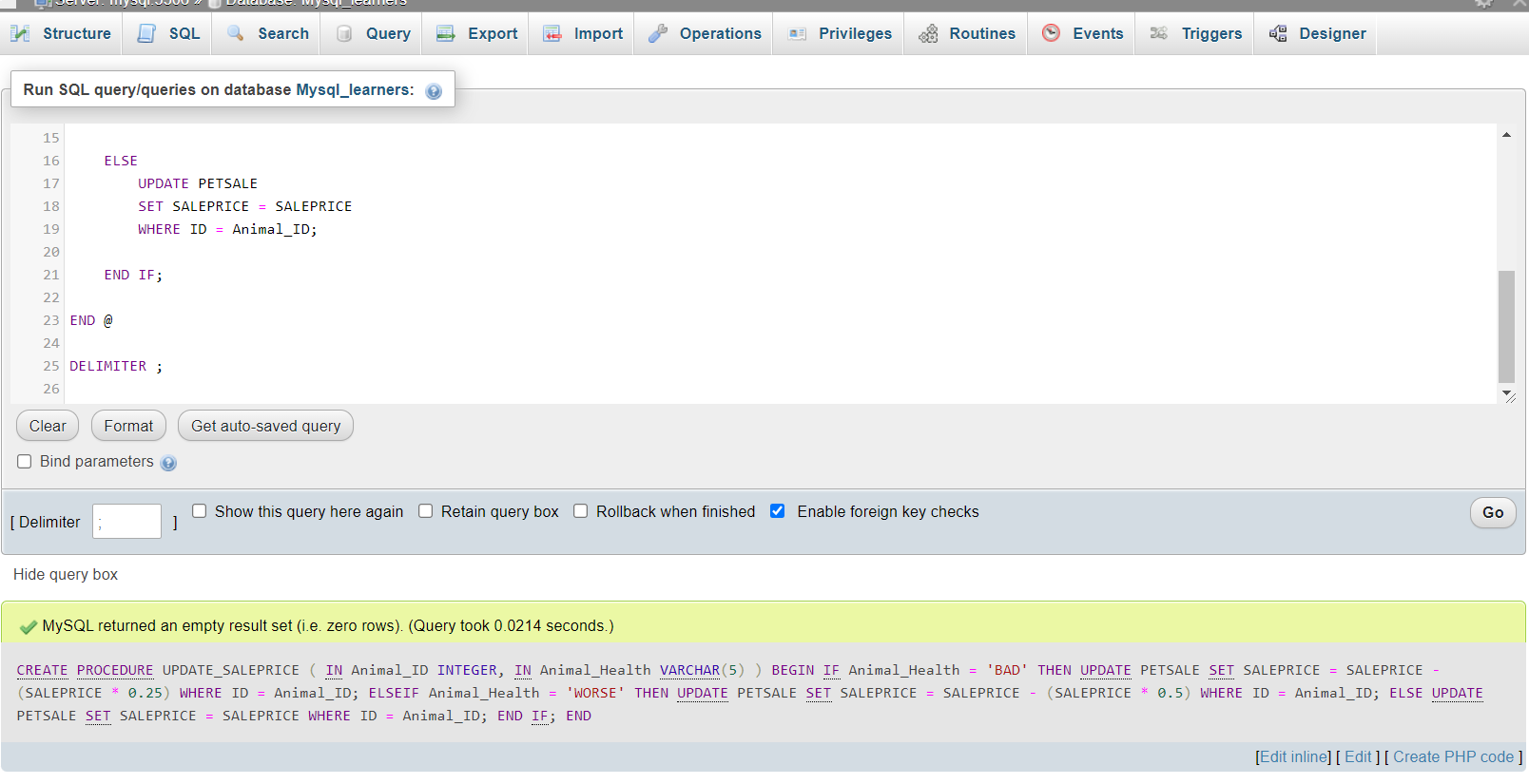
- To create the stored procedure routine, copy the code below and paste it to the textarea of the SQL page. Click Go.
要创建存储过程,请复制下方代码并将其粘贴到 SQL 页面的文本区域中。点击 Go。
DELIMITER @CREATE PROCEDURE UPDATE_SALEPRICE (IN Animal_ID INTEGER, IN Animal_Health VARCHAR(5))BEGINIF Animal_Health = 'BAD' THENUPDATE PETSALESET SALEPRICE = SALEPRICE - (SALEPRICE * 0.25)WHERE ID = Animal_ID;ELSEIF Animal_Health = 'WORSE' THENUPDATE PETSALESET SALEPRICE = SALEPRICE - (SALEPRICE * 0.5)WHERE ID = Animal_ID;ELSEUPDATE PETSALESET SALEPRICE = SALEPRICEWHERE ID = Animal_ID;END IF;END @DELIMITER ;
- Let's call the UPDATE_SALEPRICE routine. We want to update the sale price of animal with ID 1 having BAD health condition in the PETSALE table. open another SQL tab by clicking Open in new Tab
让我们调用 UPDATE_SALEPRICE 存储过程。我们需要更新 PETSALE 表中 ID 为 1 且健康状况为 BAD 的动物的售价。通过点击“在新选项卡中打开”来打开另一个 SQL 选项卡。
Delete the default line which appears so that you will get a blank window.
删除出现的默认行,以便您获得一个空白窗口。
Copy the code below and paste it to the textarea of the SQL page. Click Go.
将下面的代码复制并粘贴到 SQL 页面的文本区域中。点击“执行”。
Note if you have dropped RETRIEVE_ALL procedure rerun the creation script of that procedure before executing these lines.
注意:如果您已删除 RETRIEVE_ALL 存储过程,请在执行这些行之前重新运行该存储过程的创建脚本。
CALL RETRIEVE_ALL;CALL UPDATE_SALEPRICE(1, 'BAD');CALL RETRIEVE_ALL;
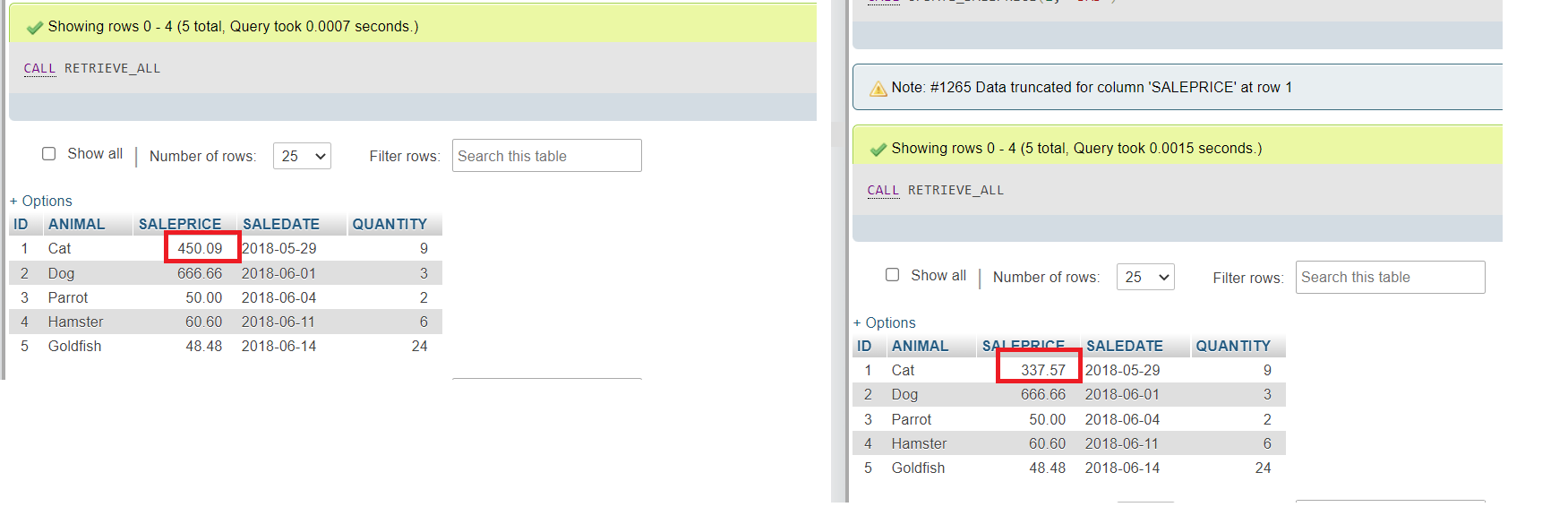
- Let's call the UPDATE_SALEPRICE routine once again. We want to update the sale price of animal with ID 3 having WORSE health condition in the PETSALE table. copy the code below and paste it to the textarea of the SQL page. Click Go. You will have all the records retrieved from the PETSALE table.
让我们再次调用 UPDATE_SALEPRICE 存储过程。我们需要更新 PETSALE 表中 ID 为 3 的动物(健康状况较差)的销售价格。将以下代码复制并粘贴到 SQL 页面的文本区域中。点击 Go。您将检索到来自 PETSALE 表的所有记录。
CALL RETRIEVE_ALL;CALL UPDATE_SALEPRICE(3, 'WORSE');CALL RETRIEVE_ALL;
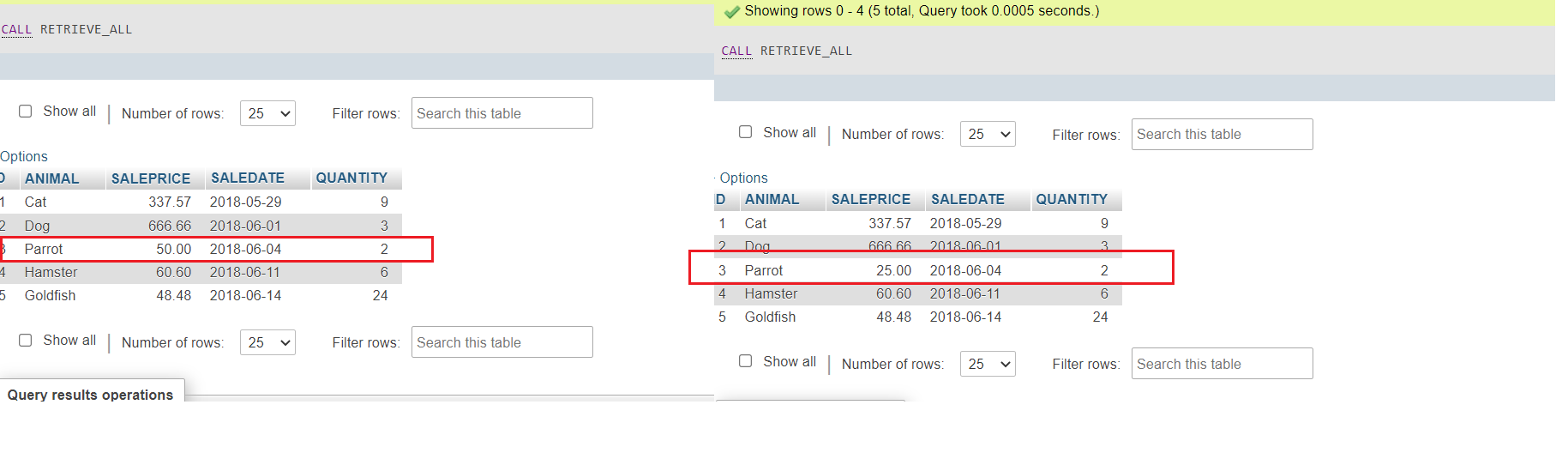
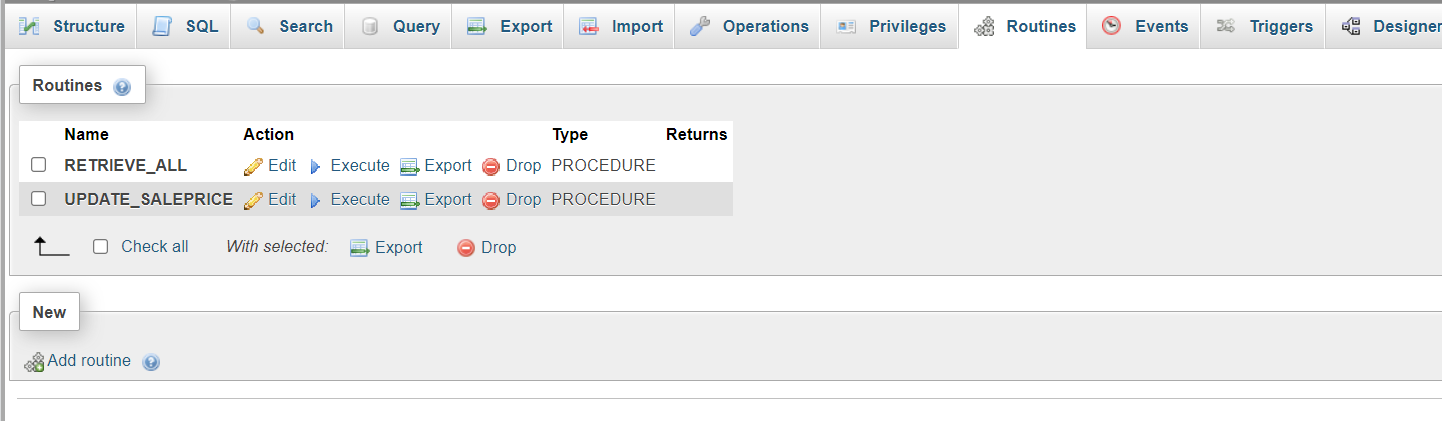
- You can view the created stored procedure routine UPDATE_SALEPRICE. Click on the Routines and view the procedure.
您可以查看创建的存储过程 UPDATE_SALEPRICE。点击 Routines 并查看该过程。
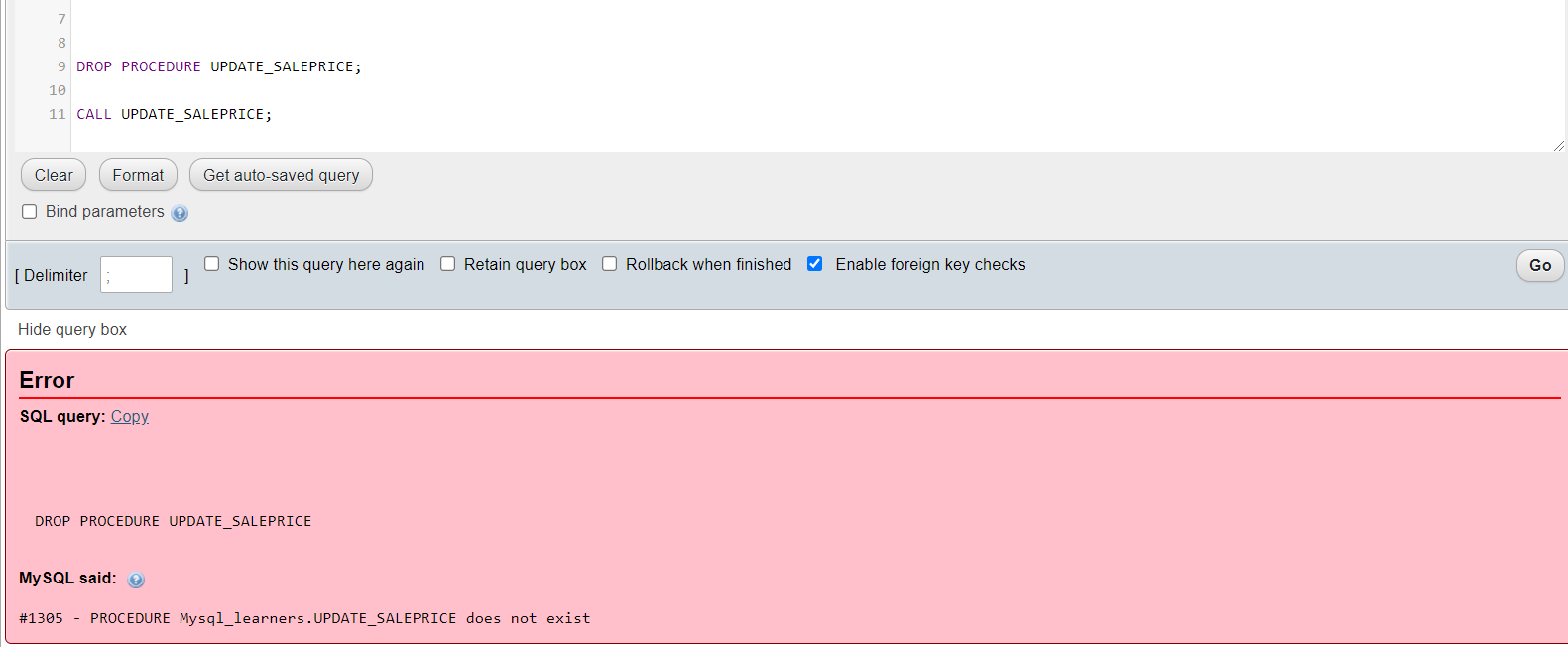
- If you wish to drop the stored procedure routine UPDATE_SALEPRICE, copy the code below and paste it to the textarea of the SQL page. Click Go.
如果您希望删除存储过程 UPDATE_SALEPRICE,请将以下代码复制并粘贴到 SQL 页面的文本区域中。点击 Go。
DROP PROCEDURE UPDATE_SALEPRICE;CALL UPDATE_SALEPRICE;
Conclusion 结论
Congratulations! You have completed this lab on creating stored procedures in MySQL.
恭喜!您已完成在 MySQL 中创建存储过程的实验。
You are now able to:
现在您可以:
- Write a stored procedure as per requirement
按要求编写存储过程 - Call or Exectue a stored procedure
调用或执行存储过程 - Drop a stored procedure once its utility is over
存储过程使用完毕后删除