Module 03 · Intermediate SQL
Hands-on Lab: Sub-queries and Nested Selects动手实验:子查询与嵌套选择

Estimated time needed: 20 minutes
预计所需时间:20 分钟
Objectives 目标
After completing this lab, you will be able to:
完成此实验后,您将能够:
- Write SQL queries that demonstrate the necessity of using sub-queries
编写展示使用子查询必要性的 SQL 查询 - Compose sub-queries in the where clause
在 WHERE 子句中编写子查询 - Build column expressions (for example, sub-query in place of a column)
构建列表达式(例如,将子查询用作列) - Write table expressions (for example, sub-query in place of a table)
编写表表达式(例如,将子查询用作表)
Software Used in this Lab 本实验中使用的软件
In this lab, you will use MySQL. MySQL is a Relational Database Management System (RDBMS) designed to store, manipulate, and retrieve data efficiently.
在这个实验室中,您将使用 MySQL。MySQL 是一个关系型数据库管理系统(RDBMS),设计用于高效地存储、操作和检索数据。
To complete this lab, you will use MySQL relational database service available as part of IBM Skills Network Labs (SN Labs) Cloud IDE. SN Labs is a virtual lab environment used in this course.
要完成这个实验室,您将使用 IBM Skills Network Labs(SN Labs)云 IDE 提供的 MySQL 关系型数据库服务。SN Labs 是本课程中使用的虚拟实验室环境。
Database Used in this Lab 本次实验使用的数据库
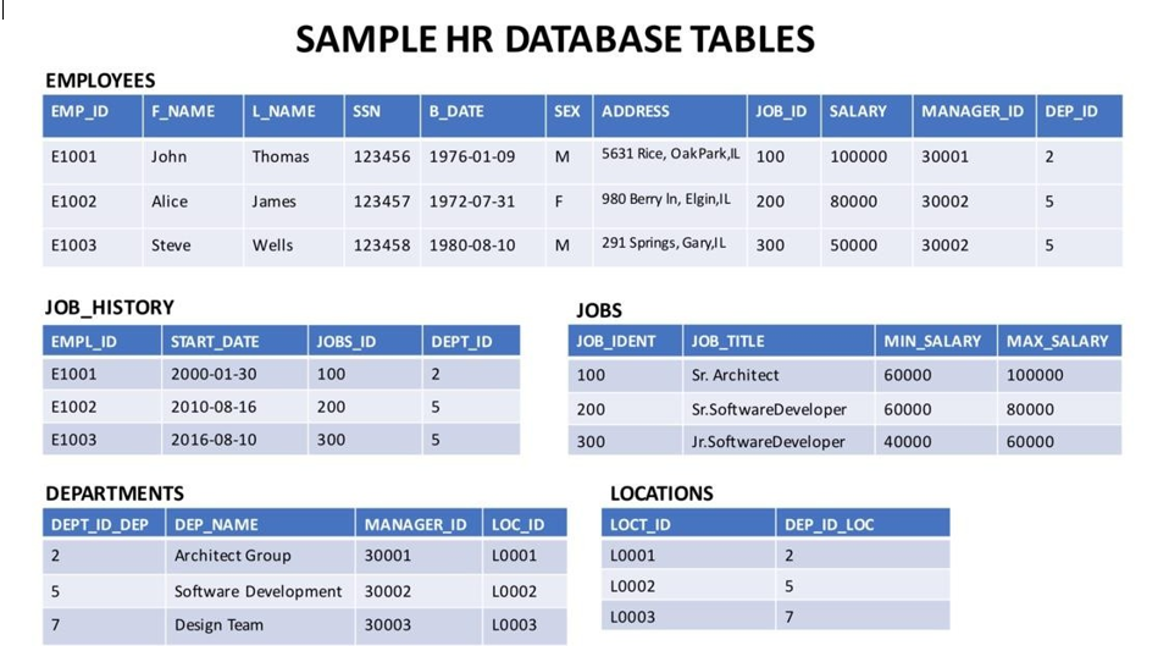
The database used in this lab is internal. You will be working on a sample HR database. This HR database schema consists of 5 tables: EMPLOYEES, JOB_HISTORY, JOBS, DEPARTMENTS, and LOCATIONS. Each table has a few rows of sample data. The following diagram shows the tables for the HR database:
本实验使用的数据库是内部的。您将使用一个示例人力资源数据库。该人力资源数据库模式由 5 个表组成:EMPLOYEES(员工)、JOB_HISTORY(工作历史)、JOBS(工作)、DEPARTMENTS(部门)和 LOCATIONS(位置)。每个表都包含一些示例数据。下图显示了人力资源数据库的表:
Load the database 加载数据库
Using the skills acquired in the previous modules, you should first create the database in MySQL. Follow the steps below.
利用前几个模块学到的技能,您应该首先在 MySQL 中创建数据库。请按照以下步骤操作。
- Open the phpMyAdmin interface from the Skills Network Toolbox in Cloud IDE.
从云 IDE 中的 Skills Network Toolbox 中打开 phpMyAdmin 界面。 - Create a blank database named 'HR'. Use the script shared in the link below to create the required tables.
创建一个名为"HR"的空数据库。使用以下链接中共享的脚本创建所需的表。
Script_Create_Tables.sql - Download the files in the links below to your local device (if not already done in previous labs)
将以下链接中的文件下载到您的本地设备(如果之前实验中尚未完成)。
Departments.csv 部门.csv
Jobs.csv 职位.csv
JobsHistory.csv 职位历史.csv
Locations.csv 位置.csv
Employees.csv - Use these files in the phpMyAdmin interface as the data for the respective tables in the 'HR' database.
请将这些文件用作 'HR' 数据库中相应表的 'phpMyAdmin' 界面的数据。
Sub-queries and Nested Selects 子查询和嵌套选择
Say you are asked to retrieve all employee records whose salary is lower than the average salary. You might use the following query to do this.
假设你需要检索所有工资低于平均工资的员工记录。你可以使用以下查询来完成这个任务。
SELECT *FROM EMPLOYEESWHERE salary < AVG(salary);
However, this query will generate an error stating, "Illegal use of group function." Here, the group function is AVG and cannot be used directly in the condition since it has not been retrieved from the data. Therefore, the condition will use a sub-query to retrieve the average salary information to compare the existing salary. The modified query would become:
然而,此查询将生成一个错误,提示"组函数使用非法"。此处,组函数为 AVG ,由于尚未从数据中检索,因此不能直接在条件中使用。因此,条件将使用子查询来检索平均薪资信息以与现有薪资进行比较。修改后的查询将变为:
SELECT *FROM EMPLOYEESWHERE SALARY < (SELECT AVG(SALARY) FROM EMPLOYEES);
Now, consider executing a query that retrieves all employee records with EMP_ID, SALARY, and maximum salary as MAX_SALARY in every row. For this, the maximum salary must be queried and used as one of the columns. This can be done using the query below.
现在,考虑执行一个查询,检索所有员工记录,包括 EMP_ID、SALARY 和每行中的最大薪资作为 MAX_SALARY。为此,必须查询最大薪资并将其作为其中一列使用。这可以使用以下查询完成。
SELECT EMP_ID, SALARY, (SELECT MAX(SALARY) FROM EMPLOYEES) AS MAX_SALARYFROM EMPLOYEES;
Now, consider that you wish to extract the first and last names of the oldest employee. Since the oldest employee will be the one with the smallest date of birth, the query can be written as:
现在,考虑您希望提取最老员工的姓和名。由于最老的员工将是出生日期最小的人,查询可以编写为:
SELECT F_NAME, L_NAMEFROM EMPLOYEESWHERE B_DATE = (SELECT MIN(B_DATE) FROM EMPLOYEES);
You may also use sub-queries to create derived tables, which can then be used to query specific information. Say you want to know the average salary of the top 5 earners in the company. You will first have to extract a table of the top five salaries as a table. From that table, you can query the average value of the salary. The query can be written as follows.
您还可以使用子查询创建派生表,然后使用这些表查询特定信息。例如,您想知道公司前五高收入者的平均薪资。您首先必须将前五名薪资提取为一个表。从该表,您可以查询薪资的平均值。查询可以编写如下。
SELECT AVG(SALARY)FROM (SELECT SALARYFROM EMPLOYEESORDER BY SALARY DESCLIMIT 5) AS SALARY_TABLE;
Note that it is necessary to give an alias to any derived tables.
注意必须为任何派生表提供别名。
Practice Problems 练习题
- Write a query to find the average salary of the five least-earning employees.
编写一个查询,以查找五个收入最低的员工的平均工资。
Click here for a hint
点击此处获取提示
You need to order the data in ascending salary order and limit it to the top five entries, treating this as a derived table. Take the average of these entries.
您需要按工资升序排列数据,并将其限制为前五条记录,将其视为一个派生表。计算这些记录的平均值。
Click here for the solution
点击此处获取答案
SELECT AVG(SALARY)
FROM (SELECT SALARY
      FROM EMPLOYEES
      ORDER BY SALARY
      LIMIT 5) AS SALARY_TABLE;
- Write a query to find the records of employees older than the average age of all employees.
编写一个查询,以查找年龄高于所有员工平均年龄的员工记录。
Click here for a hint
点击此处获取提示
Age in years can be calculated as the year component in the difference between DOB and current date. You need to compare the age in years with average age in years. The average age in years will be evaluated as a sub-query.
年龄(以年为单位)可以通过计算出生日期(DOB)与当前日期之差中的年份部分来计算。您需要将年龄(以年为单位)与平均年龄(以年为单位)进行比较。平均年龄(以年为单位)将作为一个子查询进行评估。
Click here for the solution
点击此处获取答案
SELECT *
FROM EMPLOYEES
WHERE YEAR(FROM_DAYS(DATEDIFF(CURRENT_DATE,B_DATE))) >
(SELECT AVG(YEAR(FROM_DAYS(DATEDIFF(CURRENT_DATE,B_DATE))))
    FROM EMPLOYEES);
- From the Job_History table, display the list of Employee IDs, years of service, and average years of service for all entries.
从 Job_History 表中,显示所有条目的员工 ID、服务年限和平均服务年限的列表。
Click here for hint
点击此处获取提示
For this, you need to calculate the years of service as a difference between the date of joining and the current date. Average years of service need to be queried separately to be displayed.
为此,您需要将服务年限计算为加入日期与当前日期之差。平均服务年限需要单独查询以进行显示。
Click here for solution
点击此处查看解决方案
SELECT EMPL_ID, YEAR(FROM_DAYS(DATEDIFF(CURRENT_DATE, START_DATE))),
(SELECT AVG(YEAR(FROM_DAYS(DATEDIFF(CURRENT_DATE, START_DATE))))
    FROM JOB_HISTORY)
FROM JOB_HISTORY;
Conclusion 结论
Congratulations! You have completed this lab and are ready for the next topic.
恭喜!您已完成此实验,可以进入下一个主题。
You should now be able to:
您现在应该能够:
- Write SQL queries that demonstrate the necessity of using sub-queries
编写展示使用子查询必要性的 SQL 查询 - Compose sub-queries in the WHERE clause
在 WHERE 子句中编写子查询 - Build Column Expressions (for example, sub-query in place of a column)
构建列表达式(例如,将子查询用作列) - Write Table Expressions (for example, sub-query in place of a table)
编写表表达式(例如,用子查询代替表)