Module 03 · Packages, APIs, Data Sets, and Models
Hands on Lab: Getting Started with Open Source Datasets and Deep Learning Models动手实验:开源数据集与深度学习模型入门
In this lab, you will explore how to access and utilize open source datasets for machine learning projects. You will also get hands-on experience with pre-trained deep learning models to accelerate your development process.
在本实验中,你将探索如何访问和利用开源数据集进行机器学习项目。你还将获得预训练深度学习模型的实际操作经验,以加速你的开发过程。
Objective of Exercise 1 练习 1 的目标
- Explore the open data sets.
探索开放数据集。
Objective of Exercise 2 练习 2 的目标
- Find ready-to-use deep learning models on the Model Asset Exchange.
在模型资产交换上查找现成的深度学习模型。 - Explore the deep learning model trained to detect objects in an image.
探索用于检测图像中对象的深度学习模型。
It will take you approximately 15 minutes to complete the lab. Only a web browser is required to complete the tasks.
完成此实验大约需要 15 分钟。完成任务只需要一个网络浏览器。
Exercise 1: Explore open source datasets 练习 1:探索开源数据集
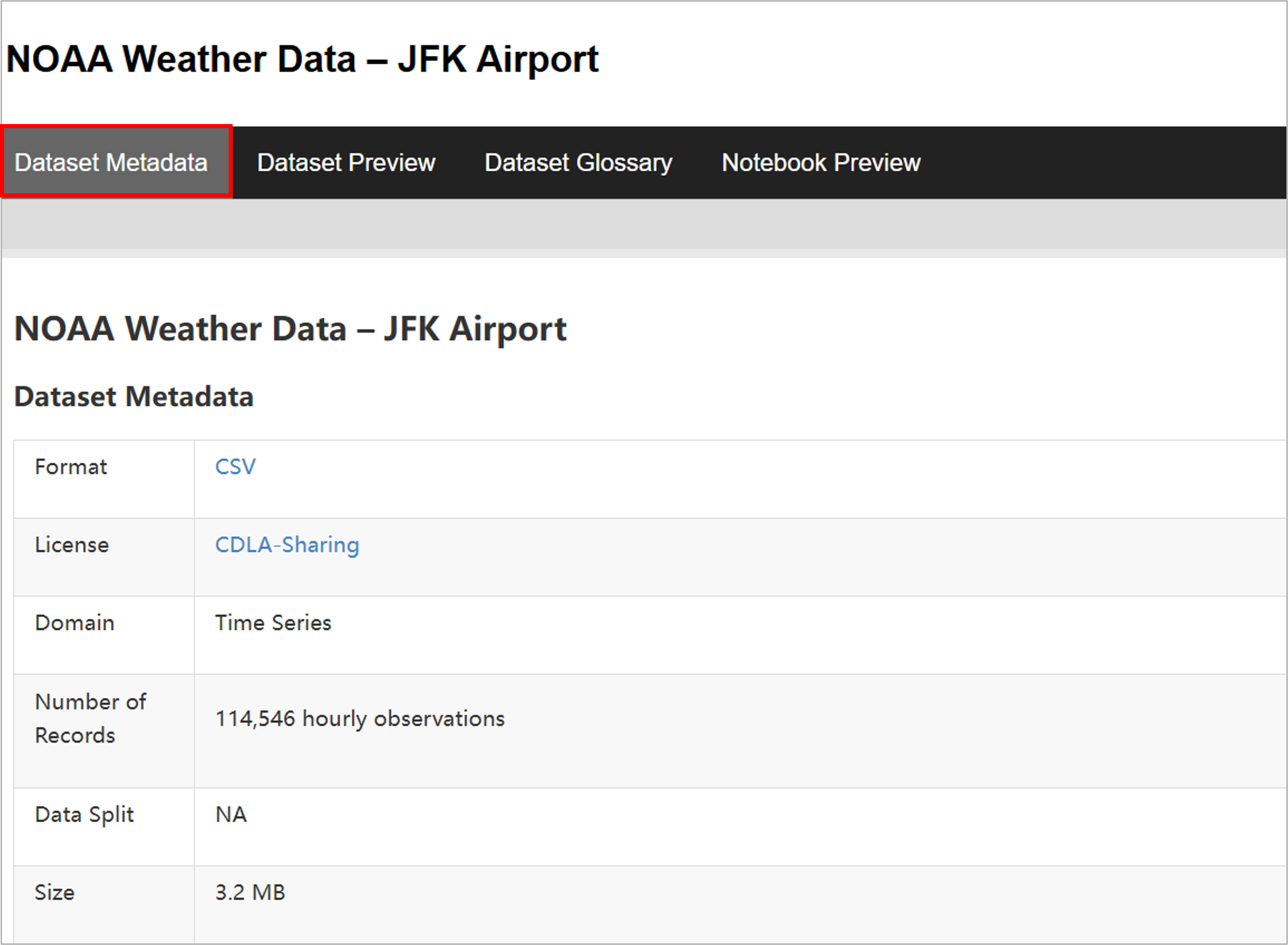
Most datasets are complemented by Python notebooks that you can use to explore, pre-process, and analyze the data. Here we will be exploring a public weather dataset taken from kaggle LINK
大多数数据集都配有 Python 笔记本,您可以使用它们来探索、预处理和分析数据。在这里,我们将探索一个来自 Kaggle 的公共天气数据集,链接 here。
Step-by-Step Instructions 逐步说明
- Click HERE to view the dataset.
点击此处查看数据集。 - Once the page loads, click the Dataset Preview tab at the top of the page.
页面加载后,点击页面顶部的“数据集预览”选项卡。
This will allow you to:
这将允许您:
- View a sample of the data directly in your browser.
直接在浏览器中查看数据样本。 - Understand the structure and fields of the dataset.
理解数据集的结构和字段。 - Explore metadata and glossary terms associated with the dataset.
探索与数据集相关的元数据和术语表。
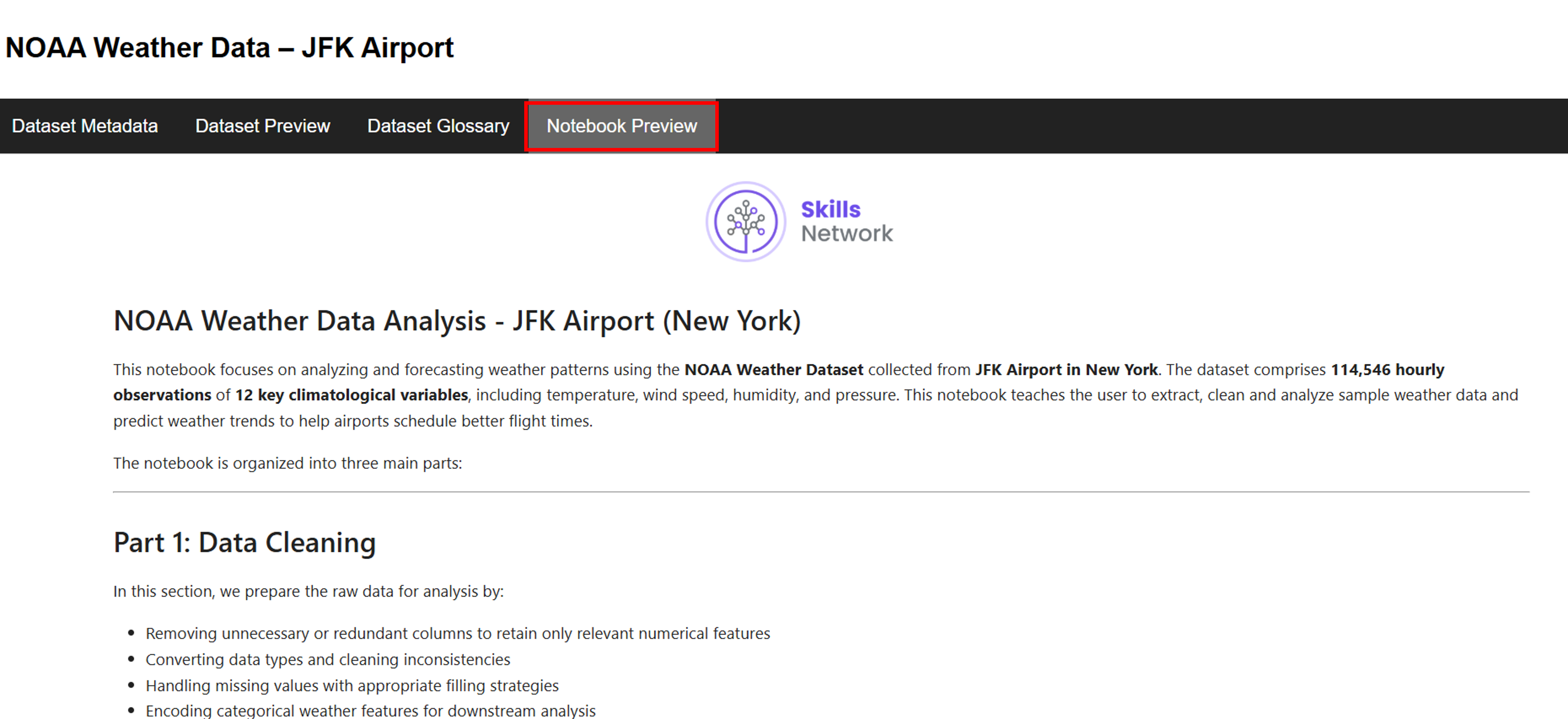
- Next, click the Notebook Preview tab.
接下来,点击 Notebook 预览标签页。- This opens a sample Python notebook associated with the dataset.
这将打开与数据集相关的一个示例 Python 笔记本。 - The notebook walks through:
该笔记本将介绍:- Cleaning the weather data.
清理天气数据。 - Performing exploratory analysis.
执行探索性分析。 - Building predictive models to help airports better manage flight schedules.
构建预测模型以帮助机场更好地管理航班计划。
- Cleaning the weather data.
- This opens a sample Python notebook associated with the dataset.
- [Optional] If you are comfortable using Jupyter Notebooks, you can download and run the notebook locally by clicking
[可选] 如果您熟悉使用 Jupyter Notebook,可以通过点击下载并在本地运行笔记本。
HERE 这里
This concludes Exercise 1 of this lab, which introduced you to the open source dataset. You may proceed to Exercise 2.
本实验的第一节到此结束,它向您介绍了开源数据集。您可以继续进行第二节。
Exercise 2 - Explore deep learning models 练习 2 - 探索深度学习模型
The Model Asset Exchange is a curated repository of Open Source deep learning models for a variety of domains, such as text, image, audio, and video processing.
模型Asset Exchange是一个精选的开源深度学习模型库,涵盖了多种领域,如文本、图像、音频和视频处理。
For more details, please visit - https://github.com/CODAIT/max-central-repo webpage.
详情请访问 - https://github.com/CODAIT/max-central-repo 网页。
The curated list includes deployable models, which you can run as a microservice locally or in the cloud on Docker or Kubernetes, and trainable models where you can use your own data to train the models. Some of the models are already built for you to test. Let's test one of the models.
精选列表包括可部署的模型,您可以在本地或云端使用 Docker 或 Kubernetes 将其作为微服务运行,以及可训练的模型,您可以使用自己的数据来训练这些模型。其中一些模型已经为您构建好,可以用于测试。让我们测试其中一个模型。
In this exercise, explore the Object Detector model hosted on CodePen platform. This model recognizes the objects present in an image. The model consists of a deep convolutional net base model for image feature extraction, together with additional convolutional layers specialized for the task of object detection, trained on the COCO data set. The input to the model is an image, and the output are extracted objects from the image, appropriately labeled.
在本练习中,探索 CodePen 平台上托管的 Object Detector 模型。该模型可以识别图像中的物体。该模型由一个用于图像特征提取的深度卷积网络基础模型,以及一些专门用于目标检测任务的卷积层组成,这些层在 COCO 数据集上进行了训练。模型的输入是图像,输出是从图像中提取并适当标记的物体。
CodePen is a social development environment. At its heart, it allows to write code in the browser and see the results of it as you build. It is a useful and liberating online code editor for developers of any skill and is particularly empowering for people learning to code.
CodePen是一个社交开发环境。其核心功能是允许在浏览器中编写代码,并在构建过程中实时查看结果。它是一个对任何技能水平的开发者都非常有用且解放性的在线代码编辑器,尤其对正在学习编程的人来说具有强大的赋能作用。
- Navigate to CodePen webpage.
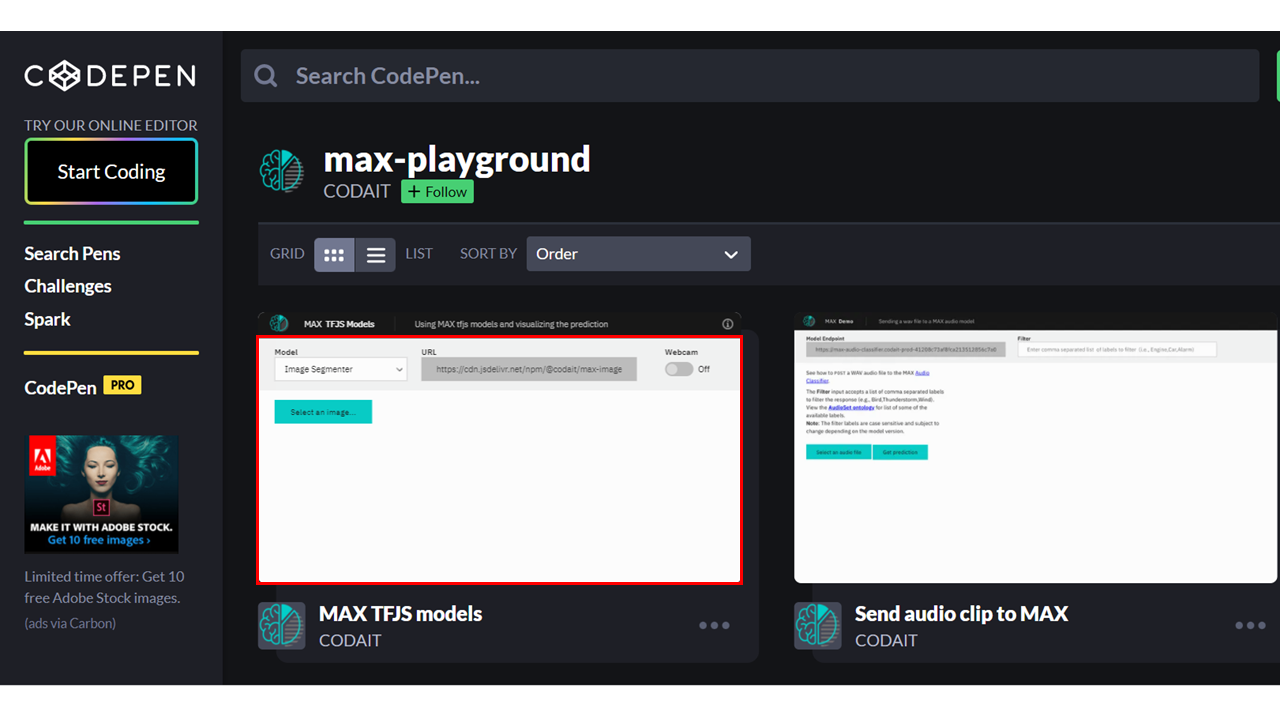
导航至 CodePen 网页。 - Select MAX TFJS models as shown in the screenshot below. Here the Image Segmenter, divides an image into regions or categories that correspond to different objects or parts of objects. Every pixel in an image is allocated to one of a number of these categories.
选择下图中所示的 MAX TFJS 模型。在这里,图像分割器将图像分割成对应于不同对象或对象部分的区域或类别。图像中的每个像素被分配到这些类别中的一个。
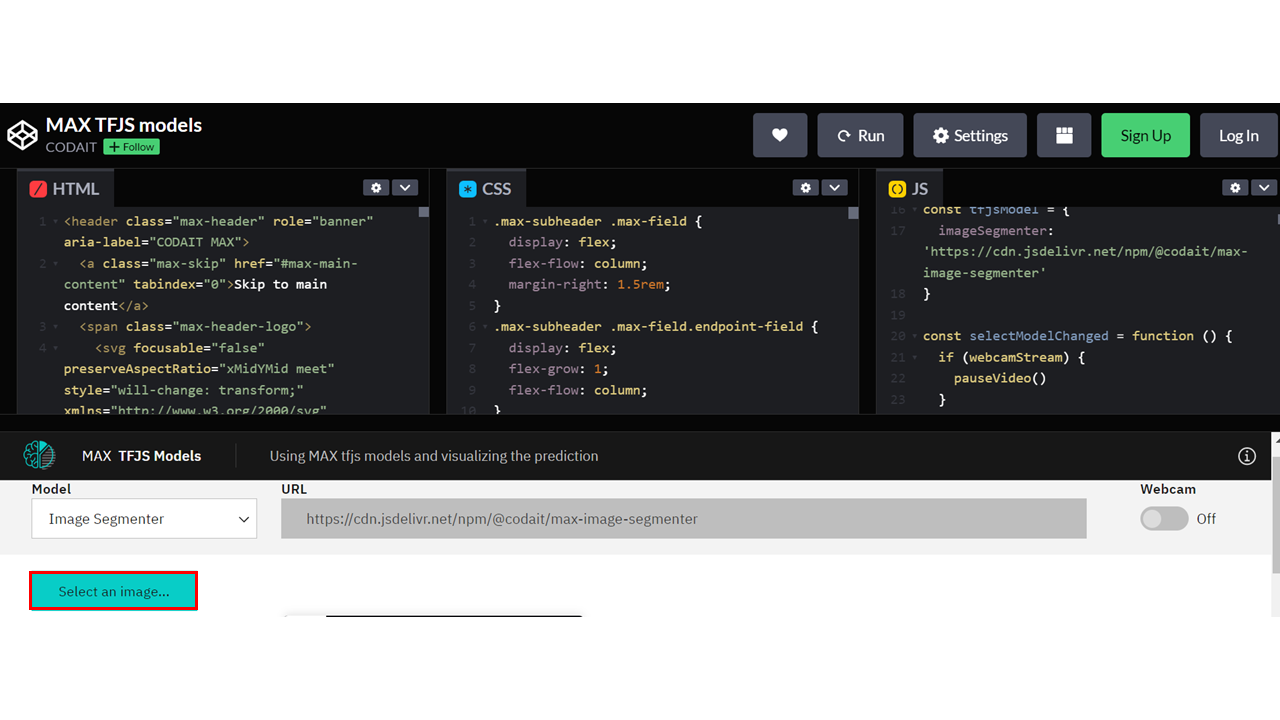
- Click on Select Image and upload an image. You may choose images with a person, dog, cat, truck, car, and so on, which are labels the model has been trained on.
点击选择图像并上传图像。你可以选择带有人物、狗、猫、卡车、汽车等图像,这些是模型已训练过的标签。
Click here for all the labels the model is trained on
点击此处查看模型已训练的所有标签
- person 人物
- bicycle 自行车
- car 汽车
- motorcycle 摩托车
- airplane 飞机
- bus 公共汽车
- train 火车
- truck 卡车
- boat 船
- traffic light 交通信号灯
- fire hydrant 消防栓
- stop sign 停车标志
- parking meter 停车计时器
- bench 长椅
- bird 鸟
- cat 猫
- dog 狗
- horse 马
- sheep 羊
- cow 牛
- elephant 大象
- bear 熊
- zebra 斑马
- giraffe 长颈鹿
- backpack 背包
- umbrella 雨伞
- handbag 手提包
- tie 领带
- suitcase 行李箱
- frisbee 飞盘
- skis 滑雪板
- snowboard 单板滑雪
- sports ball 运动球
- kite 风筝
- baseball bat 棒球棒
- baseball glove 棒球手套
- skateboard 滑板
- surfboard 冲浪板
- tennis racket 网球拍
- bottle 瓶子
- wine glass 酒杯
- cup 杯子
- fork 叉子
- knife 刀子
- spoon 勺子
- bowl 碗
- banana 香蕉
- apple 苹果
- sandwich 三明治
- orange 橙子
- broccoli 西兰花
- carrot 胡萝卜
- hot dog 热狗
- pizza 披萨
- donut 甜甜圈
- cake 蛋糕
- chair 椅子
- couch 沙发
- potted plant 盆栽
- bed 床
- dining table 餐桌
- toilet 马桶
- tv 电视
- laptop 笔记本电脑
- mouse 鼠标
- remote 遥控器
- keyboard 键盘
- cell phone 手机
- microwave 微波炉
- oven 烤箱
- toaster 烤面包机
- sink 水槽
- refrigerator 冰箱
- book 书
- clock 钟
- vase 花瓶
- scissors 剪刀
- teddy bear 泰迪熊
- hair drier 吹风机
- toothbrush 牙刷
- Click the icon Extract prediction as shown below:
按照下方所示,点击图标“提取预测”:
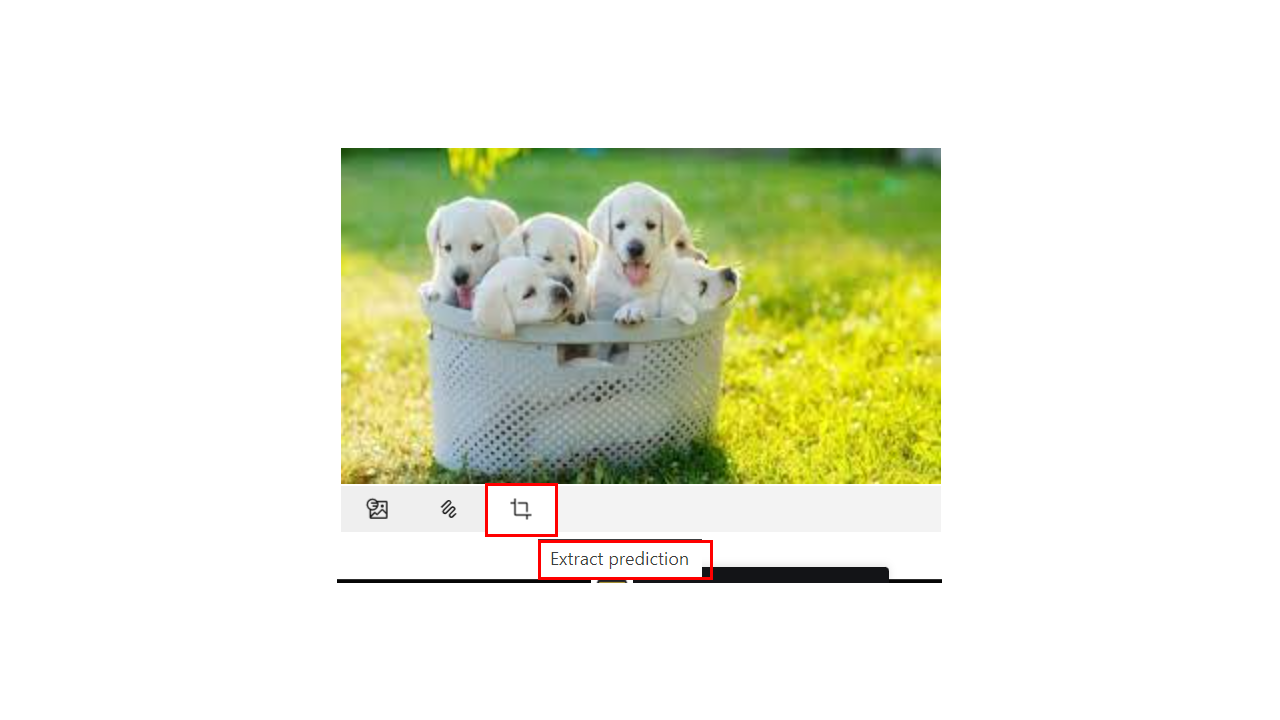
You can see the output of the prediction on the basis of the uploaded image.
您可以在上传的图像基础上看到预测结果。
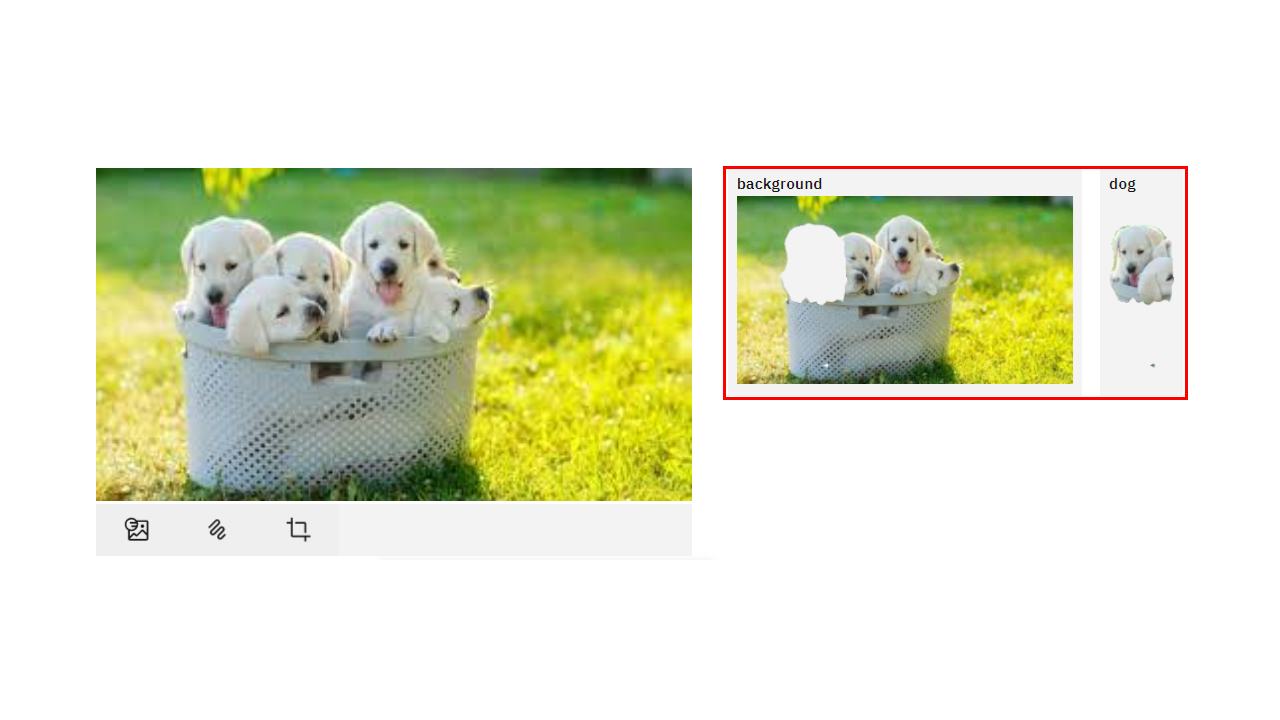
Here the background and the dog image are separated, showing two different parts of the image.
在这里,背景和狗图像被分离,显示了图像的两个不同部分。
You can also try the webcam option, which will show the real-time prediction by the toggle-on webcam option.
您还可以尝试网络摄像头选项,该选项将通过开启的网络摄像头选项显示实时预测。
This concludes Exercise 2 of this lab, which introduced the Model Asset Exchange (MAX).
这结束了本实验的练习 2,该练习介绍了模型资产交换(MAX)。
You can also watch a demo of the object detector model here.
您也可以在这里观看对象检测模型演示。
Author(s) 作者
Joseph Santarcangelo 约瑟夫·桑塔兰切洛
Other Contributor(s) 其他贡献者
Lavanya 拉瓦尼亚