Module 07 · [Optional] IBM Watson Studio
Assignment using watsonx.ai使用 watsonx.ai 完成作业
Estimated Time: 20 mins 预计时间:20 分钟
Objective(s): 目标
In this final assignment, you will be able to:
在这个最终作业中,你将能够:
- Create a blank Jupyter Notebook in the watsonx.ai environment
在 watsonx.ai 环境中创建一个空的 Jupyter Notebook - Create Markdown cells 创建 Markdown 单元格
Instructions 说明
This course introduced you to multiple data science tools, and in this final project, you will use the Jupyter Notebook, one of the easiest tools to share publicly.
本课程向您介绍了多种数据科学工具,在本项目的最后,您将使用 Jupyter Notebook,这是最容易公开分享的工具之一。
Exercise 1: Create a blank Jupyter Notebook in the watsonx.ai environment 练习 1:在 watsonx.ai 环境中创建一个空白 Jupyter Notebook
- Log in to your IBM Cloud account and launch the watsonx.ai.
登录您的IBM Cloud 账户并启动 watsonx.ai。 - Create a new project and add a new asset as Work with data and models in Python or R notebooks.
创建一个新项目,并将新资产添加为“使用 Python 或 R 笔记本处理数据和模型”。 - Create a blank notebook.
创建一个空白笔记本。
Exercise 2: Create Markdown cells 练习 2:创建 Markdown 单元格
- Cell 1 (rendered as Markdown): The title should be “My Jupyter Notebook on IBM watsonx.ai”, in H1 header style. The title is not center aligned.
单元格 1(渲染为 Markdown):标题应为“我的 IBM watsonx.ai Jupyter 笔记本”,采用 H1 标题样式。标题不是居中对齐的。 - Cell 2 (rendered as Markdown): Include your name, in bold. In the next line, write your current or desired occupation in regular font.
单元格 2(渲染为 Markdown):包括你的姓名,在 bold。在下一行,用常规字体写上你目前的或期望的职业。 - Cell 3 (rendered as Markdown): In italics, write one or two sentences about why you are interested in data science. For example, you can start your first sentence with “I am interested in data science because…”.
单元格 3(Markdown 渲染):用斜体写一到两句话,说明你为什么对数据科学感兴趣。例如,你可以用“我对数据科学感兴趣,因为……”来开始你的第一句话。 - Cell 4 (rendered as Markdown): In H3 header style, describe your code in Cell 5 using a few short sentences.
单元格 4(Markdown 渲染):用 H3 标题样式,用几句话描述你在单元格 5 中的代码。 - Cell 5 (code cell): Enter your code, as described in Cell 4. It must be executed and must display an output. Try to keep the code simple (it can even be “1 + 1”).
单元格 5(代码单元格):输入你在单元格 4 中描述的代码。它必须被执行,并且必须显示输出。尽量保持代码简单(甚至可以是“1 + 1”)。 - Cell 6 (rendered as Markdown): Using Markdown or HTML, this cell must include at least three of the following: bulleted list, numbered list, tables, hyperlinks, images.
单元格 6(Markdown 渲染):使用 Markdown 或 HTML,这个单元格必须包含以下至少三项:项目符号列表、编号列表、表格、超链接、图片。
Steps to complete the assignment in watsonx.ai
Leveraging Jupyter Notebook on the IBM watsonx.ai, you will create your own Jupyter Notebook (in English) and share it via a public link.
How to generate a publicly viewable share link for your Jupyter Notebook:
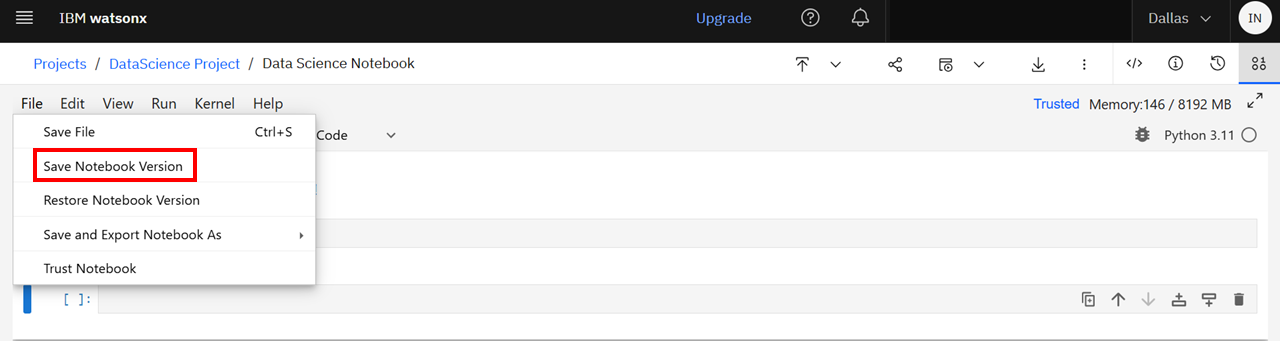
Step 1. With a Jupyter Notebook open on watsonx.ai, first ensure that you save the notebook. Click File, and select Save Notebook Version, as shown below.
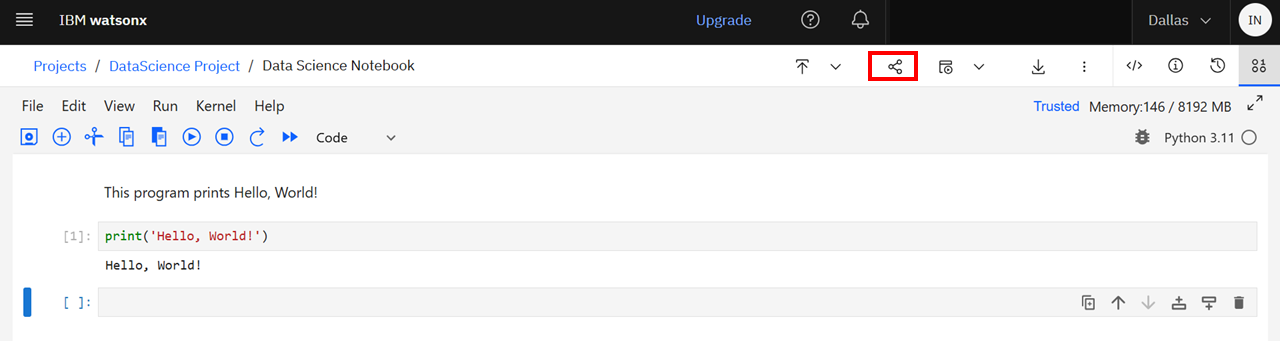
Step 2. Click the Share button, as follows:
第二步。点击分享按钮,如下所示:
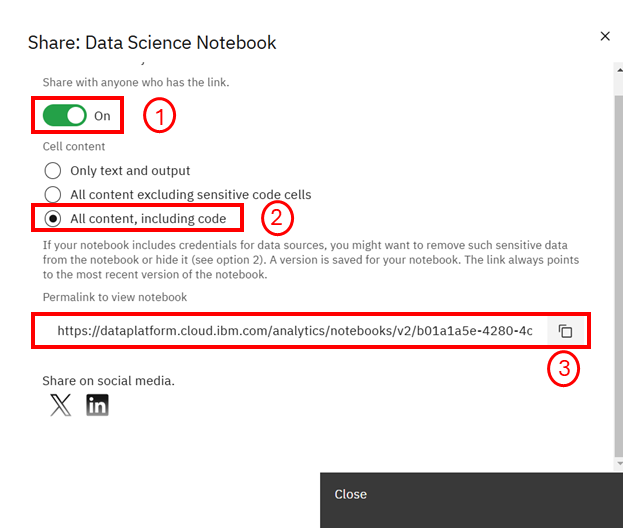
Step 3. Select the following settings to retrieve a public link to your Jupyter Notebook
第三步。选择以下设置以获取您的 Jupyter Notebook 的公共链接